
Introdución
Grazas pola compraasing the NewRixing NR-101 Wireless Speaker. This compact and versatile speaker offers multiple connectivity options including Bluetooth, USB flash drive, memory card (TF card), and AUX input. It also features a built-in microphone for hands-free calling. Please read this manual carefully to ensure proper use and optimal performance of your device.

Image: NewRixing NR-101 Wireless Speakers in multiple colors. This image displays the compact design and color variety of the speaker.
Contido do paquete
- NewRixing NR-101 Wireless Speaker
- Cable de carga USB
- Manual de usuario
- (May include an AUX cable depending on package version)
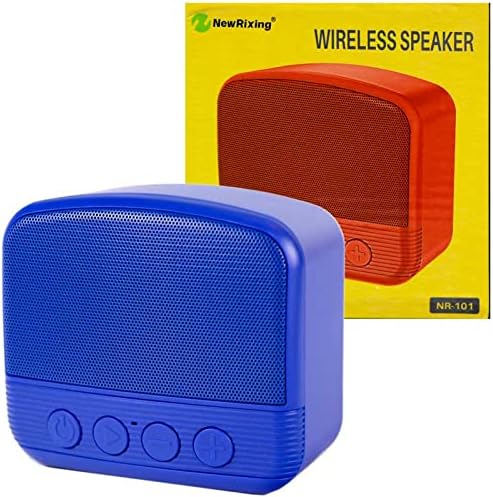
Image: NewRixing NR-101 Speaker and Packaging. This image shows the speaker alongside its retail box, indicating typical package contents.
Produto rematadoview
Controis do panel frontal
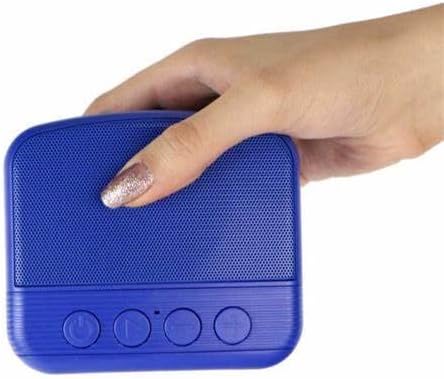
Imaxe: Fronte view of NewRixing NR-101 with controls. This image highlights the speaker's front panel, displaying the power button, play/pause button, and volume/track control buttons.
- Botón de encendido: Press and hold to turn on/off. Short press to switch modes (Bluetooth, TF Card, USB, AUX).
- Botón Reproducir/Pausa: Short press to play or pause music. In Bluetooth mode, short press to answer/end calls. Long press to reject calls.
- Botón para baixar o volume / Pista anterior: Prema curta para a pista anterior. Prema longa para baixar o volume.
- Botón para subir volume / seguinte canción: Prema curta para a seguinte pista. Prema longa para aumentar o volume.
Portos do panel traseiro

Imaxe: Traseira view of NewRixing NR-101 with ports. This image shows the back of the speaker, detailing the various input ports for charging, USB, TF card, and AUX connectivity.
- Entrada AUX: Para conectar dispositivos de son externos mediante un cable de son de 3.5 mm.
- Porto USB: For connecting USB flash drives to play music.
- Ranura para tarxetas TF: For inserting a Micro SD (TF) card to play music.
- Porto de carga micro USB: For charging the speaker using the provided USB cable.
- Indicador LED: Indica o estado de carga e o estado de emparellamento Bluetooth.
Configuración
Cargando o altofalante
- Connect the Micro USB end of the charging cable to the speaker's Micro USB charging port.
- Connect the USB-A end of the charging cable to a USB power adapter (5V/1A recommended) or a computer's USB port.
- O indicador LED acenderase durante a carga e apagarase cando estea completamente cargado.
- For first use, ensure the speaker is fully charged.
Encendido/apagado
- Para acender: Manteña premido o botón de acendido (⏻) durante aproximadamente 3 segundos ata que escoites unha indicación audible.
- Para apagar: Manteña premido o botón de acendido (⏻) durante aproximadamente 3 segundos ata que escoites unha indicación audible.
Instrucións de funcionamento
Modo Bluetooth
- Acenda o altofalante. Entrará automaticamente no modo de emparellamento Bluetooth, o que se indicará cunha luz LED intermitente e un aviso audible.
- Activa o Bluetooth no teu teléfono intelixente, tableta ou outro dispositivo compatible con Bluetooth.
- Busca "NR-101" in the list of available Bluetooth devices.
- Select "NR-101" to connect. Once connected, the LED indicator will stop flashing and you will hear a confirmation sound.
- Agora podes reproducir audio desde o teu dispositivo a través do altofalante.
Nota: O altofalante tentará reconectarse automaticamente co último dispositivo emparellado ao acendelo.
Modo de unidade flash USB / tarxeta TF
- Insert a USB flash drive or a TF (Micro SD) card into the corresponding port on the speaker.
- The speaker will automatically detect the storage device and switch to USB or TF card mode, beginning playback of audio files.
- If it does not switch automatically, short press the Power button (⏻) to cycle through modes until you reach the desired mode.
Modo de entrada AUX
- Conecta un extremo dun cable de audio de 3.5 mm (non incluído) ao porto de entrada AUX do altofalante.
- Conecta o outro extremo do cable de audio á toma de saída de audio do teu dispositivo externo (por exemplo, reprodutor de MP3, ordenador).
- The speaker will automatically switch to AUX mode, or you may need to short press the Power button (⏻) para seleccionar o modo AUX.
- Controla a reprodución e o volume desde o teu dispositivo conectado.
Chamadas mans libres
- When a call comes in while in Bluetooth mode, the music will pause.
- Para responder: Prema brevemente o botón Reproducir/Pausa (⏸).
- Para rematar: Prema brevemente o botón Reproducir/Pausa (⏸) durante unha chamada.
- Para rexeitar: Prema e manteña premido o botón Reproducir/Pausa (⏸) cando entra unha chamada.
Mantemento
- Limpeza: Usa un pano suave e seco para limpar o altofalante. Non empregues produtos de limpeza abrasivos, alcol nin outros solventes químicos, xa que poden danar a superficie.
- Almacenamento: Garde o altofalante nun lugar fresco e seco, lonxe da luz solar directa e de temperaturas extremas.
- Resistencia á auga: Este altofalante non é impermeable. Evite a exposición á auga ou á humidade excesiva.
- Coidado da batería: Para prolongar a duración da batería, cárguea regularmente, mesmo se non a usa con frecuencia. Evite descargar completamente a batería durante períodos prolongados.
Resolución de problemas
| Problema | Causa posible | Solución |
|---|---|---|
| O altofalante non se acende. | Batería baixa. | Cargue o altofalante completamente. |
| Sen son. | Volume demasiado baixo; Modo incorrecto; Dispositivo non conectado. | Increase speaker and device volume. Ensure correct mode (Bluetooth, AUX, USB, TF). Reconnect device. |
| Non se pode emparellar por Bluetooth. | O altofalante non está en modo de emparellamento; Bluetooth do dispositivo desactivado; Demasiado lonxe do altofalante. | Ensure speaker is in pairing mode (flashing LED). Turn on Bluetooth on your device. Move device closer to speaker (within 10m). Forget "NR-101" on your device and try pairing again. |
| Music playback from USB/TF card not working. | Non é compatible file formato; Corrompido files; Incorrectly inserted card/drive. | Garantir o audio files are in supported formats (e.g., MP3). Check if the USB drive/TF card is inserted correctly. Try another USB drive/TF card. |
Especificacións
| Nome do modelo | NR-101 |
| Nome da marca | NewRixing (Generic) |
| Tecnoloxía de conectividade | USB, sen fíos (Bluetooth) |
| Tecnoloxía de comunicación sen fíos | Bluetooth |
| Modo de saída de audio | Envolvente |
| Tipo de montaxe | Mesa |
| Material | Materiais Mixtos |
| Características especiais | Bluetooth, Wireless, Microphone for Calling |
| Dispositivos compatibles | portátil, teléfono intelixente, tableta |
| Diámetro do subwoofer | 5 polgadas |
| Configuración da canle de son envolvente | 1 |
| Dimensións do paquete | 11.4 x 11.2 x 6.6 cm |
| Peso do elemento | 330 g |
Garantía e Soporte
This product is covered by a standard manufacturer's warranty. Please refer to the packaging or contact your retailer for specific warranty terms and conditions.
For technical support or customer service inquiries, please contact the seller or refer to the contact information provided with your purchase.