
Introdución
This manual provides comprehensive instructions for the setup, operation, and maintenance of your VEVOR Vinyl Cutter Machine. Designed for precision and efficiency, this plotter printer is suitable for various applications, including sign making, heat transfer lettering, and more. Please read this manual thoroughly before operating the machine to ensure safe and optimal performance.

Image: The VEVOR Vinyl Cutter Machine, a compact desktop unit, shown with its various included accessories such as cables, software discs, blade holder, and power cord.
Características do produto
-
Efficient Digital Control: The machine features a maximum feed width of 14.8 inches (375 mm) and a maximum cutting width of 11.2 inches (285 mm). An integrated LCD allows for quick adjustment of cutting speed and force. Three adjustable double-spring pinch rollers and aluminum knurled rods ensure stable paper feeding and prevent jams.

Imaxe: Detallada view of the vinyl cutter's control panel and feed mechanism, illustrating the LCD display, controls for force and speed, adjustable pinch rollers, and the aluminum knurled rod for efficient material handling.
-
Precise Scale and Calibration: Equipped with three replaceable blades and a precise dividing ruler, the cutter offers a cutting precision of ±0.004 inches (±0.01 mm). A press roller is included to enhance paper feeding accuracy.

Imaxe: Un lado view of the vinyl cutter, pointing out the precise dividing ruler along the cutting path and the press roller designed to ensure accurate material alignment and feeding.
-
High Compatibility & Security: The plotter cutter includes Signcut and Signmaster software, compatible with both MAC and Windows operating systems via USB or serial port. It also supports other software like Graph-cut and Flexi. For safety, the power supply includes a fuse and an emergency stop function.

Image: The vinyl cutter displayed alongside the packaging for Signcut and Signmaster software, emphasizing its compatibility with both MAC and Windows systems and the included software solutions.
-
Well-Designed Desktop Frame: The compact desktop design saves space and facilitates convenient portability. Rounded corners enhance safety by preventing accidental scratching.

Image: The vinyl cutter positioned on a wooden desk, illustrating its space-saving desktop design and compact form factor, making it easy to place and transport.
O que hai na caixa
Ao desembalar, comprobe que estean incluídos todos os seguintes compoñentes:

Image: A comprehensive display of the VEVOR Vinyl Cutter Machine along with all its accessories, including software, cables, tools, and manuals, demonstrating the complete package.
| Elemento | Cantidade |
|---|---|
| Máquina cortadora de vinilo | 1 |
| Signcut Software | 1 |
| Signmaster Software | 1 |
| Blades Holder | 1 |
| Unidade flash USB | 1 |
| Cables (USB and Serial) | 2 |
| Portabolígrafos | 1 |
| Cable de alimentación | 1 |
| Fusible | 1 |
| Láminas | 3 |
| Hex Wrench | 1 |
| Manual | 1 |
Especificacións
| Atributo | Valor |
|---|---|
| Dimensións do produto | 23.2 x 13 x 12.6 polgadas (59 x 33 x 32 cm) |
| Peso do elemento | 17.6 libras (8 kg) |
| Max Feed Width | 14.8 polgadas (375 mm) |
| Ancho máximo de corte | 11.2 polgadas (285 mm) |
| Precisión de corte | ±0.004 polgadas (±0.01 mm) |
| Número de modelo do artigo | Vinyl Plotter 14" |
| Fabricante | VEVOR |
| Primeira data dispoñible | 1 de decembro de 2021 |
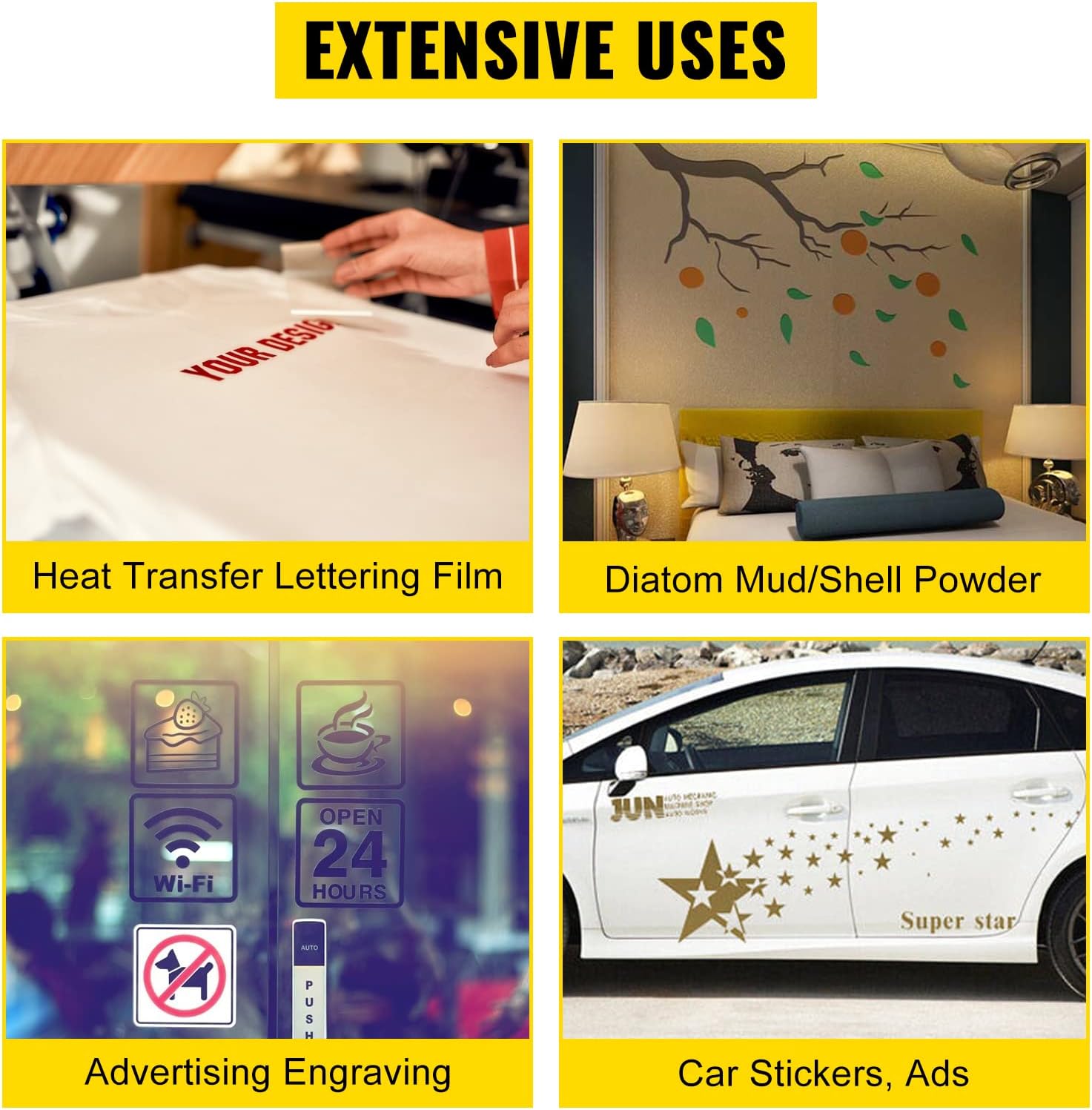
Image: The vinyl cutter machine with its key dimensions (length, width, height) clearly marked in both inches and centimeters, providing a visual reference for its size.
Guía de configuración
- Desembalaxe: Retire con coidado todos os compoñentes da embalaxe. Garde a embalaxe orixinal para o seu almacenamento ou transporte futuros.
- Colocación: Place the vinyl cutter on a stable, flat surface with adequate space around it for material feeding and output. Ensure it is near a power outlet.
- Montaxe (se é necesario): If your model includes a floor stand (not applicable for this desktop model), follow the separate assembly instructions for the stand. For the desktop unit, ensure all components like the blade holder and pen holder are correctly inserted into the carriage.
- Instalación de software: Insert the provided USB flash drive or disc containing the Signcut and Signmaster software. Follow the on-screen prompts to install the software on your MAC or Windows computer. Ensure your operating system meets the minimum requirements.
- Conexión: Connect the vinyl cutter to your computer using either the provided USB cable or serial cable. Connect the power cable to the machine and then to a suitable power outlet.
- Encendido inicial: Turn on the machine using the power switch. The LCD display should illuminate.
Instrucións de funcionamento
- Material de carga: Lift the pinch rollers and carefully feed your vinyl or other cutting material under the rollers and over the cutting strip. Align the material straight. Lower the pinch rollers to secure the material.
- Adjusting Blade Depth: Ensure the blade depth is correctly set for your material. The blade should cut through the vinyl layer but only lightly score the backing paper. Adjust the blade holder as needed.
-
Operación de software:
- Launch the Signcut or Signmaster software on your computer.
- Import or create your design within the software.
- Adjust cutting parameters such as force and speed. These can also be fine-tuned directly on the machine's LCD panel.
- Ensure the software recognizes the connected plotter. If using a USB cable, select "Direct USB Port" in the software settings. If using a COM cable, select the appropriate "COM Port".
- Position the cutting head to the desired starting point on your material using the machine's controls.
- Performing a Cut: Once your design is ready and parameters are set, send the cutting job from the software to the machine. Monitor the cutting process.
- Unloading Material: After the cut is complete, lift the pinch rollers and carefully remove the cut material.
Mantemento
- Limpeza: Regularly clean the machine, especially the cutting strip, pinch rollers, and blade holder, to prevent debris buildup that can affect cutting performance. Use a soft, dry cloth.
- Substitución da lámina: Replace blades when they become dull or damaged to maintain cutting precision. Refer to the blade holder instructions for proper replacement.
- Actualizacións de software: Periodically check for software updates for Signcut and Signmaster to ensure optimal compatibility and performance. Note that Signcut software may require renewal after one year.
- Almacenamento: When not in use for extended periods, disconnect the power and store the machine in a clean, dry environment, preferably in its original packaging.
Resolución de problemas
| Problema | Causa posible | Solución |
|---|---|---|
| Machine not recognized by software | Incorrect port selection, driver issue, loose cable. | Verify USB/Serial cable connection. In software settings, select "Direct USB Port" or the correct COM port. Reinstall software drivers if necessary. |
| Cuts are not precise or incomplete | Dull blade, incorrect blade depth, insufficient force, material slippage. | Replace the blade. Adjust blade depth. Increase cutting force. Ensure pinch rollers are firmly holding the material and material is loaded straight. |
| Material jams during feeding | Improperly loaded material, pinch rollers not engaged, debris on rollers. | Ensure material is loaded straight and centered. Lower pinch rollers completely. Clean pinch rollers and feed path. |
| Software compatibility issues (e.g., with Flexi) | Specific software versions or features may not be fully supported. | While the machine supports various software, optimal performance is guaranteed with the included Signcut and Signmaster. For other software, ensure vector files are properly prepared and exported in compatible formats (e.g., EPS). |
Aplicación Examples
The VEVOR Vinyl Cutter Machine is versatile and can be used for a wide range of creative and professional applications:
- Heat Transfer Lettering Film: Create custom designs for apparel, bags, and other fabric items.
- Advertising Engraving: Produce intricate designs for signs, displays, and promotional materials.
- Car Stickers and Ads: Design and cut durable vinyl decals for vehicle customization and advertising.
- Wall Decals: Create decorative elements for interior spaces.
- General Signage: Produce various types of signs for businesses, events, or personal use.

Image: A visual representation of the diverse applications of the vinyl cutter, including heat transfer designs on fabric, decorative wall decals, advertising engravings, and custom car stickers.
Garantía e Soporte
The VEVOR Vinyl Cutter Machine is manufactured by VEVOR. For specific warranty details, technical support, or service inquiries, please refer to the contact information provided in the included documentation or visit the official VEVOR websitio.
For additional resources and community support, you may find online forums and user groups helpful for tips and advanced techniques related to vinyl cutting and software usage.