
Ctronics
Ctronics 5MP 30X Optical Zoom Security Camera User Manual
Model: CTIPC-295C-B
1. Introdución
This user manual provides detailed instructions for the installation, operation, and maintenance of your Ctronics 5MP 30X Optical Zoom Security Camera. Please read this manual thoroughly before using the product to ensure proper functionality and safety. This camera is designed for outdoor surveillance, offering advanced features such as high-resolution video, extensive night vision, and intelligent detection capabilities.
2. Información de seguridade
- Ensure the power supply matches the camera's specifications (12 Volts DC, 12 watts).
- Non expoñas a cámara a temperaturas extremas fóra do seu rango de funcionamento (de -10 °C a 50 °C).
- Evite a exposición directa da lente a fontes de luz intensas, xa que isto podería danar o sensor.
- Install the camera securely to prevent accidental falls.
- Non intente desmontar nin modificar a cámara, xa que isto anulará a garantía.
- Keep the camera away from corrosive chemicals.
3. Contido do paquete
Verifique que todos os elementos que se indican a continuación estean incluídos no seu paquete:
- Ctronics 5MP 30X Optical Zoom Security Camera
- Adaptador de alimentación (cargador)
- Parafusos de montaxe e tacos de parede
- Waterproof Kit for Network Cable
- Guía de inicio rápido

Figure 3.1: Main product image of the Ctronics 5MP 30X Optical Zoom Security Camera, showing its dome shape, antenna, and mounting bracket.
4. Produto rematadoview
4.1 Características principais
- 5MP HD e zoom óptico de 30 aumentos: Features a Sony IMX335 5MP CMOS sensor (2560x1920 resolution) and 30X optical zoom for sharp, vivid images and detailed long-distance viewing.
- 492ft Night Vision & Smart PTZ: Equipped with 7 high-performance infrared array LED lights (including 2 laser infrared lights) for up to 492 feet (150 meters) night vision. Offers 355° pan and 90° tilt for comprehensive coverage.
- Detección humana e seguimento automático: Intelligently detects human shapes, reducing false alarms by 95%. Automatically tracks suspicious persons within the monitoring range.
- Sound Light Alarm & Two-way Audio: Triggers audible and red/blue light alarms upon intrusion. Built-in speaker and microphone enable real-time two-way communication.
- Support All Platforms & IP66 Waterproof: Compatible with iOS and Android systems, FTP server, and HIP2P Client. Connects via 2.4Ghz WiFi or network cable. Supports TF cards up to 128GB (not included). IP66 rated for outdoor use.
4.2 Compoñentes da cámara
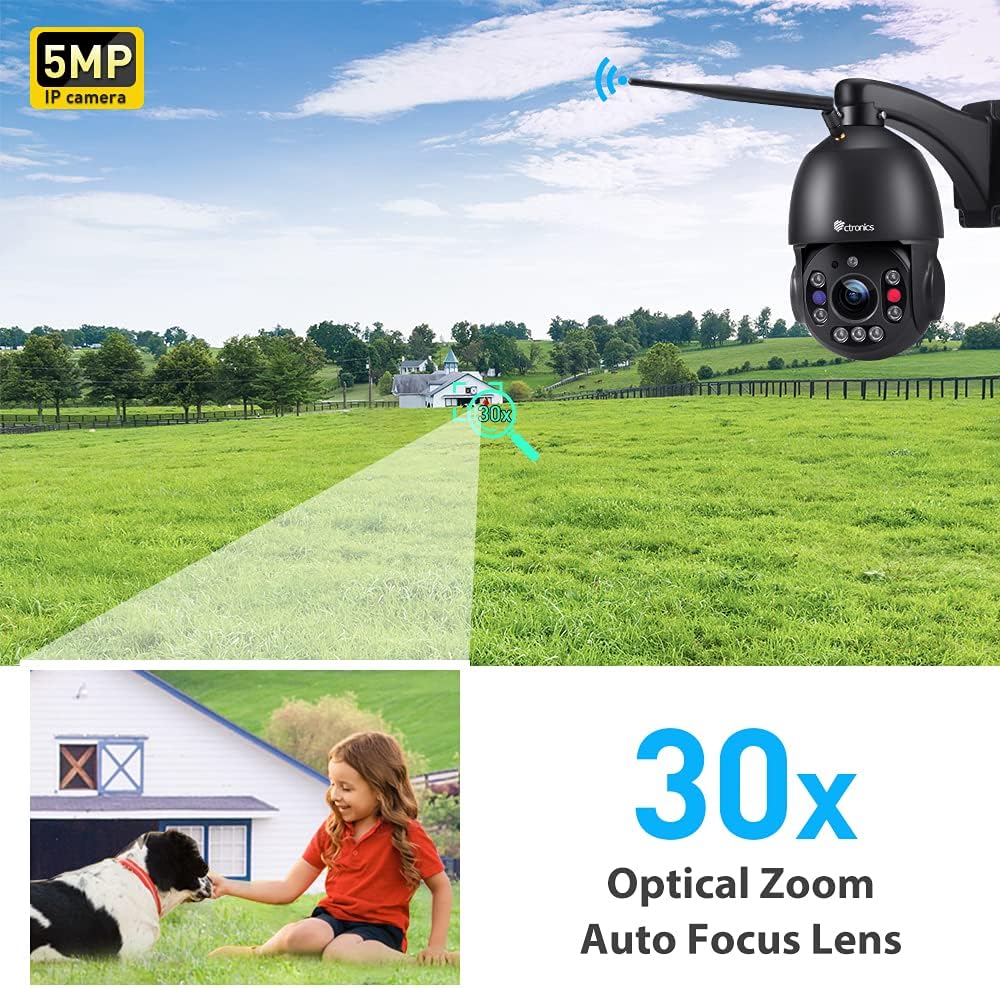
Imaxe 4.1: Primeiro plano view of the camera's lens and infrared LEDs, highlighting the optical zoom capability.

Figure 4.2: Illustration showing the Micro SD card slot, supporting up to 128GB for local storage.
5. Configuración
5.1 Acendido
Connect the provided power adapter to the camera's power input. The camera will perform a self-check, rotating its lens for calibration. This process indicates the camera is powering on correctly.
Video 5.1: Demonstrates the initial power-up sequence and self-check rotation of the camera, followed by the Wi-Fi connection process via the mobile app.
5.2 Instalación de aplicacións móbiles
Download the Ctronics APP from your device's app store (iOS App Store or Google Play Store). Alternatively, scan the QR code provided in the Quick Start Guide to directly download the app.

Figure 5.1: Image illustrating the broad compatibility of the Ctronics camera with various operating systems and platforms, including iOS, Android, Mac OS, and Windows.
5.3 Initial Setup & Wi-Fi Connection
Follow the in-app instructions to add your camera. For Wi-Fi connection, ensure your mobile device is connected to a 2.4Ghz or 5Ghz Wi-Fi network. The camera supports both frequencies. You may need to reset the camera by pressing the reset button (usually located near the cables) until you hear a chime, indicating it's ready for network configuration.
Video 5.2: Guide on how to add the camera to the HiP2P Client End software on a PC, including logging in and inputting the camera's UID.
6. Uso da cámara
6.1 En directo View e control PTZ
Once connected, open the Ctronics app to access the live video feed. Use the on-screen controls to pan (355° horizontally) and tilt (90° vertically) the camera, allowing you to monitor a wide area without blind spots.
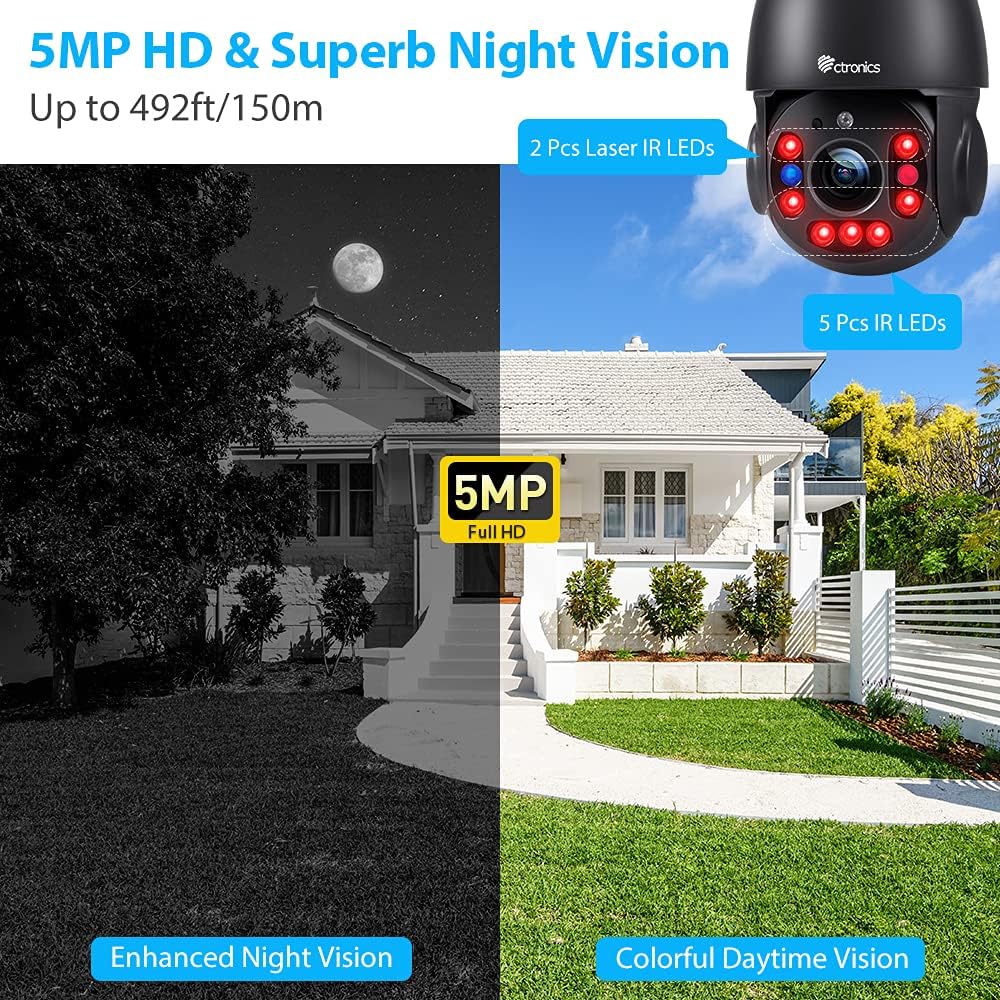
Figure 6.1: A smartphone displaying the live view from the Ctronics camera, with controls for 355° pan and 90° tilt, providing comprehensive coverage of the monitored area.
Zoom óptico de 6.2
The camera features a powerful 30X optical zoom. Use the zoom controls within the app to magnify distant objects without losing image clarity, allowing you to capture important details like faces or license plates.
Vídeo 6.1: Rematadoview of the Ctronics 5MP PTZ camera, showcasing its 30X optical zoom and pan-tilt capabilities for outdoor security.
6.3 Visión nocturna
The camera automatically switches to night vision mode in low-light conditions, providing clear black-and-white images up to 492 feet (150 meters). The laser infrared lights enhance visibility over long distances.

Figure 6.2: Depiction of the camera's enhanced night vision, showing a clear black-and-white view of a house at night, with visible IR LEDs on the camera.
6.4 Human Detection & Auto Tracking
Enable human detection in the app settings to receive real-time alerts when a person is detected. The auto-tracking feature will automatically follow the detected human, ensuring continuous monitoring of their movement.

Figure 6.3: An illustration showing the camera's auto-tracking and smart alarm features, with a phone receiving an alert message when human motion is detected.

Figure 6.4: Visual representation of the sound and light alarm feature, showing the camera activating red and blue flashing lights to deter intruders.
6.5 Audio bidireccional
Utilize the two-way audio function to communicate with individuals near the camera. This feature is useful for greeting visitors or deterring unwanted guests.
Figure 6.5: A person speaking into a smartphone, demonstrating the two-way audio feature to communicate with someone near the camera.
7. Mantemento
7.1 Limpeza
Limpa regularmente a lente da cámara cun pano suave e seco para garantir unha calidade de imaxe nítida. Non empregues produtos químicos agresivos nin materiais abrasivos.
7.2 Actualizacións de firmware
Check the Ctronics app periodically for firmware updates. Keeping your camera's firmware up-to-date ensures optimal performance and access to new features.
7.3 Xestión do almacenamento
If using a TF card for local storage, regularly back up important recordings and format the card as needed to maintain recording efficiency. The camera supports TF cards up to 128GB.
8 Solución de problemas
| Problema | Causa posible | Solución |
|---|---|---|
| Cámara sen conexión | No power, Wi-Fi signal weak, incorrect Wi-Fi password. | Check power connection. Ensure strong Wi-Fi signal. Re-enter Wi-Fi password in app. Reset camera if necessary. |
| Mala calidade de imaxe | Dirty lens, insufficient lighting, network bandwidth issues. | Clean the lens. Ensure adequate lighting for optimal daytime performance. Check network speed. |
| Falsas alarmas | Environmental factors (e.g., trees, rain, insects). | Adjust human detection sensitivity in the app. Reposition camera to minimize environmental triggers. |
| No two-way audio | Microphone/speaker blocked, app permissions, volume settings. | Ensure nothing is obstructing the microphone or speaker. Check app permissions for audio. Adjust volume in app and on device. |
| Cannot connect to 5Ghz Wi-Fi | Camera is not compatible with 5Ghz (Note: This model supports both 2.4Ghz and 5Ghz). | Ensure your router is broadcasting a 5Ghz signal. If issues persist, try connecting to a 2.4Ghz network. |
9. Especificacións técnicas
| Especificación | Valor |
|---|---|
| Nome do modelo | CTIPC-295C-B |
| Resolución de captura de vídeo | 5 MP (2560 x 1920) |
| Zoom óptico | 30X |
| Pan Range | 355° |
| Rango de inclinación | 90° |
| Range de visión nocturna | 492 pés (150 metros) |
| Tecnoloxía de conectividade | Wireless (2.4Ghz/5Ghz Wi-Fi) & Wired (Network Cable) |
| Clasificación de protección internacional | IP66 |
| Fonte de enerxía | Eléctrico con cable (12 V CC, 12 W) |
| Almacenamento | Supports TF cards up to 128GB (not included) |
| Material | Metal |
| Peso do elemento | 4.6 libras |
10. Garantía e soporte
Ctronics products typically come with a manufacturer's warranty. For specific warranty details, please refer to the documentation included with your product or visit the official Ctronics website. For technical support, troubleshooting assistance, or any inquiries, please contact Ctronics customer service through their official channels.
You can also find additional resources and a downloadable PDF user manual at: Ctronics User Manual (PDF)
Figure 10.1: The camera is shown outdoors in rainy conditions, illustrating its IP66 waterproof and weather-resistant design, suitable for various climates.
Ask a question about this manual
Ask about setup, troubleshooting, compatibility, parts, safety, or missing instructions. Manuals+ will review the question and use this page’s manual context to help answer it.