
Ipro EPro A25
Manual de usuario do teléfono móbil Ipro EPro A25
Model: EPro A25
1. Introdución
This manual provides essential information for the safe and efficient use of your Ipro EPro A25 cell phone. Please read it thoroughly before operating your device.
The Ipro EPro A25 is a compact cellular phone designed for daily use, featuring dual SIM card slots, a memory card slot for expanded storage, and an integrated camera to capture moments.
2. Contido do paquete
Comprobe se o paquete contén os seguintes elementos:
- Ipro EPro A25 Cell Phone
- Batería
- Cargador
- Manual de usuario (este documento)
- (Outros accesorios poden variar segundo a rexión)
3. Disposición do dispositivo
Familiarize yourself with the physical components of your Ipro EPro A25 phone.
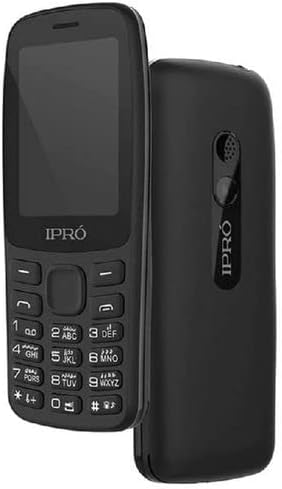
Figura 3.1: Fronte e traseiro view of the Ipro EPro A25 cell phone. The front displays the screen and keypad, while the rear shows the speaker and IPRO branding.
- Fronte: Display screen, navigation keys, alphanumeric keypad.
- Traseira: Speaker, IPRO branding.
- Laterais: (Implied, but not visible in image) Charging port, headphone jack.
4. Configuración
4.1. Instalación da(s) tarxeta(s) SIM
Your phone supports dual SIM cards. Ensure the phone is powered off before installation.
- Retire a tapa traseira do teléfono.
- Retire con coidado a batería.
- Insert the SIM card(s) into the designated slot(s) with the gold contacts facing down.
- Ensure the SIM card(s) are securely seated.
4.2. Installing the Memory Card
To expand storage for photos and other files, install a memory card (MicroSD).
- Coa tapa traseira e a batería retiradas, localice a ranura para tarxetas de memoria.
- Insira a tarxeta de memoria na ranura ata que faga clic.
4.3. Installing the Battery and Charging
- Coloque a batería no seu compartimento, aliñando os contactos.
- Volva colocar a tapa traseira.
- Connect the charger to the phone's charging port and plug it into a power outlet.
- Allow the phone to charge fully before first use.
5. Funcionamento básico
5.1. Acendido/apagado
- Para acender: Press and hold the Power key (usually the red 'End Call' key) until the screen lights up.
- Para apagar: Press and hold the Power key until the power-off options appear, then select 'Power Off'.
5.2. Realización e recepción de chamadas
- Para facer unha chamada: Enter the phone number using the keypad and press the 'Call' key (usually the green 'Send Call' key).
- Para recibir unha chamada: Press the 'Call' key when the phone rings.
- Para finalizar unha chamada: Press the 'End Call' key.
5.3. Mensaxería (SMS)
- Navega ata o menú "Mensaxes".
- Select 'Write Message' or 'New Message'.
- Introduce a túa mensaxe usando o teclado numérico.
- Enter the recipient's number or select from contacts, then send.
5.4. Usando a cámara
- Accede á aplicación da cámara desde o menú principal.
- Encadra a túa foto usando a pantalla.
- Prema a tecla designada "Capturar" ou "Aceptar" para facer unha foto.
- As fotos gárdanse na memoria do teléfono ou na tarxeta de memoria instalada.
6. Conectividade
6.1.Bluetooth
The phone supports Bluetooth for wireless connection to compatible devices like headsets or other phones.
- Vaia a "Configuración" > "Conectividade" > "Bluetooth".
- Activa o Bluetooth.
- Busca dispositivos dispoñibles e emparellalos co dispositivo desexado.
6.2. Conexión USB
Conecte o teléfono a un ordenador mediante un cable USB para transferir files ou cargar o dispositivo.
- Connect one end of the USB cable to the phone's USB port and the other to your computer.
- The phone may prompt you to select a connection mode (e.g., Mass Storage, Charge Only).
7. Mantemento e coidados
- Manteña o teléfono seco. A humidade pode danar os circuítos electrónicos.
- Evita as temperaturas extremas. As altas temperaturas poden acurtar a vida útil dos dispositivos electrónicos e deformar ou derreter certos plásticos.
- Non use produtos químicos agresivos, disolventes de limpeza ou deterxentes fortes para limpar o teléfono.
- Usa un pano suave e seco para limpar a superficie do teléfono.
- Handle the phone with care. Do not drop, knock, or shake it.
8 Solución de problemas
| Problema | Posible Solución |
|---|---|
| O teléfono non se acende. | Asegúrate de que a batería estea instalada e cargada correctamente. Tenta cargar o teléfono durante polo menos 30 minutos. |
| Non se poden facer nin recibir chamadas. | Check if the SIM card is properly inserted. Verify network signal strength. Contact your service provider if the issue persists. |
| Mala calidade de imaxe da cámara. | Asegúrate de que a lente da cámara estea limpa e libre de manchas. Comproba as condicións de iluminación. |
| Tarxeta de memoria non detectada. | Reinsert the memory card. Ensure it is compatible with the phone. Try formatting the card (this will erase all data). |
9. Especificacións
| Característica | Detalle |
|---|---|
| Modelo | EPro A25 |
| Fabricante | Ipro |
| Tamaño da pantalla | 2.4 polgadas |
| Tecnoloxía Celular | 2G |
| Tecnoloxía de conectividade | Bluetooth, USB, Wi-Fi |
| Cor | Negro |
| Número de ranuras para tarxetas SIM | SIM dual |
| Factor de forma | Bar |
| Descrición da cámara | Traseira |
| Data de primeira dispoñibilidade | 19 de abril de 2022 |
10. Garantía e soporte
For warranty information and customer support, please refer to the warranty card included with your product or contact your retailer. Keep your purchase receipt as proof of purchase.
Ask a question about this manual
Ask about setup, troubleshooting, compatibility, parts, safety, or missing instructions. Manuals+ will review the question and use this page’s manual context to help answer it.