
Azumi LS5018FP
Manual de usuario del teléfono inteligente Azumi Senwa LS5018FP
Your comprehensive guide to the Senwa LS5018FP 4G LTE Smartphone
Introdución
Thank you for choosing the Azumi Senwa LS5018FP 4G LTE Smartphone. This device is designed to provide a reliable and user-friendly mobile experience. This manual will guide you through the setup, operation, and maintenance of your new smartphone, ensuring you get the most out of its features.
The Senwa LS5018FP features a 5-inch HD display, a fingerprint sensor for enhanced security, and runs on Android 11 (Go edition). It is compatible with AT&T and T-Mobile networks, offering broad connectivity options.
Información de seguridade
Please read this section carefully before using your device to ensure safe and proper operation.
- Seguridade da batería: Use only manufacturer-approved batteries, chargers, and accessories. Do not disassemble, puncture, or short-circuit the battery. Dispose of batteries properly.
- Seguridade na condución: Always prioritize driving safety. Do not use your phone while driving if it distracts you. Use hands-free accessories when necessary.
- Dispositivos médicos: Maintain a safe distance between your phone and medical devices like pacemakers to avoid interference. Consult your physician and medical device manufacturer for specific guidelines.
- Ambientes explosivos: Apaga o teléfono en zonas con atmosferas potencialmente explosivas, como gasolineiras ou plantas químicas.
- Resistencia á auga: Este dispositivo non é resistente á auga. Evite a exposición a líquidos.
- Eliminación: Do not dispose of the device in household waste. Follow local regulations for electronic waste disposal.
Contido do paquete
Asegúrate de que todos os elementos estean presentes no paquete do produto:
- Azumi Senwa LS5018FP Smartphone
- Cargador
- Cable USB
- Tarxeta SD de 16 GB (preinstalada ou incluída por separado)
- Quick Start Guide (may be in Spanish)

Image: The Azumi Senwa LS5018FP smartphone displayed on its orange retail box, showcasing the device's screen with pre-installed applications and the included accessories.
Produto rematadoview
Familiarize yourself with the physical components of your Senwa LS5018FP smartphone.
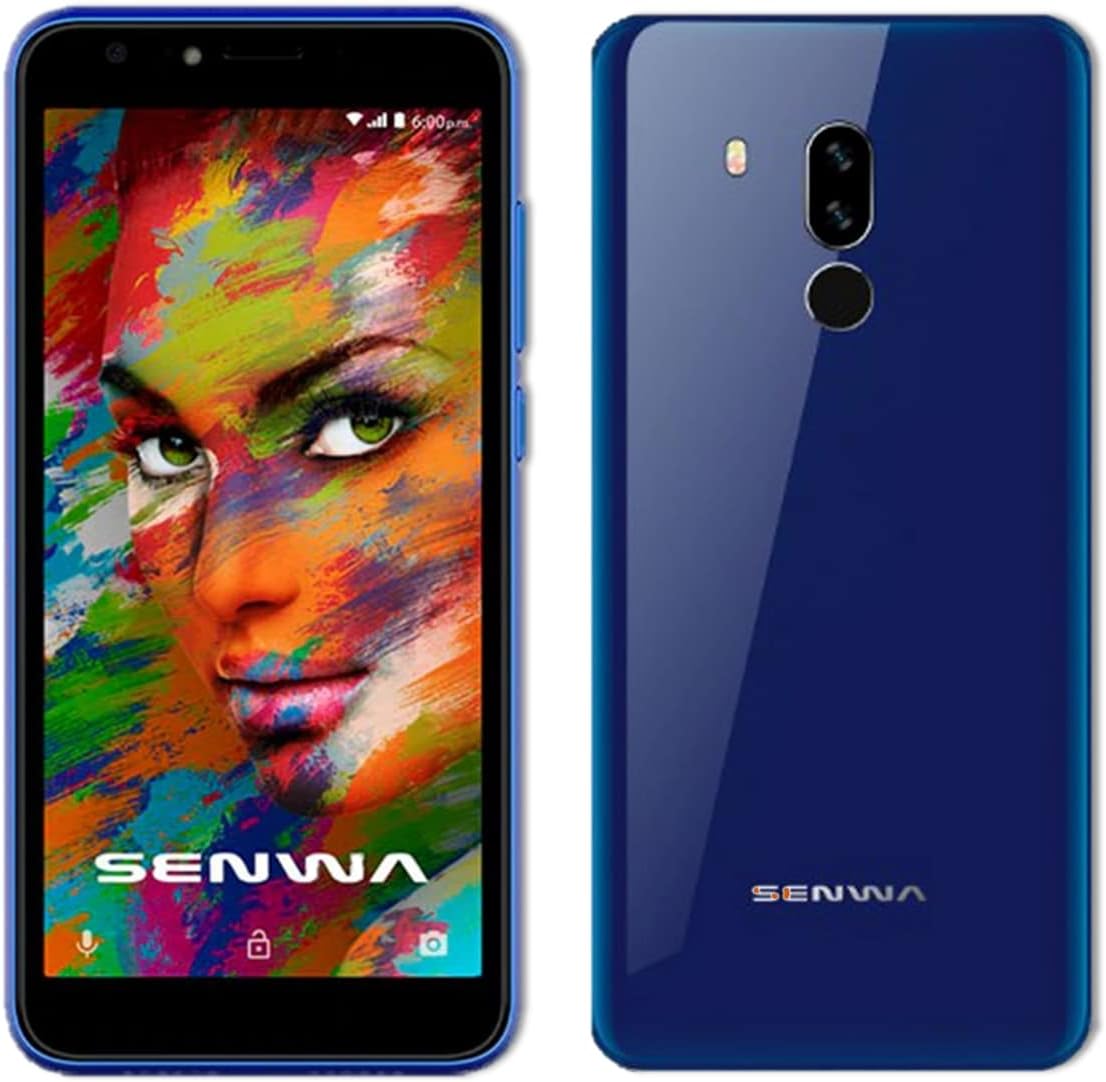
Imaxe: Anverso e reverso views of the Azumi Senwa LS5018FP smartphone. The front shows the display, earpiece, and front camera. The back highlights the dual rear cameras, LED flash, and fingerprint sensor.
Compoñentes clave:
- Cámara frontal: For selfies and video calls, equipped with a flash.
- Visualización: 5-inch HD screen with an 18:9 aspect ratio.
- Botóns de volume: Axustar os niveis de son.
- Botón de encendido: Acender/apagar o dispositivo, bloquear/desbloquear a pantalla.
- Cámaras traseiras: Main camera with flash for capturing photos and videos.
- Sensor de impresión dixital: Located on the back for secure unlocking.
- Relator: Para saída de audio.
- Porto USB: Para carga e transferencia de datos.
- Conector de audio de 3.5 mm: Para auriculares.
Configuración
1. Inserción da tarxeta SIM e da tarxeta SD
Your phone uses a standard SIM card. An additional 16GB SD card is included for expanded storage.
- Localiza a bandexa da tarxeta SIM/SD no lateral do teléfono.
- Use the provided SIM ejector tool (if included) or a small paperclip to open the tray.
- Carefully place your activated SIM card into the designated slot. Ensure the gold contacts face down.
- Insert the included 16GB SD card into its slot. The phone supports up to 64GB SD cards.
- Empurre con coidado a bandexa cara atrás no teléfono ata que quede aliñada co lateral.
2. Cargando a batería
Antes do primeiro uso, carga completamente a batería do teléfono.
- Conecte o cable USB ao cargador.
- Conecte o cargador a unha toma de corrente.
- Connect the other end of the USB cable to the phone's USB port.
- O indicador de carga aparecerá na pantalla.
3. Acendido e configuración inicial
- Press and hold the Power button until the Azumi logo appears.
- Follow the on-screen prompts to complete the initial setup. This includes selecting your language, connecting to Wi-Fi, setting up your Google account, and configuring security options like the fingerprint sensor.
Operating Your Smartphone
Navegación básica
- Xestos na pantalla táctil: Tocar, deslizar e pellizcar para ampliar son xestos estándar de Android.
- Pantalla de inicio: Accede ás túas aplicacións, widgets e notificacións.
- Barra de navegación: Usa os botóns Atrás, Inicio e Aplicacións recentes na parte inferior da pantalla.
Chamadas e mensaxes
- Facer chamadas: Abre a aplicación Teléfono, marca o número e toca a icona de chamada.
- Envío de mensaxes: Open the Messages app, tap "Start chat," enter recipient and message.
Conectividade
- Wi-Fi: Vaia a Configuración > Rede e internet > Wi-Fi para conectarse ás redes dispoñibles.
- Bluetooth: Vaia a Axustes > Dispositivos conectados > Bluetooth para emparellalos con outros dispositivos.
- Datos móbiles: Ensure mobile data is enabled in Settings > Network & internet > Mobile network for internet access via your carrier.
Uso da cámara
The Senwa LS5018FP features both front and rear cameras, each with a flash.
- Abre a aplicación Cámara.
- Toca o botón do obturador para sacar unha foto.
- Toca a icona de vídeo para gravar un vídeo.
- Use the flash icon to toggle the flash on/off/auto.
- Cambia entre as cámaras dianteira e traseira usando a icona de cambio de cámara.
Seguridade de impresións dixitais
Set up your fingerprint for quick and secure unlocking.
- Vaia a Configuración > Seguridade > Pegada dixital.
- Follow the on-screen instructions to register your fingerprint. You will need to set up a backup screen lock method (PIN, pattern, or password) first.
- Once registered, simply place your finger on the rear fingerprint sensor to unlock your phone.
Xestión do almacenamento
Your phone comes with 8GB of internal storage and an included 16GB SD card. You can expand storage up to 64GB with a compatible SD card.
- To check storage usage, go to Settings > Storage.
- Limpar a caché e as cousas innecesarias con regularidade files para liberar espazo.
- Move photos and videos to the SD card to optimize internal storage.
Mantemento
Limpeza do dispositivo
- Usa un pano suave e sen fiapos para limpar a pantalla e a carcasa do teléfono.
- Evite o uso de produtos químicos agresivos ou materiais abrasivos.
Coidado da batería
- Evita as temperaturas extremas, xa que poden afectar a duración da batería.
- Non deixes o teléfono cargando durante períodos prolongados despois de que estea completamente cargado.
- Para unha duración óptima da batería, tenta manter a carga entre o 20 % e o 80 %.
Actualizacións de software
Periodically check for software updates to ensure your phone has the latest features and security patches.
- Vaia a Configuración > Sistema > Actualización do sistema.
- Connect to Wi-Fi before downloading updates to avoid mobile data charges.
Resolución de problemas
| Problema | Posible Solución |
|---|---|
| O teléfono non se acende. | Asegúrate de que a batería estea cargada. Conecta o cargador e agarda uns minutos antes de tentar acender. |
| Non se poden facer nin recibir chamadas. | Check if the SIM card is properly inserted. Verify that your mobile network signal is strong. Ensure your account is active with your carrier. |
| Problemas coa conexión wifi. | Restart your phone and Wi-Fi router. Forget the network in Wi-Fi settings and reconnect. |
| As aplicacións fallan ou conxélanse. | Clear the app's cache (Settings > Apps & notifications > [App Name] > Storage & cache > Clear cache). Restart the phone. |
| Low storage space. | Eliminar innecesario files, photos, and videos. Move media to the SD card. Uninstall unused apps. |
| O sensor de pegadas dixitais non funciona. | Ensure your finger and the sensor are clean and dry. Re-register your fingerprint in Settings > Security. |
Especificacións
| Característica | Detalle |
|---|---|
| Nome do modelo | SENWA (LS5018FP) |
| Sistema Operativo | Android 11 (edición Go) |
| Mostrar | 5 Inches, 1280 x 720 Resolution (HD) |
| Procesador | Quad-core, 1.84 GHz CPU Speed |
| RAM | 1 GB |
| Almacenamento interno | 8 GB |
| Almacenamento ampliable | Up to 64 GB via SD Card (16GB included) |
| Cámara traseira | Si, con flash |
| Cámara frontal | Si, con flash |
| Capacidade da batería | 2000 mAh de iones de litio |
| Conectividade | 4G LTE, Wi-Fi, Bluetooth |
| Jack de audio | 3.5 mm |
| Características especiais | Finger Print Security |
| Dimensións | 5 x 4 x 4 polgadas |
| Peso do elemento | 1 libra |
| Cor | Azul |
Garantía e Soporte
For warranty information and technical support, please refer to the documentation provided with your purchase or contact Azumi customer service through their official websitio. Garda o comprobante de compra para reclamacións de garantía.
Recursos en liña:
- For general information and support, visit the Azumi Mobile official websitio.
- For software updates and FAQs, check the support section of the manufacturer's websitio.
Documentos relacionadosLS5018FP


Ask a question about this manual
Ask about setup, troubleshooting, compatibility, parts, safety, or missing instructions. Manuals+ will review the question and use this page’s manual context to help answer it.