
Xiaomi POCO M4 Pro
Poco M4 PRO 5G User Manual
Model: POCO M4 Pro | Brand: Xiaomi
Introdución
This manual provides comprehensive instructions for the setup, operation, maintenance, and troubleshooting of your Poco M4 PRO 5G smartphone. Please read this manual carefully to ensure proper use and to maximize the device's performance and longevity.

Imaxe: Anverso e reverso view of the Poco M4 PRO 5G in yellow.
1. Configuración
1.1 Desembalaxe e inspección inicial
Ao abrir o paquete, comproba que estean presentes todos os compoñentes:
- Poco M4 PRO 5G Smartphone
- Fast Car Charger (as per bundle)
- Adaptador
- Expulsor da bandexa SIM
- Funda do teléfono
Inspeccione o dispositivo para detectar calquera dano físico antes de continuar.
1.2 Instalación da tarxeta SIM
The Poco M4 PRO 5G supports Dual Nano SIM cards. Follow these steps to install your SIM card(s):
- Localiza a bandexa da tarxeta SIM no lateral do dispositivo.
- Insira a ferramenta de expulsión da bandexa da SIM no pequeno orificio que hai xunto á bandexa e prema suavemente ata que esta saia.
- Place your Nano SIM card(s) into the designated slots on the tray. Ensure the gold contacts face downwards.
- Volva inserir a bandexa da tarxeta SIM no teléfono con coidado ata que encaixe no seu lugar.

Image: The phone's display, highlighting its vibrant color capabilities, relevant for initial setup and display quality.
1.3 Carga inicial e acendido
Before first use, it is recommended to fully charge the device. Use the provided adapter and cable for optimal charging performance.
- Connect the charging cable to the phone's USB-C port.
- Conecte o adaptador a unha toma de corrente.
- Once sufficiently charged, press and hold the Power button (located on the side) until the Xiaomi logo appears.
Siga as instrucións en pantalla para completar a configuración inicial, incluíndo a selección do idioma, a conexión wifi e a configuración da conta de Google.
2. Funcionamento do teu dispositivo
2.1 Pantalla e navegación
The Poco M4 PRO 5G features a 6.6-inch FHD+ DynamicSwitch Display with a 90Hz refresh rate and 240Hz touch sampling rate, providing a smooth and responsive user experience. It also supports DCI-P3 Film Industry Color Gamut for vibrant colors.
- Pantalla táctil: Navigate by tapping, swiping, pinching, and spreading fingers on the screen.
- Sensor de impresión dixital lateral: Located on the power button for quick and secure unlocking.
- Botóns: Power button (on/off, screen lock/unlock, fingerprint sensor) and Volume buttons (up/down).

Imaxe: A pantalla do teléfono móstraseasing its vibrant DCI-P3 color gamut and smooth 90Hz refresh rate.
2.2 Características da cámara
Captura fotos e vídeos de alta calidade co versátil sistema de cámaras:
- Cámara principal de 50 MP: For detailed and clear cinematic recordings.
- Cámara ultra gran angular de 8 MP: Para capturar escenas máis amplas.
- Cámara para selfis de 16 MP: Located on the front for sharp self-portraits.
- Modo nocturno: Mellora as fotos tomadas en condicións de pouca luz.
Access the camera app from the home screen or lock screen to start capturing moments.

Imaxe: Detallada view of the Poco M4 PRO 5G's rear camera setup.
2.3 Audio and Haptics
- Altofalantes dobres: Provide a high-quality, immersive audio experience for music and videos.
- Conector para auriculares de 3.5 mm: Para conectividade de son con cable.
- Flagship X-axis Linear Motor: Delivers realistic and distinct haptic feedback for a tactile experience.
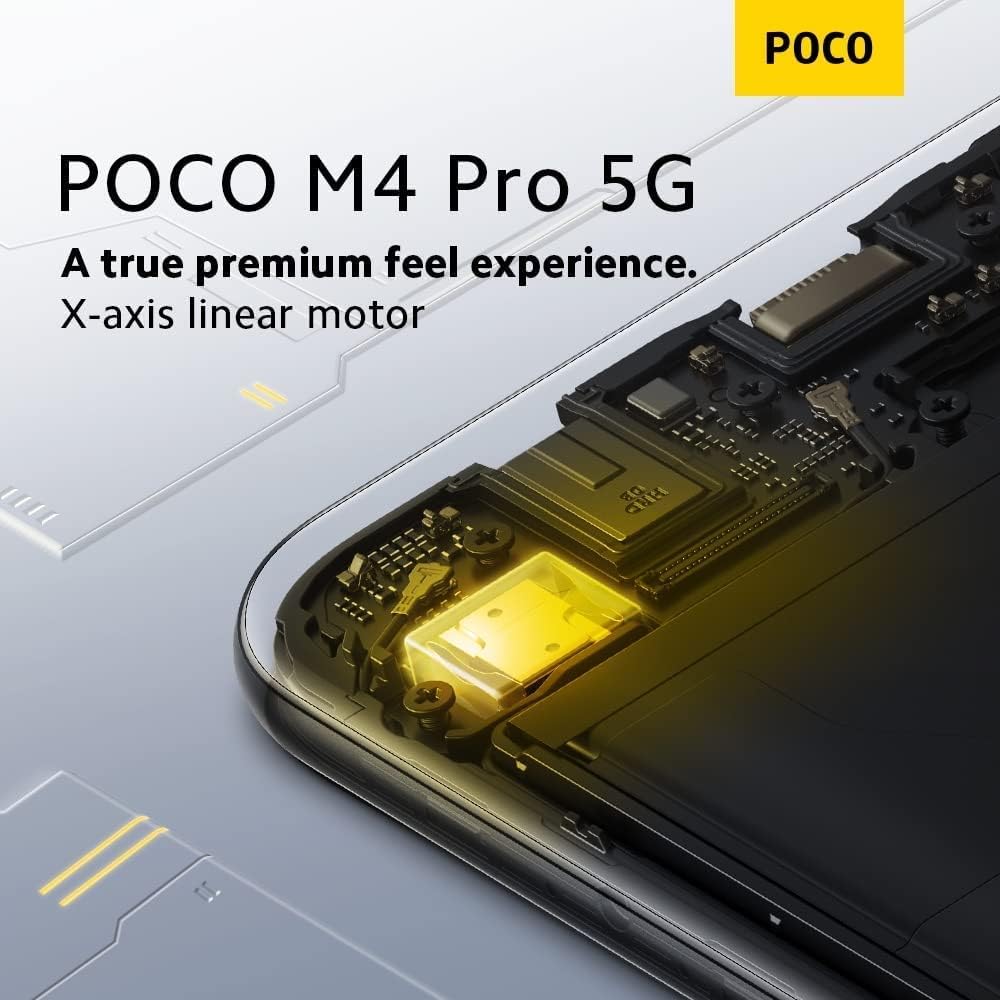
Image: An internal diagram showing the X-axis linear motor, responsible for advanced haptic feedback.
2.4 Conectividade
O dispositivo admite unha ampla gama de opcións de conectividade:
- 5G + 4G VoLTE: For high-speed cellular data and voice calls (GSM Only, not compatible with Verizon/Sprint).
- Wi-Fi: Supports 2.4 GHz and 5 GHz bands for wireless internet access.
- Bluetooth 5.1: Para conectar accesorios sen fíos.
- NFC: Para pagamentos sen contacto e emparellamento rápido.
- GPS: Includes A-GPS, BEIDOU, GALILEO, QZSS, GLONASS for accurate location services.
- Blaster IR: Permite que o teléfono funcione como un control remoto universal para dispositivos compatibles.
2.5 Batería e carga
The Poco M4 PRO 5G is equipped with a large 5000mAh (typ) battery, designed to provide extended usage. It supports 33W Pro fast charging for quick power replenishment.
- Use the provided 33W fast charger and cable for optimal charging speeds.
- Avoid extreme temperatures during charging to protect battery health.
3. Mantemento
3.1 Limpeza do dispositivo
Para manter o teu teléfono en condicións óptimas:
- Usa un pano suave e sen fiapos para limpar a pantalla e a carcasa.
- Evita o uso de produtos químicos agresivos, produtos de limpeza abrasivos ou aerosois.
- Non expoña o dispositivo a unha humidade excesiva.
3.2 Actualizacións de software
Regularly check for and install software updates to ensure your device has the latest features, security patches, and performance improvements. You can usually find this option in the phone's Settings menu under "About phone" or "System updates."
3.3 Coidado coa batería
Para prolongar a duración da batería:
- Evite descargar completamente a batería con frecuencia.
- Non deixes o teléfono conectado ao cargador durante períodos prolongados despois de que estea completamente cargado.
- Keep the phone within recommended operating temperatures.
4 Solución de problemas
This section addresses common issues you might encounter with your Poco M4 PRO 5G.
4.1 O dispositivo non se acende
- Asegúrate de que a batería estea cargada. Conecta o cargador e agarda uns minutos antes de tentar acender.
- Mantén premido o botón de acendido durante polo menos 10-15 segundos para forzar un reinicio.
4.2 Problemas de conectividade de rede
- Comprobe se a súa tarxeta SIM está inserida correctamente.
- Verify that your mobile data or Wi-Fi is enabled in the settings.
- Reinicie o dispositivo.
- Ensure you are within network coverage. Remember, this device is GSM Only and not compatible with Verizon/Sprint.
4.3 As aplicacións fallan ou conxélanse
- Pecha e volve abrir a aplicación.
- Borra a caché e os datos da aplicación en Configuración > Aplicacións.
- Asegúrate de que a aplicación estea actualizada á súa última versión.
- Reinicie o teléfono.
4.4 Duración baixa da batería
- Reduce o brillo da pantalla.
- Desactiva as funcións innecesarias como o Wi-Fi, o Bluetooth e o GPS cando non as uses.
- Pechar aplicacións en segundo plano.
- Comproba o uso da batería en Axustes para identificar as aplicacións que consomen moita enerxía.
For more complex issues, consider performing a factory reset (backup your data first) or contacting customer support.
5. Especificacións
| Característica | Especificación |
|---|---|
| Nome do modelo | POCO M4 Pro |
| Procesador | MediaTek Dimensity 810 (Octa-core, up to 2.4GHz) |
| Sistema Operativo | Android 11.0 |
| Mostrar | 6.6-inch FHD+ (1080 x 2400) LCD, 90Hz Refresh Rate, DCI-P3 |
| RAM | 4 GB |
| Cámara principal | 50 MP |
| Cámara frontal | 16 MP |
| Capacidade da batería | 5000 mAh (típico) |
| Cargando | 33W Pro Fast Charging |
| Conectividade | 5G, 4G VoLTE, Wi-Fi (2.4/5 GHz), Bluetooth 5.1, NFC, GPS |
| Jack de audio | 3.5 mm |
| Dimensións | 6.44 x 2.98 x 0.35 polgadas |
| Peso | 6.9 onzas (196 gramos) |
| Cor | Amarelo |
6. Garantía e soporte
For detailed warranty information, please refer to the warranty card included with your product or visit the official Xiaomi websitio. Garda o comprobante de compra para reclamacións de garantía.
If you encounter issues not covered in this manual or require further assistance, please contact Xiaomi customer support through their official channels. You can often find support contact details on the Xiaomi website or within the device's settings under "About phone" or "Support."
For the latest information and support resources, visit the official Xiaomi Store: Tenda Xiaomi en Amazon
Ask a question about this manual
Ask about setup, troubleshooting, compatibility, parts, safety, or missing instructions. Manuals+ will review the question and use this page’s manual context to help answer it.