
1. Introdución
Grazas pola compraasing the TURBOX Giantpeak Mechanical Feel RGB Gaming Keyboard. This manual provides essential information for setting up, operating, and maintaining your new keyboard. Please read this manual carefully before use to ensure optimal performance and longevity of your device.
2. Información de seguridade
- Keep the keyboard away from excessive heat, direct sunlight, and moisture.
- Although the keyboard is spill-resistant, avoid intentionally exposing it to large amounts of liquid. In case of spills, disconnect the keyboard immediately and allow it to dry completely before reconnecting.
- Non intente desmontar nin modificar o teclado. Isto anulará a garantía e pode causar danos.
- Use only with compatible devices and power sources as specified.
- Manter fóra do alcance dos nenos.
3. Contido do paquete
Comprobe se o paquete contén os seguintes elementos:
- TURBOX Giantpeak Mechanical Feel RGB Gaming Keyboard
- Manual de usuario (este documento)
4. Produto rematadoview
The TURBOX Giantpeak keyboard is designed for gaming, featuring a mechanical feel, customizable RGB lighting, and macro capabilities. It also includes a convenient mobile device holder.
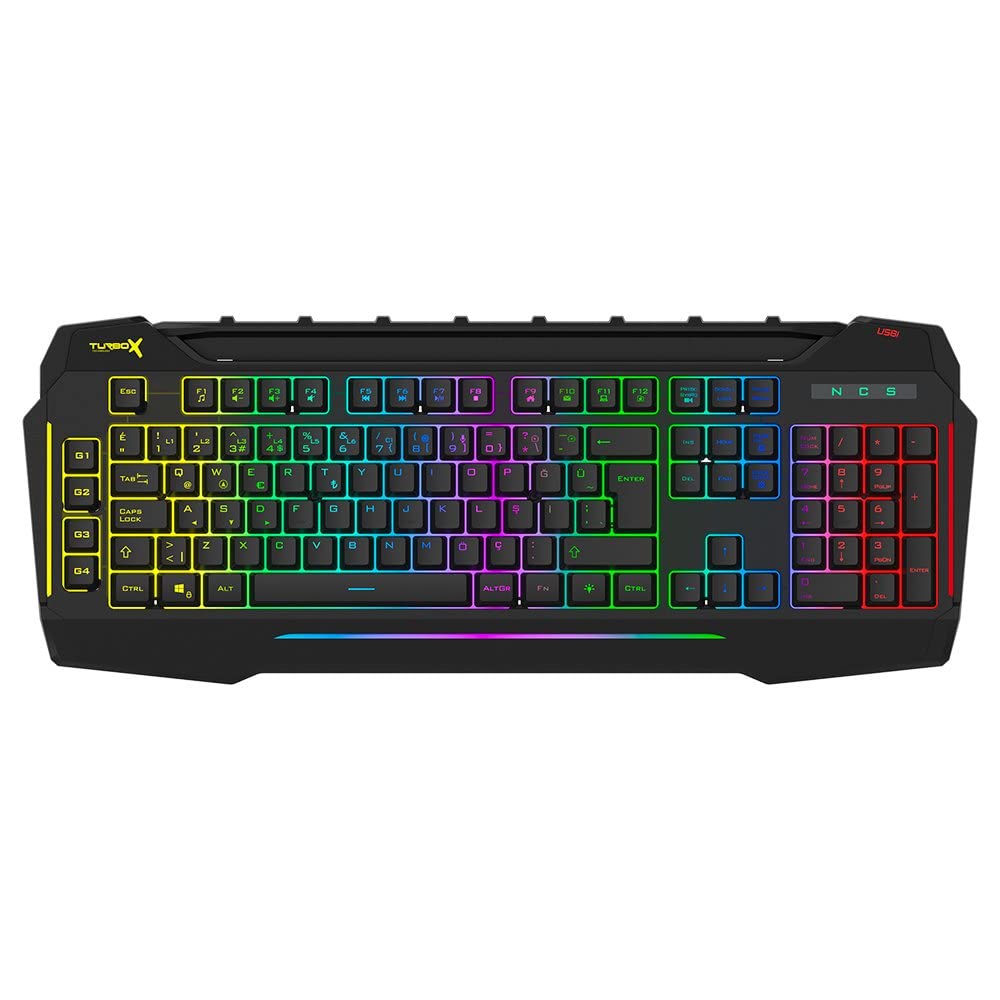
Figure 4.1: TURBOX Giantpeak keyboard with integrated mobile device stand.
This full-size keyboard offers a standard Q layout, providing a comfortable and responsive typing experience for both gaming and general use.

Figura 4.2: Arriba view of the TURBOX Giantpeak keyboard.
The keyboard features vibrant RGB backlighting that can be customized to various effects, including sound-sensitive modes. Its spill-resistant design provides added durability.

Figura 4.3: En ángulo view showing RGB lighting.
Dedicated macro keys (G1-G4) are located on the left side, allowing for quick execution of complex commands or sequences.

Figure 4.4: Close-up of programmable G-keys.
The keyboard also includes a full numeric keypad for data entry and additional functions.

Figure 4.5: Numeric keypad detail.
Connectivity is provided via a durable USB cable, ensuring a stable and responsive connection to your computer.

Figura 4.6: Lateral view con cable USB.
5. Configuración
Follow these steps to set up your TURBOX Giantpeak keyboard:
- Descomprimir o teclado: Carefully remove the keyboard and any packaging materials from the box.
- Conectar ao ordenador: Plug the USB connector of the keyboard into an available USB port on your desktop or laptop computer.
- Instalación de controladores: Your operating system (Windows, macOS, etc.) should automatically detect and install the necessary drivers. This process may take a few moments.
- Verificar a funcionalidade: Once drivers are installed, test the keyboard by typing in a text editor or browser to ensure all keys are functioning correctly. The RGB lighting should also illuminate.
6. Instrucións de funcionamento
6.1 Funcións básicas do teclado
The TURBOX Giantpeak keyboard operates like a standard Q-layout keyboard. All standard keys (alphanumeric, function keys, numeric keypad, navigation keys) function as expected.
6.2 Control de iluminación RGB
The keyboard features customizable RGB backlighting with 7 different color options and sound-sensitive modes. Specific key combinations are used to cycle through lighting effects and adjust brightness:
- Cambiar o modo de iluminación: Usa o Fn + Bloqueo de desprazamento keys to cycle through various lighting effects.
- Axustar o brillo: Usa o Fn + Páxina arriba (aumento) ou Fn + Abaixo páxina (decrease) keys to adjust the brightness level of the backlighting.
- Sound-Sensitive Mode: The keyboard supports sound-sensitive lighting. Refer to specific software or key combinations (if available) for activation. (Note: Specific key combinations for sound-sensitive mode may vary or require software.)
6.3 Macro Programming (G1-G4 Keys)
The TURBOX Giantpeak keyboard includes 4 programmable macro keys (G1, G2, G3, G4) for executing custom commands or sequences. Follow these general steps for macro recording:
- Acceder ao modo de gravación de macros: Preme o MR key (Macro Record, usually near the G-keys). The keyboard's indicator light may flash to indicate recording mode.
- Select Macro Key: Press one of the G-keys (G1, G2, G3, or G4) where you want to save the macro.
- Secuencia de rexistro: Type the sequence of keys you wish to record. This can include multiple keystrokes, delays, and modifier keys.
- Exit Macro Recording Mode: Preme o MR key again to save the macro and exit recording mode. The indicator light should stop flashing.
- Executar macro: To use the recorded macro, simply press the assigned G-key.
Note: For advanced macro settings or specific software-based macro management, please check the manufacturer's website for any available utility software.
6.4 Mobile Device Holder
The integrated slot at the top of the keyboard is designed to hold smartphones or small tablets, providing a convenient viewing angle while gaming or working.
7. Mantemento
To ensure the longevity and performance of your keyboard, follow these maintenance guidelines:
- Limpeza: Usa un pano suave e seco para limpar a superficie do teclado. Para a sucidade persistente, limpa lixeiramenteampEnxágüe o pano con auga ou unha solución de limpeza suave. Evite produtos químicos agresivos ou materiais abrasivos.
- Eliminación de po: Usa aire comprimido para eliminar o po e os residuos que hai entre as tapas das teclas.
- Xestión de vertidos: In case of liquid spills, immediately disconnect the keyboard from your computer. Turn it upside down to drain any liquid and allow it to air dry completely for at least 24-48 hours before reconnecting.
- Almacenamento: When not in use for extended periods, store the keyboard in a clean, dry environment.
8 Solución de problemas
If you encounter issues with your TURBOX Giantpeak keyboard, refer to the following common problems and solutions:
| Problema | Posible Solución |
|---|---|
| O teclado non responde. |
|
| RGB lighting is not working or is stuck. |
|
| Macro keys (G1-G4) are not working. |
|
| As teclas están pegañentas ou non responden. |
|
9. Especificacións
| Característica | Detalle |
|---|---|
| Nome do modelo | Giantpeak |
| Número de peza | ID9923266 |
| Marca | TURBOX |
| Tecnoloxía de conectividade | USB con cable |
| Dispositivos compatibles | Portátil, PC |
| Tipo de chave | Mechanical Feel (Membrane) |
| Características especiais | RGB Lighting, Macro Keys (4), Sound-Sensitive Lighting, Spill-Resistant, Mobile Device Holder |
| Número de chaves | 87 (Note: Visuals suggest a full-size layout, this number may refer to a specific key group or variant.) |
| Interface de hardware | USB |
| Dimensións do paquete | 51.2 x 22.2 x 5.2 cm |
| Peso do elemento | 1 quilogramos |
10. Garantía e soporte
For warranty information and technical support, please refer to the warranty card included with your product or visit the official TURBOX websitio. Garda o comprobante de compra para calquera reclamación de garantía.
If you require further assistance, please contact TURBOX customer support through their official channels.