
Introdución
This manual provides detailed instructions for the setup, operation, and maintenance of your TopMate SM1B Monitor Stand. Designed for ergonomic comfort and desktop organization, this stand features integrated USB 3.0 ports, RGB lighting, a storage drawer, and a mobile phone stand. Please read this manual thoroughly before use to ensure proper functionality and safety.
Características do produto
- Deseño ergonómico: Raises monitor height by 3.15 inches to reduce neck and back fatigue.
- Deseño plegable: Support legs fold 90° to adjust length and save space.
- Construción robusta: Made of thermosetting material, supporting up to 44 lbs (19.96 kg) for monitors, laptops, and printers.
- Hub USB 3.0: Includes 4 USB 3.0 ports for data transfer and charging (1 device charging, 3 input devices simultaneously).
- Efecto de iluminación RGB: Decorative lights on both sides with 7 dazzling lighting effects, controllable via a button. Long press to turn off/on.
- Caixón de almacenamento: Hidden drawer for small items like pens, paper clips, and USB drives.
- Soporte para teléfono móbil: Integrated stand for convenient phone placement.
Instrucións de configuración
The TopMate SM1B Monitor Stand requires minimal assembly. Follow these steps for initial setup:
- Desembalar o soporte: Carefully remove the monitor stand and all accessories from the packaging. Ensure all components are present: the monitor stand unit and a USB 3.0 braided cable.
- Colocación do stand: Place the monitor stand on a stable, flat surface on your desk.
- Adjust Foldable Legs (Optional): The support legs on both sides can be folded inwards by 90 degrees to shorten the stand's length, adapting to your desk space or monitor size. Adjust as needed for optimal viewing and space utilization.

Image: The monitor stand demonstrating its foldable legs for adjustable width.
- Connect USB Hub: Use the included USB 3.0 braided cable to connect the monitor stand to a USB 3.0 port on your computer or laptop. This activates the integrated USB hub and RGB lighting.
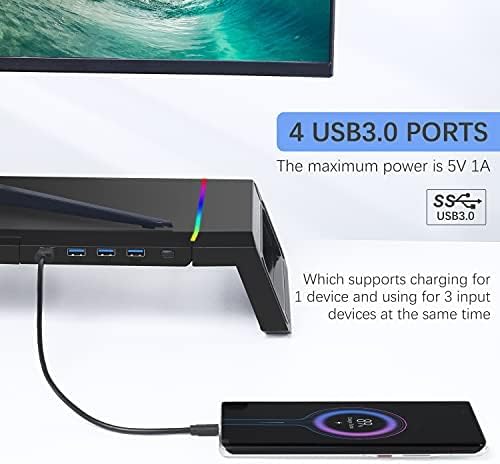
Image: Connecting the USB 3.0 cable to the monitor stand to enable the hub and lighting features.
- Place Your Monitor/Device: Carefully place your computer monitor, laptop, or other compatible device on top of the stand. Ensure it is centered and stable.
Instrucións de funcionamento
Control de iluminación RGB
The monitor stand features dynamic RGB lighting on both sides. To control the lighting:
- Efectos de cambio: Press the light control button located on the front right side of the stand to cycle through 7 different dazzling lighting effects.
- Activar/Desactivar: Long press the light button for 2-3 seconds to turn the RGB lighting off or on.

Image: The RGB lighting control button and examples of the 7 available lighting effects.
Using the USB 3.0 Hub
The integrated USB 3.0 hub provides convenient connectivity for your peripherals:
- Conectar dispositivos: Plug your USB devices (e.g., mouse, keyboard, USB drives, charging cables) into the 4 USB 3.0 ports on the front of the stand.
- Potencia de saída: The hub supports charging for one device and simultaneous use of up to three input devices. The maximum power output is 5V 1A.

Image: A smartphone charging via one of the USB 3.0 ports on the monitor stand.
Storage Drawer and Mobile Phone Stand
To utilize the integrated storage and phone stand:
- Access Storage Drawer: Pull out the hidden drawer located on the left side of the stand to store small office supplies such as pens, paper clips, or sticky notes.
- Use Phone Stand: Pull out the mobile phone stand located on the right side of the drawer to securely hold your smartphone for easy viewing.

Image: The monitor stand showcasing its integrated phone stand and storage drawer.
Mantemento
To ensure the longevity and proper functioning of your TopMate SM1B Monitor Stand, follow these simple maintenance guidelines:
- Limpeza: Wipe the surface of the stand with a soft, dry, or slightly damp pano. Evite o uso de produtos de limpeza abrasivos ou solventes, xa que poden danar o acabado ou os compoñentes electrónicos.
- Eliminación de po: Regularly dust the USB ports and RGB light strips to prevent accumulation that could affect performance or appearance.
- Xestión de cables Ensure all connected cables are neatly organized and not under excessive tension to prevent damage to the ports or cables themselves.
- Límite de peso: Do not exceed the maximum load-bearing capacity of 44 lbs (19.96 kg) to prevent structural damage.
Resolución de problemas
If you encounter any issues with your TopMate SM1B Monitor Stand, please refer to the following common troubleshooting steps:
- As luces RGB non funcionan:
- Ensure the USB cable is securely connected to both the monitor stand and your computer.
- Long press the light control button for 2-3 seconds to ensure the lights are not simply turned off.
- Proba a conectar o cable USB a un porto USB diferente do teu ordenador.
- Portos USB non funcionan:
- Verify the USB 3.0 braided cable is firmly connected to both the stand and your computer.
- Test with different USB devices to confirm if the issue is with the port or the device.
- Asegúrate de que os controladores USB do teu ordenador estean actualizados.
- Remember the hub supports charging for one device and using three input devices simultaneously. Overloading may cause issues.
- Inestabilidade do soporte:
- Ensure the stand is placed on a flat, even surface.
- Check that the foldable legs are fully extended and locked into position if using the wider configuration.
- Verify that the weight of your device does not exceed the maximum load-bearing capacity of 44 lbs (19.96 kg).
Se estes pasos non resolven o problema, ponte en contacto co servizo de atención ao cliente.
Especificacións
| Marca | TopMate |
| Número de modelo | SM1B-CA-1 |
| Forma | Rectangular |
| Tipo de base | Perna |
| Requírese montaxe | Non |
| Características especiais | Integrated USB3.0 hub, RGB lighting, storage drawer, and mobile phone stand |
| UPC | 743579376601 |
| Dimensións do paquete | 17.52 x 8.46 x 3.62 polgadas |
| Peso do elemento | 3.98 libras (1.81 quilogramos) |
| Cor | Negro |
| Material | Acrilonitrilo Butadieno Estireno (ABS) |
| Tipo de acabado | Lacado |
| Pilas necesarias | Non |
Garantía e Soporte
The TopMate SM1B Monitor Stand comes with a Servizo de garantía de 1 ano desde a data de compra.
If you experience any quality problems or require assistance with your product, please contact our online customer service. We are committed to providing satisfactory after-sales support.
For further support, please visit the official TopMate store or contact your retailer.
Vídeos oficiais de produtos
Topmate SM1B Monitor Stand Overview
Vídeo: Un funcionario acabouview of the TopMate SM1B Monitor Stand, demonstrating its features and functionality.
TopMate SM1B Foldable RGB Monitor Stand Demonstration
Video: A demonstration of the TopMate SM1B's foldable design and RGB lighting effects.