
Introdución
Thank you for choosing the IMICE T98 Wired Gaming Mouse. This manual provides detailed instructions on how to set up, operate, and maintain your new gaming mouse. Please read this manual carefully before use to ensure optimal performance and a satisfying gaming experience.
Características do produto
- Sensor de alta precisión: Up to 7200 DPI for accurate tracking.
- DPI axustable: Six adjustable DPI levels (1200, 1600, 2400, 3200, 4800, 7200) to suit various tasks and games.
- 6 botóns programables: Includes Left, Right, DPI, Scroll Wheel, Forward, and Backward buttons for enhanced control.
- Dynamic RGB LED Lighting: Features 6 colorful LED lights for an immersive gaming atmosphere.
- Deseño ergonómico: Comfortable grip for extended use, designed for both left and right-handed users.
- Lightweight Honeycomb Shell: Reduces weight and enhances airflow to prevent hand sweat.
- Memoria integrada: Stores up to four custom configurations without requiring driver software after initial setup.
- Cable USB duradeiro: High-quality 1.5-meter wired USB connection.
Guía de configuración
- Desembalar o rato: Carefully remove the IMICE T98 Gaming Mouse from its packaging.
- Conectar ao ordenador: Plug the USB connector of the mouse into an available USB port on your computer or laptop.
- Instalación de controladores: The mouse is plug-and-play and typically does not require additional drivers for basic functionality. Your operating system (Windows, Mac, Vista) will automatically detect and install the necessary drivers.
- Verificar a funcionalidade: Once connected, the mouse's LED lights should illuminate, and the cursor should respond to movement.
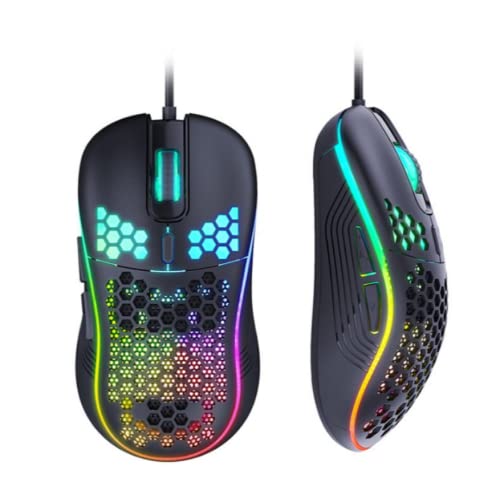
Image: The IMICE T98 Gaming Mouse with its USB cable, ready for connection.
Instrucións de funcionamento
Funcións básicas
- Clic esquerdo: Botón de acción principal.
- Clic dereito: Botón de acción secundaria, normalmente para menús contextuais.
- Roda de desprazamento: Scroll up or down in documents and web pages. Can also be pressed for a middle-click function.
- Botóns de avance/retroceso: Situados no lateral, estes botóns adoitan navegar cara adiante ou cara atrás web navegadores ou file exploradores.
Axuste de DPI
The IMICE T98 mouse features a dedicated DPI button to cycle through six sensitivity levels. Press the Botón DPI (usually located behind the scroll wheel) to change the cursor speed. Each press will switch to the next DPI setting:
- 1200 DPI (Default for browsing)
- 1600 DPI (Daily office/design)
- 2400 DPI (MOBA games)
- 3200 DPI
- 4800 DPI (FPS games)
- 7200 DPI

Image: The DPI button and visual representation of the six adjustable DPI speeds.
Iluminación LED
The mouse features dynamic RGB LED lighting. The lighting patterns are pre-programmed and enhance the aesthetic appeal of the mouse. Some lighting modes might be adjustable via the customization software.

Image: Two IMICE T98 mice displaying their vibrant RGB LED lighting.
Customization and Software
The IMICE T98 mouse supports customization through dedicated macro definition software. This software allows you to:
- Reasignación de botóns: Reset mouse buttons as multimedia buttons or assign custom macro functions.
- Xestión de macros: Record and manage macros according to your personal preferences for complex operations.
- Configuración avanzada: Adjust mouse pointer speed, fire speed, return rate, and DPI values.
- Configuración de LED: Customize backlight modes and colors.
The mouse also features onboard memory, allowing it to store up to four configurations. Once configured using the software, these settings can be used on other computers without needing the driver software installed.

Image: Screenshot of the IMICE macro definition software, showing options for button settings, macros, advanced settings, and LED control.
Mantemento
To ensure the longevity and optimal performance of your IMICE T98 Gaming Mouse, follow these maintenance guidelines:
- Limpeza: Usa un pano suave e seco para limpar a superficie do rato. Para a sucidade persistente, limpa lixeiramenteampEnxágüe o pano con auga ou unha solución de limpeza suave. Evite o uso de produtos químicos agresivos ou materiais abrasivos.
- Coidados do sensor: Keep the optical sensor on the underside of the mouse clean from dust and debris. Use a cotton swab or compressed air if necessary.
- Xestión de cables Evite dobrar bruscamente ou tirar demasiado do cable USB para evitar danos.
- Almacenamento: Cando non o use, garde o rato nun ambiente limpo e seco, lonxe de temperaturas extremas.
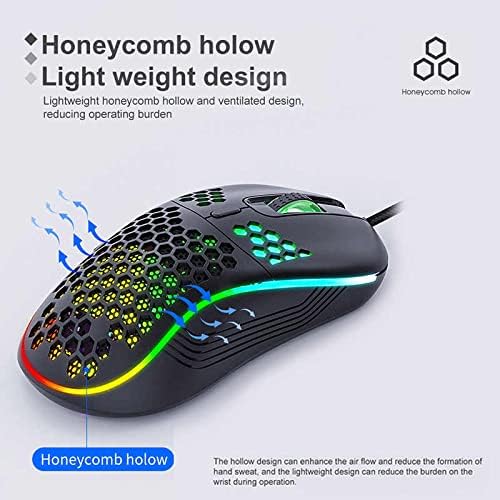
Image: The honeycomb hollow design of the IMICE T98 mouse, which aids in ventilation and reduces hand sweat.
Resolución de problemas
| Problema | Posible Solución |
|---|---|
| O rato non responde |
|
| O movemento do cursor é errático ou lento |
|
| As luces LED non funcionan |
|
| Buttons are not working or performing incorrectly |
|
Especificacións
| Característica | Detalle |
|---|---|
| Marca | IMICE |
| Modelo | T98 |
| Tecnoloxía de conectividade | USB (con cable) |
| Características especiais | LED Lighting, Adjustable DPI, Programmable Buttons, Onboard Memory |
| Cantidade de botóns | 6 |
| Orientación das mans | Ambidiestro |
| Uso recomendado | Xogos |
| Dispositivos compatibles | Computadora persoal, portátil |
| Compatibilidade do sistema operativo | Windows, Vista, Mac (implied) |
| Estilo | Moderno |
| Tipo de acabado | Mate |
| Lonxitude do cable | 1.5 metros |
| Pilas incluídas | Non |
Garantía e Soporte
Para obter información sobre a garantía e asistencia técnica, consulte a documentación proporcionada coa súa compra ou póñase en contacto directamente co vendedor/fabricante. Garde o comprobante de compra para reclamacións de garantía.