
1. Introdución
Thank you for choosing the iPega PG-P4008 Wireless Game Controller. This manual provides detailed instructions on how to set up, operate, and maintain your controller. The PG-P4008 offers broad compatibility with PS4, PS3, Android (10.0+), iOS (13.0+), and Windows PC, connecting wirelessly via Bluetooth for an enhanced gaming experience.
2. Produto rematadoview
The iPega PG-P4008 is designed for versatile gaming across multiple platforms. It features a comfortable ergonomic design, responsive controls, and several advanced functionalities to immerse you in your games.
Características principais:
- Wireless Bluetooth connectivity (BT2.1+EDR) with up to 8 meters range.
- No driver installation required for connection.
- Integrated colored LED light indicator for operational status.
- Dual motors for realistic vibration feedback during gameplay.
- Built-in three-dimensional acceleration sensor and gyroscope sensor with six-axis induction.
- Integrated speaker and 3.5mm earphone jack for game audio.
- Dual-point capacitive touchpad for enhanced control.
- Compatible with PS4, PS3, Android (10.0+), iOS (13.0+), and Windows PC.
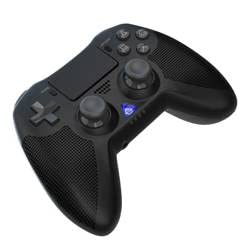
Imaxe 1: Fronte view of the iPega PG-P4008 Wireless Game Controller. This image displays the controller's ergonomic design, dual analog sticks, D-pad, action buttons, touchpad, and the central LED indicator.
3. Configuración e conexión
The PG-P4008 controller connects wirelessly via Bluetooth. Follow these steps to pair your controller with your device:
- Encendido: Ensure the controller is charged. Press and hold the Botón PS (or equivalent power button) to turn on the controller.
- Modo de emparejamento:
- For PS4/PS3: Connect the controller to the console using a USB cable. Once recognized, you can disconnect the cable for wireless play. The connection method is similar to the official P4 controller.
- For Android/iOS: Activate Bluetooth on your mobile device. On the controller, press and hold the SHARE button + PS button simultaneously until the LED indicator flashes rapidly, indicating pairing mode. Select "PG-P4008" (or similar) from your device's Bluetooth list to connect.
- For Windows PC: Ensure your PC has Bluetooth capability. On the controller, press and hold the PS button + OPTIONS button simultaneously until the LED indicator flashes rapidly. On your PC, go to Bluetooth settings, add a new device, and select "PG-P4008" (or similar) to pair.
- Conexión exitosa: Once connected, the LED indicator on the controller will change to a solid color, indicating a successful pairing.
Nota: No additional driver software is required for operation. The controller supports a stable connection up to 8 meters.
4. Instrucións de funcionamento
Indicador LED:
The built-in colored LED light indicates the controller's operational status and player assignment, similar to the official PS4 controller. Different colors will signify different stages or player numbers.
Feedback de vibración:
The controller features dual motors embedded in the handles, providing tactile vibration feedback to enhance your gaming immersion. This feedback will vary based on in-game events.
Touchpad:
The dual-point capacitive touchpad allows for intuitive control in games that support touch input, offering an additional layer of interaction.
Audio Functionality:
Connect your 3.5mm earphones to the integrated jack on the controller to experience game audio directly, providing a private and immersive sound experience.
5. Mantemento
- Keep the controller dry and away from moisture to prevent damage to internal components.
- Limpa o controlador regularmente cun pano suave e seco. Evita o uso de produtos químicos agresivos ou materiais abrasivos.
- Almacene o controlador nun lugar fresco e seco cando non estea en uso.
- Evite expoñer o controlador a temperaturas extremas ou á luz solar directa.
- Do not attempt to disassemble or modify the controller, as this will void any potential warranty and may cause damage.
6 Solución de problemas
- O controlador non se conecta:
- Asegúrate de que o controlador estea completamente cargado.
- Verifica que o Bluetooth estea activado no teu dispositivo.
- Make sure the controller is in the correct pairing mode for your device (refer to Section 3).
- Tenta reiniciar tanto o controlador como o dispositivo.
- Elimina as vinculacións anteriores da lista de Bluetooth do teu dispositivo e tenta vincular de novo.
- Retardo ou desconexión de entrada:
- Asegúrate de estar dentro do rango de funcionamento de 8 metros.
- Minimizar as interferencias doutros dispositivos sen fíos.
- Check for any physical obstructions between the controller and the device.
- A vibración non funciona:
- Asegúrate de que o xogo ao que estás a xogar admita a retroalimentación por vibración.
- Revisa a configuración do xogo para asegurarte de que a vibración estea activada.
- Audio not working via 3.5mm jack:
- Ensure your earphones are properly plugged in.
- Check the volume settings on your device and in-game.
- Test with another pair of earphones to rule out earphone issues.
7. Especificacións
| Número de modelo | PG-P4008 |
| Marca | iPega |
| Conectividade | Bluetooth (BT2.1+EDR) |
| distancia wireless | Ata 8 metros |
| Dispositivos compatibles | PS4, PS3, Android (10.0+), iOS (13.0+), Windows PC |
| Características especiais | Wireless, Touchpad, Vibration, 6-axis Gyroscope, Built-in Speaker, 3.5mm Audio Jack |
| Cantidade de botóns | 17 |
| Fonte de enerxía | Alimentado por batería |
8. Garantía e soporte
Non se inclúe información relativa á garantía do produto nin á atención ao cliente neste manual. Consulte a embalaxe do produto ou o folleto do vendedor. websitio web para obter detalles sobre a cobertura da garantía e como contactar co servizo de atención ao cliente.