
Edifier W280NB
Manual de instrucións dos auriculares inalámbricos con banda para o pescozo Edifier W280NB Bluetooth
Modelo: W280NB | Marca: Edifier
1. Introdución
Thank you for choosing the Edifier W280NB Bluetooth Wireless Neckband Earbuds. These earbuds are designed to provide a high-quality audio experience with features like Active Noise Cancellation (ANC), Ambient Sound Monitoring, and AI call noise reduction. Their lightweight, comfortable design and IP55 water resistance make them ideal for various activities, including gym workouts and running.
2. Que hai na caixa
- Edifier W280NB Earbuds
- Cable de carga
- Multiple Sizes of Eartips and Ear Wings
3. Produto rematadoview
Familiarize yourself with the components of your Edifier W280NB earbuds:

Figura 3.1: Edifier W280NB Neckband Earbuds. The image shows the black neckband-style earbuds with the control module visible on the right side of the neckband.
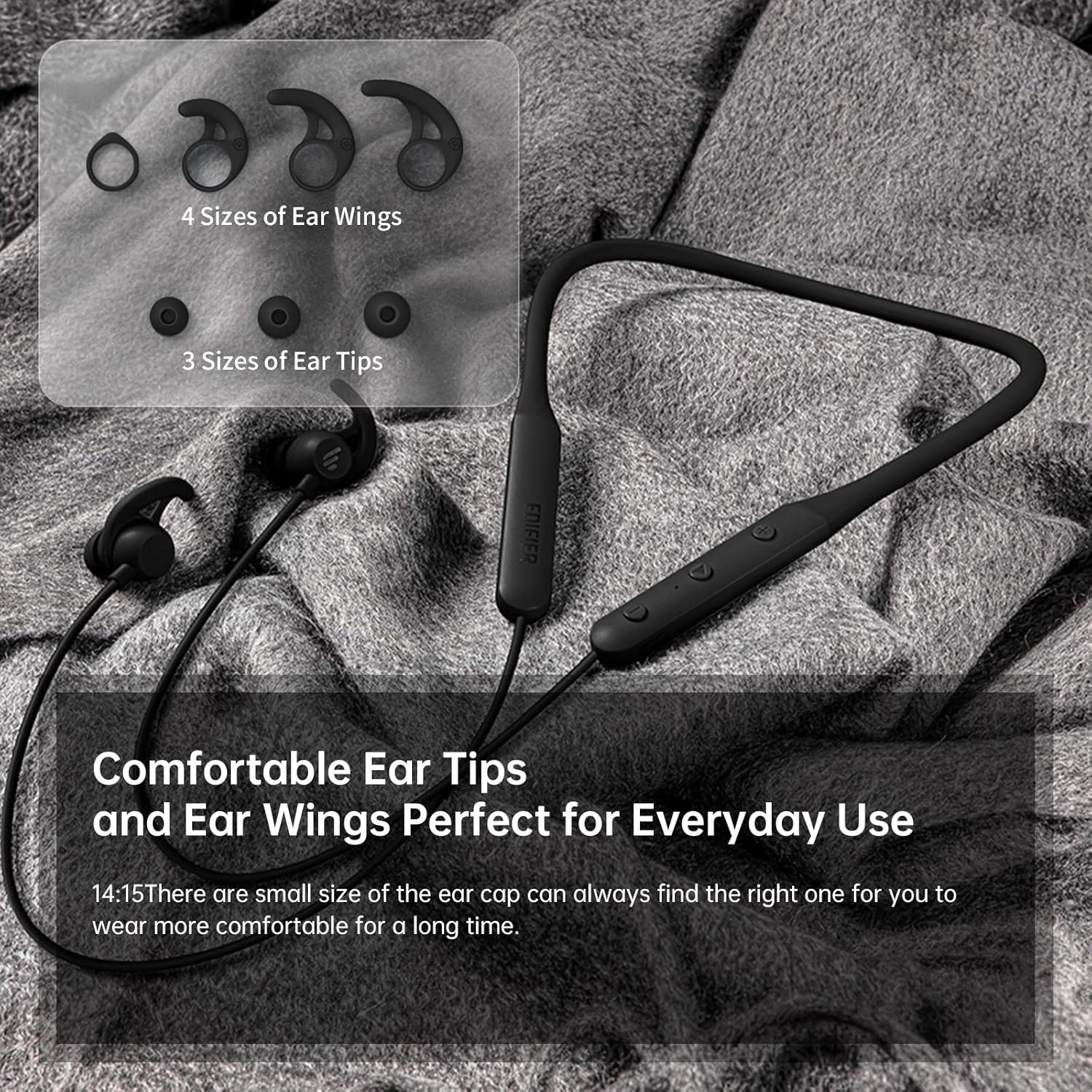
Figura 3.2: Comfortable Ear Tips and Ear Wings. This image displays different sizes of silicone ear tips and ear wings, highlighting the customizable fit for user comfort.
The earbuds feature a flexible neckband for secure wear, with integrated controls for easy access to functions like volume, playback, and call management. The ear tips and ear wings are designed for a comfortable and stable fit during various activities.
4. Configuración
4.1 Carga dos auriculares
Before first use, fully charge the earbuds. Connect the provided charging cable to the charging port on the neckband and to a USB power source. The indicator light will show charging status. A full charge provides up to 13 hours of playtime (ANC off). For quick use, a 2-minute charge can provide approximately 2 hours of playtime.

Figura 4.1: Fast Charge and Long Playback Time. This image illustrates the battery life with ANC on (11 hours) and ANC off (13 hours), and the quick charge capability (10 minutes charge for 2.5 hours use).
4.2 Emparejamento Bluetooth
- Asegúrate de que os auriculares estean cargados e apagados.
- Manteña premido o botón de acendido ata que a luz indicadora parpadee en azul e vermello, o que indica o modo de emparellamento.
- No teu dispositivo (teléfono intelixente, tableta, portátil), activa o Bluetooth e busca os dispositivos dispoñibles.
- Select "Edifier W280NB" from the list of found devices.
- Unha vez conectado, a luz indicadora acenderase en azul fixo.
5. Instrucións de funcionamento
5.1 Controis
The control module on the neckband allows you to manage various functions:
- Botón de encendido: Manter premido para acender/apagar. Premer brevemente para reproducir/pausar música ou responder/finalizar chamadas.
- Subir volume (+): Prema curta para aumentar o volume. Prema longa para a seguinte pista.
- Baixar o volume (-): Prema curta para baixar o volume. Prema longa para volver á pista anterior.
- Botón de función: (Specific button for ANC/Ambient mode, refer to product diagram if available, otherwise assume integrated with power/volume)
5.2 Cancelación activa de ruído (ANC)
The ANC feature reduces ambient noise, providing a more immersive listening experience. Activate or deactivate ANC using the designated control button (often a long press on the power button or a dedicated button).

Figura 5.1: Active Noise Cancellation. A man is shown wearing the earbuds, with text indicating the ANC technology for a quieter experience.
5.3 Ambient Sound Monitoring
This mode allows you to hear your surroundings without removing the earbuds, enhancing safety and awareness. Toggle this mode on/off via the control module.

Figura 5.2: Ambient Sound Mode. A woman is shown wearing the earbuds, with text explaining the real-time sensation of ambient sound monitoring.
5.4 Funcións de chamada
The earbuds support hands-free calling with AI call noise reduction technology, ensuring clear conversations by filtering out ambient noise.
- Responder/Finalizar chamada: Prema brevemente o botón de acendido.
- Rexeitar a chamada: Mantén presionado o botón de acendido.

Figura 5.3: Call Noise Cancellation. A woman is shown wearing the earbuds, with text describing the AI call noise-cancelling technology for clear calls.
6. Mantemento
6.1 Limpeza
- Regularly clean the ear tips with a soft, dry cloth.
- If necessary, remove the ear tips and wash them with mild soap and water, ensuring they are completely dry before reattaching.
- Wipe the neckband and earbud surfaces with a slightly damp pano. Evite o uso de produtos químicos agresivos ou materiais abrasivos.
6.2 Resistencia á auga e ao po (IP55)
The Edifier W280NB earbuds are IP55 rated, meaning they are protected against dust ingress and low-pressure water jets from any direction. This makes them suitable for use during workouts and in light rain. However, they are not designed for submersion in water.

Figura 6.1: IP55 Dust and Water Resistance. A man is shown wearing the earbuds, with text highlighting their IP55 protection against dust and water.
6.3 Almacenamento
Store the earbuds in a cool, dry place away from direct sunlight and extreme temperatures. Avoid tangling the neckband to prevent damage.
7 Solución de problemas
| Problema | Causa posible | Solución |
|---|---|---|
| Os auriculares non se acen | Batería baixa | Carga os auriculares completamente. |
| Non se pode emparellar co dispositivo | Earbuds not in pairing mode; Bluetooth off on device; too far from device | Ensure earbuds are in pairing mode (flashing blue/red). Turn on Bluetooth on your device. Move earbuds closer to your device (within 10 meters). |
| Sen son nin baixo volume | Volume too low; earbuds not connected; incorrect audio output selected | Increase volume on earbuds and device. Reconnect earbuds. Check your device's audio output settings. |
| A calidade do son é mala | Interference; ear tips not sealed properly; dirty earbuds | Move away from sources of interference. Adjust ear tips for a secure fit. Clean ear tips and earbud nozzles. |
8. Especificacións
| Característica | Detalle |
|---|---|
| Número de modelo | W280NB |
| Tecnoloxía de conectividade | Sen fíos |
| Tecnoloxía de comunicación sen fíos | Bluetooth 5.0 |
| Compoñentes incluídos | Cable, Eartip |
| Material | Silicona |
| Usos específicos do produto | Deportes e exercicio |
| Usos recomendados para o produto | Calling, Running |
| Dispositivos compatibles | Teléfonos intelixentes, tabletas, portátiles, ordenadores de sobremesa |
| Tipo de control | Control de medios |
| Función de cable | Sen Cable |
| Nivel de resistencia á auga | Impermeable (IP55) |
| Rango de frecuencias | 20Hz - 20KHz |
| Método de control | Toca |
| Número de elementos | 1 |
| Duración da batería | 13 horas (ANC desactivado) |
| Tipo de controlador de audio | Driver dinámico |
| Alcance Bluetooth | 10 metros |
| Forma do auricular | In-Ear |
| Número de portos USB 2 | 1 |
| UPC | 875674006623 |
9. Garantía e soporte
Edifier products typically come with a limited warranty. Please refer to the warranty card included with your product or visit the official Edifier website for detailed warranty terms and conditions. For technical support, product inquiries, or service requests, please contact Edifier customer service through their official channels.
Ask a question about this manual
Ask about setup, troubleshooting, compatibility, parts, safety, or missing instructions. Manuals+ will review the question and use this page’s manual context to help answer it.