
Introdución
This manual provides detailed instructions for the safe and effective use of your VANPO 1/2" Digital Torque Wrench. This advanced digital torque wrench offers precise torque management with a clear digital display. It is designed for various applications, including automotive, motorcycle, and bicycle maintenance. Please read this manual thoroughly before operation and keep it for future reference.
Contido do paquete
Ao abrir o paquete, asegúrese de que estean presentes todos os seguintes elementos:
- 1 x VANPO 1/2" Digital Torque Wrench
- 2 x pilas AAA
- 1 x Desaparafusador
- 1 x Manual de instrucións (este documento)

Image: The VANPO Digital Torque Wrench, screwdriver, and instruction manual neatly arranged in its protective case.
Configuración
1. Instalación da batería
- Locate the battery compartment on the handle of the torque wrench.
- Use the provided screwdriver to open the battery cover.
- Introduza dúas pilas AAA, asegurándose de manter a polaridade correcta (+/-).
- Coloque a tapa da batería e fíxaa co parafuso.
2. Acendido/apagado
- To power on: Press the 'C' (ON/OFF) button.
- To power off: Press and hold the 'C' (ON/OFF) button. The device will automatically shut off after approximately five minutes of inactivity to conserve battery life.
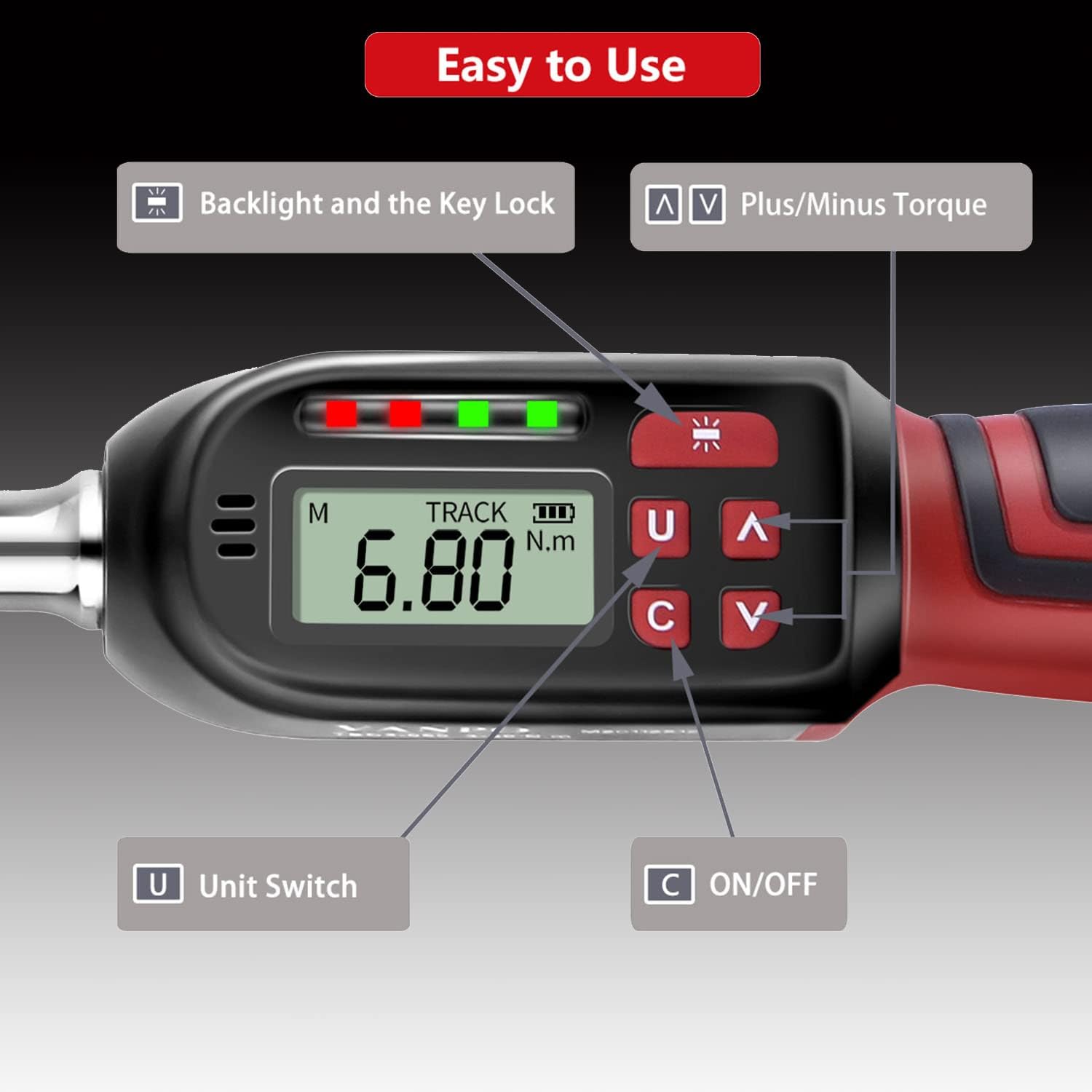
Imaxe: Detallada view of the digital display showing "TRACK" mode and "6.80 N.m", with labeled buttons for Backlight/Key Lock, Plus/Minus Torque, Unit Switch, and ON/OFF.
Instrucións de funcionamento
1. Cambio de unidades de medida
Press the 'U' (Unit Switch) button to cycle through available measurement units: N-m (Newton-meters), kgf-cm (kilogram-force centimeters), lbf-ft (pound-force feet), and lbf-in (pound-force inches).
2. Selecting Measurement Mode (TRACK / PEAK)
The torque wrench offers two measurement modes:
- TRACK Mode: Displays the real-time torque value as force is applied.
- Modo PEAK: Records and displays the maximum torque value achieved during an operation.
To switch between modes, press the 'M' button (Mode button, usually located near the display).

Image: The display showing "TRACK" mode with a real-time torque value (6.80 N.m) and "PEAK" mode displaying a maximum recorded torque value (30.00 N.m).
3. Axuste do valor de par obxectivo
Use the '∧' (Plus) and '∨' (Minus) buttons to adjust the desired target torque value. The display will show the set value.
4. Aplicación do par de torsión
- Attach the appropriate socket or bit to the 1/2" square drive.
- Place the tool onto the fastener.
- Apply steady force. The LCD will show the current torque.
- Cambio de dirección: If the product does not perform the tightening operation in the desired direction, hold the square drive interface of the ratchet head with one hand and rotate the ratchet disk with the other hand to change the direction (left or right).

Image: The ratchet head of the torque wrench, illustrating the direction of rotation for clockwise (±2% accuracy) and counter-clockwise (±3% accuracy) operations.

Image: A user applying the VANPO Digital Torque Wrench to tighten a fastener on a bicycle wheel, demonstrating practical use.
5. Torque Alert System
The wrench provides visual and audible alerts as you approach and reach the preset torque value:
- When the applied torque reaches 85%-95% of the preset value, a green LED will illuminate, and the buzzer will sound intermittently.
- When the applied torque reaches 100% of the preset value, a red LED will illuminate, and the buzzer will emit a continuous tone. This indicates the target torque has been reached.

Image: The digital torque wrench display indicating a torque value of 60.00 N.m, with a visual representation of the "BEEP" sound alert when the preset torque is achieved.
6. Backlight and Key Lock
The advanced LCD display features a backlight for use in dark environments.
- To activate/deactivate the backlight: Press the backlight button (often indicated by a sun icon).
- To lock the product: Press and hold the backlight button.
- To unlock the product: Press and hold the backlight button again.
Mantemento e precaucións
- Over-Torque Protection: Do not apply force exceeding 110% of the maximum torque value (135 Nm), as this may damage the torque wrench.
- Manipular con coidado: Avoid violently shaking or dropping the torque wrench. Do not store it in locations subject to strong vibrations.
- Uso previsto: This digital torque wrench is designed for precise torque application. Do not use it as a threading tool or for any purpose other than its intended function.
- Almacenamento da batería: Se o produto non se vai usar durante un período prolongado, retire as pilas para evitar fugas e danos.
- Apagado automático: The product will automatically power off after approximately five minutes of non-use to conserve battery life.
- Calibración: This product cannot be reset to zero by the user. For professional calibration, please contact customer support.
Resolución de problemas
| Problema | Causa posible | Solución |
|---|---|---|
| A chave inglesa non se acende. | Baterías gastadas ou instaladas incorrectamente. | Comprobe a polaridade das pilas. Substitúaas por pilas AAA novas. |
| A pantalla está escura ou parpadea. | Batería baixa. | Substitúe as pilas. |
| Wrench not tightening in desired direction. | Ratchet direction is set incorrectly. | Hold the square drive and rotate the ratchet disk to change direction. |
| Lecturas de par inexactas. | Tool may require calibration or has been damaged. | Ensure proper usage. If issues persist, contact customer support for calibration or service. |
| Wrench is locked and buttons are unresponsive. | Key lock feature is active. | Press and hold the backlight button to unlock the device. |
Especificacións
| Característica | Detalle |
|---|---|
| Nome do produto | VANPO Digital Torque Wrench |
| Número de modelo | VP016 |
| Tamaño da unidade | 1/2 polgadas |
| Alcance do par | 6.8 - 135 Nm (10-135 N.m for this variant) |
| Precisión (sentido horario) | ± 2 % |
| Precisión (en sentido antihorario) | ± 3 % |
| Unidades de medida | N-m, kgf-cm, lbf-ft, lbf-in |
| Mostrar | LCD con retroiluminación |
| Fonte de enerxía | 2 pilas AAA (incluídas) |
| Material | Acero Cromo Vanadio |
| Dimensións (L x W x H) | 35 x 12 x 5 cm |
| Peso | 1.15 kg |
Garantía e Soporte
Specific warranty information is not provided in this manual. For details regarding warranty coverage, technical support, or service, please refer to the product packaging or contact VANPO customer service directly through their official websitio web ou o vendedor onde se comprou o produto.
Electronic manuals in five languages are available. Please refer to the product's official support channels for access.