
KOFIRE UT-01
Auriculares inalámbricos para xogos KOFIRE UT-01
Manual de usuario
1. Introdución
Thank you for choosing the KOFIRE UT-01 Wireless Gaming Headset. This headset is designed to provide an immersive audio experience with ultra-low latency, 3D surround sound, and vibration feedback, making it ideal for gaming across multiple platforms including Nintendo Switch, PS4, PS5, PC, and mobile devices. This manual will guide you through the setup, operation, and maintenance of your new headset.

Image: The KOFIRE UT-01 Wireless Gaming Headset, showcasing its blue and red earcups, detachable microphone, and included USB-C and USB-A wireless adapters.
2. Contido do paquete
Asegúrate de que todos os artigos estean presentes no teu paquete:
- Auriculares inalámbricos para xogos KOFIRE UT-01
- Detachable Noise Reduction Microphone
- Dongle sen fíos USB-C
- Adaptador USB-A a USB-C
- Cable de audio de 3.5 mm
- Cable de carga USB
- Manual de usuario (este documento)
3. Características do produto
- Specially Designed for Nintendo Switch: Equipped with a dedicated USB-C adapter for seamless connectivity in handheld or docked mode. Includes a USB-A to USB-C adapter for versatile compatibility.
- 3D Surround and Vibration Sound Quality: Dual 40mm dynamic EQ driver units deliver immersive 3D stereo surround sound. Physical vibration enhances low-frequency effects, providing tactile feedback for in-game actions.
- Ergonomic Design, Comfortable Fit: Features soft memory protein earmuffs, an adjustable headband, and a lightweight 250g build for extended comfort. Foldable design for portability.
- Detachable Noise Reduction Microphone & Mute Function: The microphone reduces up to 80% of background noise for clear communication. A convenient mute button is included.
- Compatibilidade multiplataforma: Works with Nintendo Switch (Lite/OLED), PS4/5, PCs via USB dongle, and tablets/smartphones via Bluetooth. Also supports wired connection via 3.5mm audio cable.
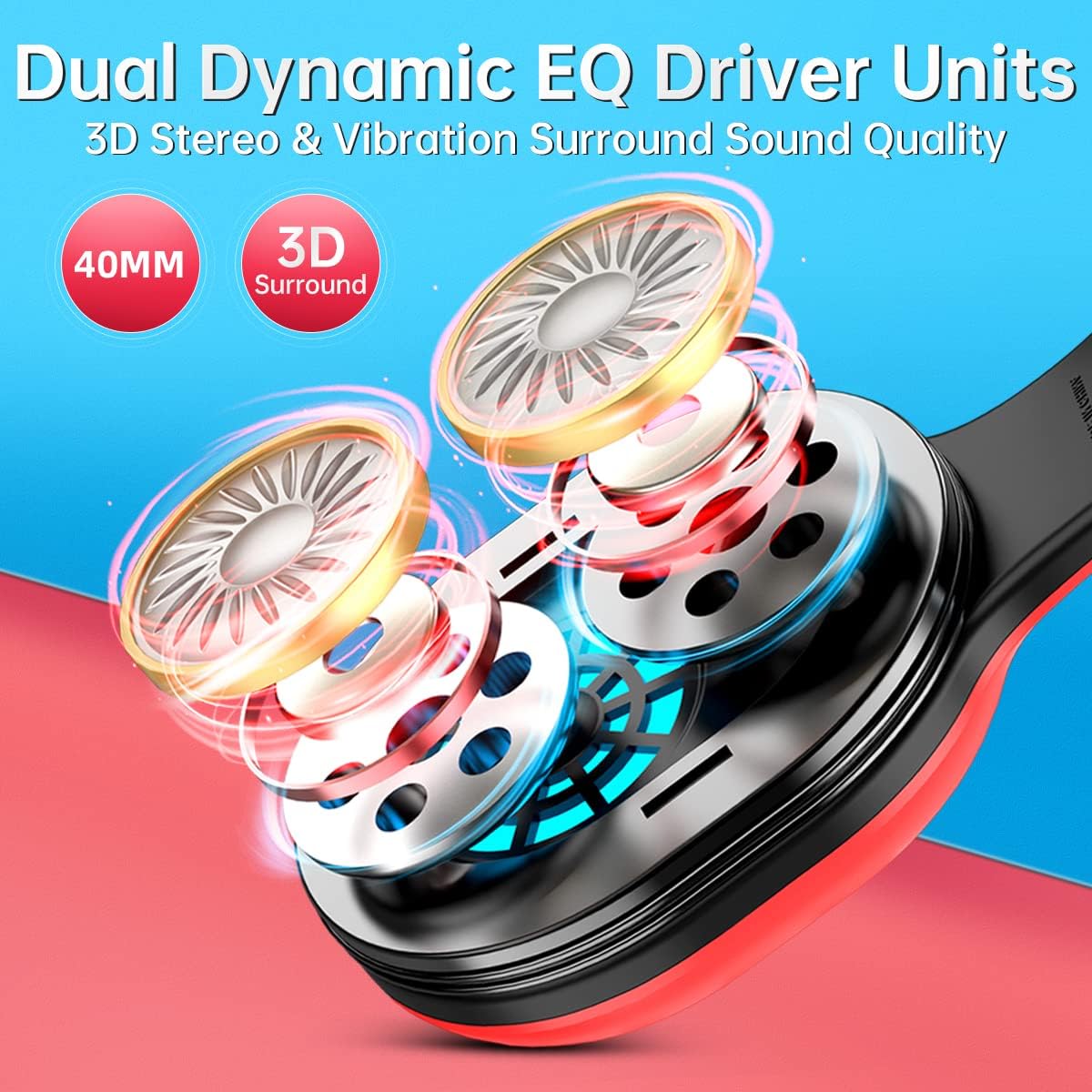
Imaxe: Unha explosión view of the headset's earcup, highlighting the dual 40mm dynamic EQ driver units responsible for 3D stereo and vibration surround sound.

Image: Two individuals wearing the KOFIRE UT-01 headset while gaming, demonstrating the comfortable fit with soft earmuffs, adjustable headband, and foldable design.
4. Controis e Indicadores
Os auriculares inclúen controis intuitivos para un funcionamento sinxelo:
- Botón de encendido/multifunción: Located on the earcup, used for powering on/off and other functions.
- Volume Up/Next Track Button (Vol+): Increases volume, or skips to the next track in media playback.
- Volume Down/Previous Track Button (Vol-): Decreases volume, or goes to the previous track in media playback.
- Botón de silencio: On the detachable microphone, allows quick muting/unmuting of the microphone.
- Vibrating Gaming Mode Button: Activates or deactivates the vibration feedback feature.
- Luces RGB: The headset features glowing colorful LED lights. To turn on or off the RGB lights, press the Vol+ and Vol- buttons simultaneously. Note: This function only works when connected via Bluetooth.

Image: A visual guide to the headset's control buttons, including Power/Multifunction, Volume Up/Next, Volume Down/Previous, and Vibrating Gaming Mode.

Imaxe: Unha detallada view of the detachable noise-cancelling microphone, highlighting the integrated mute button for easy control during gameplay.
5. Configuración
5.1 Carga inicial
Before first use, fully charge the headset using the provided USB charging cable. Connect the cable to the headset's charging port and a USB power source. The LED indicator will show charging status and turn off when fully charged. A full charge provides up to 30 hours of playtime.

Image: The KOFIRE UT-01 headset with an overlay indicating its impressive battery life of up to 30 hours on a single charge.
5.2 Wireless Connection (2.4GHz)
For Nintendo Switch, PS4/PS5, and PC:
- Insert the USB-C wireless dongle directly into the USB-C port of your Nintendo Switch (handheld mode) or use the included USB-A to USB-C adapter for the Nintendo Switch docking station, PS4/PS5, or PC's USB-A port.
- Power on the headset by pressing and holding the Power/Multifunction button.
- The headset will automatically pair with the dongle. A stable LED indicator on the headset signifies a successful connection.

Image: A diagram illustrating how the KOFIRE UT-01 headset connects wirelessly to both the Nintendo Switch console in handheld mode and the Nintendo Switch docking station using the appropriate USB adapters.
5.3 Conexión Bluetooth
For tablets and smartphones:
- Asegúrese de que os auriculares están apagados.
- Press and hold the Power/Multifunction button until the LED indicator flashes, indicating pairing mode.
- On your device, enable Bluetooth and select "KOFIRE UT-01" from the list of available devices.
- Once connected, the LED indicator on the headset will become stable.
5.4 conexión por cable
For devices supporting 3.5mm audio:
- Conecta un extremo do cable de audio de 3.5 mm á toma de audio dos auriculares.
- Conecta o outro extremo ao porto de audio de 3.5 mm do teu dispositivo.
- Note: Microphone functionality may vary or be unavailable in wired mode depending on the device.
6. Instrucións de funcionamento
6.1 Encendido/apagado
- Encendido: Press and hold the Power/Multifunction button for 3 seconds.
- Apagado: Press and hold the Power/Multifunction button for 5 seconds.
6.2 Axuste de volume
- Preme o botón Vol+ para aumentar o volume.
- Press the Vol- button to decrease volume.
6.3 Uso do micrófono
- Attach the detachable microphone to the designated port on the headset.
- Press the Mute button on the microphone to toggle mute on/off.
- Nota importante: The microphone may not work when connected to the Nintendo Switch via Bluetooth. For full mic functionality on Nintendo Switch, please use the USB adapter (2.4GHz wireless connection).
6.4 Vibration Gaming Mode
Press the Vibrating Gaming Mode button to activate or deactivate the physical vibration feedback. This feature enhances immersion by providing tactile responses to in-game sounds like explosions and gunfire.

Image: A visual representation of the vibration feedback feature on the headset, showing sound waves emanating from the earcups to illustrate the immersive gaming experience.
7. Mantemento
- Limpeza: Usa un pano suave e seco para limpar os auriculares. Non empregues produtos de limpeza abrasivos nin disolventes.
- Almacenamento: Garda os auriculares nun lugar fresco e seco, lonxe da luz solar directa e de temperaturas extremas. O deseño pregable permite un almacenamento compacto.
- Coidado da batería: Para prolongar a duración da batería, evite descargar completamente os auriculares con frecuencia. Cárgueos regularmente, mesmo se non os usa durante períodos prolongados.
8 Solución de problemas
| Problema | Causa posible | Solución |
|---|---|---|
| Sen son nin baixo volume | Headset not powered on; Volume too low; Incorrect audio output selected on device; Headset not paired. | Ensure headset is powered on; Increase headset and device volume; Check device's audio settings; Re-pair the headset. |
| O micrófono non funciona | Microphone muted; Microphone not properly attached; Incorrect input device selected; Bluetooth connection on Switch. | Unmute microphone; Re-attach microphone firmly; Check device's audio input settings; For Switch, use 2.4GHz USB adapter for mic functionality. |
| Connectivity issues (disconnections, lag) | Fóra de alcance; Interferencia; Batería baixa. | Move closer to the device; Avoid strong electromagnetic interference; Charge the headset. |
| Os auriculares non se cargan | Charging cable or port issue; Power source issue. | Ensure charging cable is securely connected; Try a different USB port or power adapter; Check for debris in charging port. |
9. Especificacións
| Característica | Detalle |
|---|---|
| Nome do modelo | UT-01 |
| Tecnoloxía de conectividade | Wireless (2.4GHz, Bluetooth), Wired (3.5mm Jack) |
| Tecnoloxía de comunicación sen fíos | Bluetooth |
| Tamaño do controlador de audio | 40 milímetros |
| Resposta en frecuencia | 20-40000 Hz |
| Latencia de audio | 1 Millisecond (2.4GHz) |
| Alcance Bluetooth | 10 metros |
| Duración da batería | Ata 30 horas |
| Tempo de carga | Aprox. 3 horas |
| Peso do elemento | 14.9 onzas (aprox. 422 g) |
| Material | Leather (earmuffs) |
| Características especiais | Foldable, Detachable Microphone, Surround Sound, Vibration Feedback |
10. Compatibilidade ao longo deview
The KOFIRE UT-01 headset offers broad compatibility across various devices and connection types:
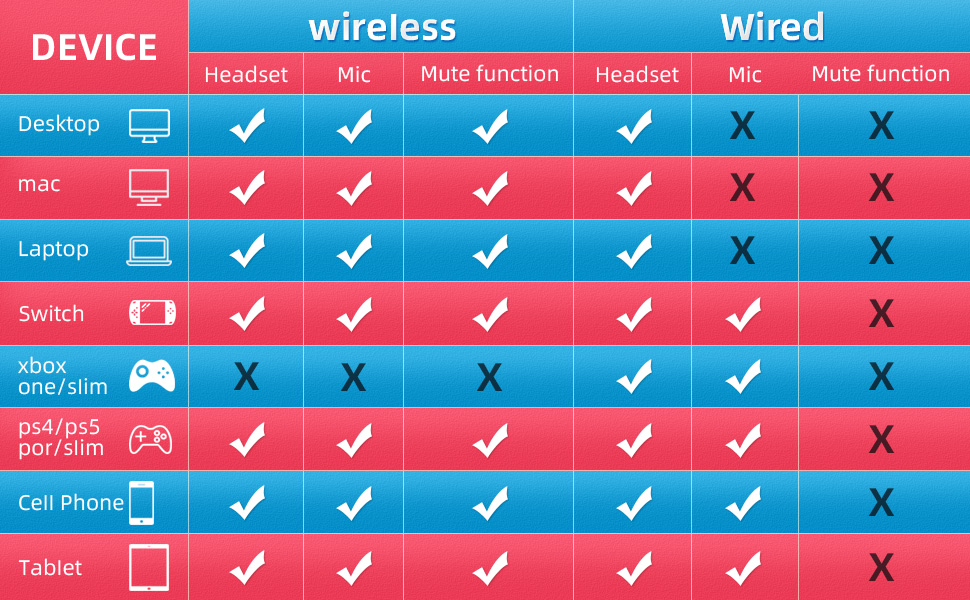
Image: A detailed compatibility chart indicating headset, microphone, and mute function support for various devices (Desktop, Mac, Laptop, Switch, Xbox One/Slim, PS4/PS5, Cell Phone, Tablet) in both wireless and wired modes.
| Dispositivo | Wireless (Headset) | Wireless (Mic) | Wireless (Mute) | Wired (Headset) | Wired (Mic) | Wired (Mute) |
|---|---|---|---|---|---|---|
| Escritorio | ✓ | ✓ | ✓ | ✓ | ✗ | ✗ |
| Mac | ✓ | ✓ | ✓ | ✓ | ✗ | ✗ |
| Portátil | ✓ | ✓ | ✓ | ✓ | ✗ | ✗ |
| Nintendo Switch | ✓ | ✓ | ✓ | ✓ | ✗ | ✗ |
| Xbox One/Slim | ✗ | ✗ | ✗ | ✓ | ✗ | ✗ |
| PS4/PS5 | ✓ | ✓ | ✓ | ✓ | ✗ | ✗ |
| Teléfono móbil | ✓ | ✓ | ✓ | ✓ | ✗ | ✗ |
| Tablet | ✓ | ✓ | ✓ | ✓ | ✗ | ✗ |
11. Garantía e soporte
KOFIRE products are manufactured to the highest quality standards. For warranty information or technical support, please refer to the contact details provided on the product packaging or visit the official KOFIRE websitio. Garde o comprobante de compra para reclamacións de garantía.
Ask a question about this manual
Ask about setup, troubleshooting, compatibility, parts, safety, or missing instructions. Manuals+ will review the question and use this page’s manual context to help answer it.