
1. Produto rematadoview
This replacement remote control is designed to function as a direct substitute for your original Yamaha remote. It comes pre-programmed with all the essential functions of the original RAV477, RAV501, RAV504, RX-A730, RX-V675, and RX-V773 remote controls, requiring no setup or pairing. Simply insert batteries, and it is ready for immediate use.
1.1 Modelos compatibles
This remote control is compatible with the following Yamaha models:
- YAMAHA RAV477
- YAMAHA RAV501
- YAMAHA RAV504
- YAMAHA RX-A730
- YAMAHA RX-V675
- YAMAHA RX-V773
2. Iniciación
2.1 Instalación da batería
The remote control requires two AAA alkaline batteries (not included). Follow these steps to install them:
- Localice o compartimento da batería na parte traseira do control remoto.
- Prema o pestillo e deslice a tapa da batería cara abaixo para abrila.
- Insira dúas pilas AAA, asegurándose de que os terminais positivo (+) e negativo (-) estean aliñados correctamente coas marcas do interior do compartimento.
- Deslice a tapa da batería de novo no seu lugar ata que faga clic de forma segura.
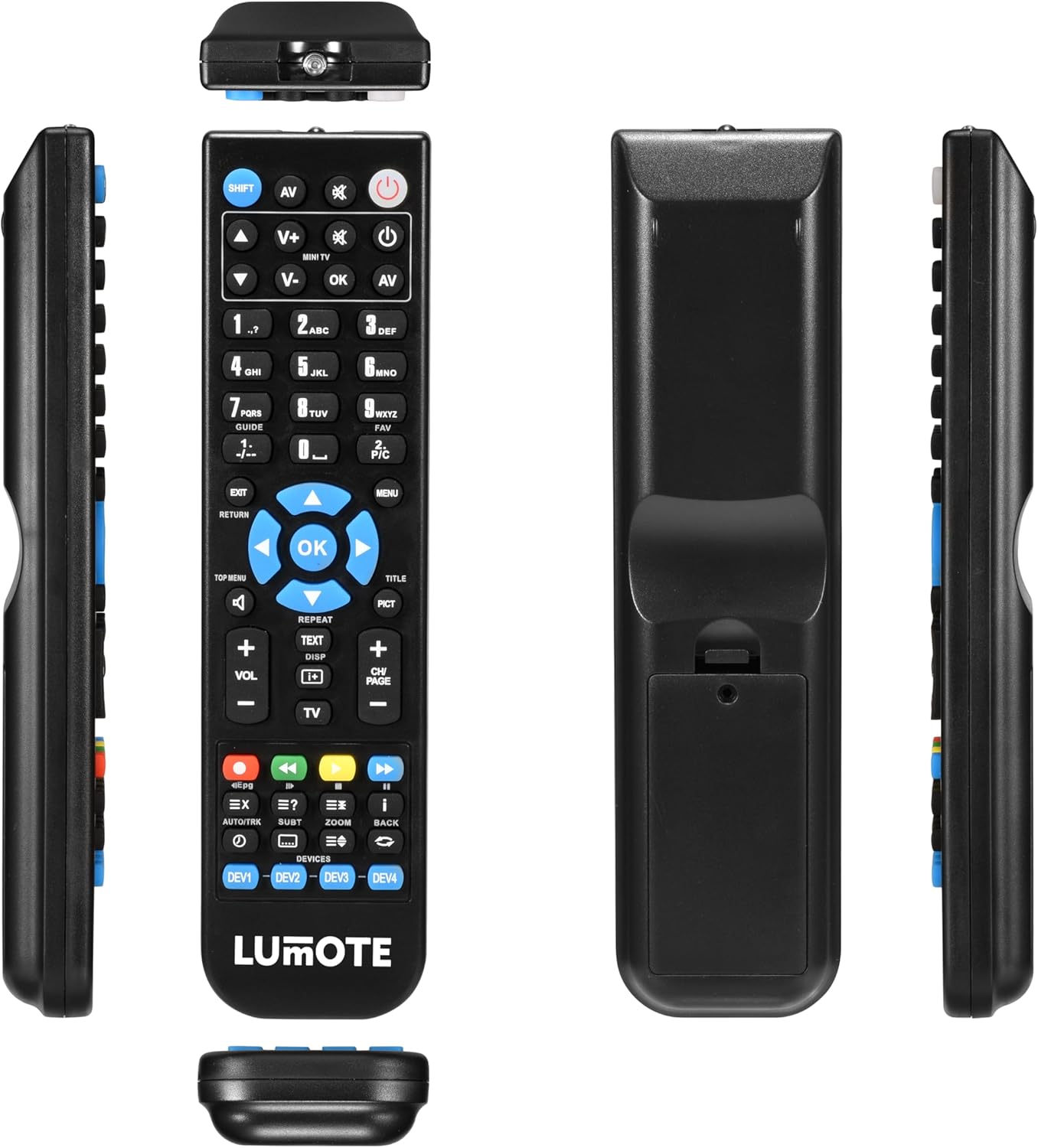
Image: The Generic Replacement Remote Control, displaying its front, back, and side profiles. The battery compartment is visible on the back.
3. Instrucións de funcionamento
3.1 Funcionamento básico
Once batteries are installed, the remote control is ready for use. Point the remote directly at your Yamaha audio/video receiver or compatible device. Ensure there are no obstructions between the remote and the device's infrared sensor.
3.2 Funcións dos botóns
The remote control features a comprehensive set of buttons designed to replicate the functionality of your original Yamaha remote. Below is a general guide to common button groups:
- Botón de encendido (POTENCIA): Acende ou apaga o dispositivo.
- Input Select Buttons (e.g., AV, TV, DVD): Selects the audio/video input source.
- Volume Control (VOL + / -): Axusta o nivel de volume.
- Botón de silencio (MUTO): Silencia ou activa o audio.
- Teclado numérico (0-9): For direct input of channel numbers or other numerical selections.
- Botóns de navegación (ARRIBA, ABAIXO, ESQUERDA, DEREITA, OK): Úsase para navegar polos menús e confirmar as seleccións.
- Menu/Setup Buttons (MENU, SETUP, RETURN, EXIT): Accesses device menus, navigates back, or exits current screens.
- Media Control Buttons (PLAY, PAUSE, STOP, REW, FF, SKIP): Controls playback of media (e.g., CD, DVD, USB).
- Function Buttons (e.g., SHIFT, TOP MENU, TITLE, PICT): Specific functions related to device operation or display modes.
4. Coidados e mantemento
- Limpeza: Limpe o mando a distancia cun pano suave e seco. Non empregue produtos de limpeza abrasivos, solventes nin alcol, xa que poden danar a superficie.
- Substitución da batería: Substitúa as pilas cando a resposta do mando a distancia sexa lenta ou deixe de funcionar. Substitúa sempre as dúas pilas ao mesmo tempo por unhas novas do mesmo tipo.
- Almacenamento: If the remote control will not be used for an extended period, remove the batteries to prevent leakage and potential damage. Store in a cool, dry place away from direct sunlight.
- Evitar a humidade: Manteña o mando a distancia lonxe da auga e da humidade elevada.
5 Solución de problemas
If you experience issues with your remote control, please refer to the following common solutions:
- O mando a distancia non responde:
- Comprobe se as pilas están inseridas correctamente coa polaridade correcta.
- Replace the batteries with fresh AAA alkaline batteries.
- Ensure there are no obstructions between the remote control and the device's infrared sensor.
- Make sure you are pointing the remote directly at the device.
- Rango de funcionamento curto:
- Replace the batteries. Weak batteries can reduce the remote's effective range.
- Ensure the remote's infrared emitter and the device's sensor are clean and unobstructed.
- Funcións específicas que non funcionan:
- Verify that the function you are trying to use is supported by your specific Yamaha model.
- Some advanced functions might require specific settings on your Yamaha device. Refer to your Yamaha device's original manual.
6. Especificacións técnicas
| Marca | Xenérico |
| Tecnoloxía de conectividade | Infravermello |
| Tipo de controlador | Control remoto |
| Rango máximo | 10 metros |
| Descrición da batería | Alcalino (AAA) |
| Número de elementos | 1 |
| UPC | 037203302044 |
7. Información da garantía
Este produto vén cun 12 meses de garantía from the date of purchase. This warranty covers manufacturing defects under normal use. It does not cover damage caused by misuse, accidents, unauthorized modifications, or battery leakage. Please retain your proof of purchase for warranty claims.
8. Atención ao cliente
If you encounter any issues not covered in this manual or require further assistance, please contact your retailer or the point of purchase for support. Provide your product model and a detailed description of the issue to facilitate a quicker resolution.