
1. Instrucións de seguridade importantes
Please read all instructions carefully before operating the appliance. Retain this manual for future reference. Failure to follow these instructions may result in electric shock, fire, or serious injury.
- Seguridade eléctrica: Asegúrese de que o aparello estea conectado a unha toma de corrente con conexión a terra e o voltaxe correctotage (800 watts). Do not immerse the machine, cord, or plug in water or other liquids. Do not operate with a damaged cord or plug.
- Hot Surfaces and Liquids: The coffee machine produces hot water and steam. Exercise extreme caution to avoid burns. Do not touch hot surfaces during or immediately after operation.
- Nenos e persoas vulnerables: This appliance is not intended for use by persons with reduced physical, sensory, or mental capabilities, or lack of experience and knowledge, unless they have been given supervision or instruction concerning use of the appliance by a person responsible for their safety. Keep children away from the appliance.
- Limpeza e mantemento: Always unplug the appliance before cleaning. Allow it to cool completely before handling any internal components.
- Uso previsto: This appliance is designed for preparing coffee beverages. Do not use it for any other purpose.
2. Produto rematadoview
The Mcilpoog WS-101+3 is a super automatic coffee machine designed for ease of use and high performance. It integrates a coffee machine, a mini refrigerator, and a cup heating equipment for a complete beverage solution.
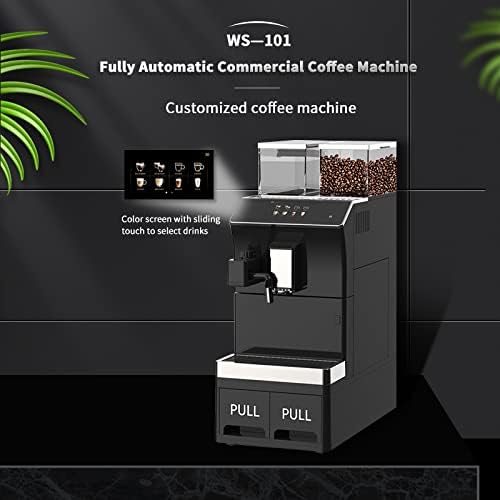
Figura 2.1: Fronte view of the Mcilpoog WS-101+3 coffee machine, highlighting the color touch screen for drink selection and the integrated design with pull-out waste drawers.
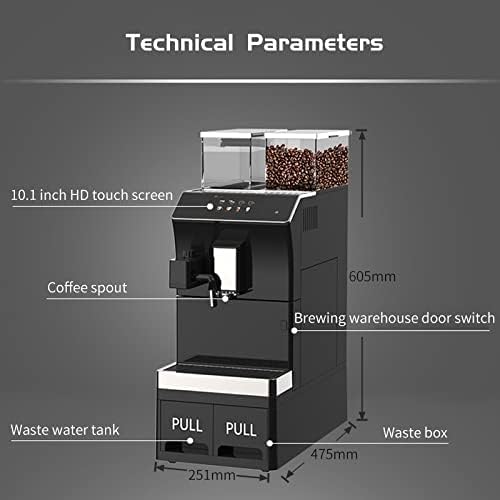
Figura 2.2: Technical diagram showing key components and dimensions of the coffee machine, including the 10.1-inch HD touch screen, coffee spout, brewing warehouse door switch, waste water tank, and waste box.
Compoñentes clave:
- Pantalla táctil HD de 10.1 polgadas: For intuitive selection and customization of beverages.
- Coffee Bean Hoppers: Two transparent hoppers for fresh coffee beans.
- Boca de café: Adjustable for various cup sizes.
- Brewing Warehouse Door Switch: Access point for the brewing unit.
- Tanque de augas residuais: Collects used water.
- Caixa de residuos: Collects spent coffee grounds.
- Self-contained Fresh Milk Foaming Device: Para a preparación de bebidas a base de leite.
3. Configuración e primeiro uso
3.1 Desembalaxe e colocación
- Retire con coidado todos os materiais de embalaxe.
- Place the machine on a stable, level, and heat-resistant surface. Ensure adequate ventilation around the unit.
- The product dimensions are approximately 47.5 cm (D) x 24.6 cm (W) x 48.3 cm (H). Allow extra space for access and connections.
3.2 Conexión de abastecemento de auga
The machine offers flexible water supply options:
- Depósito de auga interno: The machine has an internal water tank with a capacity of 3.5 liters. Fill this tank with fresh, cold drinking water.
- External Water Source: For continuous operation, the machine can be connected to an external water source, such as a water purifier or a barrel water supply. Refer to Figure 3.1 for connection points.

Figura 3.1: Diagram illustrating the external connections for the Mcilpoog WS-101+3, including options for a water purifier, direct-discharge waste water tank, and barrel water supply.
3.3 Filling Coffee Beans
Open the lids of the coffee bean hoppers and fill them with fresh, whole coffee beans. The total soybean storage capacity is 1000g.

Figura 3.2: Acabadoview of the machine's capacities, showing the 1000g soybean storage, 3.5L water tank (with external connection option), and large waste residue bin (25-50 pcs capacity).
3.4 Power Connection and Initial Rinse
- Conecta o cable de alimentación a unha toma de corrente con conexión a terra. A máquina acenderase.
- Follow the on-screen prompts for the initial setup and rinse cycle. This primes the system and cleans internal components.
3.5 Mini Refrigerator and Cup Heating Equipment
The integrated mini refrigerator uses semiconductor refrigeration technology, allowing temperature adjustment between 2-14°C. The cup warmer provides space for cup storage and helps maintain hygiene by drying cups.
4. Instrucións de funcionamento
4.1 Using the Touch Screen Interface
The 10.1-inch HD touch screen provides an intuitive interface for selecting and customizing your coffee. Simply slide or tap to navigate through the options.

Figura 4.1: Image demonstrating interaction with the touch screen to adjust coffee parameters and the dial for 12 levels of coffee powder thickness adjustment.
4.2 Selecting and Customizing Beverages
- From the main menu, select your desired coffee beverage (e.g., Espresso, Americano, Latte).
- Adjusting Coffee Parameters: On-screen options allow you to adjust parameters such as coffee strength, volume, and temperature. These settings can be adjusted at any time.
- Axuste de moenda: The machine features 12 levels of coffee powder thickness adjustment. Use the dedicated dial (refer to Figure 4.1) to set your preferred grind fineness. A finer grind typically results in stronger coffee.
4.3 Uso do espumador de leite
The self-contained fresh milk foaming device allows for easy preparation of milk-based drinks.
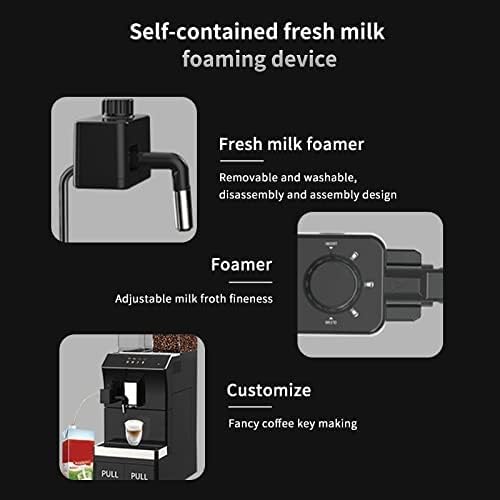
Figura 4.2: Detallado view of the fresh milk foamer, showing its removable and washable design, and the control for adjustable milk froth fineness.
- Connect the milk frother to a container of cold milk.
- Select a milk-based beverage from the touch screen.
- Adjusting Froth Fineness: Use the dedicated control on the frother (refer to Figure 4.2) to adjust the desired fineness of the milk froth.
- After use, ensure the frother is cleaned promptly to prevent milk residue buildup.
5. Mantemento e Limpeza
Regular cleaning and maintenance ensure optimal performance and longevity of your coffee machine. Always unplug the machine and allow it to cool before cleaning.
5.1 Emptying Waste Containers
- Tanque de augas residuais: Regularly pull out and empty the waste water tank. Rinse it with clean water.
- Waste Box (Coffee Grounds): The waste box has a capacity for 25-50 spent coffee pucks. Empty and clean it regularly to prevent mold growth.
5.2 Limpeza da unidade de preparación
- Open the brewing warehouse door switch to access the brewing unit.
- Remove the brewing unit and rinse it thoroughly under lukewarm running water. Do not use detergents.
- Allow the brewing unit to air dry completely before reinserting it.
5.3 Limpeza do espumador de leite
The fresh milk foamer is designed for easy disassembly and assembly, making it removable and washable.
- After each use, detach the milk frother components.
- Rinse all parts under running water to remove milk residue. Use a mild detergent if necessary, then rinse thoroughly.
- Asegúrese de que todas as pezas estean secas antes de volver a montar.
5.4 Descalcificación
Depending on water hardness, the machine will require descaling periodically. Follow the on-screen prompts or refer to the descaling instructions provided with a suitable descaling solution. Use only descaling solutions recommended for coffee machines.
5.5 Limpeza exterior
Limpe o exterior da máquina cun suave, damp pano. Non use produtos de limpeza ou disolventes abrasivos.
6 Solución de problemas
If you encounter issues with your Mcilpoog WS-101+3, please refer to the common problems and solutions below. If the problem persists, contact customer service.
| Problema | Causa posible | Solución |
|---|---|---|
| A máquina non se acende | Sen fonte de alimentación; o cable de alimentación non está conectado correctamente | Check power outlet and ensure power cord is securely plugged in. |
| Non se dispensa café | Depósito de auga baleiro; Grans de café baleiros; Unidade de preparación bloqueada | Fill water tank. Fill coffee beans. Clean the brewing unit. |
| O café é demasiado feble/forte | Axuste de moenda incorrecto; axuste de intensidade do café incorrecto | Adjust the grind fineness (12 levels). Adjust coffee strength via the touch screen. |
| Milk frother not working | Milk frother blocked; Insufficient milk | Clean the milk frother thoroughly. Ensure sufficient cold milk is available. |
| Mensaxe de erro na pantalla | Problema interno específico | Note the error code and consult the customer service or a more detailed troubleshooting guide if available. |
7. Especificacións técnicas
| Característica | Especificación |
|---|---|
| Marca | Mcilpoog |
| Modelo | WS-101+3 |
| Cor | Negro |
| Dimensións do produto (L x W x H) | 47.5 x 24.64 x 48.26 cm |
| Peso do elemento | 13.6 kg |
| Potencia/Wattage | 800 vatios |
| Capacidade do depósito de auga | 3.5 Liters (internal, with external connection option) |
| Capacidade da tolva de granos de café | 1000 g |
| Waste Residue Capacity | 25-50 unidades |
| Mostrar | Pantalla táctil HD de 10.1 polgadas |
| Características especiais | Programmable, Self-contained Milk Frother, Mini Refrigerator, Cup Heating Equipment |
| Tipo de cafetera | Máquina espresso |
8. Garantía e soporte
Mcilpoog is committed to providing excellent customer service and support for your WS-101+3 coffee machine.
- Atención ao cliente: 24-hour online customer service is available to assist with any inquiries or issues.
- Return and Exchange: The product is eligible for return and exchange within 30 days of purchase.
- Garantía posvenda: An 18-month after-sales guarantee covers manufacturing defects and malfunctions under normal use.
For support, please refer to the contact information provided with your purchase or visit the official Mcilpoog websitio.


