
1. Introdución
This manual provides essential information for the safe and efficient use of your LDNIO 65W 4-Port USB C Charger, Model A4808Q. Please read this manual thoroughly before using the product and retain it for future reference.
2. Información de seguridade
- Non expoñas o cargador a líquidos, humidade nin temperaturas extremas.
- Evite deixar caer o cargador nin sometelo a impactos fortes.
- Do not disassemble, modify, or attempt to repair the charger. This may void the warranty and pose safety risks.
- Use only compatible cables that support fast charging speeds for optimal performance and safety.
- Asegure a ventilación adecuada ao redor do cargador durante o uso.
- Desconecte o cargador da toma de corrente cando non o use ou durante tormentas eléctricas.
3. Que hai na caixa
- 1 x LDNIO 65W 4-Port USB C Charging Station (Model A4808Q)
- 1 x 5ft Extension Power Cable
4. Produto rematadoview
The LDNIO 65W 4-Port USB C Charger is designed to provide efficient and fast charging for multiple devices simultaneously. It features an LED display to show real-time charging information and multiple safety protections.
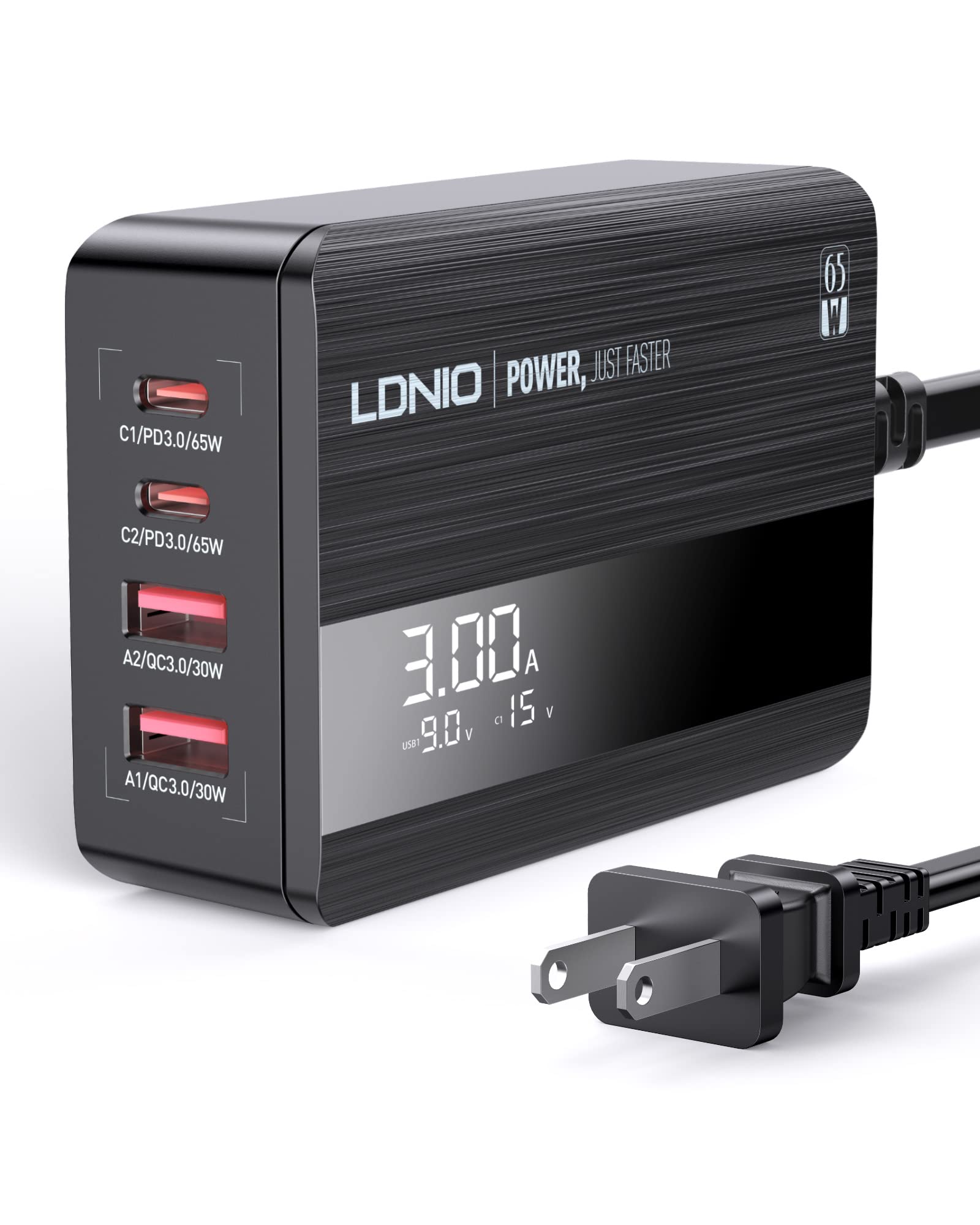
Image: The LDNIO 65W 4-Port USB C Charger connected to a laptop, tablet, and smartphone, demonstrating its multi-device charging capability.
4.1 Características principais
- 4-Port Charging: Two USB-C ports and two USB-A ports.
- Potencia total de 65 W: Delivers up to 65W of power for fast charging compatible devices.
- Pantalla LED: Mostra o volume en tempo realtage e amperage for connected devices.
- Múltiples protocolos de carga rápida: Supports Power Delivery 3.0 (PD3.0), Quick Charge 4+ (QC4.0), and PPS.
- Proteccións de seguridade: Includes over-power, over-voltage, over-charge, and over-temperature protection.

Imaxe: Unha detallada view of the charger's ports, showing the power delivery capabilities for each: C1/PD3.0/65W, C2/PD3.0/20W, A2/QC3.0/30W, A1/QC3.0/30W.

Image: A graphic highlighting the charger's safety features, including over-power, over-voltage, over-charge, and over-temperature protection.
Video: An official product video demonstrating the LDNIO 65W 4-Port USB C Charging Station, showcasing o seu deseño e funcionalidade.
5. Configuración
- Desempaquetar: Carefully remove the LDNIO 65W 4-Port USB C Charger and the 5ft extension power cable from its packaging.
- Conectar o cable de alimentación: Insert the included 5ft extension power cable into the power input port on the back of the charging station.
- Enchufe na toma: Plug the other end of the power cable into a standard wall outlet (100-240V, 50-60Hz). The LED display on the charger will illuminate.
- Place Charger: Position the charger on a stable, flat surface, ensuring adequate ventilation. The anti-slip rubber feet on the bottom help prevent it from sliding.
6. Instrucións de funcionamento
6.1 Dispositivos de carga
- Conectar dispositivos: Use appropriate USB charging cables (not included) to connect your devices to the available USB-C (C1, C2) or USB-A (A1, A2) ports on the charger.
- Pantalla LED do monitor: The LED display will show the real-time current (Amps) e voltage (Volts) for the active charging ports. The display cycles through the information for each connected port.
- Carga de varios dispositivos: The charger can charge up to four devices simultaneously. When a new device is connected, the charger may briefly pause charging on other devices to intelligently redistribute power based on each device's protocol. This is normal behavior to protect your device's battery.

Image: The LDNIO 65W charger positioned on a desk, efficiently charging a laptop, tablet, and smartphone, illustrating its desktop use and cable management benefits.
6.2 Entender a pantalla LED
The LED display provides dynamic feedback on the charging status. It typically shows the current (A) and voltage (V) for each active port. When multiple ports are in use, the display will cycle through the information for each port, often indicated by a brief flicker on the corresponding port's display value.
Video: An official product video demonstrating the LDNIO 4-Port 65W USB C Charger, highlighting its features and the LED display in action.
7. Mantemento
- Limpeza: Desconecte o cargador da toma de corrente antes de limpalo. Use un pano suave e seco para limpar a superficie. Non empregue produtos de limpeza líquidos nin aerosois.
- Almacenamento: Garde o cargador nun lugar fresco e seco, lonxe da luz solar directa e de temperaturas extremas cando non o estea a usar.
- Coidado do cable: Avoid bending or crimping the power cable or charging cables excessively.
8 Solución de problemas
- O dispositivo non se carga: Ensure the charger is properly plugged into a live power outlet and the power cable is securely connected to the charger. Verify that the charging cable is fully inserted into both the charger and your device.
- Carga lenta: Check if your device supports fast charging and if the cable you are using is rated for fast charging speeds. Third-party cables may sometimes result in slower charging. The charging power is determined by your device's capabilities and the maximum power it can accept.
- LED display flickering: This is normal when multiple devices are connected. The charger is intelligently redistributing power, and the display cycles through the current and voltage information for each port.
- O cargador ten unha sensación de calor: It is normal for the charger to become warm during operation, especially when charging multiple devices or high-power devices. If it becomes excessively hot, disconnect it immediately and contact support.
9. Especificacións
| Característica | Especificación |
|---|---|
| Número de modelo | A4808Q |
| Total de portos USB | 4 (2 USB-C, 2 USB-A) |
| Wat totaltage | 65 W máx |
| USB-C Output (C1) | PD3.0 65W (5V/3A, 9V/3A, 12V/3A, 15V/3A, 20V/3.25A) |
| USB-C Output (C2) | PD3.0 20W (5V/3A, 9V/2.22A, 12V/1.67A) |
| USB-A Output (A1/A2) | QC3.0 30 W (5 V/3 A, 9 V/2 A, 12 V/1.5 A) |
| Vol. De entradatage | 100-240V ~ 50-60Hz, 1.5A Max |
| Material | Policarbonato |
| Peso | 0.28 quilogramos |
| Compoñentes incluídos | 65W USB C Charging Station, 5ft Extension Power Cable |
10. Garantía e soporte
LDNIO products are manufactured with high-quality standards. For warranty information or technical support, please refer to the warranty card included with your product or visit the official LDNIO websitio. Garde o recibo da compra como xustificante de compra para reclamacións de garantía.