
Introdución
This manual provides essential instructions for the safe and efficient use of your Juice Jumbo Marshmallow Portable Bluetooth Speaker. Please read this manual thoroughly before operating the device and retain it for future reference.
Información de seguridade
- Non expoñas o altofalante a temperaturas extremas, luz solar directa ou humidade elevada.
- Evite deixar caer ou someter o altofalante a fortes impactos.
- Keep the speaker away from water and other liquids. If it gets wet, power it off immediately and allow it to dry completely before reuse.
- Non intente desmontar, reparar nin modificar o altofalante. Isto anulará a garantía e pode causar danos ou lesións.
- Emprega só o cable de carga incluído ou un equivalente certificado.
- Manter fóra do alcance dos nenos.
- Desfágase da batería e do altofalante segundo a normativa local.
Contido do paquete
Verifica que todos os elementos estean presentes no paquete:
- Juice Jumbo Marshmallow Portable Bluetooth Speaker
- Cable de carga USB
- Manual de usuario
Produto rematadoview
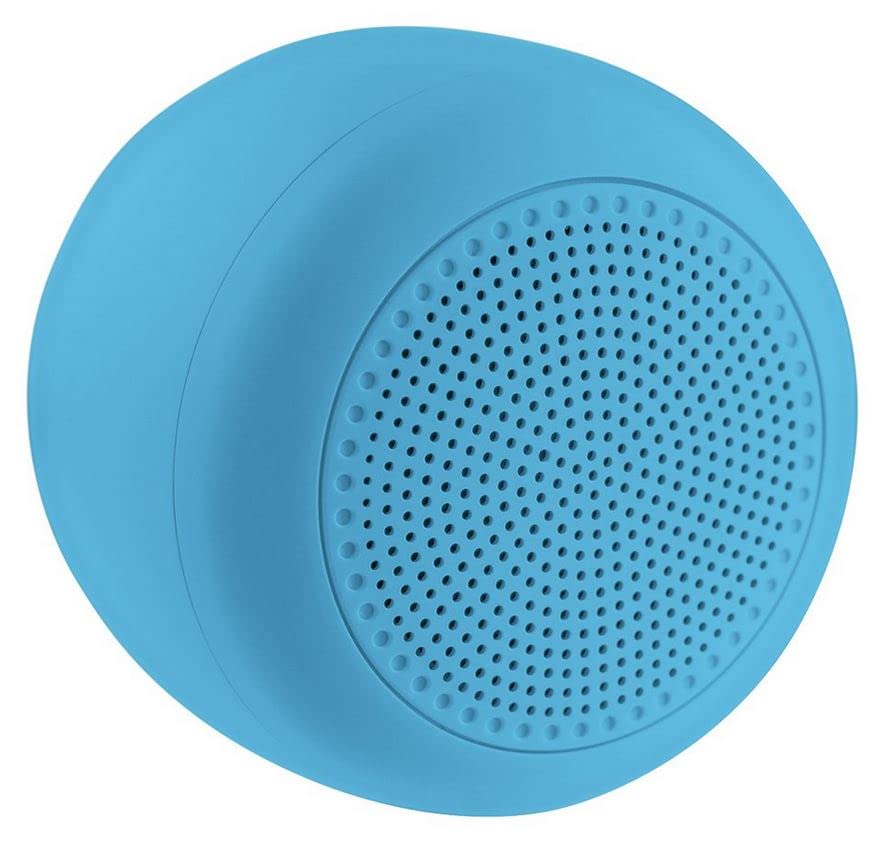
Image: The Juice Jumbo Marshmallow Portable Bluetooth Speaker. This image displays the speaker's compact, cylindrical design in blue, highlighting its fabric grille and the location of its control panel.
- Botón de encendido: Úsase para activar ou desactivar o altofalante.
- Botón para subir o volume/seguinte pista: Increases volume with a short press, skips to the next track with a long press.
- Botón para baixar o volume/pista anterior: Decreases volume with a short press, goes to the previous track with a long press.
- Botón Reproducir/Pausa: Controla a reprodución de audio.
- Porto de carga: Para conectar o cable de carga USB.
- Indicador LED: Displays charging status and Bluetooth connection status.
Configuración
1. Cargando o altofalante
- Conecta o extremo pequeno do cable de carga USB ao porto de carga do altofalante.
- Conecta o extremo grande do cable de carga USB a un adaptador de corrente USB (non incluído) ou ao porto USB dun ordenador.
- The LED indicator will illuminate to show charging status. It will typically turn off or change color when fully charged.
- Unha carga completa leva aproximadamente 2-3 horas.
2. Emparellamento Bluetooth
- Asegúrate de que o altofalante estea completamente cargado.
- Manteña premido o Botón de encendido for a few seconds to turn on the speaker. The LED indicator will flash, indicating it is in pairing mode.
- No teu teléfono intelixente ou tableta, vai á configuración de Bluetooth.
- Activa o Bluetooth e busca os dispositivos dispoñibles.
- Select "Juice Jumbo Marshmallow" from the list of devices.
- Once paired, the LED indicator will stop flashing and remain solid, and you may hear a confirmation tone.
- The speaker will automatically connect to the last paired device when powered on, if that device's Bluetooth is active and within range.
Instrucións de funcionamento
- Encendido/apagado: Manteña premido o Botón de encendido durante aproximadamente 3 segundos.
- Reproducir/Pausa: Preme o Botón Reproducir/Pausa unha vez para reproducir ou pausar o audio.
- Control de volume:
- Prema brevemente o Botón de subir volume para aumentar o volume.
- Prema brevemente o Botón de baixar de volume para diminuír o volume.
- Control de pista:
- Mantén presionado Botón de subir volume para saltar á seguinte pista.
- Mantén presionado Botón de baixar de volume para ir á pista anterior.
Mantemento
- Limpeza: Use a soft, dry cloth to wipe the speaker. Do not use abrasive cleaners or solvents.
- Almacenamento: Garde o altofalante nun lugar fresco e seco, lonxe da luz solar directa e de temperaturas extremas, cando non o use durante períodos prolongados.
- Coidado da batería: To prolong battery life, avoid fully discharging the speaker frequently. Charge it regularly, even if not in use.
Resolución de problemas
| Problema | Causa posible | Solución |
|---|---|---|
| O altofalante non se acende. | Batería baixa. | Cargue o altofalante completamente. |
| Non se pode sincronizar co dispositivo Bluetooth. | Bluetooth is off on the device; speaker is not in pairing mode; device is too far. | Ensure Bluetooth is enabled on your device. Turn the speaker off and on again to re-enter pairing mode. Move the device closer to the speaker (within 10 meters). |
| Sen son ou volume baixo. | Volume demasiado baixo no altofalante ou dispositivo; o altofalante non está conectado. | Aumenta o volume tanto no altofalante como no dispositivo conectado. Asegúrate de que o altofalante estea emparellado correctamente. |
| Distorsión do son. | Volume demasiado alto; dispositivo demasiado lonxe do altofalante. | Reduce volume on both the speaker and your connected device. Move the device closer to the speaker. |
Especificacións
| Número de modelo | JUI-SPKER-JMBMALOW |
| Marca | Zume |
| Tecnoloxía de conectividade | Bluetooth |
| Potencia máxima de saída do altofalante | 6 vatios |
| Tipo de batería | 1 batería de ións de litio (obrigatoria) |
| Peso do elemento | 222.2 gramos |
| Dimensións do paquete | 13.8 x 8.2 x 6.5 cm |
| Uso recomendado | Para teléfono intelixente ou tableta |
Garantía e Soporte
This product comes with a standard manufacturer's warranty. For detailed warranty information, please refer to the warranty card included in your package or visit the official Juice website. For technical support or customer service inquiries, please contact Juice customer support through their official channels.
Nota: Os termos e condicións da garantía poden variar segundo a rexión.