
1. Introdución
The Zelotes F17 Vertical Wireless Mouse is designed for enhanced comfort and productivity, featuring an ergonomic vertical design that promotes a natural hand posture. This manual provides comprehensive instructions for setting up, operating, maintaining, and troubleshooting your new mouse.

Image: The Zelotes F17 Vertical Wireless Mouse, showcasinpolo seu deseño ergonómico e o receptor USB incluído.
2. Contido do paquete
Verifique que todos os elementos estean presentes no seu paquete:
- 1 x Zelotes Wireless Vertical Mouse
- 1 x receptor USB
- 1 x manual de instrucións
3. Guía de configuración
Follow these steps to set up your Zelotes F17 Vertical Wireless Mouse:
- Instalar baterías: The mouse requires two AA batteries (not included). Locate the battery compartment on the underside of the mouse. Open the cover, insert the batteries according to the polarity indicators, and close the cover.
- Recuperar receptor USB: The USB receiver is conveniently stored next to the battery compartment. Gently pull it out.
- Conectar o receptor USB: Plug the USB receiver into an available USB port on your computer (Laptop, PC, Mac).
- Encendido: Locate the On/Off switch on the underside of the mouse and slide it to the 'On' position. The mouse is plug-and-play, requiring no driver installation.

Image: The underside of the Zelotes F17 mouse, illustrating the battery compartment and the integrated storage slot for the USB receiver.
Video: A demonstration of the Zelotes F17 Vertical Wireless Mouse in use, highlighting its ergonomic grip and functionality.
4. Instrucións de funcionamento
The Zelotes F17 mouse features 6 buttons and adjustable DPI settings for optimal control.
4.1 Ergonomic Grip
The vertical design allows your hand to rest in a natural handshake position, reducing wrist and forearm strain during prolonged use.
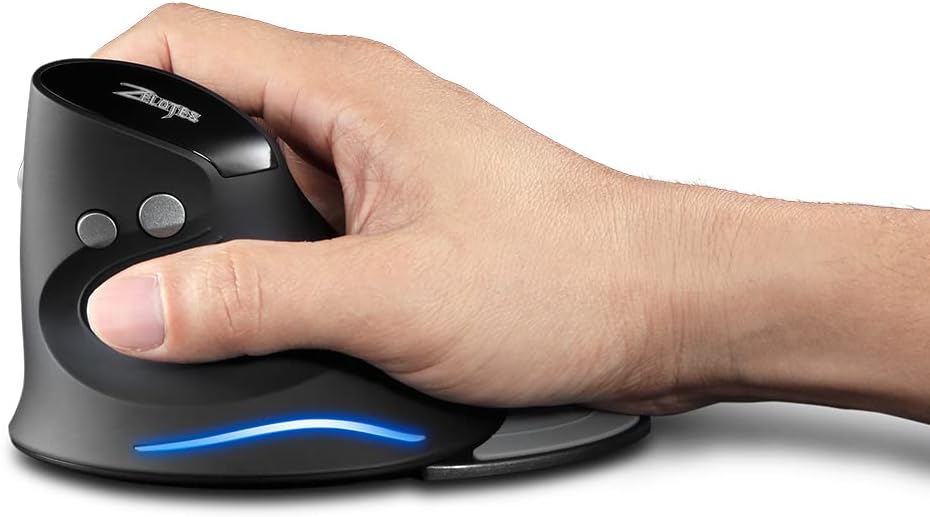
Image: A hand demonstrating the natural, ergonomic grip on the Zelotes F17 vertical mouse.
4.2 Funcións dos botóns
- Clic esquerdo: Función de clic principal estándar.
- Clic dereito: Función de clic secundario estándar.
- Roda de desprazamento: Scroll up or down, and click for middle-button functionality.
- Botón DPI: Cycles through DPI settings (1200/1600/2400 DPI).
- Botóns de avance/retroceso: Located on the thumb side, these buttons allow for quick navigation in web navegadores ou file exploradores.
4.3 DPI axustable
Press the DPI button (located near the scroll wheel) to switch between 1200, 1600, and 2400 DPI settings. This allows you to adjust the mouse sensitivity to suit your task, whether it's precise graphic design or fast-paced gaming.
4.4 Detachable Palm Rest
The Zelotes F17 includes a detachable palm rest for additional wrist support. You can easily attach or remove it based on your preference and comfort needs.

Image: The Zelotes F17 mouse with its detachable palm rest separated, illustrating the modular design.
5. Mantemento
To ensure the longevity and optimal performance of your Zelotes F17 mouse, follow these maintenance guidelines:
- Limpeza: Usa un pano suave e seco para limpar a superficie do rato. Para a sucidade persistente, limpa lixeiramenteampEnxágüe o pano con auga ou unha solución de limpeza suave. Evite produtos químicos agresivos ou materiais abrasivos.
- Substitución da batería: When the mouse's performance degrades or the LED illumination dims, it's time to replace the AA batteries. Refer to Section 3.1 for battery installation instructions.
- Almacenamento: When not in use for extended periods, turn off the mouse to conserve battery life. Store the USB receiver in its dedicated slot on the underside of the mouse to prevent loss.
6 Solución de problemas
If you encounter issues with your Zelotes F17 mouse, try the following solutions:
| Problema | Causa posible | Solución |
|---|---|---|
| O rato non responde | Low battery; USB receiver disconnected; Mouse is off. | Replace batteries; Re-insert USB receiver; Turn mouse On. |
| Movemento errático do cursor | Sensor óptico sucio; Superficie inadecuada; Batería baixa. | Clean optical sensor; Use on a smooth, non-reflective surface; Replace batteries. |
| A iluminación LED non funciona | Low battery; Mouse is off. | Replace batteries; Turn mouse On. |
| DPI setting not changing | Avaría do botón DPI. | Ensure the mouse is powered on and connected. If the issue persists, contact customer support. |
7. Especificacións
Key technical specifications for the Zelotes F17 Vertical Wireless Mouse:
| Característica | Detalle |
|---|---|
| Dimensións do produto | 4.33 x 3.39 x 3.15 polgadas |
| Peso do elemento | 3.53 onzas |
| Número de modelo do artigo | F17 |
| Marca | zelotes |
| Cor | Negro |
| Tecnoloxía de conectividade | USB (2.4 GHz Wireless) |
| Característica especial | Ergonomic Design, Removable Wrist Rest, LED Illumination |
| Tecnoloxía de detección de movemento | Óptica |
| Configuración de DPI | 1200/1600/2400 DPI |
| Número de botóns | 6 |
| Fonte de enerxía | 2 pilas AA (non incluídas) |
| Compatibilidade | Win11, Win10, Win8, Win7, Mac OS |

Image: A diagram illustrating the dimensions of the Zelotes F17 Vertical Wireless Mouse.
8. Garantía e soporte
For warranty information or technical support, please refer to the contact details provided on the product packaging or the official Zelotes websitio. Garde o recibo da compra como xustificante da mesma.