
1. Introdución
This manual provides detailed instructions for the safe and effective operation of your Andoer 4K 48MP 60FPS WiFi Camcorder. Please read this manual thoroughly before using the device and retain it for future reference. This camcorder is designed for high-quality video recording and photography, featuring 4K Ultra HD resolution, 48-megapixel photos, a 3-inch IPS touchscreen, and infrared night vision capabilities. It is equipped with WiFi connectivity for easy file transfer and remote control, and comes with essential accessories such as an external microphone and a wide-angle macro lens.

Image 1.1: Andoer 4K Camcorder with included accessories.
2. Contido do paquete
Verifique que todos os artigos que se indican a continuación estean incluídos no seu paquete. Se falta algún artigo ou está danado, póñase en contacto co seu vendedor.

Imaxe 2.1: Todos os compoñentes incluídos no paquete.
- Videocámara
- Micrófono
- Parabrisas para micrófono
- Cable de audio TRS a TRS de 3.5 mm
- Cable USB
- Empuñadura
- Camera Lens (Wide-angle macro lens)
- Anel adaptador de lente
- 2 x Lithium-polymer Batteries (2000mAh)
- Control remoto
- Camcorder Storage Bag
- Bolsa de almacenamento de lentes
- Camcorder User Manual
- Manual do usuario do micrófono
3. Produto rematadoview
Familiarícese coas distintas pezas e controis da súa videocámara.
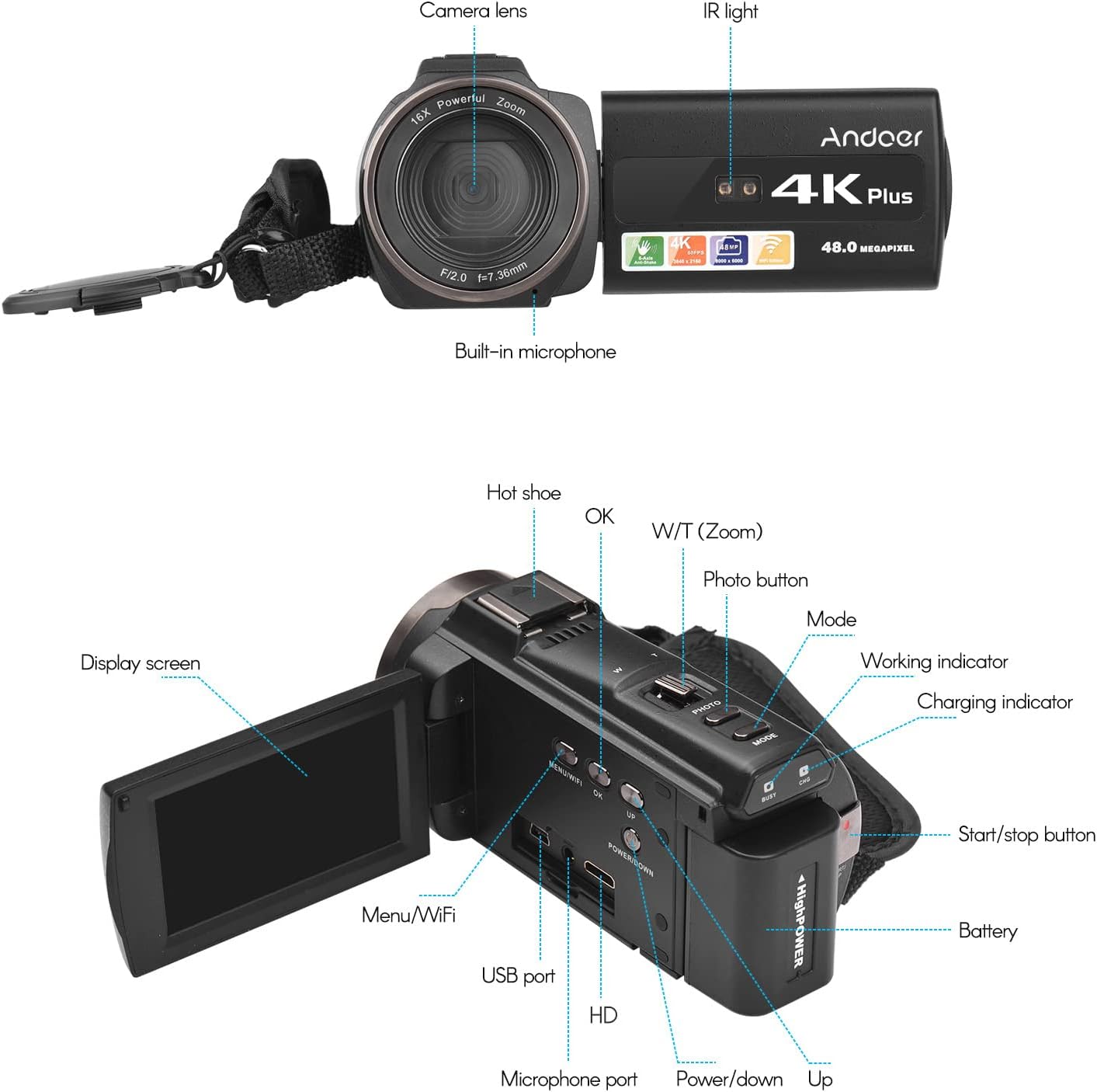
Image 3.1: Front and Rear View of the Camcorder with labeled components.
Compoñentes clave:
- Lente da cámara: Compoñente óptico principal para capturar imaxes e vídeos.
- Luz IR: Emits infrared light for night vision recording.
- Micrófono incorporado: Captures audio. An external microphone can be connected for enhanced sound quality.
- Zapata quente: Mount for external accessories like the included microphone or an LED video light.
- Display Screen (3" IPS Touch Screen): Para viewing vivo footage, playback, and navigating menus.
- Botóns de control: Including Power, Mode, Photo, Zoom (W/T), OK, Menu/WiFi, Up/Down.
- Portos: USB, HD (HDMI), Microphone port.
- Compartimento de batería: Alberga a batería recargable.
4. Configuración
4.1 Carga da batería
Before first use, fully charge the included lithium-polymer batteries. Insert one battery into the camcorder's battery compartment. Connect the camcorder to a power source using the provided USB cable. The charging indicator will illuminate during charging and turn off when fully charged. A full charge typically takes several hours.

Image 4.1: Battery installation and charging indication.
4.2 Inserción dunha tarxeta de memoria
The camcorder supports TF (MicroSD) cards up to 128GB. Ensure the card is formatted before first use in the camcorder's settings. Insert the memory card into the designated slot until it clicks into place.
- Use a Class 10 or higher speed rating for optimal performance, especially for 4K video recording.
- The camcorder supports V60 video speed class.
4.3 Attaching the External Microphone
For improved audio quality, attach the external stereo microphone to the hot shoe mount on top of the camcorder. Connect the microphone's 3.5mm audio cable to the microphone input port on the camcorder.
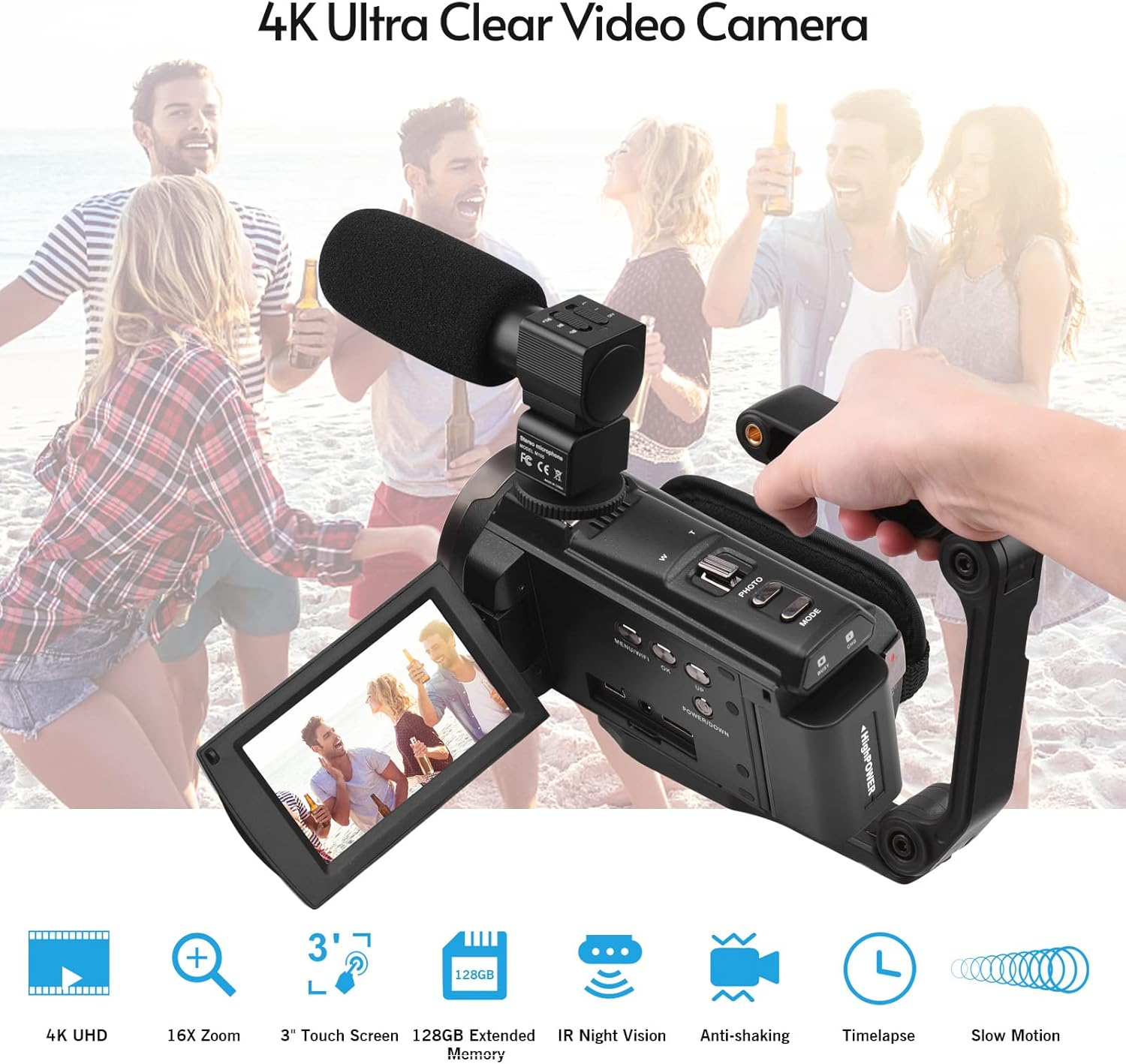
Image 4.2: External microphone attached to the camcorder.
4.4 Attaching the Wide-Angle Macro Lens
To use the wide-angle macro lens, first attach the lens adapter ring to the camcorder's main lens. Then, screw the wide-angle macro lens onto the adapter ring. This lens provides a broader perspective for your shots.

Image 4.3: Wide-angle macro lens for expanded field of view.
4.5 Attaching the Handgrip
The included handgrip can be attached to the bottom of the camcorder via the 1/4" screw hole for more stable handheld recording.
5. Instrucións de funcionamento
5.1 Acendido/Apagado
To power on the camcorder, open the display screen and press the Power button. To power off, press and hold the Power button, or close the display screen.
5.2 Gravación de vídeo
- Acende a videocámara.
- Preme o Modo button to select video recording mode.
- Preme o Inicio/Parar button to begin recording. The recording indicator will flash.
- Preme o Inicio/Parar botón de novo para deter a gravación.
The camcorder supports 4K/60FPS video resolution for clear and smooth footage.
5.3 Facer fotos
- Acende a videocámara.
- Preme o Modo button to select photo mode.
- Encadra a túa foto usando a pantalla.
- Preme o Foto button to capture a 48-megapixel image.
5.4 Using the 3" IPS Touch Screen
The capacitive touchscreen allows for intuitive navigation of menus and settings. Tap to select options, swipe to scroll, and pinch to zoom (if supported in specific modes).
5.5 WiFi Function
The built-in WiFi allows for wireless transmission of files to a compatible smartphone or tablet via a dedicated app. It also enables remote control of the camcorder from your mobile device.
- Activate WiFi on the camcorder via the menu.
- Download and install the specified app on your mobile device.
- Connect your mobile device to the camcorder's WiFi network.
- Use the app to control recording, view vivir footage, e transferencia files.
Visión nocturna 5.6 IR
For recording in low-light or dark conditions, activate the IR Night Vision feature. This utilizes infrared light to capture clear black and white footage.

Image 5.1: IR Night Vision in operation.
5.7 Zoom dixital
Use the W/T (Wide/Telephoto) button to adjust the 16x digital zoom. Note that digital zoom can reduce image quality compared to optical zoom.
5.8 Estabilización da imaxe
The camcorder features 6-axis image stabilization to reduce blur and shakiness in your recordings, especially during handheld use.
5.9 Características especiais
- Detección de movemento: The camcorder can be set to automatically start recording when motion is detected.
- Face Detection/Recognition: Optimizes focus and exposure for faces in the frame.
- Control remoto: Use the included remote control to operate the camcorder from a distance, useful for self-recording or group shots.
- Temporizador automático: Set a delay before capturing a photo or starting a video recording.

Image 5.2: Tripod mounting for self-timer and stable shots.
5.10 Conexión a dispositivos externos
- USB: Conectar a un ordenador para file Transferir.
- HD (HDMI): Connect to a TV or monitor to view as túas gravacións nunha pantalla máis grande.
6. Mantemento
- Limpeza: Use a soft, dry cloth to clean the camcorder body. For the lens, use a specialized lens cleaning cloth and solution. Avoid harsh chemicals.
- Almacenamento: Garde a videocámara nun lugar fresco e seco, lonxe da luz solar directa e de temperaturas extremas. Retire a batería se a garda durante períodos prolongados.
- Coidado da batería: Do not expose batteries to high temperatures. Recharge regularly even if not in use to maintain battery health.
- Actualizacións de firmware: Consulte o do fabricante websitio periodicamente para ver se hai actualizacións de firmware dispoñibles para garantir un rendemento óptimo e novas funcións.
7 Solución de problemas
| Problema | Causa posible | Solución |
|---|---|---|
| A videocámara non se acende. | A batería está esgotada ou non está inserida correctamente. | Ensure battery is fully charged and correctly inserted. Try the second battery. |
| Non se pode gravar vídeo/tirar fotos. | Memory card is full, not inserted, or corrupted. Incorrect mode selected. | Check memory card status, ensure it's inserted and has free space. Format if necessary (backup data first). Select the correct mode. |
| Mala calidade de imaxe/vídeo. | Lens is dirty. Low light conditions without IR. Digital zoom used excessively. | Clean the lens. Activate IR Night Vision in dark environments. Avoid excessive digital zoom. Ensure sufficient lighting. |
| Problemas de conexión wifi. | Incorrect WiFi settings. App not installed or updated. | Ensure WiFi is enabled on camcorder and mobile device. Re-establish connection. Update or reinstall the mobile app. |
| Microphone not recording audio. | Microphone not connected properly or settings incorrect. | Check microphone cable connection. Verify audio input settings in the camcorder menu. |
8. Especificacións
| Característica | Detalle |
|---|---|
| Número de modelo | ZOH0150584179474NZ |
| Resolución de vídeo | 4K (3840x2160) at 60FPS |
| Resolución fotográfica | 48 megapíxeles (8000 x 6000) |
| Estabilización da imaxe | 6 eixes |
| Pantalla de visualización | Pantalla táctil capacitiva IPS de 3 polgadas |
| Zoom dixital | 16x |
| Conectividade | USB, Wi-Fi, HDMI |
| Soporte para tarxetas de memoria | TF (MicroSD) up to 128GB (Class 10, V60 recommended) |
| Características especiais | IR Night Vision, Motion Detection, Face Detection, Remote Control |
| Batería | 2 x 2000mAh Lithium-polymer |
| Apertura da lente | f/2.0 |
| Distancia focal mínima | 39 mm |
| Dispositivos compatibles | Tripod, Microphone, TV, Computer, Smartphone |
| Compatibilidade do sistema operativo | Windows |
| Dimensións (paquete) | 18 x 15 x 11 cm |
| Peso (paquete) | 1.01 kg |
9. Garantía e soporte
Andoer products are designed for reliability and performance. For any technical assistance, troubleshooting beyond this manual, or warranty inquiries, please contact Andoer customer support through their official websitio ou o seu distribuidor.
Conserve o comprobante de compra para reclamacións de garantía.