
1. Introdución
This manual provides detailed instructions for the installation, operation, and maintenance of your DEKCO Solar Security Camera and Wireless Doorbell Camera system. Please read this manual thoroughly before using the product to ensure proper function and safety. Keep this manual for future reference.
2. Contido do paquete
Comprobe que todos os compoñentes estean presentes e en bo estado ao desembalar.
- DEKCO Solar Security Camera
- Cámara de timbre sen fíos
- Unidade de timbre interior
- Solar Panel (integrated with camera)
- Soportes e parafusos de montaxe
- Cable de carga USB
- Manual de usuario (este documento)
3. Produto rematadoview
The DEKCO security system combines a solar-powered outdoor camera with a wireless doorbell camera to provide comprehensive home surveillance.
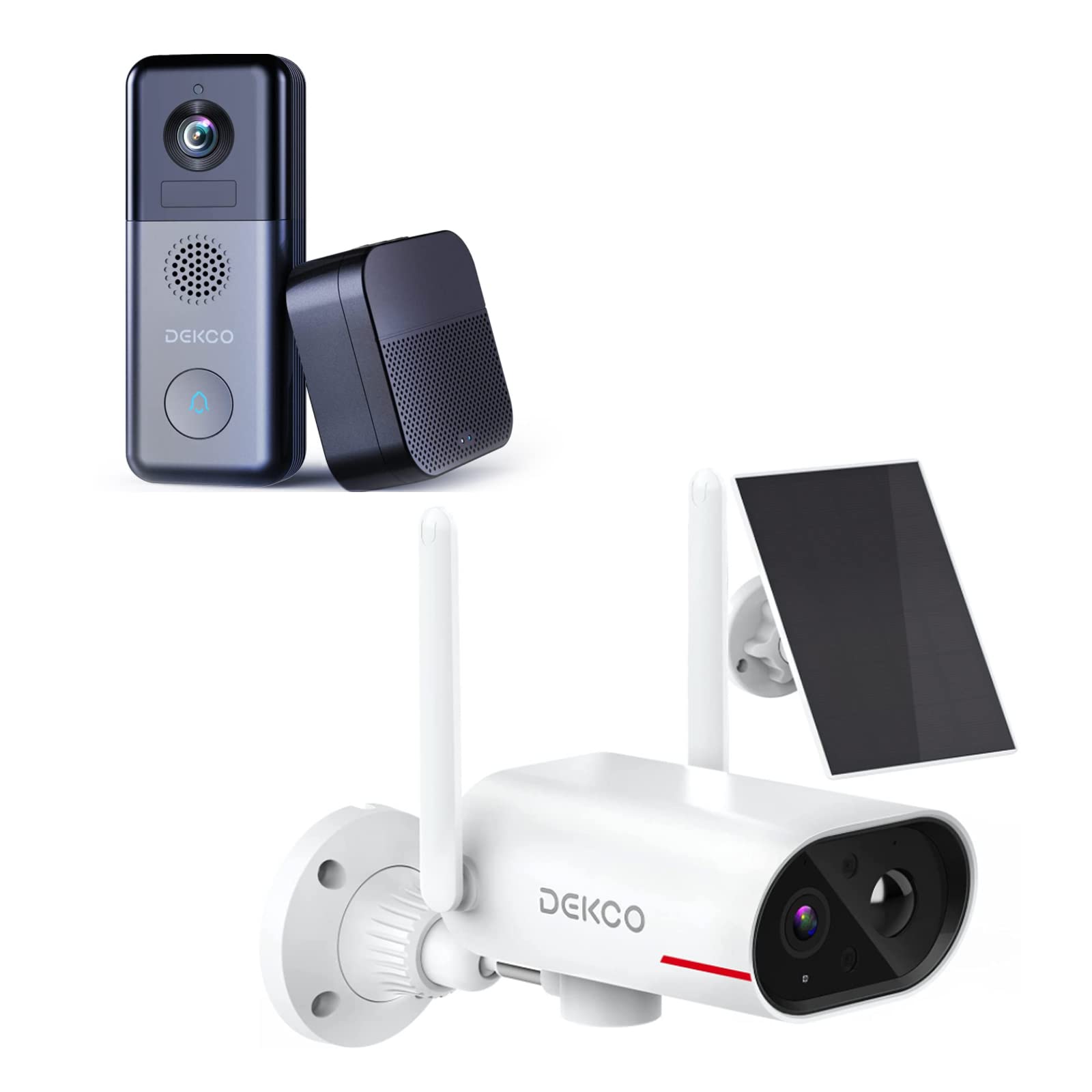
An image showing the DEKCO solar-powered security camera, the wireless doorbell camera, and its indoor chime unit. The security camera is white with two antennas and a solar panel, while the doorbell is dark grey with a camera lens and a call button. The chime is a compact black box.
3.1 Solar Security Camera Features
- 260° ViewRango: Achieved through a 170° rotating design.
- 100 % sen fíos: Flexible installation without power cables.
- Alimentación solar: Integrated solar panel for continuous power with adequate sunlight.
- Visión nocturna: Features color night vision for clear images in low light.
- Almacenamento: Supports Micro SD card and cloud storage (no monthly fees).
- Clasificación impermeable: IP65 for outdoor use.
3.2 Wireless Doorbell Camera Features
- Duración da batería de 180 días: Batería recargable integrada de 10000 mAh para un uso prolongado.
- Audio bidireccional: Communicate with visitors remotely.
- Detección de movemento: Receive alerts for activity at your door.
- Chime sen fíos: Connects to an indoor chime unit.
- Clasificación impermeable: IP65 for outdoor use.
4. Guía de configuración
Follow these steps to set up your DEKCO security system.
4.1 Instalación da aplicación
- Download the DEKCO app from your smartphone's app store (available for Android and iOS).
- Rexístrate para obter unha nova conta ou inicia sesión se xa tes unha.
4.2 Solar Security Camera Setup
- Carga inicial: Before installation, fully charge the camera using the provided USB cable.
- Montaxe: Choose a location with good Wi-Fi signal and direct sunlight exposure for the solar panel. Use the mounting bracket and screws to securely attach the camera to a wall. Ensure the camera has a clear view da área de monitorización desexada.
- Emparejamento: Open the DEKCO app, select 'Add Device', and follow the on-screen instructions to connect the camera to your Wi-Fi network.
4.3 Wireless Doorbell Camera Setup
- Carga inicial: Fully charge the doorbell camera using the provided USB cable.
- Montaxe: Install the doorbell camera at your desired location near your front door using the provided mounting hardware. Ensure it has a clear view e boa sinal wifi.
- Emparejamento: In the DEKCO app, select 'Add Device' and follow the instructions to connect the doorbell camera to your Wi-Fi network.
- Chime Setup: Plug the indoor chime unit into a power outlet. Follow the app's instructions to pair the chime with the doorbell camera. You can select different chime tones and adjust the volume through the app.
5. Instrucións de funcionamento
Learn how to use the features of your DEKCO security system.
5.1 Solar Security Camera Operation
- En directo View: Open the DEKCO app and select your camera to view vivir footage. You can manually pan/tilt the camera within its 260° range.
- Detección de movemento: The camera is configured for motion-only alerts. Adjust sensitivity settings in the app to optimize detection and minimize false alarms.
- Gravación: Motion-triggered events are recorded and stored on the Micro SD card (if installed) or in the cloud. Access recordings via the app's playback feature.
- Visión nocturna: The camera automatically switches to color night vision in low-light conditions.
5.2 Wireless Doorbell Camera Operation
- Responder chamadas: When a visitor presses the doorbell button, your smartphone will receive a notification. Tap the notification to answer and engage in two-way audio communication.
- Detección de movemento: The doorbell camera detects motion and sends alerts to your phone. Review motion events in the app.
- En directo View: You can initiate a live view of your front door at any time through the DEKCO app.
- Función de timbre: The indoor chime will sound when the doorbell button is pressed. Adjust settings in the app.
6. Mantemento
Regular maintenance ensures optimal performance and longevity of your devices.
- Limpeza de lentes: Periodically wipe the camera lenses and solar panel with a soft, damp pano para eliminar o po e a sucidade. Evita produtos de limpeza abrasivos.
- Eficiencia do panel solar: Ensure the solar panel is free from obstructions (leaves, snow, etc.) to maximize charging efficiency.
- Saúde da batería: While solar-powered, ensure the security camera receives sufficient sunlight. For the doorbell, monitor battery levels via the app and recharge when necessary.
- Actualizacións de firmware: Check the DEKCO app regularly for firmware updates. Install updates to ensure your devices have the latest features and security enhancements.
7 Solución de problemas
Consulta esta sección para obter solucións a problemas comúns.
- O dispositivo non se conecta á wifi:
- Ensure your Wi-Fi network is 2.4GHz (5GHz is not supported).
- Comproba a precisión do contrasinal da wifi.
- Achega o dispositivo ao teu enrutador Wi-Fi.
- Restart your router and the device.
- Sen alertas de detección de movemento:
- Verifica que a detección de movemento estea activada na configuración da aplicación.
- Axusta a sensibilidade do movemento.
- Asegúrate de que o dispositivo teña unha imaxe clara view e non está obstaculizado.
- Baixa calidade do vídeo:
- Comproba a intensidade do sinal wifi.
- Limpar a lente da cámara.
- Doorbell Battery Drains Quickly:
- Reduce motion detection sensitivity or frequency.
- Asegúrese de que o dispositivo estea completamente cargado antes de usalo.
- Solar Camera Not Charging:
- Ensure the solar panel receives at least 1 hour of direct sunlight daily.
- Limpar a superficie do panel solar.
8. Especificacións
| Característica | Especificación |
|---|---|
| Marca | DEKCO |
| Número de modelo | B09TF8K2W8 |
| Tecnoloxía de conectividade | Sen fíos (Wi-Fi) |
| Fonte de enerxía | Solar Powered (Camera), Battery (Doorbell) |
| Doorbell Battery Capacity | 10000 mAh |
| Viewing Angle (Camera) | 260° (170° rotating design) |
| Visión Nocturna | Visión nocturna en cor |
| Clasificación impermeable | IP65 |
| Dispositivos compatibles | Smartphone (Android) |
| Tipo de alerta | Só Movemento |
| Tipo de montaxe | Soporte de parede |
| Formato de captura de vídeo | MPEG-4 |
9. Garantía e soporte
For warranty information, technical support, or further assistance, please refer to the DEKCO official website or contact DEKCO customer service directly. Keep your purchase receipt as proof of purchase.


