
1. Introdución
This manual provides essential instructions for the proper use and maintenance of your LOTUS Smartwatch Model 50003/A. Please read this guide thoroughly before using your smartwatch to ensure optimal performance and longevity.
The LOTUS Smartwatch 50003/A features an intuitive interface and elegant design, offering a variety of smart functions. It is equipped with Bluetooth connectivity, allowing seamless synchronization with your mobile devices. This synchronization enables features such as call and message notifications, music control, and other practical functions for daily life.
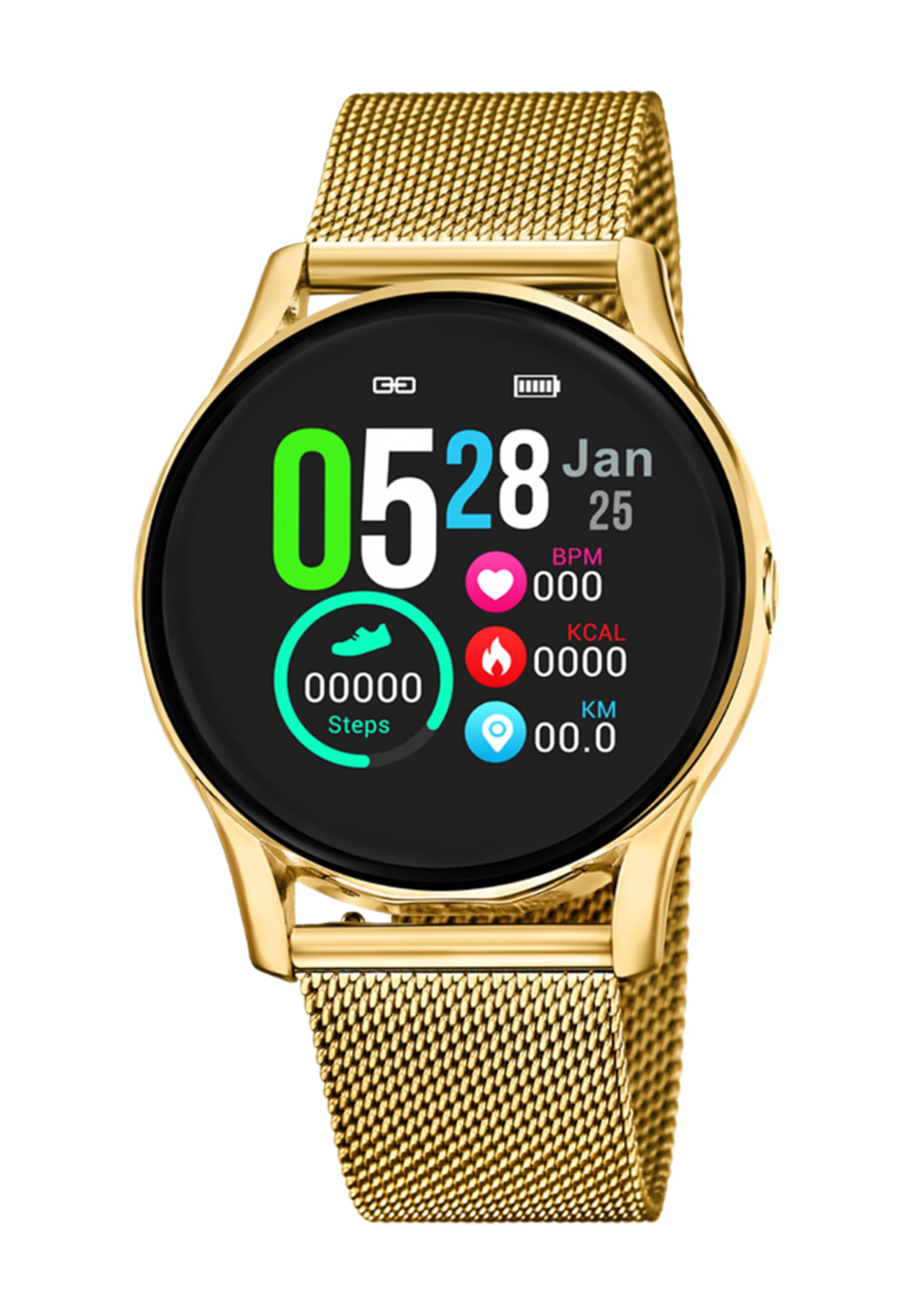
Imaxe 1.1: Fronte view of the LOTUS Smartwatch 50003/A.
2. Contido do paquete
Please check the package contents upon unboxing. The standard package for the LOTUS Smartwatch 50003/A should include:
- LOTUS Smartwatch 50003/A
- Cable de carga
- Manual de usuario (este documento)
3. Guía de configuración
3.1. Carga do reloxo intelixente
Before initial use, fully charge your smartwatch.
- Conecta o cable de carga ao porto de carga da parte traseira do reloxo intelixente.
- Conecta o outro extremo do cable de carga a un adaptador de corrente USB (non incluído) ou a un porto USB do ordenador.
- A pantalla do reloxo indicará o estado da carga. Agarde aproximadamente de 2 a 3 horas para unha carga completa.
3.2. Instalación da aplicación complementaria
To unlock all features and synchronize your smartwatch with your smartphone, you need to install the official LOTUS Connected app.
- Scan the QR code provided in the watch packaging or search for "LOTUS Connected" in your smartphone's app store (Google Play Store for Android, Apple App Store for iOS).
- Descarga e instala a aplicación.
- Siga as instrucións en pantalla para crear unha conta ou iniciar sesión.

Image 3.2: Synchronizing the smartwatch with the companion app on a smartphone.
3.3. Emparellamento co teu teléfono intelixente
Ensure Bluetooth is enabled on your smartphone and the smartwatch is charged.
- Open the LOTUS Connected app on your smartphone.
- Follow the app's instructions to add a new device.
- The app will search for available smartwatches. Select "LOTUS 50003/A" from the list.
- Confirm the pairing request on both your smartphone and smartwatch if prompted.
- Unha vez emparellado, o reloxo sincronizará a hora e os datos co teu teléfono.
4. Instrucións de funcionamento
4.1. Navegación básica
- Pantalla táctil: Desliza o dedo cara á esquerda/dereita, arriba/abaixo para navegar polos menús e as funcións. Toca para seleccionar.
- Botóns laterais: The smartwatch may have one or more physical buttons. Typically, one button serves as a power on/off, back, or home button. Refer to the on-screen prompts for specific button functions.

Imaxe 4.1: Ex.ample of a smartwatch display showing activity data.
4.2. Características clave
- Notificacións: Receive alerts for incoming calls, messages, and app notifications directly on your wrist. Manage notification settings via the LOTUS Connected app.
- Control de música: Control music playback on your connected smartphone (play, pause, skip tracks, adjust volume).
- Seguimento da actividade: Monitor steps, distance, calories burned, and sleep patterns. View detailed statistics in the companion app.
- Resistencia á auga: The smartwatch is water resistant. Avoid prolonged submersion or use in hot water/steam. Refer to specifications for exact water resistance rating.
5. Mantemento
5.1. Limpeza do reloxo intelixente
- Limpa a pantalla e a carcasa do reloxo cun pano suave e sen fiapos.
- Para a sucidade persistente, d lixeiramenteampEnxágüe o pano con auga. Evite produtos químicos agresivos ou materiais abrasivos.
- Asegúrate de que os contactos de carga estean limpos e secos antes de cargar.
5.2. Coidado da batería
- Charge the smartwatch regularly. Avoid letting the battery completely drain for extended periods.
- Do not expose the smartwatch to extreme temperatures, as this can affect battery life and performance.
- If the watch will not be used for a long time, charge it to about 50% before storing.
6 Solución de problemas
6.1. Problemas comúns e solucións
- O reloxo non se acende: Asegúrate de que o reloxo estea completamente cargado. Conéctao ao cargador e agarda uns minutos antes de tentar acendelo.
- Non se pode emparellar co teléfono intelixente:
- Asegúrate de que o Bluetooth estea activado no teu smartphone.
- Asegúrate de que o reloxo intelixente estea dentro do alcance do teu teléfono.
- Reinicia tanto o teu teléfono intelixente como o reloxo intelixente.
- Tenta desvincular e volver vincular o dispositivo a través da aplicación.
- Notificacións non recibidas:
- Check notification settings in the LOTUS Connected app.
- Asegúrate de que a aplicación teña os permisos necesarios no teu teléfono intelixente.
- Verify that the smartwatch is properly connected via Bluetooth.
- Autonomía curta da batería:
- Reduce o brillo da pantalla.
- Disable unnecessary notifications or features.
- Asegúrate de que o reloxo estea completamente cargado antes de usalo.
6.2. Restablecemento de fábrica
If issues persist, a factory reset may resolve them. This will erase all data on the smartwatch and restore it to its original settings.
- Navigate to the "Settings" menu on your smartwatch.
- Look for an option like "System," "Reset," or "Factory Reset."
- Confirma o restablecemento cando se lle solicite.
- After resetting, you will need to re-pair the smartwatch with your phone and set it up again.
7. Especificacións
| Característica | Detalle |
|---|---|
| Marca | LOTO |
| Número de modelo | 50003/A |
| Cor | Negro |
| Compatibilidade do sistema operativo | Android, iOS |
| Tamaño da pantalla | 39.65 milímetros |
| Características especiais | Resistente á auga |
| Dispositivos compatibles | Teléfono intelixente |
| Composición da batería | Metal de litio |
| Dispoñibilidade de Recambios | 5 Anos |
8. Garantía e soporte
Your LOTUS Smartwatch 50003/A comes with a manufacturer's warranty. Please refer to the warranty card included in your product packaging for specific terms and conditions.
As pezas de reposto para este modelo están dispoñibles durante un máximo de 5 anos a partir da data de compra.
For technical support, service, or warranty claims, please contact LOTUS customer service through their official websitio web ou a información de contacto proporcionada na documentación da garantía.