
1. Introdución
This manual provides detailed instructions for the installation, operation, and maintenance of your SriHome 3MP FHD Security Camera (Model SH039B/SP039). Please read this manual thoroughly before using the product to ensure proper functionality and safety. This camera offers 3MP Full HD resolution, color night vision, sound and light alarms, IP66 waterproofing, two-way audio, and local TF card storage.
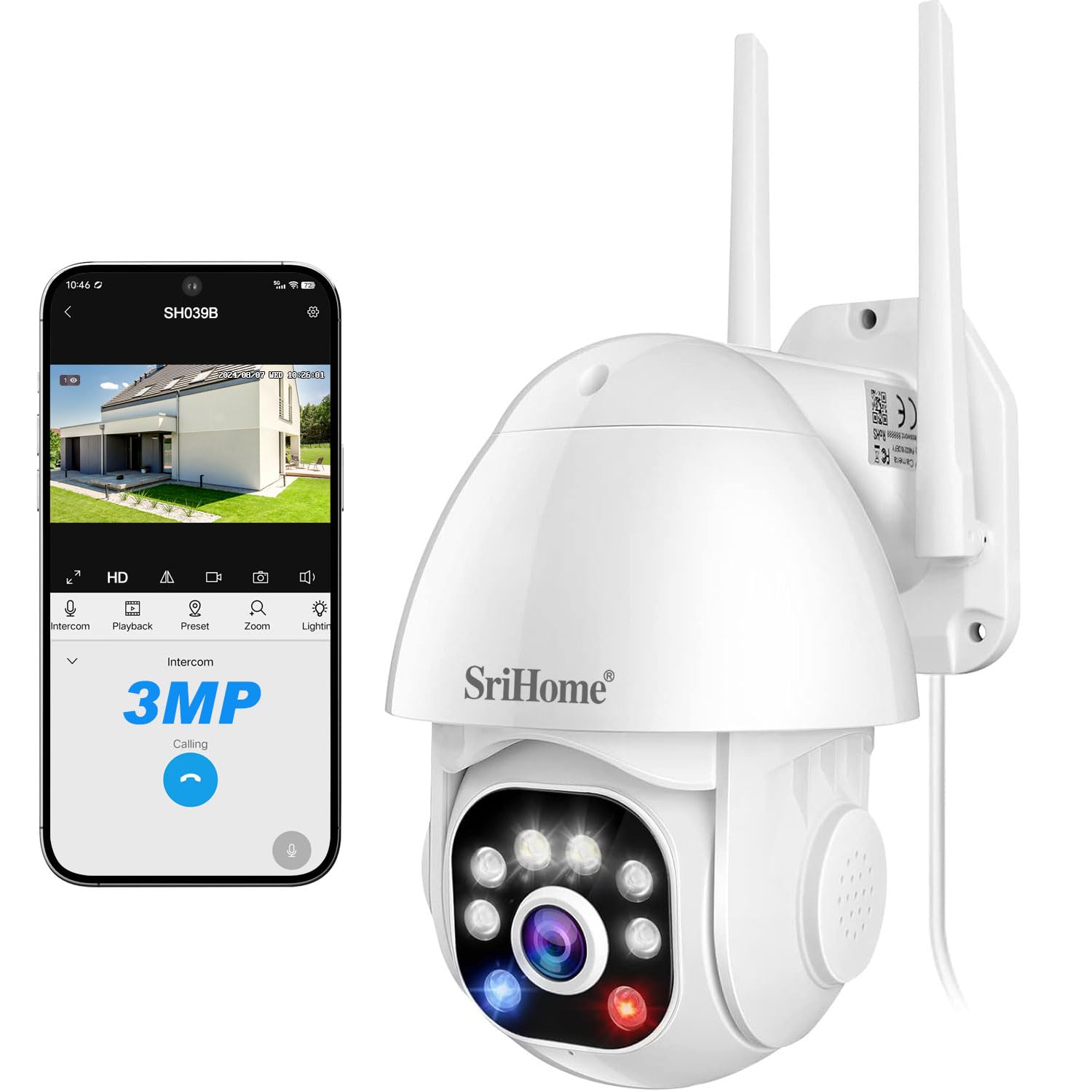
Image 1: SriHome 3MP IP Camera highlighting key features like 3MP resolution, starlight lens, two-way audio, waterproof design, human detection, motion detection, ONVIF support, color night vision, MicroSD card slot, and H.265 compression.
2. Contido do paquete
Verifique que todos os elementos que se indican a continuación estean incluídos no seu paquete:
- SriHome IP Camera (x1)
- Adaptador de alimentación (x1)
- Manual de usuario (x1)
- Mounting Screws (x1 set)
- Waterproof Plug (x1)

Image 2: Visual representation of the items included in the product package.
3. Diagrama do produto
Familiarize yourself with the components of your SriHome security camera:
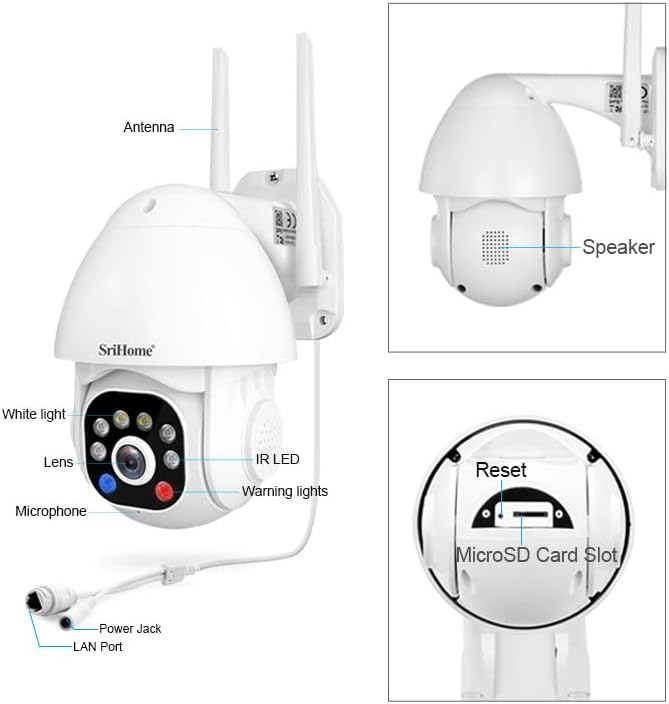
Image 3: Detailed diagram illustrating the various parts and ports of the SriHome IP Camera.
- Antena: Para conectividade Wi-Fi.
- Relator: For two-way audio communication and audible alarms.
- Luz branca: Provides illumination for color night vision and acts as a warning light.
- Lente: The primary camera sensor.
- Micrófono: Para comunicación de audio bidireccional.
- Toma de alimentación: Conéctase ao adaptador de alimentación.
- Porto LAN: Para conexión de rede por cable.
- LED IR: LED infravermellos para visión nocturna en branco e negro.
- Luces de aviso: Red and blue lights for active deterrence.
- Botón de reinicio: Úsase para restablecer a cámara á configuración de fábrica.
- Ranura para tarxetas MicroSD: Para almacenamento de vídeo local.
4. Configuración
4.1 Descarga da aplicación
Download the SriHome app to your smartphone for camera control and monitoring.
- Para Android: Escanee o código QR ou visite Google Play Store.
- Para iOS: Escanee o código QR ou visite Apple App Store.
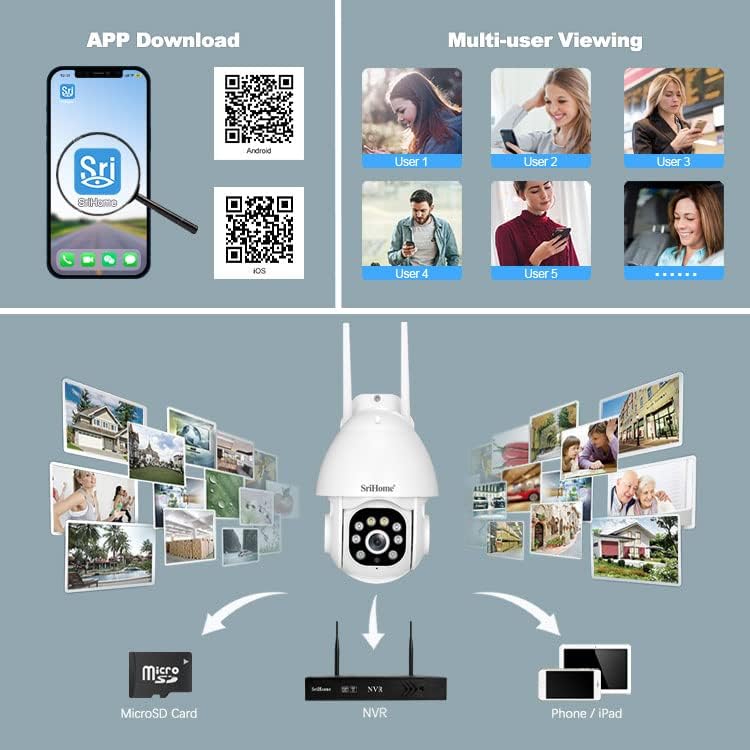
Image 4: Instructions for downloading the SriHome app and an overview of multi-user viewing and storage options.
4.2 Conexión de rede
The camera supports both wireless (Wi-Fi) and wired connections.
- QR Code Network: Follow the in-app instructions to connect the camera to your Wi-Fi network by scanning a QR code generated by the app.
- AP Hotspot Network: The camera can connect directly to your phone via its built-in AP hotspot without a router for initial setup or direct monitoring.
- Rede con cable: Connect an Ethernet cable to the LAN port for a stable wired connection.
4.3 Instalación da tarxeta MicroSD
To enable local storage, install a MicroSD card (up to 128GB, not included) into the designated slot. Ensure the camera is powered off before inserting or removing the card.
4.4 Montaxe
The camera is designed for wall mounting. Use the provided screws and waterproof plug to secure the camera in your desired outdoor location. Ensure the mounting surface is stable and can support the camera's weight.
5. Instrucións de funcionamento
5.1 Pan & Tilt Rotation
Controla a cámara viewing angle remotely through the SriHome app. The camera offers 355° horizontal pan and 90° vertical tilt for comprehensive coverage.

Image 5: Remote control of camera pan and tilt functions via the SriHome app.
5.2 Modos de visión nocturna
The camera features three night vision modes:
- Alarm Mode (Default): Provides black and white night vision. When a human figure is detected, the white light automatically turns on, switching to full-color night vision.
- Modo de luz branca: The white light remains on, providing continuous full-color night vision. Brightness is adjustable.
- Modo infravermello: White light is off, and the camera uses IR LEDs for standard black and white night vision.
5.3 Detección e seguimento de humanos
Equipped with AI, the camera can distinguish human motion from other movements (e.g., pets, wind, leaves) to reduce false alarms. Upon human detection, the camera sends immediate notifications to your smartphone and can track the detected person.
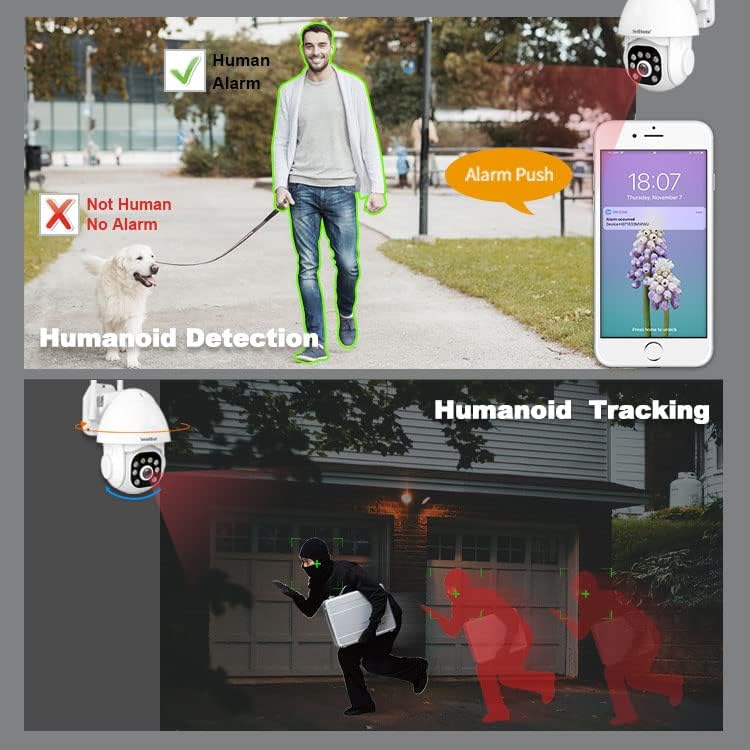
Image 6: Demonstration of the camera's ability to detect and track human figures.
5.4 Audio bidireccional
The integrated microphone and high-fidelity speaker allow for real-time two-way communication through the mobile app. You can listen to the camera's surroundings and speak through the camera.

Image 7: The camera's IP66 waterproof design and two-way audio communication capability.
5.5 Audible Alarm & Active Defense
When motion or a human is detected, the camera can actively deter intruders by emitting loud sound alarms and flashing red and blue warning lights.

Image 8: The camera activating its audible alarm and flashing lights to deter a person.
5.6 Multi-User Viewing
A cámara admite ata 5 imaxes simultáneas viewers. The first user to set up the camera becomes the administrator. Other users require administrator authorization to access the camera feed.
5.7 Opcións de almacenamento
Recordings can be stored in two ways:
- Tarxeta MicroSD: Local storage on a MicroSD card (up to 128GB).
- NVR: Connect the camera to a Network Video Recorder (NVR) for continuous recording and extended storage (NVR not included).
6. Mantemento
The SriHome camera is designed for outdoor use with an IP66 waterproof rating, making it resistant to dust, heat, and cold. Regular cleaning of the lens with a soft, dry cloth is recommended to ensure clear image quality. Avoid using harsh chemicals.
7 Solución de problemas
- A cámara non se conecta á wifi: Ensure the camera is within range of your Wi-Fi router. Check Wi-Fi password accuracy. Try resetting the camera using the reset button.
- No image or black screen: Verify the power adapter is correctly connected and the camera is powered on. Check network connection.
- Falsas alarmas: Adjust the motion detection sensitivity settings in the app. Utilize the human detection feature to minimize alerts from non-human movements.
- MicroSD card not recording: Ensure the MicroSD card is correctly inserted and formatted within the app. Check if the card is full or corrupted.
- Problemas de audio bidireccional: Check microphone and speaker permissions for the SriHome app on your smartphone. Ensure network connection is stable.
8. Especificacións
| Característica | Especificación |
|---|---|
| Número de modelo | SH039B/SP039 |
| Resolución | 3 megapíxeles (2304 x 1296) |
| Conectividade | Wired (LAN) / Wireless (Wi-Fi) |
| Ángulo de panorámica / inclinación | Panorama: 355°, Inclinación: 90° |
| Visión Nocturna | Color Night Vision, Infrared Night Vision (up to 15 meters) |
| Audio | Audio bidireccional (micrófono e altofalante integrados) |
| Almacenamento | MicroSD Card (up to 128GB), NVR |
| Resistencia á intemperie | Impermeable IP66 |
| Características especiais | Human Detection, Motion Tracking, Audible Alarm, Red/Blue Warning Lights |
| Fonte de enerxía | Adaptador de alimentación de 12 V CC |
| Dimensións | 16 x 16 x 11 cm |
| Peso | 420 gramos |
9. Garantía e soporte
For warranty information and technical support, please refer to the contact details provided in the product packaging or visit the official SriHome websitio. Conserve o recibo de compra para reclamacións de garantía.