
Introdución
This manual provides essential information for the safe and efficient operation of your Westinghouse 43-inch 4K Ultra HD Certified Android LED TV, model WH43UD10. Please read these instructions thoroughly before using your television and retain them for future reference.
Información importante de seguridade
- Non expoña o televisor á choiva nin á humidade para evitar incendios ou descargas eléctricas.
- Non abra o armario. Solicite o servizo a persoal cualificado.
- Asegúrese de que haxa unha ventilación axeitada. Non bloquee as aberturas de ventilación.
- Protexa o cable de alimentación para evitar que se pise ou se pinche.
- Desconecte o televisor durante as tormentas eléctricas ou cando non o use durante períodos prolongados.
- Use só accesorios/accesorios especificados polo fabricante.
Configuración
Desembalaxe e inspección inicial
Carefully remove the television and all accessories from the packaging. Inspect for any damage. Keep packaging materials for potential future transport.
Opcións de montaxe
Your television supports both table-top and wall-mount installations.
- Montaxe de mesa: Attach the included stands to the bottom of the TV using the provided screws. Ensure the TV is placed on a stable, level surface.
- Montaxe na parede: For wall mounting, use a VESA compatible bracket (200 x 200 mm). Consult a professional for wall mounting to ensure safety and proper installation.

Imaxe: Fronte e lateral view of the Westinghouse 43-inch TV with detailed dimensions in centimeters and inches.
Conexión de periféricos
Connect your external devices to the appropriate ports on the television.
- HDMI: Connect up to 3 HDMI devices (e.g., set-top box, gaming console, Blu-ray player).
- USB: Connect USB storage devices for media playback (2 USB ports available).
- Ethernet: Para unha conexión a internet por cable.
- Auxiliar: Para entrada de audio.
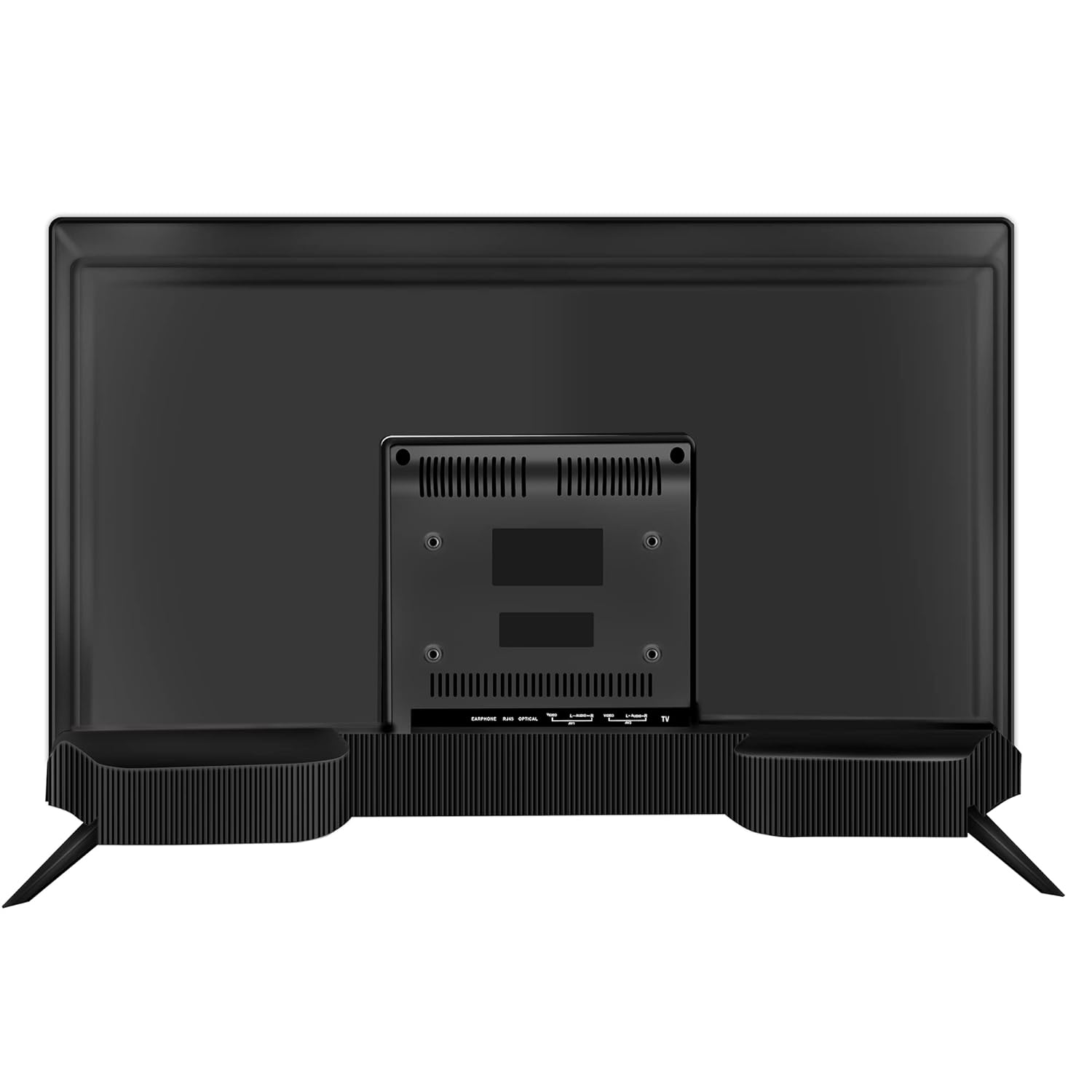
Imaxe: Traseira view of the Westinghouse 43-inch TV showing various input/output ports including HDMI, USB, and Ethernet.

Imaxe: Lateral view of the Westinghouse 43-inch TV highlighting the accessible HDMI and USB ports.
Configuración do control remoto
Insert the two AAA batteries (included) into the remote control, observing polarity. The remote supports both IR and Bluetooth connectivity. For Bluetooth functions like Google Voice Assistance, pair the remote with the TV during initial setup or via the TV's settings menu.
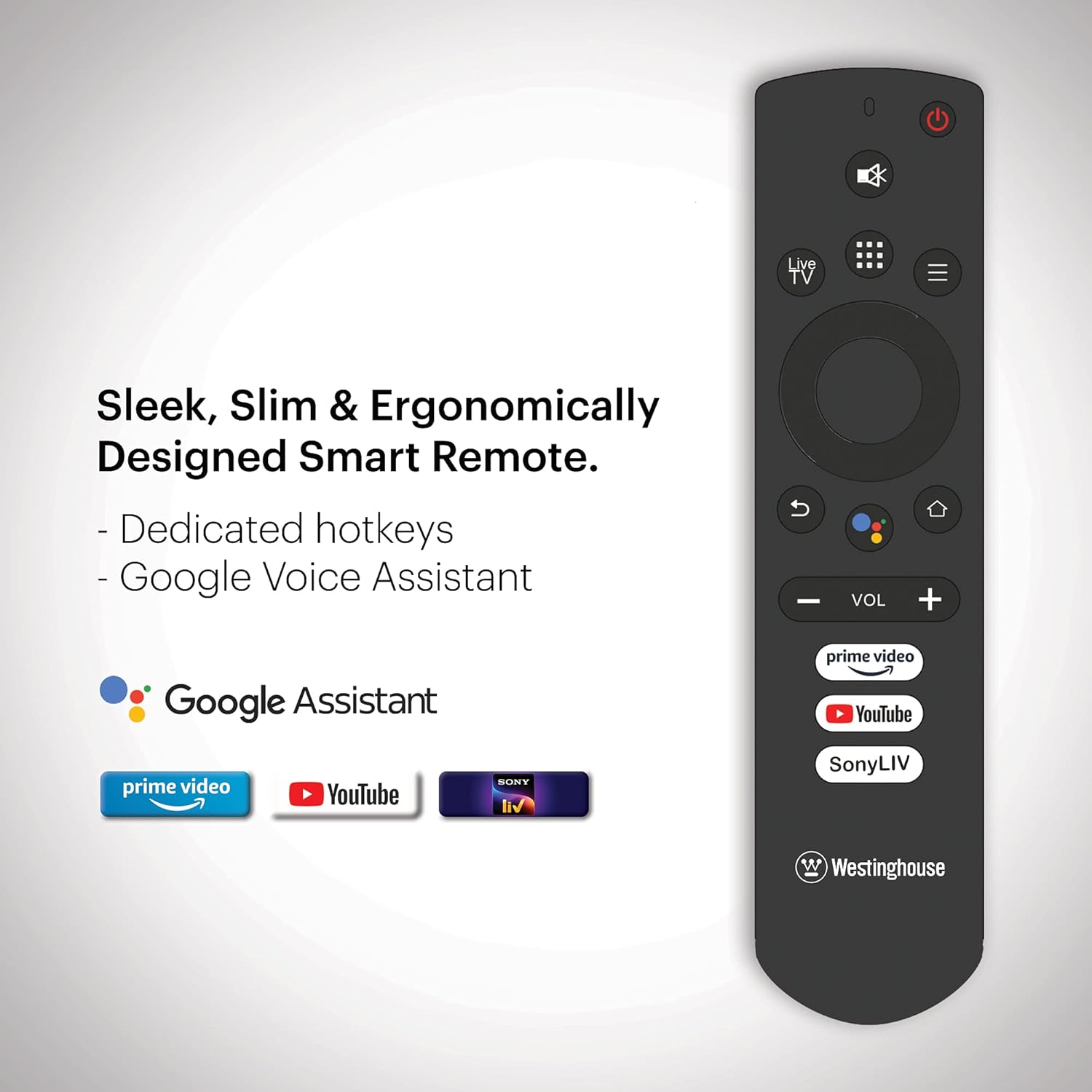
Image: Ergonomically designed smart remote control for the Westinghouse TV, featuring dedicated hotkeys for popular streaming services and Google Voice Assistant button.
Initial Power On and Android TV Setup
After connecting the power cord, press the power button on the remote or TV. Follow the on-screen instructions to complete the initial setup, which includes:
- Selección de idioma.
- Conexión de rede (Wi-Fi ou Ethernet).
- Google account sign-in for Android TV features.
- Busca de canles (se se usa unha antena).
- Pairing the Bluetooth remote control.
Instrucións de funcionamento
Encendido/apagado
Preme o Poder button on the remote control to turn the TV on or off. The TV enters standby mode when turned off.
Navegando por Android TV
Use the directional pad and OK button on your remote to navigate the Android TV interface. The home screen provides access to installed apps, inputs, and settings.

Image: The Westinghouse Android TV home screen displaying various streaming applications and content recommendations.
Usando o Asistente de Google
Preme o Asistente de Google button on your remote and speak into the microphone to control your TV, search for content, get answers, and more.
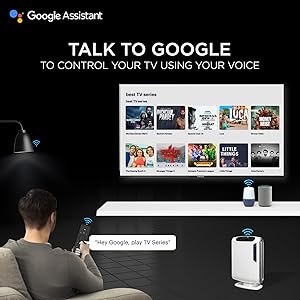
Imaxe: Un usuario interactuando co televisor usando os comandos de voz do Asistente de Google a través do mando a distancia.
Applications and Streaming
Access a wide range of applications through the Google Play Store. Pre-installed applications include Amazon Prime Video, Sony Liv, Disney+Hotstar, Zee5, YouTube, and MX Player. You can download additional apps and games to enhance your entertainment experience.

Image: A collage of various popular streaming service logos and app icons available on the Android TV platform.
Chromecast integrado
Use the built-in Chromecast feature to cast content from your compatible mobile devices or computer directly to your TV screen.
Funcións de audio
The TV is equipped with powerful 40W speakers for an immersive audio experience. Adjust volume using the VOL +/- buttons on the remote. You can also connect external audio devices via Bluetooth for a personalized sound setup.

Image: A couple enjoying music from the TV, illustrating the powerful 40-watt speakers and immersive sound experience.
Mantemento
Limpeza do televisor
- Pantalla: Limpe a pantalla con suavidade cun pano suave e sen pelusa. Para marcas difíciles, d lixeiramenteampEnxágüe o pano con auga ou cun limpador de pantallas especializado. Non pulverice líquido directamente sobre a pantalla.
- Gabinete: Limpa o moble do televisor cun pano suave e seco. Evita o uso de produtos de limpeza abrasivos ou solventes.
Actualizacións de software
Your Android TV may receive periodic software updates. Ensure your TV is connected to the internet to receive these updates, which can improve performance and add new features. You can check for updates manually in the TV's settings menu.
Atención Xeral
- Evite colocar o televisor baixo a luz solar directa ou preto de fontes de calor.
- Non coloque obxectos pesados enriba do televisor.
- Manteña o televisor lonxe de campos magnéticos fortes.
Resolución de problemas
| Problema | Posible Solución |
|---|---|
| Sen poder | Comprobe se o cable de alimentación está ben conectado ao televisor e á toma de corrente. Asegúrese de que a toma de corrente funcione. |
| Sen imaxe, pero hai son | Comproba a fonte de entrada. Asegúrate de que o dispositivo conectado estea acendido e funcione correctamente. Proba cun cable HDMI diferente. |
| Sen son, pero si imaxe | Check the volume level. Ensure the TV is not muted. Check audio settings and external audio connections. |
| O control remoto non funciona | Substitúa as pilas. Asegúrese de que non haxa obstrucións entre o mando a distancia e o televisor. Volva emparellar o mando a distancia Bluetooth se é necesario. |
| Problemas de conexión á rede | Check your Wi-Fi router or Ethernet cable. Restart your router. Re-enter Wi-Fi password in TV settings. |
| As aplicacións son lentas ou fallan | Clear app cache or data in TV settings. Ensure sufficient storage space. Restart the TV. |
Restablecemento de fábrica
If issues persist, a factory reset may resolve them. This will erase all personal data and settings. Navigate to Configuración > Preferencias do dispositivo > Restablecer e siga as indicacións en pantalla.
Especificacións
| Característica | Detalle |
|---|---|
| Marca | Westinghouse |
| Número de modelo | WH43UD10 |
| Tamaño da pantalla | 43 polgadas (108 cm) |
| Tecnoloxía de visualización | LED |
| Resolución | 4K Ultra HD |
| Taxa de actualización | 60 Hz |
| Sistema Operativo | Android 9.0 Pie |
| Capacidade de almacenamento da memoria | 8 GB |
| Tecnoloxía de conectividade | Ethernet, HDMI, USB, Wi-Fi, Bluetooth |
| Total de portos HDMI | 3 |
| Total de portos USB | 2 |
| Saída de audio | 40 Watts (Speakers) |
| Tempo de resposta | 8 milisegundos |
| Viewángulo ing | 178 graos |
| Dimensións do produto (P x A x A) | 23P x 97L x 62H centímetros |
| Peso do elemento | 6.4 quilogramos |
| Estándar de montaxe VESA | 200 x 200 mm |
| Formato HDR compatible | IPS |
| Maximum Display Brightness | 500 Candela Per Square Meter |
| Relación de contraste | 5000:1 |
Garantía e Soporte
Información da garantía
This product comes with a 1-year warranty provided by the manufacturer from the date of purchase. Please retain your invoice as proof of purchase.
Atención ao cliente
For assistance, please contact the brand's toll-free number: 1800-103-3036. When contacting support, provide the product's model name (WH43UD10) and the seller's details as mentioned on your invoice. The service center will schedule a convenient service slot.
Información de contacto do fabricante: SPPL B-29,30&31 Sector 81 Noida UP-201305