1. Introdución
Welcome to the T500 Plus PRO HiWatch 6 Smartwatch user manual. This guide provides essential information on setting up, operating, and maintaining your new smartwatch. The T500 Plus PRO HiWatch 6 Smartwatch offers high-quality Bluetooth calling with a built-in microphone for clear conversations. It features a long-lasting battery and an adjustable strap for a perfect fit. Customize your watch with a variety of exciting watch faces and choose from a wide range of straps to match your personal style. Its eye-catching design enhances your modern look.
2. Características do produto
- Chamadas Bluetooth: Make and receive calls directly from your watch with a high-quality microphone.
- Bluetooth Dial Pad: Conveniently dial numbers from your wrist.
- Vixilancia da saúde: Includes Heart Rate Monitor and Blood Pressure Monitor.
- Detección do sono: Track your sleep patterns for better health insights.
- Esferas de reloxo personalizables: Choose from a variety of exciting watch faces to personalize your device.
- Correas intercambiables: Easily swap straps to match your style.
- Batería de longa duración: Designed for extended use on a single charge.
3. Que hai na caixa
Upon opening your T500 Plus PRO HiWatch 6 Smartwatch package, you should find the following items:
- T500 Plus PRO HiWatch 6 Smartwatch Unit
- Adjustable Silicone Strap (pre-attached or separate)
- Cable de carga magnética
- Manual de usuario

Figure 3.1: Package Contents. This image displays all items included in the T500 Plus PRO HiWatch 6 Smartwatch retail box, showing the watch, charging cable, and instruction booklet.
4. Guía de configuración
4.1 Cargar o reloxo intelixente
Antes do primeiro uso, carga completamente o teu reloxo intelixente. Conecta o cable de carga magnético aos puntos de carga da parte traseira do reloxo e conecta o extremo USB a un adaptador de corrente compatible (non incluído) ou ao porto USB dun ordenador.

Figure 4.1: Smartwatch and Charging Cable. This image shows the T500 Plus PRO HiWatch 6 Smartwatch with its strap detached, alongside the magnetic charging cable, illustrating how the watch connects for charging.
4.2 Fixación da correa
If the strap is not pre-attached, slide each half of the strap into the slots on either side of the watch body until you hear a click, indicating it is securely fastened.
4.3 Acendido/Apagado
- Encendido: Manteña premido o botón lateral durante uns segundos ata que a pantalla se ilumine.
- Apagado: Press and hold the side button, then select "Power Off" from the options on the screen.
4.4 Emparellamento co teu teléfono intelixente
To unlock the full potential of your smartwatch, pair it with your smartphone via Bluetooth. Download the companion app (refer to the quick start guide or packaging for app name, typically "HiWatch" or similar). Enable Bluetooth on your phone, open the app, and follow the on-screen instructions to search for and connect to your T500 Plus PRO HiWatch 6.
5. Instrucións de funcionamento
5.1 Navegando pola interface
- Pantalla táctil: Desliza o dedo cara á esquerda/dereita, arriba/abaixo para navegar polos menús e as funcións. Toca para seleccionar.
- Botón lateral: Preme para volver á pantalla de inicio ou activar o dispositivo. Mantén premido para ver as opcións de acendido e apagado.
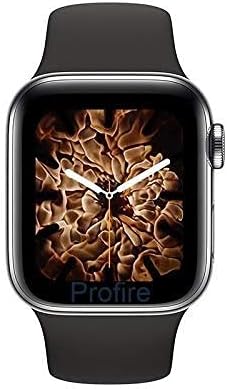
Figure 5.1: Smartwatch Display. This image shows the front of the T500 Plus PRO HiWatch 6 Smartwatch, highlighting its vibrant display and a customizable watch face.
5.2 Facer e recibir chamadas
Once paired via Bluetooth, you can use the watch for calls:
- Marcación: Access the Bluetooth dial pad from the main menu and enter the number.
- Recibindo: Cando reciba unha chamada, toque a icona verde na pantalla do reloxo para responder.
5.3 Vixilancia da saúde
Access the Heart Rate Monitor, Blood Pressure Monitor, and Sleep Detection features from the main menu. Ensure the watch is worn snugly on your wrist for accurate readings.
5.4 Personalización das esferas do reloxo
Swipe on the home screen or navigate through the settings menu to change your watch face. The companion app may offer additional watch face options.

Figure 5.2: Customizable Watch Faces. This image shows the product packaging highlighting three distinct watch faces available for the T500 Plus PRO HiWatch 6 Smartwatch.
6. Mantemento e coidados
- Limpeza: Limpa o reloxo e a correa regularmente cun pano suave e seco. Para a sucidade persistente, usa un pano lixeiramente seco.amp pano e seca ben.
- Resistencia á auga: While the watch may have some splash resistance, avoid submerging it in water or wearing it during swimming or showering unless explicitly stated otherwise in product specifications.
- Cargando: Use only the provided charging cable. Avoid exposing the charging contacts to moisture or corrosive liquids.
- Almacenamento: Garda o reloxo nun lugar fresco e seco cando non o uses.
- Evita temperaturas extremas: Do not expose the watch to extreme heat or cold, as this can damage the battery and internal components.
7 Solución de problemas
| Problema | Posible Solución |
|---|---|
| O reloxo non se acende. | Asegúrate de que o reloxo estea completamente cargado. Conéctao ao cargador durante polo menos 30 minutos. |
| Non se pode emparellar co teléfono intelixente. |
|
| Lecturas de saúde inexactas. | Asegúrate de levar o reloxo ben axustado ao pulso, nin demasiado solto nin demasiado axustado. Limpa os sensores da parte traseira do reloxo. |
| Batería de curta duración. | Reduce screen brightness, disable unnecessary notifications, and limit continuous health monitoring. Ensure proper charging. |
8. Especificacións
| Característica | Detalle |
|---|---|
| Nome do modelo | T500 Plus Pro Black Smartwatch |
| Marca | Xenérico |
| Número de modelo do artigo | T500 PLUS PRO BLACK SMARTWATCH |
| Dimensións do produto | 4 x 3 x 1 cm |
| Peso do elemento | 150 gramos |
| Tamaño da pantalla | 44 milímetros |
| Forma do elemento | Rectangular |
| Tecnoloxía de conectividade | Sen fíos |
| Estándar de comunicación sen fíos | Bluetooth |
| Características especiais | Monitor de sono |
| GPS | Sen GPS |
| Cor | Negro |
| Estilo | Moderno |
| Fabricante | KAROL BAGH |
| Primeira data dispoñible | 25 de xuño de 2022 |
9. Garantía e soporte
For warranty information and customer support, please refer to the documentation included with your purchase or contact the retailer where you purchased the T500 Plus PRO HiWatch 6 Smartwatch. Keep your proof of purchase for warranty claims.
Para obter máis axuda, tamén pode visitar o fabricante website (if available) or contact their customer service department. Please have your model number (T500 PLUS PRO BLACK SMARTWATCH) and ASIN (B09WF59R7H) ready when seeking support.


