
HP DeskJet 2755e
HP DeskJet 2755e Series Wireless Inkjet All-in-One Color Printer User Manual
Model: DeskJet 2755e | Brand: HP
Introdución
This manual provides comprehensive instructions for the setup, operation, maintenance, and troubleshooting of your HP DeskJet 2755e Series Wireless Inkjet All-in-One Color Printer. Please read this manual thoroughly before using your device to ensure optimal performance and longevity.

Figura 1: Fronte view of the HP DeskJet 2755e All-in-One Printer, showing its compact design and paper output tray.
Guía de configuración
1. Desembalaxe e verificación do contido
Carefully remove all components from the packaging. Ensure all items listed below are present. Retain packaging for future transport or service.
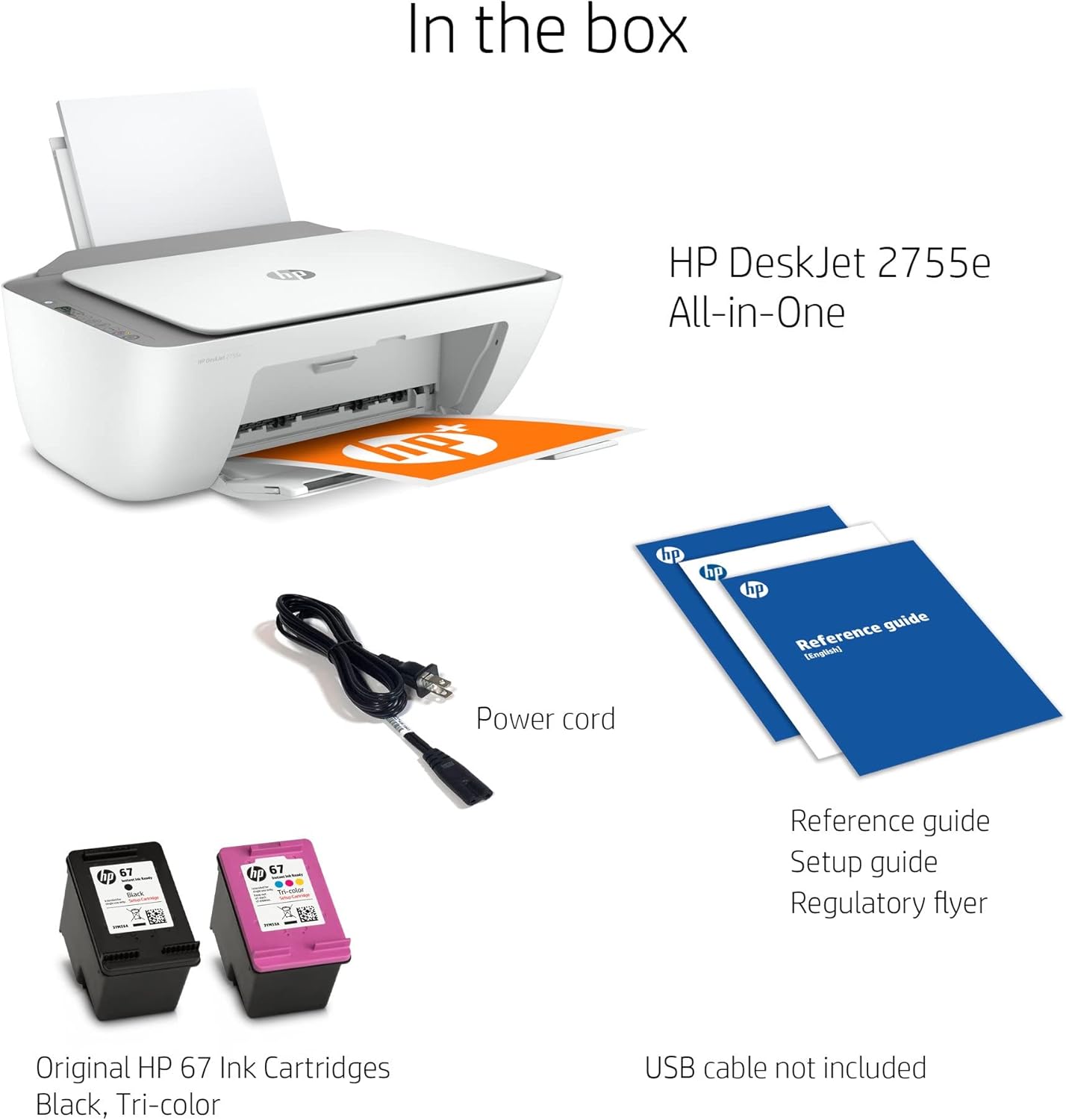
Figure 2: Items included in the box for the HP DeskJet 2755e. Note that a USB cable is not included and must be purchased separately for wired connection.
- Impresora todo-en-uno HP DeskJet 2755e
- Cable de alimentación
- Original HP 67 Ink Cartridges (Black, Tri-color)
- Reference Guide, Setup Guide, Regulatory Flyer
- HDMI Cable (included as part of this renewed product package)
Note: A USB cable for direct PC connection is not typically included and may need to be purchased separately.
2. Conexión física
- Coloque a impresora sobre unha superficie estable e plana.
- Connect the power cord to the printer's power port and then to a wall outlet.
- For a wired connection, connect a USB cable (not included) from the printer's USB 2.0 port to your computer.

Figura 3: Traseira view of the printer, highlighting the 60-sheet rear input tray and the USB 2.0 port for PC connection.
3. Instalación do cartucho de tinta
Open the ink cartridge access door. Wait for the carriage to move to the center. Gently insert the black and tri-color ink cartridges into their respective slots until they click into place. Close the access door.
4. Carga de papel
Extend the input tray. Load a stack of plain paper into the input tray, print-side down. Adjust the paper guides to fit the paper snugly.
5. Instalación do software e configuración sen fíos
Turn on the printer. For initial setup and full functionality, download the HP Smart app from your device's app store or visit hp.com/go/hpsmart. Follow the on-screen instructions within the app to connect your printer to your wireless network and install necessary drivers.
Instrucións de funcionamento
Impresión
The HP DeskJet 2755e supports wireless and USB printing. It offers a maximum print resolution of 4800 x 1200 dpi for both color and black & white, with print speeds up to 5.5 pages per minute (PPM).
- Desde un ordenador: Open the document or image you wish to print. Select "Print" from the application's menu. Choose your HP DeskJet 2755e printer, adjust settings (e.g., paper size, quality), and click "Print".
- Impresión móbil: Use the HP Smart app on your smartphone or tablet to print documents and photos directly from your mobile device.
Copiando
Place the original document face-down on the scanner glass. Use the control panel's copy buttons to select color or black & white copy and the number of copies. Press the copy button to start.
Escaneando
The printer features a flatbed scanner. Place the document or photo face-down on the scanner glass. Open the HP Smart app on your computer or mobile device, select the scan function, and follow the prompts to scan your item. You can choose scan resolution and destination.
Mantemento
Substitución do cartucho de tinta
When an ink cartridge is low or empty, the printer's display or the HP Smart app will indicate it. Purchase genuine HP 67 ink cartridges. Open the cartridge access door, press down on the old cartridge to release it, and pull it out. Insert the new cartridge firmly until it clicks into place. Close the door.
Limpeza da impresora
- Exterior: Use un pano suave e sen pelusa dampened with water to wipe the exterior surfaces.
- Cristal do escáner: Use un pano suave e sen pelusa dampened with glass cleaner (non-abrasive) to clean the scanner glass. Avoid spraying cleaner directly onto the glass.
Eliminación de atascos de papel
If a paper jam occurs, the printer's display will show an error. Carefully open the access doors and remove any jammed paper, pulling gently to avoid tearing. Check the input tray, output tray, and inside the printer. Close all doors and the printer should resume operation.
Resolución de problemas
This section addresses common issues you might encounter with your HP DeskJet 2755e printer.
A impresora non responde
- Ensure the printer is powered on and connected to a power outlet.
- Check USB cable connection (if applicable) or wireless network connection.
- Reinicie a impresora e o seu ordenador/dispositivo móbil.
- Verify that the correct printer is selected in your print dialog.
Mala calidade de impresión
- Comprobe os niveis de tinta e substitúa calquera cartucho baleiro ou con pouca tinta.
- Run a print head cleaning cycle from the HP Smart app or printer software.
- Asegúrate de usar o papel axeitado para o teu traballo de impresión.
- Verify print settings (e.g., print quality, paper type) in your print dialog.
Atascos de papel
Refer to the "Clearing Paper Jams" section under Maintenance for detailed steps.
Problemas de conectividade
- Sen fíos: Ensure your printer is within range of your Wi-Fi router. Restart your router and printer. Re-run the wireless setup using the HP Smart app.
- USB: Try a different USB port on your computer or a different USB cable.
For more detailed troubleshooting, visit the official HP support website or consult the HP Smart app.
Especificacións técnicas
| Característica | Especificación |
|---|---|
| Nome do modelo | DeskJet 2755e |
| Funcións | Imprimir, copiar, escanear (todo en un) |
| Tecnoloxía de impresión | Inxección de tinta |
| Conectividade | Sen fíos, USB |
| Resolución máxima de impresión (cor) | Ata 4800 x 1200 ppp |
| Resolución máxima de impresión (branco e negro) | Ata 4800 x 1200 ppp |
| Velocidade de impresión | Up to 5.5 PPM (pages per minute) |
| Tipo de escáner | Cama plana |
| Capacidade máxima da folla de entrada | 60 follas |
| Capacidade de follas de saída | 25 follas |
| Tamaños de folla compatibles | 4x6, 5x7, 8x10 inches, A3 (Max Media Size) |
| Impresión dúplex | Simplex (Manual Duplex Supported via Software) |
| Dimensións do produto (ancho x fondo x alto) | 16.7 x 11.97 x 6.06 polgadas |
| Método de control | Remote (via HP Smart App), Icon LCD Display |
| Dispositivos compatibles | Smartphones, Computers (Windows, macOS) |

Figure 4: Dimensions of the HP DeskJet 2755e printer, with input and output trays extended.
Garantía e Soporte
Información da garantía
This HP DeskJet 2755e printer, being a renewed product, comes with a Garantía limitada de 90 días. Please refer to the warranty documentation included with your product for specific terms and conditions regarding coverage and claims.
Atención ao cliente
Para obter asistencia técnica, descargas de controladores ou máis solucións de problemas, visite o soporte oficial de HP website. You can also utilize the HP Smart app for guided support and resources.
Soporte HP Websitio: support.hp.com
Ask a question about this manual
Ask about setup, troubleshooting, compatibility, parts, safety, or missing instructions. Manuals+ will review the question and use this page’s manual context to help answer it.