
1. Información importante
This RAINPOINT Bluetooth Soil Moisture and Temperature Sensor (Model TCS005ARF) is designed to monitor soil conditions. Please note that this sensor requires a separate RAINPOINT Bluetooth Monitor Display for operation. It cannot function independently or connect directly to a smartphone application. Ensure you have the compatible monitor display before attempting setup.
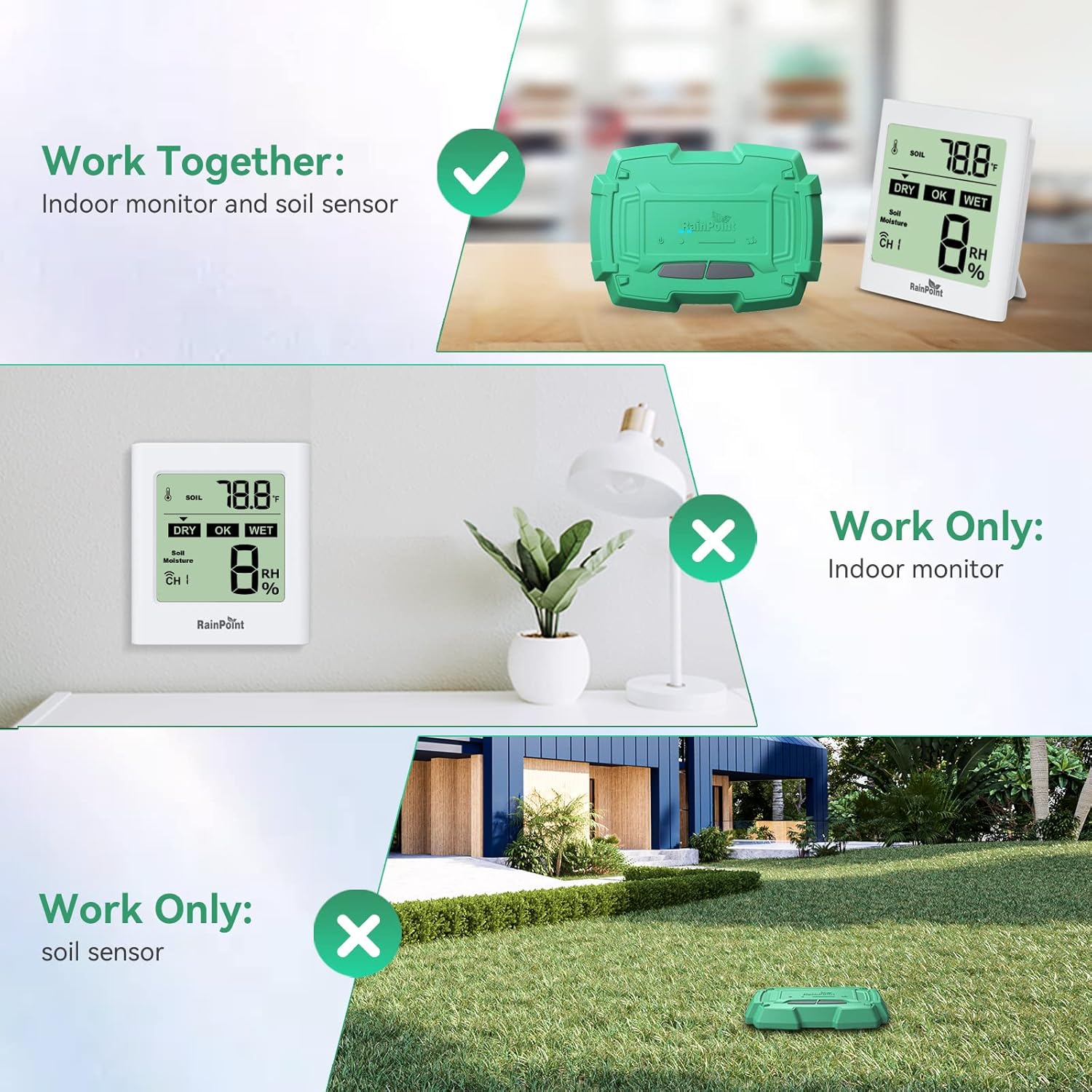
Imaxe 1.1: The RAINPOINT Soil Moisture Sensor (TCS005ARF) must be paired with a compatible Indoor Monitor Display to function. It does not operate as a standalone device.
2. Produto rematadoview
The RAINPOINT Bluetooth Soil Moisture and Temperature Sensor provides real-time data on your soil's moisture and temperature levels. This information is transmitted wirelessly to a compatible RAINPOINT Bluetooth Monitor Display, helping you maintain optimal conditions for your plants.
2.1 Compoñentes
- RAINPOINT Bluetooth Soil Moisture and Temperature Sensor (TCS005ARF)
- Manual de instrucións
Note: The Indoor Monitor Display and 4 x AAA batteries for the sensor are not included and must be purchased separately.
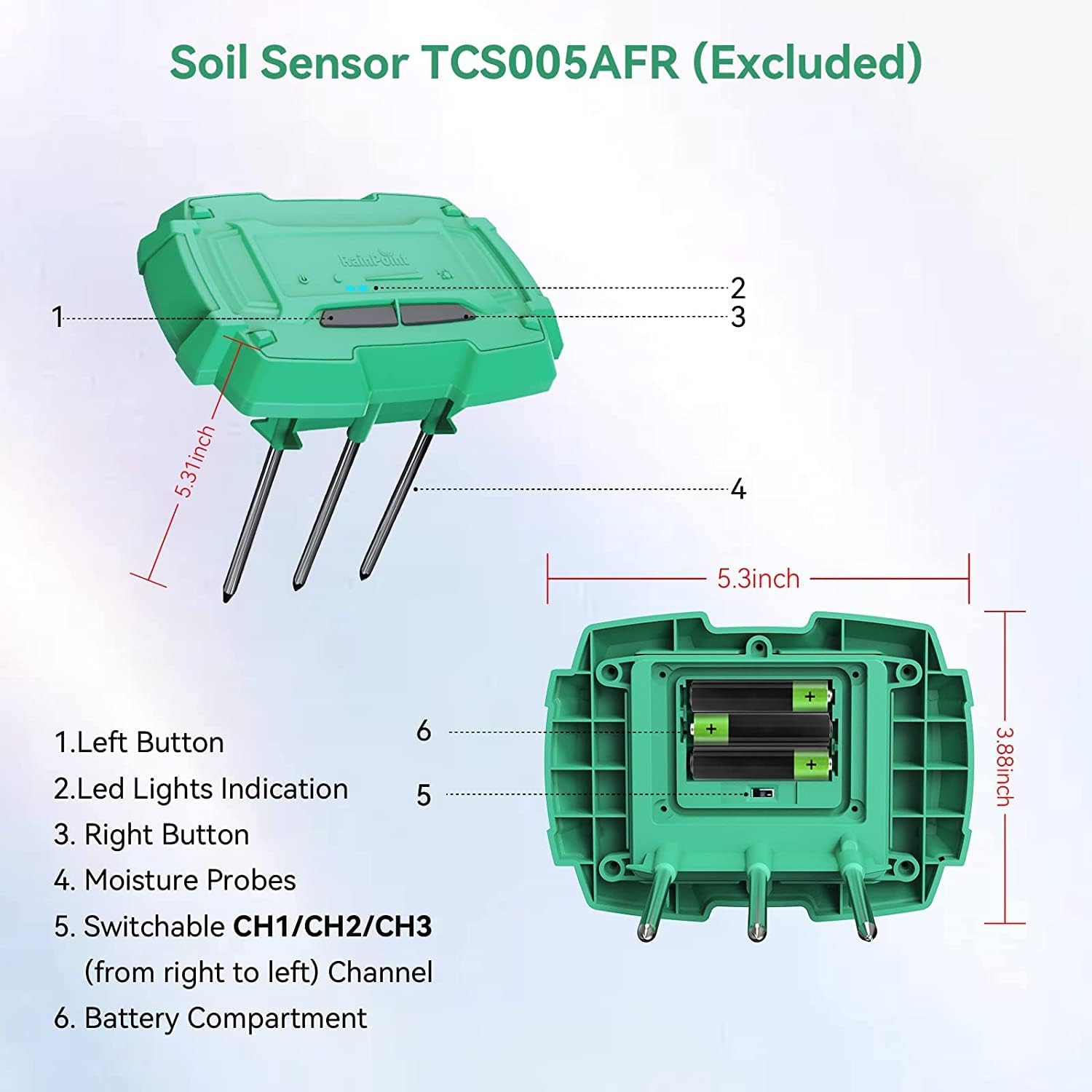
Imaxe 2.1: Detallado view of the Soil Sensor TCS005AFR.
- Botón Esquerdo
- Indicación de luces LED
- Botón dereito
- Moisture Probes (SS304 material for precision and corrosion resistance)
- Switchable CH1/CH2/CH3 (from right to left) Channel Selector
- Compartimento de batería
3. Instrucións de configuración
3.1 Instalación da batería
- Locate the battery compartment (6) on the underside of the sensor.
- Using a small screwdriver, carefully remove the screws securing the battery compartment cover.
- Insert 4 x AAA 1.5V alkaline batteries into the compartment, ensuring correct polarity (+/-).
- Replace the battery compartment cover and secure it with the screws.
3.2 Selección de canles
- The sensor supports up to 3 channels (CH1, CH2, CH3). Use the channel selector (5) to choose a channel.
- Ensure that each sensor you use with your monitor display is set to a unique channel.
3.3 Pairing with Monitor Display
Follow the instructions provided with your RAINPOINT Bluetooth Monitor Display to pair the sensor. Generally, this involves:
- Ensure the monitor display is powered on and in pairing mode.
- Press and hold the Left Button (1) and Right Button (3) on the sensor simultaneously for a few seconds until the LED Lights Indication (2) flashes, indicating it's in pairing mode.
- Once paired, the monitor display will show the sensor's data.
3.4 Colocación do sensor
Insert the moisture probes (4) into the soil of the plant or area you wish to monitor. Ensure the sensor body is above ground and the probes are fully submerged in the soil for accurate readings.

Imaxe 3.1: Proper placement of the soil sensor in the ground.
4. Instrucións de funcionamento
Once the sensor is set up and paired with your RAINPOINT Bluetooth Monitor Display, it will automatically begin transmitting soil moisture and temperature data.
4.1 Data Monitoring
- The monitor display will show real-time soil moisture (0-100%) and temperature (-10℃ to 60℃ / 14°F to 140°F) readings.
- Data is updated approximately every 7 seconds.
- The monitor display may also indicate soil humidity levels as 20%, 40%, 60%, 80%, or 100%.

Imaxe 4.1: Monitor display showing soil temperature and humidity ranges.
4.2 Alcance sen fíos
The sensor communicates with the monitor display via Bluetooth 5.0, offering a wireless transmission range of up to 50 meters (160 feet) in open areas. Obstacles such as walls or dense foliage may reduce this range.

Imaxe 4.2: Illustration of the wireless range and multi-channel capability.
5. Mantemento
- Limpeza: Periodically clean the moisture probes (4) with a soft cloth to remove any soil buildup that might affect accuracy.
- Substitución da batería: The sensor is powered by 4 x AAA batteries, which typically last 3-6 months. Replace batteries when the low battery indicator appears on your monitor display. Follow the battery installation steps in Section 3.1.
- Almacenamento: When not in use for extended periods, remove the batteries and store the sensor in a dry, cool place.
6 Solución de problemas
| Problema | Causa posible | Solución |
|---|---|---|
| No data displayed on monitor. |
|
|
| Lecturas inexactas. |
|
|
| Batería de curta duración. |
|
|
7. Especificacións
| Característica | Especificación |
|---|---|
| Modelo | TCS005ARF |
| Compatibilidade | Requires RAINPOINT Bluetooth Monitor Display (Excluded) |
| Conectividade | Bluetooth 5.0 |
| distancia wireless | Ata 50 metros (160 pés) en zonas abertas |
| Intervalo de actualización de datos | Approximately every 7 seconds |
| Rango de humidade do solo | 0 % ~ 100 % |
| Soil Moisture Accuracy | ≤ 5% (0% ~ 50%) or ≤ 10% (51% ~ 100%) |
| Soil Temperature Range | -10 ℃ ~ 60 ℃ (14 °F ~ 140 °F) |
| Material da sonda | SS304 Stainless Steel |
| Clasificación impermeable | IP65 |
| Fonte de enerxía | 4 x AAA 1.5V Alkaline Batteries (Not Included) |
| Duración da batería | 3-6 months (typical) |
| Dimensións (sensor) | Approximately 5.31 inches (length) x 3.88 inches (width) x 5.3 inches (height, including probes) |
8. Garantía e soporte
For warranty information and technical support, please refer to the documentation included with your RAINPOINT Bluetooth Monitor Display or visit the official RAINPOINT websitio.
You can also contact RAINPOINT customer service directly for assistance.
- Correo electrónico: Refer to RAINPOINT product packaging or websitio.
- Websitio: Visit the RAINPOINT Store on Amazon