
1. Introdución
Grazas pola compraasing the Depusheng U6 Audio Mixer. This 6-channel DJ sound controller is designed for versatile audio mixing, recording, and live streaming applications. It features a built-in USB audio interface, Bluetooth connectivity, and U-Disk playback/recording capabilities. This manual provides essential information for safe operation, setup, and optimal performance of your device. Please read it thoroughly before use and retain it for future reference.
2. Información de seguridade
- Fonte de enerxía: Use only the specified power adapter or a compatible USB power source. Ensure the voltage coincide cos requisitos do dispositivo.
- Auga e humidade: Do not expose the mixer to water, rain, or excessive moisture. Avoid placing liquid-filled objects on the unit.
- Ventilación: Asegúrese de que haxa unha ventilación axeitada. Non bloquee as aberturas de ventilación.
- Calor: Manteña a unidade lonxe de fontes de calor como radiadores, reixas de calor, estufas ou outros aparellos que produzan calor.
- Limpeza: Limpar só cun pano seco. Non utilice produtos de limpeza líquidos nin produtos de limpeza en aerosois.
- Servizo: Non intente atender este produto vostede mesmo. Remita todo o servizo a persoal de servizo cualificado.
- Poder fantasma: When using condenser microphones, ensure +48V phantom power is activated only when necessary and that the microphone is compatible.
3. Contido do paquete
Comprobe que o seu paquete inclúa todos os seguintes elementos:
- Depusheng U6 Audio Mixer
- Cable de alimentación USB
- Manual de usuario
4. Produto rematadoview
The Depusheng U6 is a compact 6-channel mixer designed for various audio applications. It features multiple input and output options, integrated effects, and digital connectivity.
4.1 Controis e conexións do panel frontal
The front panel provides access to all mixing controls and primary input/output ports.

Descrición da imaxe: Un detallado view of the Depusheng U6 Audio Mixer's front panel, showing all knobs, faders, buttons, and the digital display for USB/Bluetooth functions. Key controls include GAIN, HIGH, LOW, EFX, PEAK, VOL for each channel, along with DELAY, REPEAT, and MAIN volume controls. The USB port and Bluetooth indicator are also visible.
- MIC/LINE Inputs (Channels 1-4): Combo jacks supporting both XLR and 1/4" (6.35mm) inputs for microphones or line-level instruments.
- +48V FANTASMA: Button to activate +48V phantom power for condenser microphones on channels 1-4.
- GAÑA: Axusta a sensibilidade de entrada para cada canal.
- ALTO/BAIXO: 2-band equalizer for adjusting treble and bass frequencies for each channel.
- EFX: Sends signal to the built-in effects processor (DELAY/REPEAT).
- LED PICO: Ilumínase cando o sinal de entrada é demasiado alto, o que indica un posible recorte.
- VOL: Channel volume control.
- S/S (Stereo Input 5/6): 1/4" stereo inputs for connecting line-level devices.
- REC/MAIN OUT (RCA): Stereo RCA outputs for recording or connecting to external devices.
- MAIN OUT (1/4"): Stereo 1/4" outputs for connecting to power amplifiers ou altofalantes activos.
- Porto USB: For U-Disk playback/recording and connection to a computer as an audio interface.
- MODE/BT (Bluetooth): Button to switch between USB, Bluetooth, and other modes.
- PLAY/PAUSE, PREVIOUS, NEXT: Controls for U-Disk and Bluetooth playback.
- DELAY/REPEAT: Controls for adjusting the built-in delay effect.
- LED CLIP: Indicates output signal clipping.
- LED POWER: Indica que a unidade está acendida.
- PRINCIPAL: Master volume control for the main output.
- TELÉFONO: Control de volume dos auriculares.
- Jack para auriculares: 1/4" stereo output for monitoring.
4.2 Input Interface Types

Descrición da imaxe: Primeiro plano view of the input jacks on the Depusheng U6 Audio Mixer, illustrating both the 6.5mm (1/4 inch) and XLR connection types for microphones and line-level devices. This image highlights the versatility of the combo input jacks.
- 6.5mm (1/4") Interface: For connecting instruments or line-level audio sources.
- XLR Interface: For connecting microphones, providing a balanced connection.
5. Configuración
5.1 Alimentación da mesturadora
The Depusheng U6 mixer can be powered via its USB port.

Descrición da imaxe: This image demonstrates two methods of powering the Depusheng U6 Audio Mixer via USB: connecting it to a computer's USB port or to a portable power bank. This highlights the flexibility of its power options.
- Connect the provided USB cable to the mixer's USB power input.
- Connect the other end of the USB cable to a computer's USB port or a USB power adapter (not included) connected to a wall outlet, or a power bank.
- The POWER LED on the mixer will illuminate when power is supplied.
5.2 Conexións básicas
Refer to the diagram below for typical connection setups.

Descrición da imaxe: A comprehensive diagram illustrating various connection possibilities for the Depusheng U6 Audio Mixer. It shows connections for a computer, condenser microphone, dynamic microphone, wireless microphone receiver, power amplifier, passive speakers, and headphones, demonstrating a complete audio setup.
- Micrófonos: Connect dynamic or condenser microphones to the MIC/LINE inputs (Channels 1-4) using XLR cables. Activate +48V phantom power for condenser microphones.
- Instruments/Line Devices: Connect instruments or other line-level devices to the MIC/LINE inputs (Channels 1-4) using 1/4" cables, or to the S/S (Stereo Input 5/6) using 1/4" stereo cables.
- Output to Speakers/Ampmáis vivo: Connect the MAIN OUT (1/4") to your power amplifier ou altofalantes activos.
- Auriculares: Conecte os auriculares á toma PHONE para monitorizar.
- Ordenador: Connect the mixer's USB port to your computer for use as an audio interface.
6. Instrucións de funcionamento
6.1 Wireless Bluetooth Streaming
The U6 mixer supports wireless Bluetooth audio streaming from compatible devices.
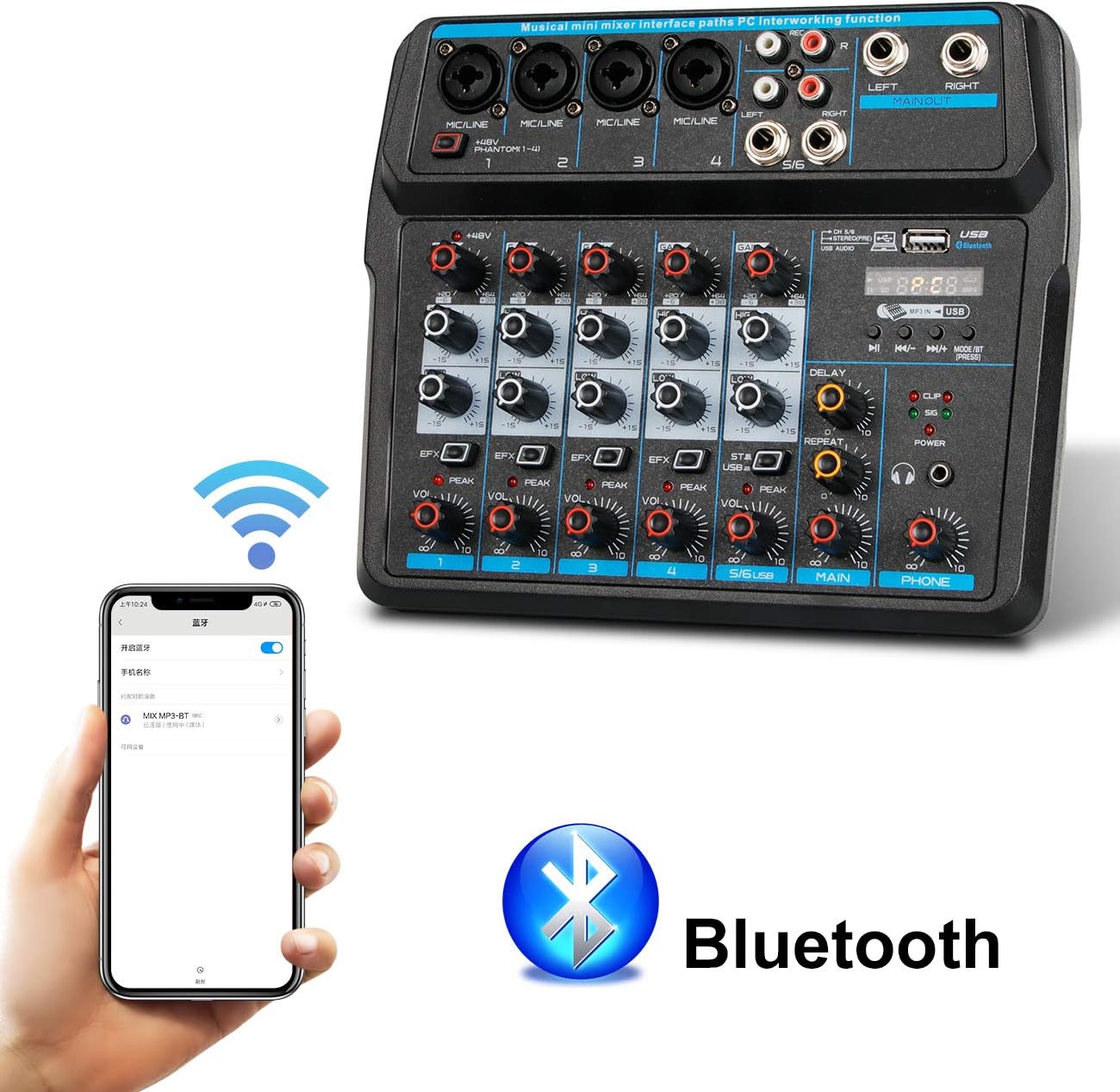
Descrición da imaxe: This image shows a smartphone displaying its Bluetooth settings, with the Depusheng U6 Audio Mixer (labeled 'U6 MP3-BT') available for connection. A large Bluetooth logo is also present, indicating the wireless connectivity feature.
- Preme o MODE/BT button on the mixer until the Bluetooth indicator lights up and the display shows 'BT'.
- No teu dispositivo móbil (teléfono intelixente, tableta, etc.), activa o Bluetooth e busca os dispositivos dispoñibles.
- Select 'U6 MP3-BT' from the list to pair.
- Once paired, you can stream audio wirelessly from your device to the mixer. Bluetooth operates effectively within approximately 1.5 feet.
6.2 USB Audio Interface (PC Recording/Playback)
The U6 mixer can function as an external sound card for your computer.

Descrición da imaxe: This diagram illustrates how to connect the Depusheng U6 Audio Mixer to a laptop via USB for both playback and recording. It shows audio signals flowing from the computer to the mixer (background music) and from the mixer to the computer (for recording), with a close-up of the USB connection port on the mixer.
- Connect the mixer to your PC using a USB cable.
- The mixer will be recognized as a USB audio device by your computer.
- In your computer's sound settings or DAW (Digital Audio Workstation) software (e.g., Pro Tools, Logic Pro X, GarageBand, Audacity), select the U6 mixer as the input and output audio device.
- You can now record audio from the mixer's inputs to your computer or play back audio from your computer through the mixer.
6.3 U-Disk Playback and Recording
The mixer supports direct playback of audio files from a USB flash drive (U-Disk) and recording to it.

Descrición da imaxe: This image highlights the U-Disk functionality of the Depusheng U6 Audio Mixer. It shows a USB flash drive inserted into the mixer's USB port, with text indicating its capabilities: 1. Play MP3/WAV/WMA/FLAC files, and 2. Record audio. The mixer's digital display shows '88:88', likely indicating playback time or a menu option.
- Reprodución: Insert a U-Disk containing audio files (MP3/WAV/WMA/FLAC) into the USB port. The mixer will automatically switch to U-Disk mode or you may need to press MODE/BT. Use the PLAY/PAUSE, PREVIOUS, and NEXT buttons to control playback.
- Gravación: To record to a U-Disk, ensure it is inserted and the mixer is in U-Disk mode. Follow the specific recording instructions in the full manual (if available) or typically press and hold the PLAY/PAUSE button to initiate recording.
6.4 Using Effects (DELAY and REPEAT)
The U6 mixer includes built-in DELAY and REPEAT effects to enhance your audio.
- Usa o EFX knob on each channel to send a portion of that channel's signal to the effects processor.
- Axustar o RETRASO knob to control the delay time of the effect.
- Axustar o REPETIR knob to control the number of repetitions of the delay effect.
- The overall level of the effects return can be controlled via a dedicated EFX return knob (if present) or integrated into the main mix.
7. Mantemento
- Limpeza: Use a soft, dry cloth to clean the surface of the mixer. Do not use abrasive cleaners, waxes, or solvents.
- Almacenamento: Cando non se use durante períodos prolongados, garde a batedora nun lugar fresco e seco, lonxe da luz solar directa e de temperaturas extremas.
- Coidado do cable: Always grasp the connector, not the cable, when unplugging. Avoid bending or kinking cables excessively.
8 Solución de problemas
If you encounter issues with your Depusheng U6 Audio Mixer, refer to the following common problems and solutions:
| Problema | Causa posible | Solución |
|---|---|---|
| Sen saída de son |
|
|
| O micrófono non funciona |
|
|
| Bluetooth non se conecta |
|
|
| USB recording/playback issues |
|
|
9. Especificacións
| Característica | Especificación |
|---|---|
| Marca | Depusheng |
| Número de modelo | U6 |
| Número de canles | 6 |
| Tecnoloxía de conectividade | Bluetooth, USB |
| Entrada de audio | XLR, 1/4" (6.35mm) |
| Fonte de enerxía | Cable USB |
| Peso do elemento | 1.02 quilogramos |
| Dimensións do paquete | 29.3 x 24.3 x 9.2 cm |
| Interface de hardware | Bluetooth |
10. Garantía e soporte
Depusheng products are designed for reliability and performance. This product comes with a standard manufacturer's warranty. For specific warranty terms and conditions, please refer to the documentation provided at the time of purchase or contact your retailer.
If you require technical support or have questions not covered in this manual, please contact Depusheng customer service through the retailer where you purchased the product. Please have your model number (U6) and purchase information ready.