
Introdución
This manual provides instructions for setting up, operating, maintaining, and troubleshooting your HP 650 Wireless Keyboard and Mouse Combo. Please read this manual thoroughly before using the product to ensure proper functionality and longevity.
O que hai na caixa
Verifica que todos os elementos estean presentes no paquete:
- HP 650 Wireless Keyboard and Mouse Combo (4R013AA)
- USB Dongle (2.4GHz Receiver)
- 2 x AA Batteries (for mouse)
- 2 pilas AAA (para o teclado)
- Guía de inicio rápido
- Tarxeta de garantía
Configuración
1. Instalación da batería

Image: Underside of the HP 650 Keyboard and Mouse, illustrating battery compartments and the USB receiver slot.
- Para o teclado: Locate the battery compartment on the underside of the keyboard. Open the cover and insert two AAA batteries, ensuring correct polarity (+/-). Close the compartment cover.
- Para o rato: Locate the battery compartment on the underside of the mouse. Open the cover and insert two AA batteries, ensuring correct polarity (+/-). Close the compartment cover.
2. Conexión do receptor USB
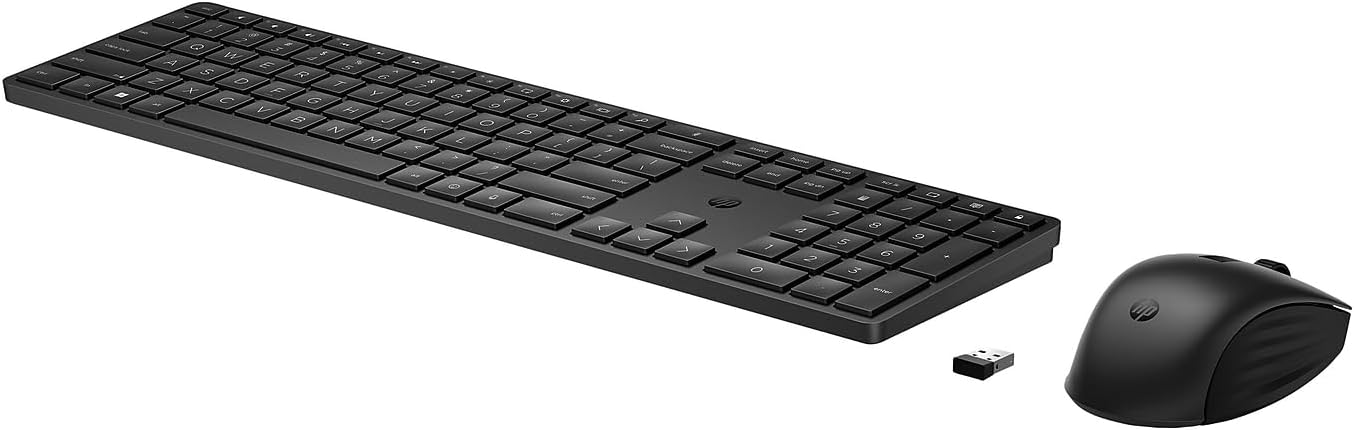
Image: The HP 650 Wireless Keyboard and Mouse, alongside the compact USB receiver.
- Locate the USB receiver (dongle) which may be stored in the mouse's battery compartment or packaged separately.
- Conecta o receptor USB a un porto USB-A dispoñible do teu ordenador.
- O teu ordenador debería detectar e instalar automaticamente os controladores necesarios. Este proceso pode tardar uns intres.
3. Initial Use and Compatibility
The HP 650 Wireless Keyboard and Mouse Combo is compatible with Windows, macOS, and Chrome OS devices. Once the USB receiver is connected, the keyboard and mouse should be ready for immediate use.
For advanced customization, such as programming keys or adjusting mouse sensitivity, download and install the HP Accessory Center (HPAC) Software. HPAC is available for free download from the Microsoft Store or Apple Store.
Instrucións de funcionamento
Funcións básicas do teclado

Image: Detail of the HP 650 Keyboard, showing key layout and the HP logo.
- Escritura estándar: Use as teclas alfanuméricas para introducir texto.
- Teclado numérico: The dedicated numeric keypad on the right provides efficient data entry.
- Teclas de función (F1-F12): These keys perform various system functions, often requiring the 'Fn' key to be pressed simultaneously for secondary actions.
- Pernas axustables: The keyboard features adjustable legs on the underside to set your preferred typing angle.
Basic Mouse Functions
- Clic esquerdo/dereito: Standard selection and context menu functions.
- Roda de desprazamento: Desprácese polos documentos e web pages. The scroll wheel may also function as a middle click.
- Deseño ergonómico: The contoured design of the mouse is suitable for both right and left-handed users.
- Multi-Surface Tracking: The mouse utilizes a power-efficient multi-surface sensor for reliable tracking on most surfaces, including marble. Note that it does not track on glass.
Customization with HP Accessory Center

Image: Illustration highlighting the programmable keys feature of the HP 650 Keyboard.
The HP Accessory Center (HPAC) software allows you to personalize your keyboard and mouse:
- Teclas programables: Customize over 20 keys on the keyboard to create shortcuts for your most frequently used applications or functions.
- Configuración de DPI do rato: Adjust the mouse's DPI (dots per inch) settings, including cursor speed and sensitivity, for enhanced precision and control.
Mantemento
Substitución da batería

Image: Battery life diagram for the HP 650 Keyboard and Mouse, indicating battery types and estimated durations.
The keyboard requires two AAA batteries, offering over 20 months of battery life. The mouse requires two AA batteries, providing over 24 months of battery life. Actual battery life may vary based on usage and environmental conditions.
Replace batteries when performance degrades or the device stops responding. Follow the battery installation steps outlined in the Setup section.
Limpeza
To maintain hygiene and functionality, the HP 650 Wireless Keyboard & Mouse Combo can be cleaned. Select household wipes can be safely used to clean the devices up to 1,000 times. Refer to the wipe manufacturer's instructions for disinfecting and the HP cleaning guide for HP-tested wipe solutions.
Resolución de problemas
O dispositivo non responde
- Comprobe as baterías: Asegúrate de que as baterías estean instaladas correctamente e teñan a carga suficiente. Substitúeas se é necesario.
- Comprobar o receptor USB: Ensure the USB receiver is securely plugged into a functional USB-A port on your computer. Try a different USB port.
- Restablecer a conexión: Desconecte o receptor USB, agarde uns segundos e volva conécteo.
- Interferencia: Move the keyboard and mouse closer to the USB receiver. Avoid placing the receiver near other wireless devices or large metal objects that might cause interference.
Entrada con atraso ou retardo
- Nivel de batería: Unha batería baixa pode causar problemas de rendemento. Substitúa as baterías.
- Distance/Obstructions: Ensure the devices are within optimal range of the receiver and there are no significant obstructions.
- Porto USB: Try connecting the USB receiver to a different USB port, preferably a direct port on the computer rather than a hub.
- Recursos do sistema: Pecha as aplicacións innecesarias do teu ordenador que poidan estar a consumir recursos do sistema.
Keys Sticking or Not Registering
- Limpeza: Dust or debris under the keys can cause sticking. Gently clean around the affected keys.
- Danos físicos: Inspect keys for any physical damage.
Especificacións

Imaxe: Dimensional ao finalview of the HP 650 Keyboard and Mouse, including length, width, height, and weight.
| Característica | Detalle |
|---|---|
| Número de modelo | 4R013AA |
| Conectividade | Sen fíos de 2.4 GHz (receptor USB-A) |
| Dimensións do teclado (L x A x H) | 16.85 x 4.54 x 0.71 polgadas (428.22 x 115.47 x 18.06 mm) |
| Peso do teclado | 1.8 libras (430 g) |
| Dimensións do rato (L x A x H) | 4.73 x 2.75 x 1.62 polgadas (120.28 x 69.95 x 41.39 mm) |
| Peso do rato | 3.1 onzas (88 g) |
| Tipo de batería do teclado | 2 pilas AAA |
| Tipo de batería do rato | 2 x pilas AA |
| Sistemas operativos compatibles | Windows, macOS, Chrome OS |
| Características especiais | 20+ Programmable Keys, DPI Adjustable Mouse, Multi-Surface Tracking (excludes glass), Ergonomic Design, Recycled Materials (60% PCR in keyboard) |
Garantía e Soporte
Información da garantía
This HP product is covered by a limited warranty. For detailed information regarding warranty terms, conditions, and duration, please refer to the Warranty Card included in your product packaging or visit the official HP support websitio.
Atención ao cliente
For further assistance, technical support, or to download the latest drivers and software (such as the HP Accessory Center), please visit the official HP support website or contact HP customer service. Contact information can typically be found on the HP websitio web ou na documentación do produto.
Vídeos de produtos
Non se atoparon vídeos oficiais de produtos do vendedor nos datos proporcionados para inserilos neste manual.