
1. Introdución
This manual provides essential information for the safe and efficient use of your Princess 357250 Smart Air Cooler Fan. Please read these instructions carefully before operating the appliance and retain them for future reference.

Figure 1: Princess 357250 Smart Air Cooler Fan in operation, illustrating air circulation.
The Princess 357250 is a versatile 3-in-1 appliance functioning as a fan, air cooler, and air freshener. It features a 3.5-liter water reservoir, three operating modes, and can be controlled via the HomeWizard Climate app, voice commands, or the included remote control.
2. Instrucións de seguridade importantes
Siga sempre as precaucións de seguridade básicas ao usar electrodomésticos para reducir o risco de incendio, descarga eléctrica e lesións persoais.
- Le todas as instrucións antes de usar.
- Asegurar o voltagO indicado no aparello corresponde ao seu volume de rede localtage antes de conectar.
- Non mergullo o aparello, o cable ou o enchufe en auga ou outros líquidos.
- É necesaria unha estreita supervisión cando calquera aparello é usado por nenos ou preto de eles.
- Desconécteo da toma de corrente cando non o estea a usar, antes de montar ou desmontar pezas e antes de limpar.
- Non faga funcionar ningún aparello cun cable ou enchufe danados, ou despois de que o aparello funcione mal ou teña dano dalgún xeito.
- Non use ao aire libre.
- Non deixes que o cable colgue sobre o bordo dunha mesa ou mostrador, nin toque superficies quentes.
- Non o coloque sobre ou preto dun queimador eléctrico ou de gas quente, nin nun forno quente.
- Always place the appliance on a dry, stable, and level surface.
- Use só accesorios recomendados ou vendidos polo fabricante.
- Non bloquee ningunha abertura de ventilación.
- Do not fill the water tank above the MAX level indicator.
- Asegúrese sempre de que o depósito de auga estea ben colocado no seu lugar antes de utilizalo.
3. Compoñentes do produto
The Princess 357250 Smart Air Cooler Fan comes with the following components:
- Princess 357250 Smart Air Cooler Fan unit
- Control remoto
- 2 x CR2032 batteries (for remote control)
- Manual de instrucións
- Ice packs (typically 2, for enhanced cooling)

Figure 2: Included remote control for convenient operation.

Figura 3: Example of an ice pack used to enhance cooling performance.
4. Configuración e uso inicial
4.1 Desembalaxe
Carefully remove the air cooler from its packaging. Retain the packaging for future storage or transport. Check that all components listed in Section 3 are present and undamaged.
4.2 Colocación
Place the air cooler on a firm, level surface. Ensure there is adequate space around the unit for proper air circulation. Do not place it directly against a wall or furniture that could obstruct the air intake or outlet.
4.3 Encher o depósito de auga
- Tire do depósito de auga pola parte inferior traseira da unidade.
- Fill the water tank with clean, cool water. Do not exceed the 'MAX' fill line.
- For enhanced cooling, place the included ice packs in a freezer until frozen. Once frozen, add them to the water tank.
- Deslice con coidado o depósito de auga de volta na unidade ata que encaixe no seu lugar.
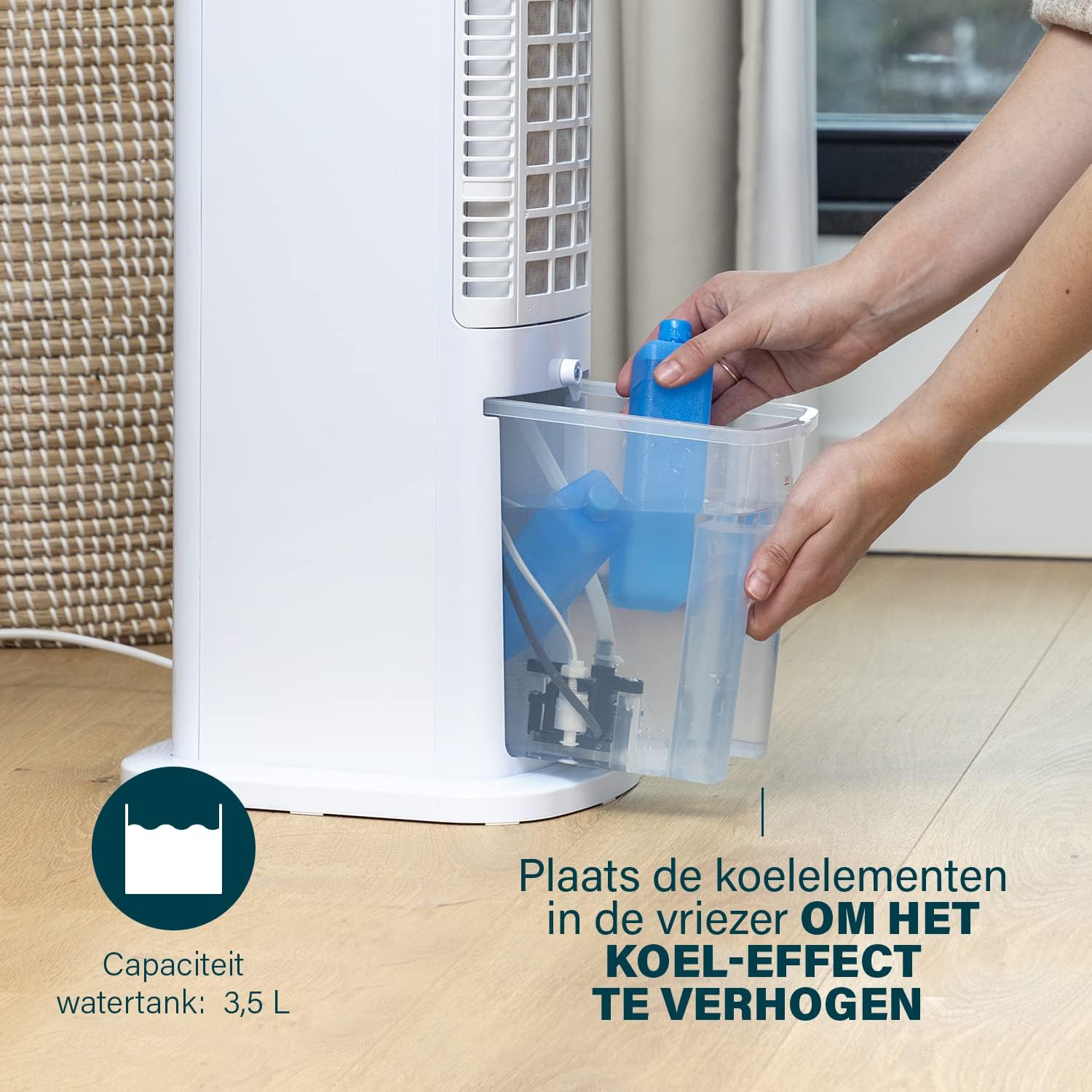
Figure 4: Adding ice packs to the water reservoir to increase cooling effect.
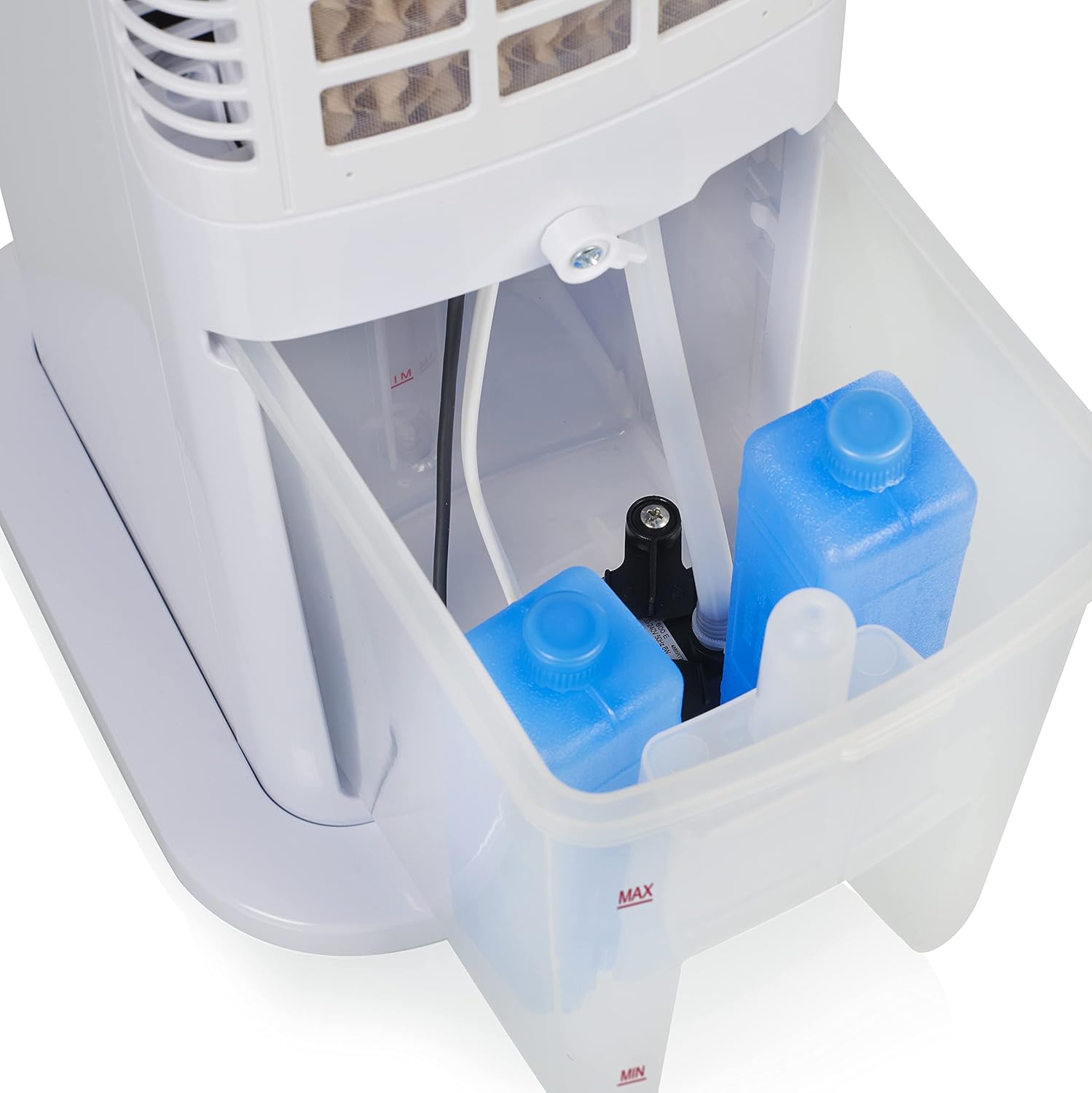
Figure 5: Water tank with ice packs, indicating fill levels.
4.4 Conexión de alimentación
Plug the power cord into a suitable electrical outlet (230V). The unit will enter standby mode.
5. Instrucións de funcionamento
The Princess 357250 can be operated via its control panel, remote control, or the HomeWizard Climate app.
5.1 Panel de control rematadoview
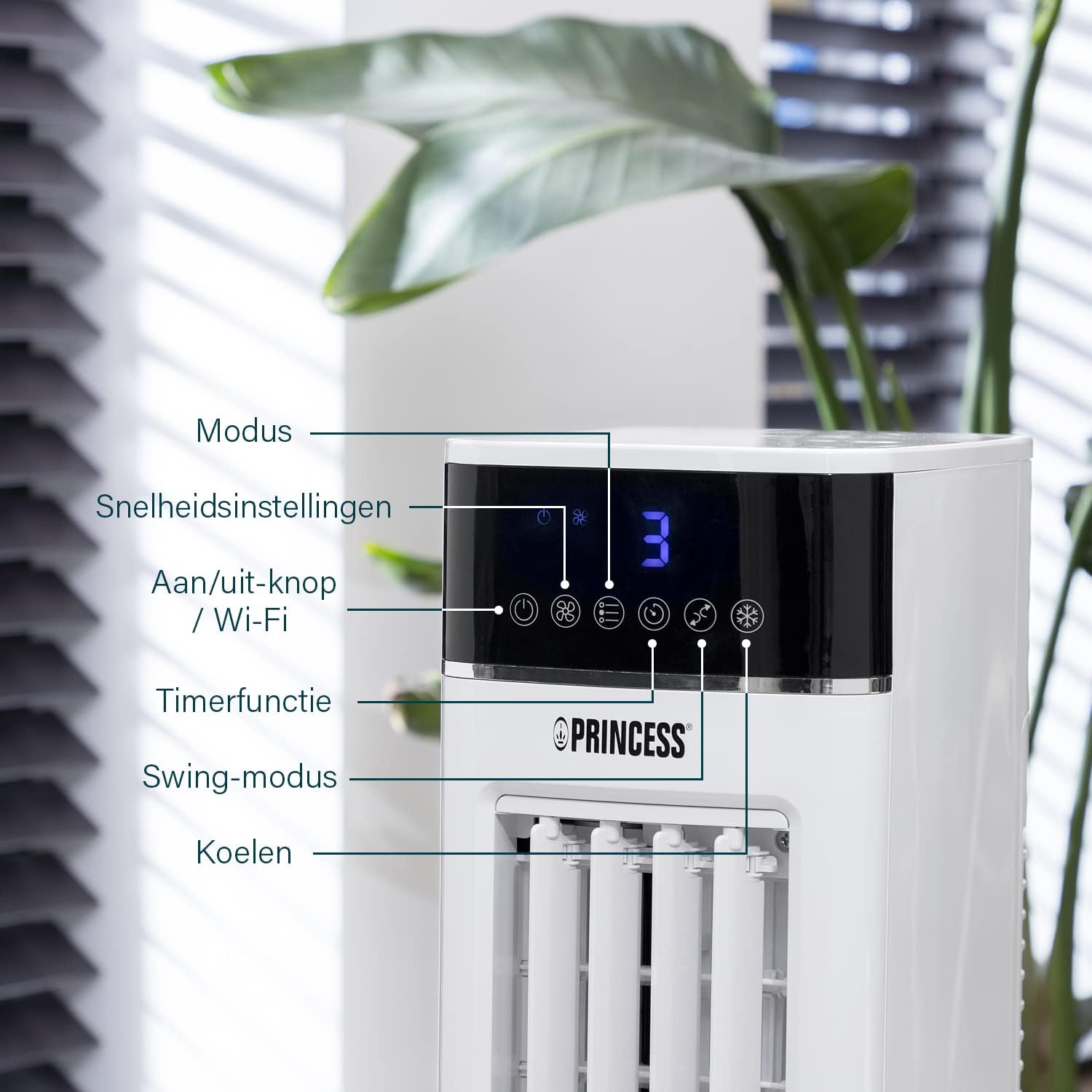
Figure 6: Control panel with various function buttons.
- Power Button (On/Off / Wi-Fi): Turns the unit on or off. Press and hold to activate Wi-Fi pairing mode.
- Botón de modo: Cycles through operating modes (Normal, Natural, Sleep).
- Botón de velocidade: Adjusts fan speed (Low, Medium, High).
- Botón do temporizador: Sets the operating timer.
- Botón de balance: Activates or deactivates the oscillation function.
- Botón Cool: Activates or deactivates the evaporative cooling function (requires water in the tank).

Figure 7: Manual control via the top panel buttons.
5.2 Modos de funcionamento
- Modo normal: Provides a constant airflow at the selected speed.
- Modo natural: Simulates natural breeze by varying fan speed intermittently.
- Modo de sono: Operates at a lower, quieter speed, gradually decreasing fan speed over time for undisturbed sleep.
5.3 Función de oscilación
Press the 'Swing' button to activate the oscillation function. The unit will rotate horizontally to distribute air across a wider area (Oscillation range: 50°). Press again to stop oscillation.
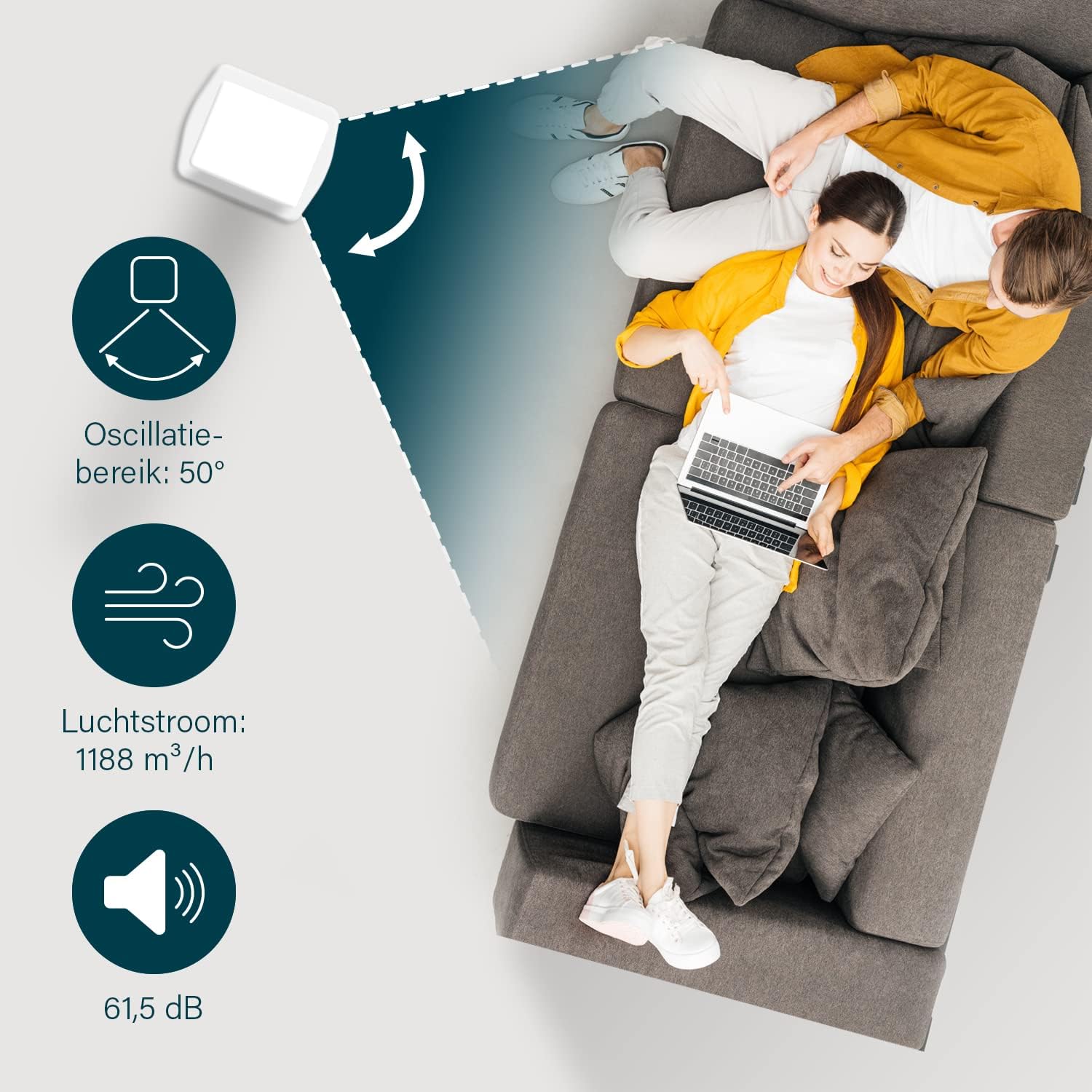
Figure 8: The oscillation function distributes cool air across a 50° range.
5.4 Evaporative Cooling Function
To activate the cooling function, ensure the water tank is filled. Press the 'Cool' button. The unit will use the water from the reservoir to cool the air through evaporation. This function works best in dry climates.

Figure 9: Innovative cooling technology utilizes a membrane system to cool air particles.
5.5 Smart Control (HomeWizard Climate App & Voice Control)
The Princess 357250 can be controlled remotely via the HomeWizard Climate app or voice commands (compatible with Siri and Google Assistant).
- Download the HomeWizard Climate app from your device's app store.
- Follow the in-app instructions to pair your air cooler with your Wi-Fi network. This typically involves pressing and holding the Power/Wi-Fi button on the unit until the Wi-Fi indicator blinks.
- Once paired, you can control all functions of the air cooler from your smartphone or tablet.
- For voice control, link your HomeWizard Climate account with your preferred voice assistant (Siri or Google Assistant) through their respective apps.

Figure 10: Control your air cooler using the HomeWizard Climate app and voice assistants.
6. Mantemento e Limpeza
Regular cleaning ensures optimal performance and extends the lifespan of your air cooler.
6.1 Limpeza xeral
- Desenchufe sempre o aparello antes de limpar.
- Limpe as superficies exteriores cun suave, damp pano. Non use produtos de limpeza ou disolventes abrasivos.
- Ensure no water enters the control panel or other electrical parts.
6.2 Limpeza do depósito de auga
The water tank should be cleaned regularly, especially if using the cooling function frequently, to prevent mold and bacteria growth.
- Desconecte o refrixerador de aire.
- Retire o depósito de auga da unidade.
- Baleirar a auga restante.
- Clean the inside of the tank with a mild detergent and warm water. Use a soft brush if necessary to remove any residue.
- Enxágüe ben con auga limpa.
- Deixe que o tanque seque completamente ao aire antes de volvelo inserir na unidade.
6.3 Cooling Pad Cleaning/Replacement
The cooling pad (evaporative filter) may accumulate dust and mineral deposits over time. Refer to the diagram for its location.

Figure 11: The cooling pad, which should be cleaned periodically.
- Desconecte o refrixerador de aire.
- Carefully remove the back panel to access the cooling pad.
- Retire con coidado a almofada de refrixeración.
- Rinse the cooling pad under running water to remove dust and deposits. For stubborn deposits, soak in a mild descaling solution (e.g., vinegar and water) for 30 minutes, then rinse thoroughly.
- Allow the cooling pad to dry completely before reinserting.
- Replace the cooling pad if it is damaged or heavily soiled and cannot be cleaned effectively.
7 Solución de problemas
If you encounter issues with your air cooler, refer to the following table for common problems and solutions.
| Problema | Causa posible | Solución |
|---|---|---|
| A unidade non se acende. | Sen fonte de alimentación. | Comprobe se o cable de alimentación está conectado correctamente a unha toma de corrente que funcione. |
| No cool air/weak cooling effect. | O depósito de auga está baleiro ou ten pouco nivel. Función de refrixeración non activada. Cooling pad is dirty. | Enche o depósito de auga. Prema o botón "Arrefriar". Clean or replace the cooling pad (see Section 6.3). |
| Cheiro desagradable procedente da unidade. | Stagnant water or dirty water tank/cooling pad. | Clean the water tank and cooling pad thoroughly (see Section 6.2 & 6.3). Use fresh water. |
| O control remoto non funciona. | As pilas están gastadas ou inseridas incorrectamente. | Replace the CR2032 batteries. Ensure they are inserted with correct polarity. |
| O control da aplicación non funciona. | Problema de conexión wifi. App not paired correctly. | Check your Wi-Fi network. Re-pair the device with the HomeWizard Climate app (see Section 5.5). |
Se o problema persiste despois de probar estas solucións, póñase en contacto co servizo de atención ao cliente.
8. Especificacións técnicas
| Característica | Detalle |
|---|---|
| Número de modelo | 01.357250.01.001 |
| Marca | Princesa |
| Tipo | Smart Air Cooler Fan (3-in-1: fan, air freshener, air cooler) |
| Material | Acrilonitrilo Butadieno Estireno (ABS) |
| Cor | Branco |
| Tipo de montaxe | Autónomo |
| Tipo de control | Remote control, Control Panel, HomeWizard Climate App, Voice Control (Siri, Google Assistant) |
| Capacidade do depósito de auga | 3.5 litros |
| Modos de funcionamento | Normal, natural, sono |
| Número de velocidades | 3 |
| Rango de oscilación | 50 graos |
| Wattage | 70 vatios |
| Voltage | 230 voltios |
| Nivel de ruído | 61.5 decibeis |
| Peso do elemento | 4 quilogramos |
| Dimensións (D x W x H) | 28P x 22L x 76H centímetros |
| Dispoñibilidade de pezas de reposto (UE) | 2 Anos |

Figure 12: Dimensions and key specifications of the air cooler.
9. Garantía e soporte
9.1 Información da garantía
This Princess 357250 Smart Air Cooler Fan comes with a 2 anos de garantía do fabricante from the date of purchase. This warranty covers manufacturing defects and material faults under normal use conditions. It does not cover damage resulting from misuse, neglect, accident, alteration, or unauthorized repair.
Conserve o comprobante de compra para reclamacións de garantía.
9.2 Atención ao cliente
For technical assistance, warranty claims, or questions regarding your Princess 357250 Smart Air Cooler Fan, please contact your retailer or visit the official Princess websitio para obter os datos de contacto de asistencia.
Tamén podes consultar o product page on Amazon.nl para obter información e recursos adicionais.