
Introdución
Thank you for choosing the BOBLOV W3 WiFi Body Camera. This manual provides detailed instructions for the proper setup, operation, and maintenance of your device. Please read this manual thoroughly before using the camera to ensure optimal performance and to prevent damage.
Contido do paquete
Verifique que todos os elementos que se indican a continuación estean incluídos no seu paquete:
- 1x BOBLOV W3 Body Camera
- 1x 64GB Micro SD Card (pre-installed in camera)
- 1x cable de carga USB-C
- 1x Desaparafusador
- 1x Manual de usuario (este documento)
- 1x Back Magnets Clip
- 1x Brooch
Produto rematadoview
Familiarízate cos compoñentes e controis da cámara:

Imaxe: BOBLOV W3 Body Camera with labels indicating the Power/Video Button, Audio/WiFi Button, Microphone, Reset button, Brooch attachment point, Back Magnetic Clip, and USB-C Charging Interface. The image also shows the dimensions of the camera.
- Power/Video Button: Used to power on/off the device and start/stop video recording.
- Audio/WiFi Button: Used to start/stop audio recording and activate/deactivate WiFi function.
- Micrófono: Micrófono para captura de audio.
- Restablecer: Botón pequeno para reiniciar o dispositivo (require un PIN).
- Brooch: Attachment point for the included brooch clip.
- Back Magnetic Clip: Removable clip for magnetic attachment.
- Interface de carga: Porto USB-C para carga e transferencia de datos.
Configuración
1. Cargando a cámara
Before initial use, fully charge the camera. The built-in 1450mAh battery takes approximately 3 hours to fully charge.
- Connect the provided USB-C charging cable to the camera's charging interface.
- Conecta o outro extremo do cable a un adaptador de corrente USB (non incluído) ou ao porto USB dun ordenador.
- A luz indicadora de carga acenderase durante a carga e apagarase cando estea completamente cargada.
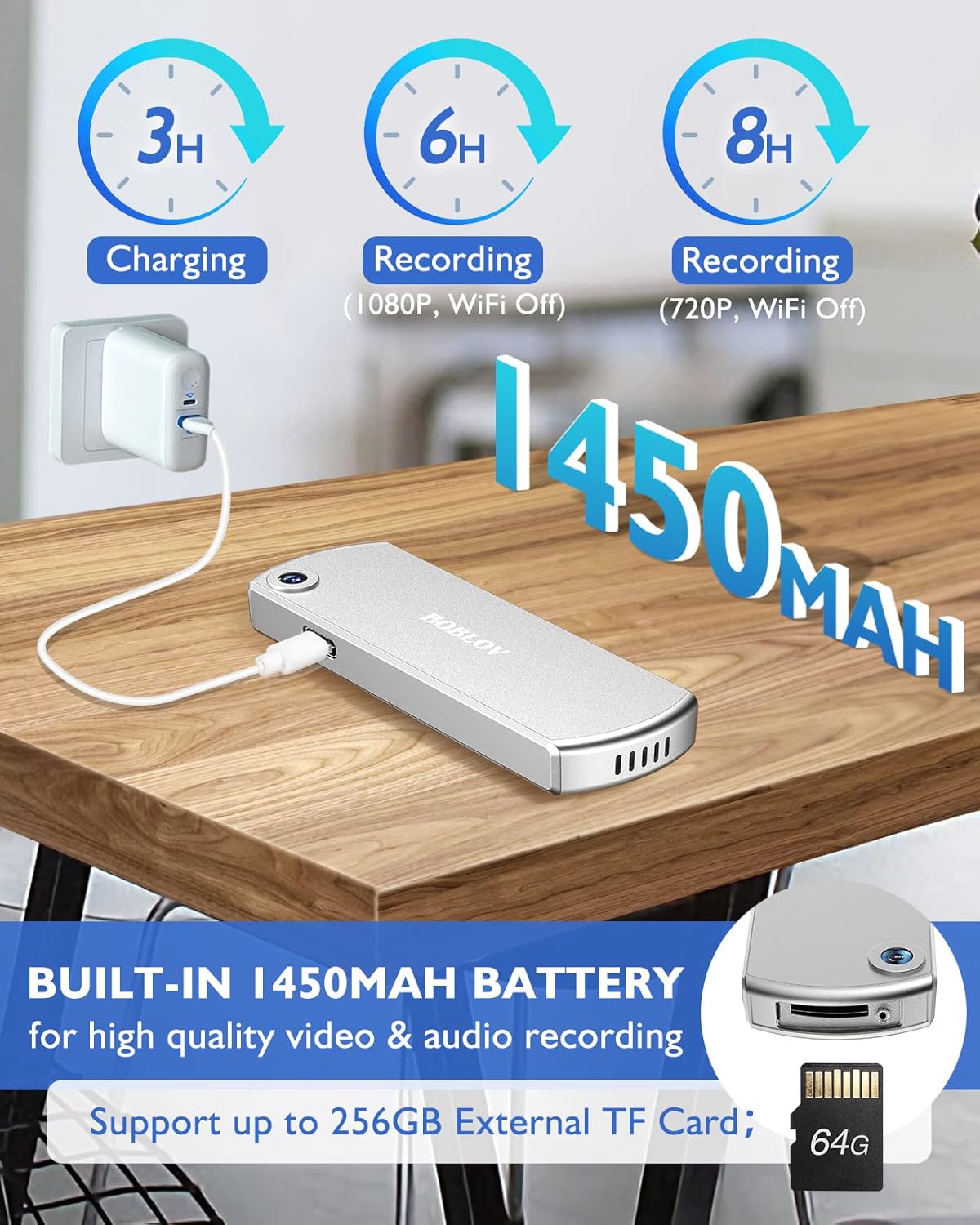
Imaxe: The BOBLOV W3 Body Camera being charged via a USB-C cable, highlighting the 1450mAh battery and charging times: 3 hours for full charge, 6 hours recording (1080P, WiFi Off), and 8 hours recording (720P, WiFi Off).
2. Inserting/Expanding Memory Card
The W3 Body Camera uses an external Micro SD card. A 64GB card is included and pre-installed.
- Localice a ranura da tarxeta de memoria na cámara.
- Use the included screwdriver to carefully unscrew the cover of the card slot.
- Insert or replace the Micro SD card (up to 256GB) into the slot with the contacts facing down.
- Securely fasten the card slot cover with the screwdriver.
3. Conexión da cámara
The camera offers two attachment options: a back magnetic clip and a brooch.
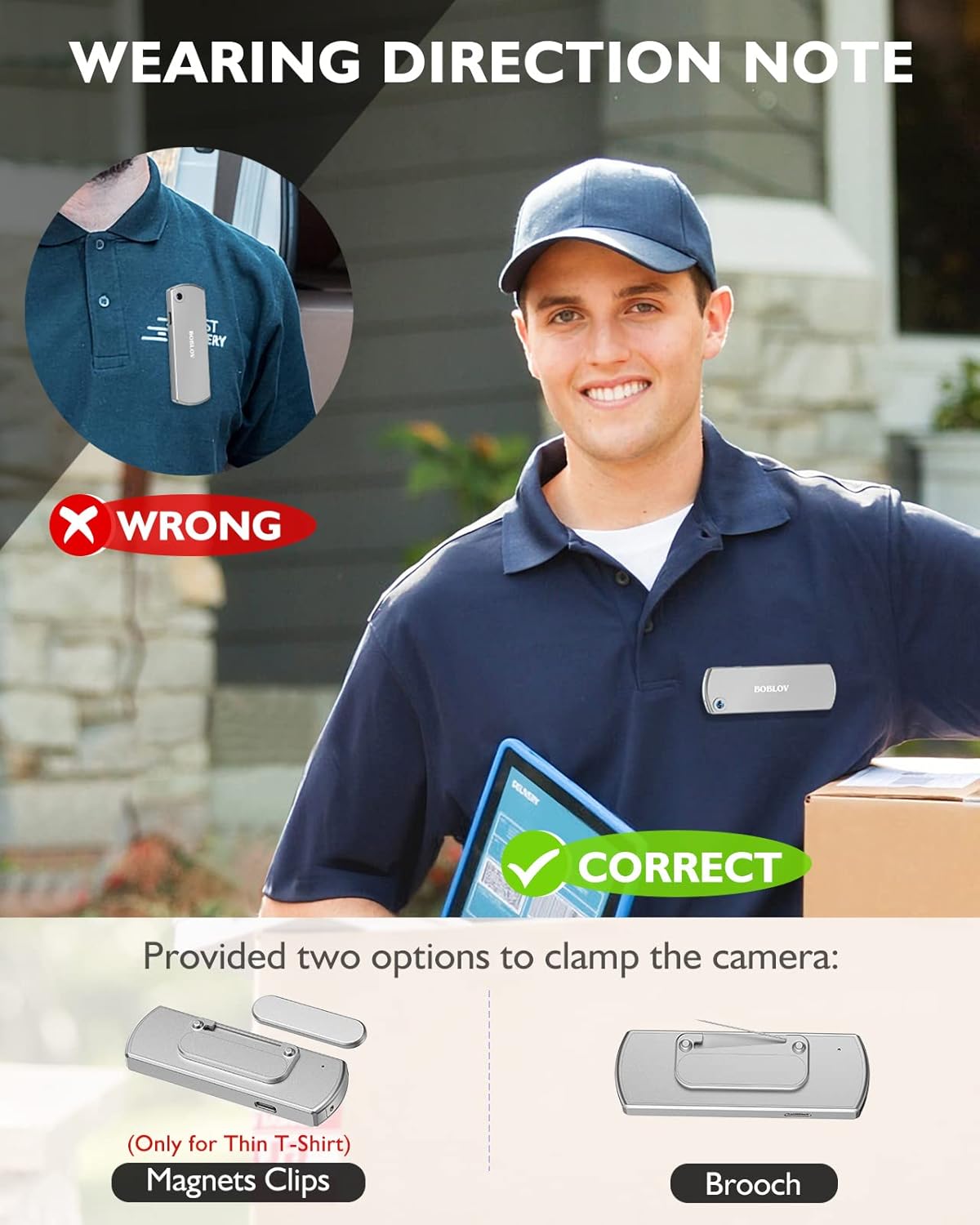
Imaxe: Illustration demonstrating correct and incorrect ways to wear the BOBLOV W3 Body Camera. It shows that magnetic clips are suitable for thin T-shirts, while a brooch provides a more secure attachment for other clothing types.
- Clip magnético: Attach the magnetic clip to the back of the camera. This is suitable for thin fabrics like T-shirts. Ensure the camera is securely held.
- Brooch: For more secure attachment or thicker clothing, use the provided brooch. Attach it to the camera's designated brooch point and then pin it to your clothing.
Instrucións de funcionamento
1. Acendido/apagado
- Encendido: Manteña premido o Power/Video Button for a few seconds until the indicator light illuminates.
- Apagado: Manteña premido o Power/Video Button again for a few seconds until the indicator light turns off.
2. Gravación de vídeo
- While the camera is powered on, press the Power/Video Button once to start video recording. The indicator light will flash to indicate recording is in progress.
- Preme o Power/Video Button again to stop video recording. The indicator light will return to a steady state.
- The camera supports 1080P and 720P video recording. With WiFi off, it can record for approximately 6 hours at 1080P or 8 hours at 720P on a full charge.
- Videos are saved in 5-minute fragments by default. The camera supports loop recording, overwriting older files cando a tarxeta de memoria estea chea.
3. Gravación de audio
- While the camera is powered on, press the Audio/WiFi Button once to start audio recording.
- Preme o Audio/WiFi Button de novo para deter a gravación de audio.
4. WiFi Function and App Connectivity
The BOBLOV W3 features WiFi connectivity, allowing you to manage files and change settings via a smartphone app.
- Activar o wifi: Manteña premido o Audio/WiFi Button for a few seconds to turn on the WiFi function. The WiFi indicator light will flash.
- Descarga a aplicación:
- For Android devices, download the DHiHZ aplicación.
- For iOS devices, download the Mini-XRcam aplicación.
- Conectar á cámara: On your smartphone, go to WiFi settings and connect to the camera's WiFi network (usually named "BOBLOV_W3_XXXX"). The default password is typically "12345678".
- Use App: Open the downloaded app to view vivir footage, reprodución de gravacións, descarga files e axusta a configuración da cámara.
- Desactivar o wifi: Manteña premido o Audio/WiFi Button de novo para apagar a wifi.

Imaxe: The BOBLOV W3 Body Camera wirelessly connected to a smartphone, illustrating the WiFi function for managing files, changing settings, and accessing features like video, audio, preview, playback, and download through the dedicated Android (DHiHZ) and iOS (Mini-XRcam) applications.
5. Conectando a un PC
You can connect the camera to a computer to manage recorded files e cambiar a configuración.
- Ensure the camera is powered ON before connecting to the PC.
- Conecta a cámara ao teu ordenador usando o cable USB-C fornecido.
- The camera will appear as a removable disk drive on your computer.
- You can then access, copy, delete, or upload recorded files. Some settings may also be configurable via a configuration file on the camera's storage.

Imaxe: The BOBLOV W3 Body Camera connected to a laptop via a USB-C cable, demonstrating how to manage recorded files and change settings. Icons for Playback, Delete, Upload, and Settings are shown, with a note to ensure the camera is powered ON for connection.
Mantemento
- Limpeza: Use a soft, dry cloth to clean the camera body. Do not use liquid cleaners or solvents.
- Almacenamento: Garde a cámara nun lugar fresco e seco, lonxe da luz solar directa e de temperaturas extremas.
- Coidado da batería: Para prolongar a duración da batería, evite descargala completamente con frecuencia. Cargue a cámara regularmente, mesmo se non a usa durante períodos prolongados.
- Tarxeta de memoria: Periodically back up important recordings from the Micro SD card to a computer. Format the Micro SD card regularly (e.g., once a month) to maintain optimal performance and prevent data corruption.
- Resistencia á auga: The camera has an IP65 waterproof rating, meaning it is protected against dust and low-pressure water jets. It is not designed for submersion.
Resolución de problemas
| Problema | Posible causa/solución |
|---|---|
| A cámara non se acende. | Battery may be depleted. Charge the camera for at least 3 hours. If the issue persists, try resetting the camera using a pin in the reset hole. |
| Camera gets hot when WiFi is on. | This is normal behavior for the camera when the WiFi function is active due to increased power consumption. |
| Cannot connect to WiFi via smartphone app. | Ensure WiFi is enabled on the camera. Check if you have downloaded the correct app (DHiHZ for Android, Mini-XRcam for iOS). Verify the WiFi password (default is "12345678"). Try restarting both the camera and your phone. |
| Camera stops recording unexpectedly. | The memory card may be full. The camera supports loop recording, but if the card is corrupted or too slow, it might cause issues. Try formatting the card or using a different high-speed Micro SD card. Battery may be low. |
| Non se pode acceder files no PC. | Ensure the camera is powered ON before connecting to the PC. Try a different USB-C cable or USB port. |
Especificacións
| Característica | Detalle |
|---|---|
| Marca | BOBLOV |
| Nome do modelo | W3 |
| Número de modelo | B-W3 |
| Tecnoloxía de conectividade | Wi-Fi |
| Características especiais | Lixeiro |
| Dispositivos compatibles | Android/iOS Phone |
| Fonte de enerxía | Alimentado por batería |
| Resolución de captura de vídeo | 1080 p |
| Cor | Prata |
| Tipo de montaxe | Montaxe en superficie |
| Factor de forma | Compacto |
| Material do recinto | Metal |
| Tipo de alerta | Só Movemento |
| Fonte de luz | Infravermello |
| Clasificación impermeable | IP65 |
| Método de control | Aplicación |
| Wattage | 3.7 vatios-hora |
| Visión Nocturna | Cor da noite |
| Dimensións do elemento | 9 x 3 x 1.5 centímetros |
| Capacidade da batería | 1450 mAh (integrada) |
| Recording Time (1080P, WiFi Off) | Aprox. 6 horas |
| Recording Time (720P, WiFi Off) | Aprox. 8 horas |
| Tempo de carga | Aprox. 3 horas |
| Memoria externa | Micro SD Card, up to 256GB (64GB included) |
| Peso neto | 60 g / 2 oz |
Garantía e Soporte
BOBLOV provides a two-year warranty for high-value products, including the W3 Body Camera. For any technical assistance, troubleshooting, or warranty claims, please contact BOBLOV customer service.
Please refer to the official BOBLOV website or your purchase documentation for the most up-to-date contact information and warranty details.