
1. Introdución
Grazas pola compraasing the Blaupunkt PB10DB Bluetooth Karaoke Speaker. This manual provides essential information for the safe and efficient operation of your device. Please read it thoroughly before use and keep it for future reference. The PB10DB is a portable party speaker designed for high-quality audio playback and karaoke, featuring Bluetooth connectivity, USB, and AUX inputs.
2. Información de seguridade
Para garantir un funcionamento seguro e evitar danos, observe as seguintes precaucións:
- Non expoñas o dispositivo a temperaturas extremas, luz solar directa nin humidade elevada.
- Keep the speaker away from water and other liquids. The product is indicated as waterproof, but avoid submerging it.
- Do not attempt to disassemble or modify the speaker. Repairs should only be performed by qualified personnel.
- Use só os accesorios de carga especificados.
- Asegúrese de que haxa unha ventilación axeitada arredor do altofalante durante o seu uso.
- Evite escoitar a volumes excesivamente altos durante períodos prolongados para evitar danos auditivos.
3. Contido do paquete
Comprobe que todos os elementos estean presentes no paquete:
- Blaupunkt PB10DB Bluetooth Karaoke Speaker
- Adaptador de corrente/cable de carga
- Manual de usuario (este documento)
- Microphone (if included in your specific package)
4. Produto rematadoview
Familiarize yourself with the various parts of your Blaupunkt PB10DB speaker.
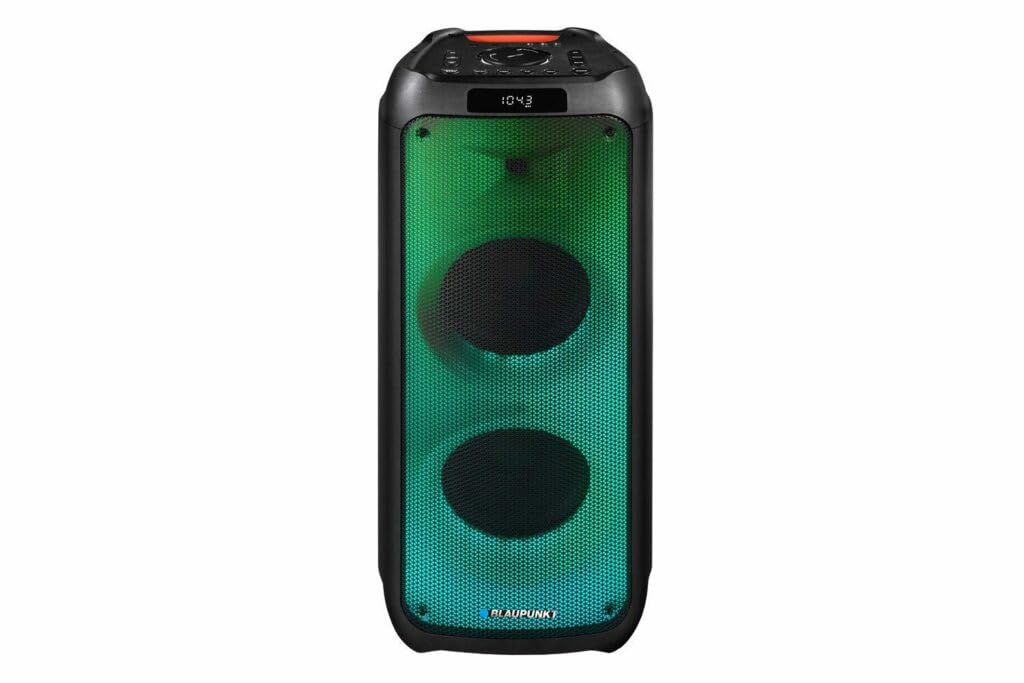
Figura 1: Fronte view of the Blaupunkt PB10DB speaker, showcasing the dual speaker grilles and dynamic LED lighting. The top panel features a display and control buttons.

Figura 2: En ángulo view of the Blaupunkt PB10DB speaker, highlighting its portable design and the side profile.
Controls and Ports (Typical Layout)
- Botón de encendido: Activa/desactiva o altofalante.
- Botón de modo: Switches between Bluetooth, USB, AUX, and FM radio modes.
- Control de volume: Axusta o volume principal.
- Botón Reproducir/Pausa: Controla a reprodución multimedia.
- Botóns de pista anterior/seguinte: Navega polas pistas.
- Entrada de micrófono (MIC IN): For connecting a wired microphone for karaoke.
- Porto USB: For playing music from a USB drive or charging external devices.
- Entrada AUX (3.5 mm): For connecting external audio devices via an audio cable.
- Porto de carga: Para conectar o adaptador de corrente para cargar o altofalante.
5. Configuración
5.1 Carga do altofalante
- Connect the provided power adapter to the charging port on the speaker.
- Enchufe o adaptador nunha toma de corrente adecuada.
- O indicador luminoso de carga acenderase (a cor pode variar) para indicar que o altofalante está a cargar.
- Once fully charged, the indicator light may change color or turn off. Disconnect the charger.
A full charge typically takes several hours and provides approximately 8 hours of playback time.
5.2 Acendido/Apagado
- Para acender: Press and hold the Power button for a few seconds until the display lights up and you hear an audible prompt.
- Para apagar: Press and hold the Power button again for a few seconds until the display turns off and you hear an audible prompt.
6. Instrucións de funcionamento
6.1 Emparejamento Bluetooth
- Ensure the speaker is powered on and in Bluetooth mode. If not, press the Mode button until "Bluetooth" or a similar indicator appears on the display. The speaker will enter pairing mode, indicated by a flashing Bluetooth icon or LED.
- No teu dispositivo móbil (teléfono intelixente, tableta, etc.), activa o Bluetooth e busca os dispositivos dispoñibles.
- Select "Blaupunkt PB10DB" from the list of found devices.
- Once paired, the speaker will emit an audible confirmation, and the Bluetooth indicator will stop flashing.
- Agora podes reproducir audio desde o teu dispositivo a través do altofalante.
O altofalante tentará reconectarse automaticamente co último dispositivo emparellado ao acendelo.
6.2 Función de karaoke
- Connect a wired microphone (not always included) to the MIC IN port on the speaker.
- Ensure the microphone is switched on (if it has a power switch).
- Play your desired karaoke track via Bluetooth, USB, or AUX.
- Adjust the microphone volume and echo effects (if available on the speaker) using the dedicated controls.
Reprodución por USB 6.3
- Inserir unha unidade flash USB que conteña son MP3 files no porto USB.
- Press the Mode button to switch to USB mode. The speaker will automatically begin playing music from the USB drive.
- Use the Play/Pause and Previous/Next Track buttons to control playback.
6.4 Entrada AUX
- Conecte un extremo dun cable de audio de 3.5 mm (non incluído) ao porto AUX IN do altofalante.
- Connect the other end of the cable to the headphone jack or audio output of your external audio device.
- Prema o botón Modo para cambiar ao modo AUX.
- Controla a reprodución e o volume desde o teu dispositivo de son externo.
7. Mantemento
7.1 Limpeza
- Always power off the speaker and disconnect it from the power source before cleaning.
- Use un pano suave e seco para limpar o exterior do altofalante.
- Do not use abrasive cleaners, waxes, or solvents, as these may damage the finish.
7.2 Almacenamento
- Garde o altofalante nun lugar fresco e seco, lonxe da luz solar directa e de temperaturas extremas.
- Se a gardas durante un período prolongado, cárgaa periodicamente (por exemplo, cada 3 meses) para mantelo en bo estado.
8 Solución de problemas
| Problema | Causa posible | Solución |
|---|---|---|
| O altofalante non se acende. | A batería está esgotada. | Charge the speaker using the provided power adapter. |
| Non se escoita son do altofalante. | O volume está demasiado baixo ou silenciado. Modo de entrada incorrecto. | Increase volume. Press the Mode button to select the correct input (Bluetooth, USB, AUX). |
| Falla o emparellamento Bluetooth. | O altofalante non está en modo de emparellamento. O dispositivo está demasiado lonxe. Interferencias. | Ensure speaker is in Bluetooth pairing mode. Move device closer to speaker. Turn off other Bluetooth devices. |
| O micrófono non funciona. | Microphone not connected properly or switched off. Microphone volume too low. | Check microphone connection. Ensure microphone is powered on. Adjust microphone volume. |
| A reprodución por USB non funciona. | USB drive not formatted correctly or unsupported file tipos. | Ensure USB drive is formatted to FAT32 and contains MP3 fileProba cunha unidade USB diferente. |
9. Especificacións
| Nome do modelo: | PB10DB |
| Marca: | BLAUPUNKT |
| Tecnoloxía de conectividade: | Auxiliar, Bluetooth, USB |
| Potencia máxima de saída do altofalante: | 1000 vatios |
| Modo de saída de audio: | Estéreo |
| Tipo de montaxe: | Soporte de mesa |
| Material: | Metal e plástico |
| Tipo de altofalante: | Tweeter |
| Característica especial: | Música |
| Usos recomendados: | For music player |
| Cor: | Azul |
| Impermeable: | Verdade |
| Método de control: | Toca |
| Diámetro do tweeter: | 4 Centímetros |
| Duración media da batería: | 8 horas |
| Dispositivos compatibles: | Portátil, Smartphone |
| Fonte de enerxía: | Alimentado por batería |
| Peso do artigo: | 105 gramos |
| Dimensións do produto (L x W x H): | 24 x 69 x 2.5 cm |
10. Garantía e soporte
Blaupunkt products are designed and manufactured to the highest quality standards. For detailed warranty information, please refer to the warranty card included with your product or visit the official Blaupunkt websitio.
For technical support, troubleshooting assistance, or service inquiries, please contact Blaupunkt customer support through their official channels.
- Oficial Websitio: www.blaupunkt.com
- Atención ao cliente: Refer to your regional Blaupunkt websitio para os detalles de contacto.