
Introdución
This manual provides essential information for the proper installation, operation, and maintenance of your TELE System TS6105 DVB-T2 HEVC Digital Terrestrial Decoder. Please read these instructions carefully before using the device to ensure optimal performance and safety.
The TS6105 decoder is designed to receive DVB-T2 HEVC 10-bit digital terrestrial television broadcasts, offering Full HD resolution up to 1080p@60Hz. It includes features such as automatic channel scanning (AUTOSCAN), an Electronic Program Guide (EPG), and multimedia playback capabilities via USB.
Contido do paquete
Asegúrate de que todos os elementos estean presentes no paquete:
- TELE System TS6105 DVB-T2 HEVC Digital Terrestrial Decoder
- Control remoto
- Adaptador de alimentación
- Manual de usuario (este documento)

This image shows the compact design of the TS6105 decoder, highlighting the TELE System logo, model number TS6105 DVB-T2 HEVC, Dolby Audio, and HDMI branding on the front, with ventilation on the side.
Configuración
1. Conexión do descodificador
Before connecting, ensure your television and the decoder are turned off.

This image displays the rear panel of the TS6105 decoder, featuring the ANT IN, ANT OUT, COAXIAL, HD OUT (HDMI), SCART, and DC IN ports for power and signal connections.
- Conexión antena: Conecte o cable da antena terrestre ao FORMIGA EN port on the rear of the decoder. If you wish to loop the signal to another device, connect a coaxial cable from the FORMIGA port to the next device.
- Conexión de TV (HDMI): For the best picture quality, connect an HDMI cable from the SAÍDA HD port on the decoder to an available HDMI input on your television. Select the corresponding HDMI input on your TV.
- Conexión de TV (SCART): If your TV does not have an HDMI input, connect a SCART cable from the SCART porto SCART do descodificador á entrada SCART do televisor.
- Conexión de alimentación: Conecte o adaptador de enerxía ao DC IN porto do descodificador e, a seguir, conecte o adaptador a unha toma de corrente.
2. First-Time Installation and Channel Scan
After connecting the decoder and turning on your TV, switch on the decoder. The first time you use it, an installation wizard will guide you through the initial setup.
- Selección do idioma: Choose your preferred language using the remote control's navigation buttons and press OK.
- Country Selection: Select your country. This helps the decoder apply the correct regional settings for channel scanning.
- AUTOSCAN: The decoder will automatically initiate the AUTOSCAN function. This process searches for all available digital terrestrial channels and organizes them logically using the LCN (Logical Channel Number) system. This may take several minutes.
- Finalización: Once the scan is complete, the decoder will save the channels and display the first available channel.
Operating the Decoder
Control remoto rematadoview
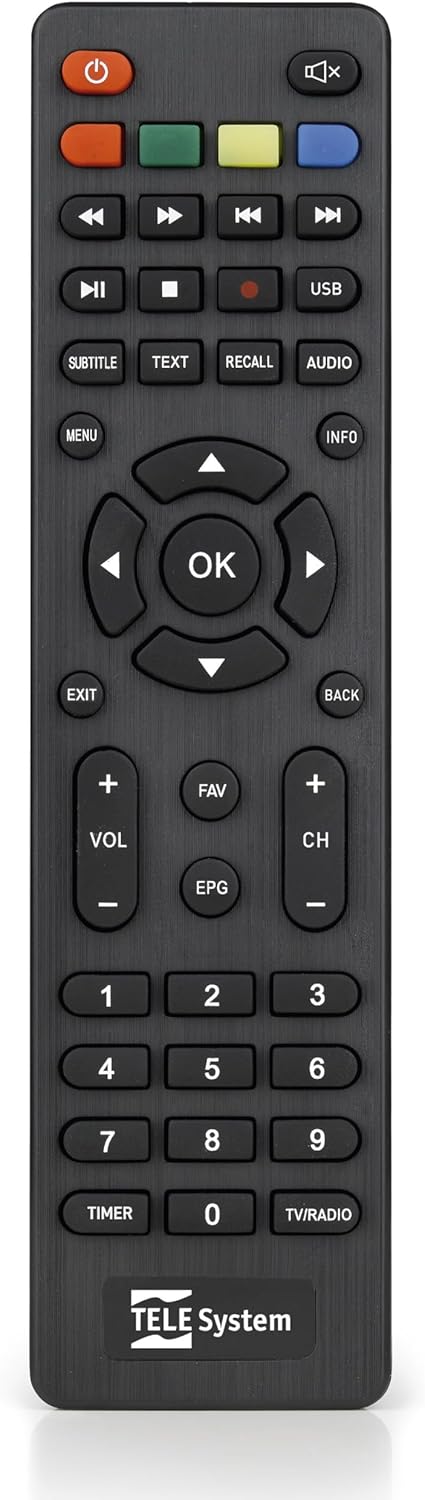
This image presents the remote control for the TS6105 decoder, featuring power, mute, channel, volume, navigation, EPG, media playback, and numeric buttons for comprehensive control.
- Botón de encendido (U): Turns the decoder on or off (standby).
- CH +/-: Cambia de canle cara arriba ou cara abaixo.
- VOL +/-: Axusta o nivel de volume.
- OK: Confirms selections in menus or displays channel information.
- MENÚ: Accede ao menú principal para a configuración e as funcións.
- EXIT/BACK: Exits the current menu or returns to the previous screen.
- EPG: Abre a Guía electrónica de programas.
- TEXTO: Activates Teletext.
- SUBTÍTULO: Toggles subtitles on/off or selects subtitle language.
- USB: Accesses the multimedia player.
- Botóns de cores (vermello, verde, amarelo, azul): Functionality varies depending on the current menu or EPG.
Guía electrónica de programas (EPG)
Preme o EPG botón do control remoto para view the Electronic Program Guide. The EPG provides information about current and upcoming programs for all channels. You can navigate through channels and time slots to see program details.
Multimedia Player (USB)
O TS6105 pode reproducir contido multimedia files desde un dispositivo de almacenamento USB.
- Insert a USB drive into the USB port on the decoder.
- Preme o USB button on the remote control or navigate to the multimedia section via the MENÚ.
- Select the type of media you wish to play (Music, Photo, Video).
- Explora o teu files e prema OK para xogar.
Pause TV / Timeshift
The Pause TV / Timeshift function allows you to pause live television and resume viewing later. This feature requires a USB storage device connected to the decoder.
- Mentres ves un programa, preme o botón PAUSA button (usually represented by two vertical bars) on the remote control.
- Para retomar a reprodución, prema o XOGAR button (usually represented by a right-pointing triangle).
- You can also fast-forward or rewind using the respective buttons.
Mantemento
Limpeza
To clean the decoder, ensure it is unplugged from the power outlet.
- Use un pano suave e seco para limpar as superficies exteriores.
- Do not use liquid cleaners, aerosols, or abrasive materials, as these can damage the device.
- Manteña as aberturas de ventilación libres de po e obstrucións.
Actualizacións de software
Comprobe periodicamente o fabricante website for available software updates. Updates can improve performance, add new features, or resolve issues. Follow the instructions provided with the update file coidadosamente.
Resolución de problemas
If you encounter problems with your decoder, refer to the following common issues and solutions:
- Sen imaxe/son:
- Ensure all cables (antenna, HDMI/SCART, power) are securely connected.
- Verify that your TV is set to the correct input source (e.g., HDMI 1, AV).
- Check if the decoder is powered on and not in standby mode.
- Non se atoparon canles:
- Perform an AUTOSCAN again from the menu.
- Check your antenna connection and ensure the antenna is properly positioned and functional.
- Verify that your region has DVB-T2 HEVC broadcasts.
- O control remoto non responde:
- Substitúe as pilas do control remoto.
- Ensure there are no obstructions between the remote control and the decoder's IR sensor.
- Picture Freezing or Pixelation:
- This often indicates a weak or unstable signal. Check your antenna connection and position.
- Try rescanning channels.
Especificacións
- Modelo: TS6105
- Marca: Sistema TELE
- Cor: Negro
- Tipo de sintonizador: DVB-T2 HEVC 10-bit
- Resolución de vídeo: Up to 1080p@60Hz (Full HD)
- Conectividade: HDMI, USB, SCART, Coaxial (ANT IN/OUT)
- Características: AUTOSCAN, LCN, EPG, Pause TV/Timeshift, Multimedia Player (USB), Teletext, Subtitle Support
- Número de modelo: 21005353
Garantía e Soporte
Información da garantía
This product comes with a manufacturer's warranty of 2 years. Please retain your proof of purchase for warranty claims. The warranty covers defects in materials and workmanship under normal use. It does not cover damage caused by misuse, accidents, unauthorized modifications, or improper installation.
Atención ao cliente
For technical assistance, troubleshooting beyond this manual, or warranty inquiries, please contact TELE System customer support. Refer to the official TELE System website or product packaging for the most up-to-date contact information.