
1. Introdución
This manual provides comprehensive instructions for the installation, operation, and maintenance of your REVODATA 5MP POE Starlight IP Camera, model I706-P-FC-HS. This camera is designed for indoor security surveillance, offering high-resolution imaging, full-color night vision, and flexible power options. Please read this manual thoroughly before using the product to ensure proper setup and functionality.
2. Contido do paquete
Verifique que todos os elementos que se indican a continuación estean incluídos no seu paquete. Se falta algún elemento ou está danado, póñase en contacto co servizo de atención ao cliente.
- Cámara x 1
- Screws set x 1
- Manual de usuario x 1

Image: Contents of the product package, showing the camera, user manual, and mounting screws.
3. Produto rematadoview
3.1 Características principais
- Imaxe HD de 5MP: Equipped with a 1/3-inch 5.0 megapixel CMOS sensor, providing clear and smooth video at up to 25 frames per second.
- Full Color Starlight Night Vision: Offers 24-hour color monitoring, presenting color images even in low-light environments.
- Mini 4mm Lens: Compact design with a 4mm lens, suitable for discreet installation.
- POE Support: Supports 48V 802.3af Power Over Ethernet (POE) for simplified wiring, or can be powered by a 12V 2A power supply (not included) as a non-POE network camera.
- H.265/H.264 Compression: Utilizes advanced video compression to save storage space and bandwidth.
- Detección de movemento: Features motion detection with alarm notification capabilities.
- P2P Remote View: Allows remote viewing and playback of surveillance footage via mobile clients (iOS, Android) using the "Linklemo" app or VMS software for Windows computers.
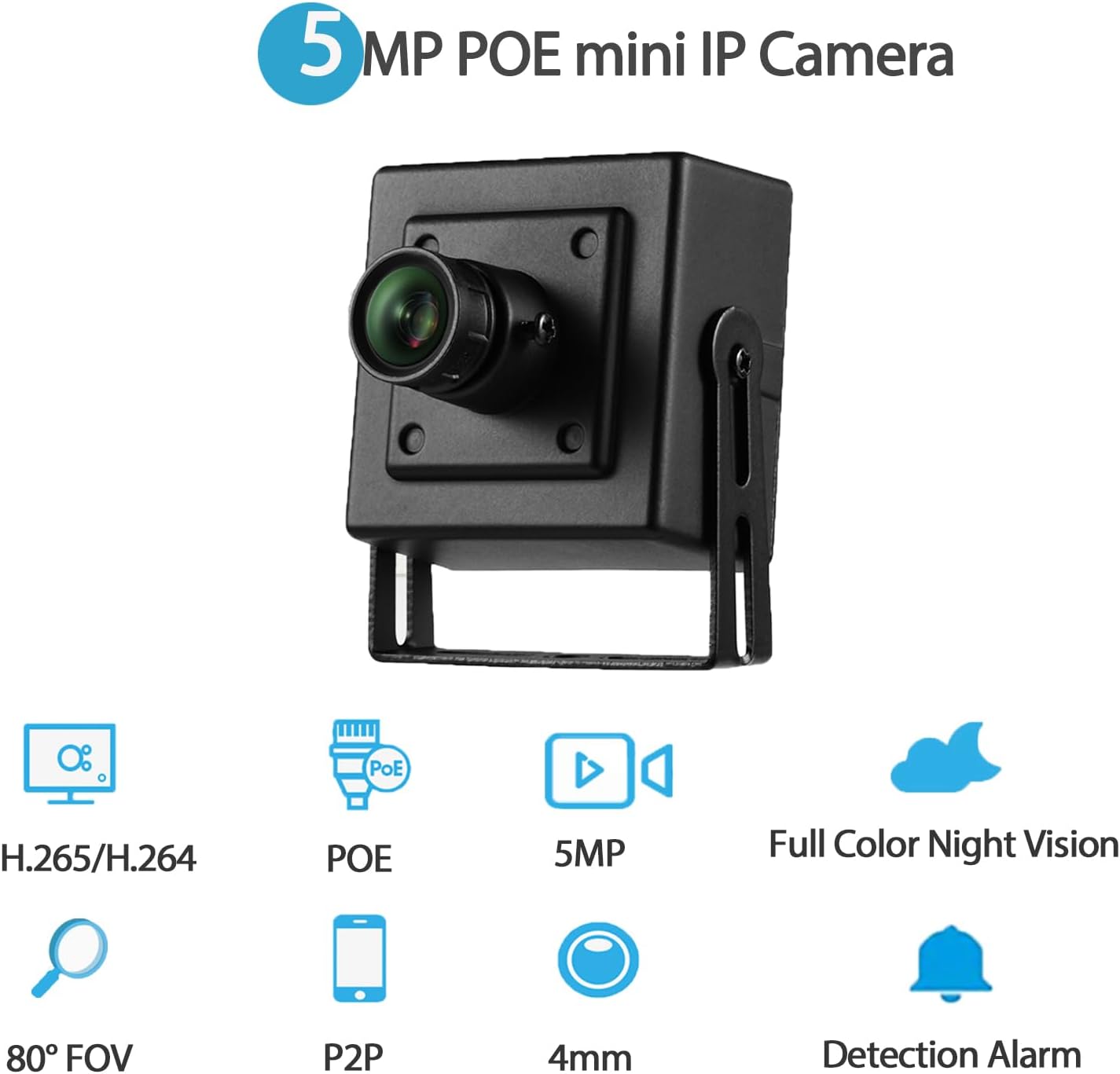
Imaxe: Máis deview of the camera's main features, including 5MP resolution, POE, full-color night vision, and motion detection.
3.2 Compoñentes da cámara
- Carcasa metálica: Durable housing for the camera.
- Lente de 4 mm: Fixed focal length lens for a wide field of view.
- Soportes de montaxe: Adjustable brackets for flexible installation.
- Screw Hole: Para unha montaxe segura.
- Porto RJ45: For Ethernet connection and POE power (48V version).
- Porto de alimentación DC: Auxiliary power input (supports 12V 2A).
Imaxe: Detallada view of the camera's physical components and dimensions.
4. Instrucións de configuración
4.1 Instalación física
- Escolle unha localización: Select an indoor location that provides the desired viewing angle and is within reach of an Ethernet cable. The camera is suitable for various indoor environments such as bedrooms, garages, living rooms, offices, and study rooms.
- Montar a cámara: Use the included screws and mounting brackets to securely attach the camera to a wall or other suitable surface. Adjust the bracket to achieve the optimal camera orientation.
4.2 Acendido da cámara
A cámara admite dúas opcións de alimentación:
- Alimentación por Ethernet (POE): Connect an Ethernet cable from a 48V 802.3af POE-enabled switch or NVR directly to the camera's RJ45 port. This method provides both power and data connectivity through a single cable.
- Auxiliary DC Power: If POE is not available, connect a 12V 2A DC power adapter (not included) to the camera's DC power port. An Ethernet cable will still be required for data transmission.

Image: Illustration of POE connectivity, simplifying power and data wiring.
4.3 Conexión de rede
Connect the camera to your local network using an Ethernet cable plugged into the RJ45 port. Ensure your network provides internet access for remote viewcaracterísticas de ing.
5. Instrucións de funcionamento
5.1 Instalación de software
Para view and manage your camera, install the appropriate software:
- Aplicación móbil: Download and install the "Linklemo" app from the App Store (iOS) or Google Play Store (Android).
- Software para PC: For Windows computers, use the VMS software. Note that VMS software is not available for MAC OS or Linux.
5.2 Remoto Viewing (P2P)
The camera supports P2P (Peer-to-Peer) cloud functionality, allowing you to view vivir footage and playback recordings remotely from your mobile device or computer.
- Open the "Linklemo" app or VMS software.
- Follow the on-screen instructions to add your camera using its unique ID or QR code.
- Once added, you can access the camera's live feed and recorded data from anywhere with an internet connection.

Imaxe: Examples of remote viewing through the Linklemo mobile app and VMS desktop software.

Image: P2P remote viewing on multiple devices.
5.3 Motion Detection Setup
The camera can be configured to detect motion and send alerts.
- Access the camera settings through the "Linklemo" app or VMS software.
- Navigate to the motion detection settings.
- Enable motion detection and configure sensitivity, detection zones, and notification preferences (e.g., push notifications to your phone).

Image: Motion detection alarm notification on a smartphone.
5.4 Modos de visión nocturna
The camera features full-color starlight night vision, providing clear color images even in very low light conditions (minimum illumination: 0.01Lux @(F1.2,AGC ON)).

Image: Full-color night vision capability in a low-light outdoor setting.

Image: Real picture comparison of day and night vision.
6. Mantemento
- Limpeza: Limpe con coidado a lente e o corpo da cámara cun pano suave e seco. Evite o uso de produtos químicos agresivos ou materiais abrasivos que poidan danar a cámara.
- Actualizacións de firmware: Comprobe periodicamente o fabricante website or the "Linklemo" app for available firmware updates to ensure optimal performance and security.
- Xestión de cables Ensure all cables are securely connected and not exposed to potential damage or interference.
7 Solución de problemas
| Problema | Causa posible | Solución |
|---|---|---|
| Sen fonte de imaxes/vídeos | No power; Network connection issue; Incorrect software settings. | Check power supply (POE or 12V adapter). Verify Ethernet cable connection. Ensure camera is added correctly in Linklemo app/VMS. |
| Mala calidade de imaxe | Lente suxa; iluminación insuficiente; problemas de ancho de banda da rede. | Clean the camera lens. Ensure adequate lighting for optimal performance. Check network speed and reduce video quality settings if necessary. |
| A detección de movemento non funciona | Settings not configured; Sensitivity too low; Network issues preventing notifications. | Verify motion detection is enabled and configured in the app/software. Adjust sensitivity. Check network connectivity for notifications. |
| Cannot connect remotely | No internet access; P2P service issues; Firewall restrictions. | Ensure the camera and your viewing device have internet access. Check P2P status in the app. Configure router/firewall to allow camera traffic if necessary. |
8. Especificacións
| Nome do modelo | I706-P-FC-HS |
| Resolución de captura de vídeo | 5 MP (2560 x 1920) |
| Lente | 4 mm |
| Velocidade de cadros | 25 fps |
| Visión Nocturna | Full Color Starlight Night Vision (Min illumination: 0.01Lux @(F1.2,AGC ON)) |
| Compresión de vídeo | H.265/H.264 |
| Conectividade | Ethernet (LAN) |
| Fonte de enerxía | 48V 802.3af POE or 12V 2A DC (adapter not included) |
| Tipo de controlador | Android, iOS, Windows |
| Tipo de montaxe | Soporte de parede |
| Uso interior/exterior | Interior |
| Campo de View | 80 graos |
| Material | Metal |
| Dimensións do produto | 1.77 x 1.57 x 2.09 polgadas |
| Peso do elemento | 6.4 onzas |
| Clasificación de protección internacional | IP67 (Note: Product description states Indoor/Outdoor Usage: Indoor, but IP67 rating suggests outdoor capability. Follow manufacturer's primary recommendation for indoor use.) |
9. Garantía e soporte
For warranty information and technical support, please refer to the official REVODATA website or contact their customer service directly. Details are typically provided on the product packaging or the manufacturer's official support channels.
Manufacturer: REVODATA