
1. Introdución
Thank you for choosing the WORKPRO 6-inch 1080W Dual Action Random Orbital Polisher. This manual provides essential information for the safe and effective operation, maintenance, and troubleshooting of your new polisher. Please read this manual thoroughly before first use and keep it for future reference. This tool is designed for various polishing and waxing applications, including car detailing, floor polishing, and metal polishing.
2. Información de seguridade
Siga sempre as precaucións de seguridade básicas ao usar electrodomésticos para reducir o risco de incendio, descarga eléctrica e lesións persoais.
- Usar o equipo de protección individual axeitado, incluíndo lentes e luvas de seguridade.
- Asegúrate de que a área de traballo estea limpa, ben iluminada e libre de obstáculos.
- Do not operate the polisher in damp ou condicións húmidas.
- Manteña os nenos e os espectadores afastados mentres manexa a ferramenta.
- Unplug the polisher from the power source before making any adjustments, changing accessories, or performing maintenance.
- Do not force the tool; use the correct speed and pressure for the application.
- Inspeccione o cable de alimentación para detectar danos antes de cada uso.
3. Contido do paquete
Verifique que todos os elementos que se indican a continuación estean incluídos no seu paquete. Se falta algún elemento ou está danado, póñase en contacto co servizo de atención ao cliente.
- 1 × Polisher Machine
- 1 × Auxiliary Handle
- 1 × Backing Pad
- 1 × Woolen Buffer Pad
- 6 × Foam Pads (various types for different applications)
- 2 × Replaceable Carbon Brushes
- 1 × Hex Key
- 3 × Hex Head Bolts
- 1 × Towel

Figura 3.1: Compoñentes incluídos
4. Características do produto
The WORKPRO Buffer Polisher is engineered for efficiency and user comfort.
- 6 Variable Speed Control: Adjust speeds from 1400-5000 RPM to match project requirements, allowing for precise control during waxing and polishing.

Figure 4.1: Polisher Components Overview
- Motor de alto rendemento: Equipado cun 9 amp, 1080 watt motor and 15mm dual action orbital motion for powerful and efficient operation. Heat-resistant copper wire ensures longer working time.

Figure 4.2: High-Performance Motor
- Deseño ergonómico: Features a comfortable grip hood and an auxiliary handle for non-slip control. The switch-locking mechanism reduces hand fatigue during extended use.

Figura 4.3: Deseño ergonómico
- Dual Action Orbital Motion: Provides high security and allows for polishing without glare, ensuring a smooth and even finish.

Figure 4.4: Dual Action Mechanism
5. Configuración
- Fixar a asa auxiliar: Secure the auxiliary handle to the polisher using the provided hex head bolts and hex key. Ensure it is firmly tightened for safe operation.
- Install the Backing Pad: Align the backing pad with the spindle on the polisher and screw it on securely.
- Attach Polishing Pads: The foam pads and woolen buffer pad attach to the backing pad via hook-and-loop fasteners. Select the appropriate pad for your task (e.g., foam pads for compounding/polishing, woolen pad for buffing).
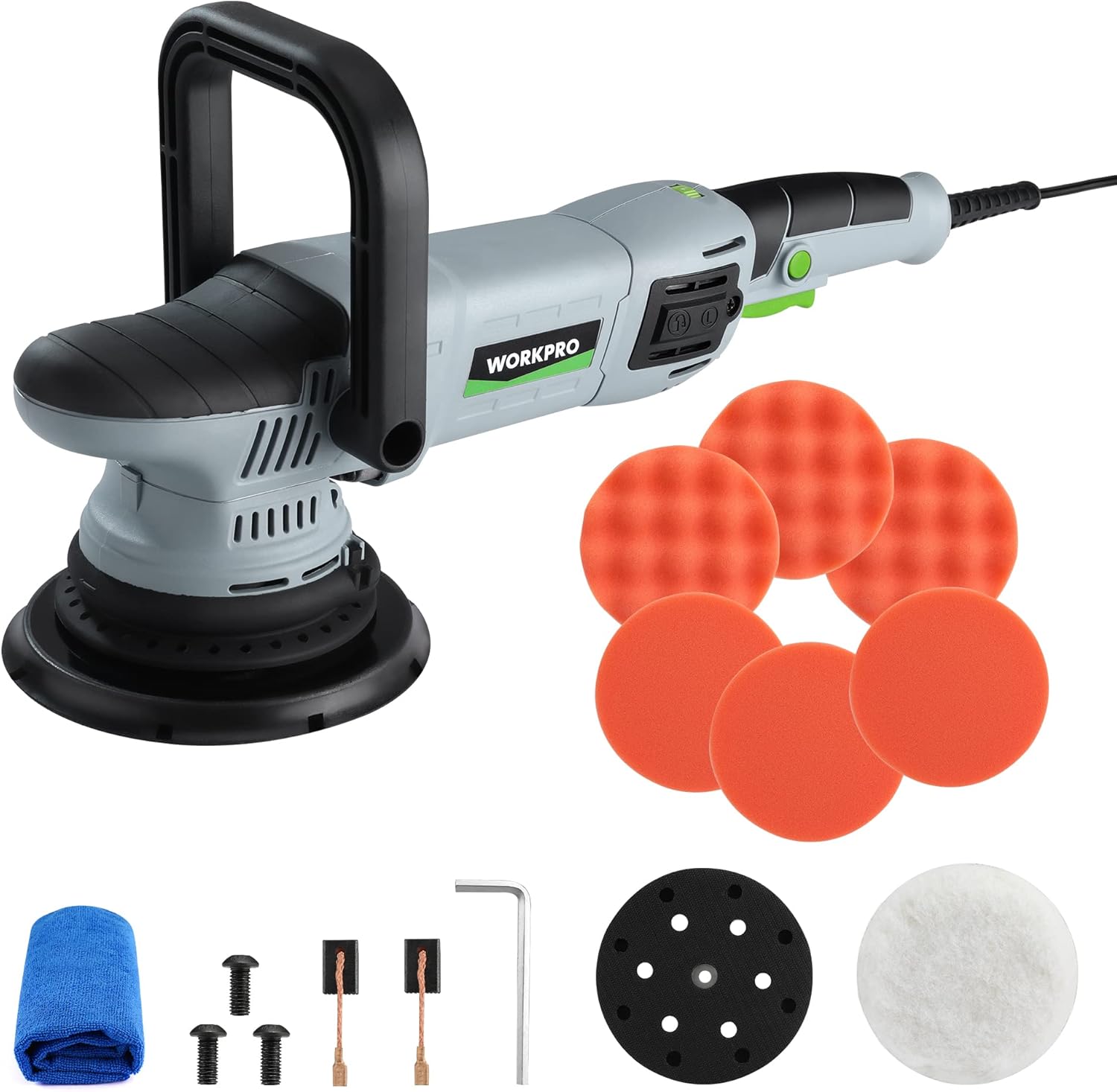
Figure 5.1: Polisher Setup
6. Instrucións de funcionamento
This section details the proper use of your WORKPRO Buffer Polisher for various applications.
- Encendido/apagado: Plug the polisher into a suitable power outlet. Press the On/Off trigger to start the tool.
- Using the Switch Locking Mechanism: For continuous operation, press the lock button located near the trigger after starting the polisher. This will keep the tool running without needing to hold the trigger. Press the trigger again to release the lock and stop the tool.

Figure 6.1: Trigger and Lock Button
- Velocidade de axuste: Use the 6-variable speed adjustor dial to select the desired RPM (1400-5000 RPM). Lower speeds are generally used for waxing and spreading compounds, while higher speeds are for polishing and buffing.

Figure 6.2: Speed Adjustor Dial
- Métodos de aplicación: The polisher can be used with either the auxiliary handle for two-handed control or by gripping the main body for single-handed operation, depending on the task and user preference.

Figura 6.3: Múltiples métodos de control
- Uso xeral: Apply a small amount of compound or wax directly to the pad or the surface. Start the polisher at a low speed to spread the product, then increase speed as needed for polishing or buffing. Maintain even pressure and move the polisher in overlapping passes.

Figura 6.4: Ampla gama de aplicacións
Video 6.1: WORKPRO Dual Action Buffer Polisher Kit in action, demonstrating variable speed control, switch locking mechanism, and various polishing applications on cars, tiles, and wood.
7. Mantemento
Un mantemento regular garante a lonxevidade e o rendemento óptimo da súa pulidora.
- Limpeza: After each use, wipe down the polisher with a clean, dry cloth. Remove any residue from the backing pad and ensure ventilation slots are clear.

Figure 7.1: Ventilation Slots
- Substitución da escobilla de carbono: The carbon brushes are wear items and will need periodic replacement. When the tool's performance decreases or it stops working, check the carbon brushes. To replace, unscrew the carbon brush covers on the side of the motor housing, remove the old brushes, and insert new ones. Ensure the brushes are seated correctly before replacing the covers.

Figure 7.2: Carbon Brush Replacement
- Coidado das almofadas: Clean polishing pads thoroughly after each use to remove product residue. This prolongs their life and maintains polishing effectiveness.
8 Solución de problemas
| Problema | Causa posible | Solución |
|---|---|---|
| O pulidor non arranca. | No power supply; damaged cord; worn carbon brushes. | Check power connection; inspect cord for damage; replace carbon brushes. |
| Reduced power or erratic operation. | Worn carbon brushes; motor overheating; excessive pressure. | Replace carbon brushes; allow tool to cool; reduce pressure. |
| Vibracións ou ruídos excesivos. | Loose backing pad; damaged pad; internal component issue. | Tighten backing pad; replace damaged pad; contact customer support. |
| Malos resultados de pulido. | Incorrect pad type; insufficient product; improper technique. | Use appropriate pad; apply sufficient product; review instrucións de funcionamento. |
9. Especificacións
| Atributo | Valor |
|---|---|
| Número de modelo | W125163AE |
| Fonte de enerxía | Eléctrico con cable |
| Voltage | 12 voltios |
| Ampera | 9 Amps |
| Wattage | 1080 vatios |
| Velocidade | 1400-5000 RPM (variable) |
| Peso do elemento | 7.41 libras (3.37 quilogramos) |
| Dimensións do paquete | 16.97 x 7.6 x 6.69 polgadas |
| Material | Metal, Plástico |
| Cor | Gris, Negro |
10. Garantía e soporte
WORKPRO products are manufactured to high-quality standards. For specific warranty details, please refer to the warranty card included with your product or visit the official WORKPRO websitio.
For technical support, replacement parts, or any inquiries regarding your WORKPRO Buffer Polisher, please contact WORKPRO customer service. Contact information can typically be found on the product packaging or the official WORKPRO websitio.
You can also visit the WORKPRO Store on Amazon for more information and products: WORKPRO Amazon Store.