
1. Introdución
This user manual provides comprehensive instructions for the ASHATA 5012H Portable Digital Oscilloscope. It covers product features, technical specifications, setup procedures, operating modes, maintenance, and troubleshooting. Please read this manual thoroughly before using the device to ensure proper operation and to maximize its performance and longevity.
2. Produto rematadoview
The ASHATA 5012H is a portable digital oscilloscope designed for a wide range of electrical measurement and engineering debugging applications. It features a 100MHz bandwidth and a 500MS/s sample rate, making it suitable for analyzing various electrical signals.

Figura 2.1: Fronte view of the ASHATA 5012H Portable Digital Oscilloscope, showing the IPS LCD screen and control buttons.
Características principais:
- Ancho de banda de 100 MHz: Capable of measuring a wide range of electrical signals for amplifiers, oscillators, control systems, DC/DC conversion, inverter systems, and switching power supplies.
- 500 MS/s SampTarifa: Provides high-resolution signal capture.
- Tres modos de funcionamento: Automatic, Single, and Normal modes for diverse testing scenarios.
- IPS LCD Screen: Clear display for waveform analysis.
- Deseño portátil: Compact and lightweight for field use.
- Engineering Debugging Tool: Ideal for DIY production, inverter circuits, switching power supplies, oscillation circuits, PWM drives, communication circuits, power amplifier circuits, network measurement, and bus circuits.
3. Especificacións
| Especificación | Valor |
|---|---|
| Tipo de elemento | Osciloscopio dixital |
| Material do produto | ABS |
| Cor do produto | Amarelo |
| Entrada de carga | 5V 1A/2A/3A/4A |
| Max Test Voltage | 1X: 80V, 10X: 800V |
| Pantalla LCD Tamaño | Aprox. 6.1 cm (2.4 polgadas) |
| Resolución LCD | 320 x 240 |
| Tecnoloxía de visualización | TFT |
| Batería incorporada | Batería de litio de 5000 mAh |
| Ancho de banda | 100 MHz |
| Sample Tarifa | 500 MS/s |
| Tempo de espera | 8 horas |
| Externo Voltage | 0-80 V |

Figure 3.1: The oscilloscope's screen, indicating its approximate 6.1 cm (2.4 inch) size.
4. Contido do paquete
Verifique que todos os elementos que se indican a continuación estean incluídos no seu paquete. Se falta algún elemento ou está danado, póñase en contacto co servizo de atención ao cliente.
- 1 x Oscilloscope Host
- 1 x 100MHz Matching Probe (1X and 10X)
- 1 x cable de datos USB
- 1 x Manual de usuario
- 1 x estuche de almacenamento
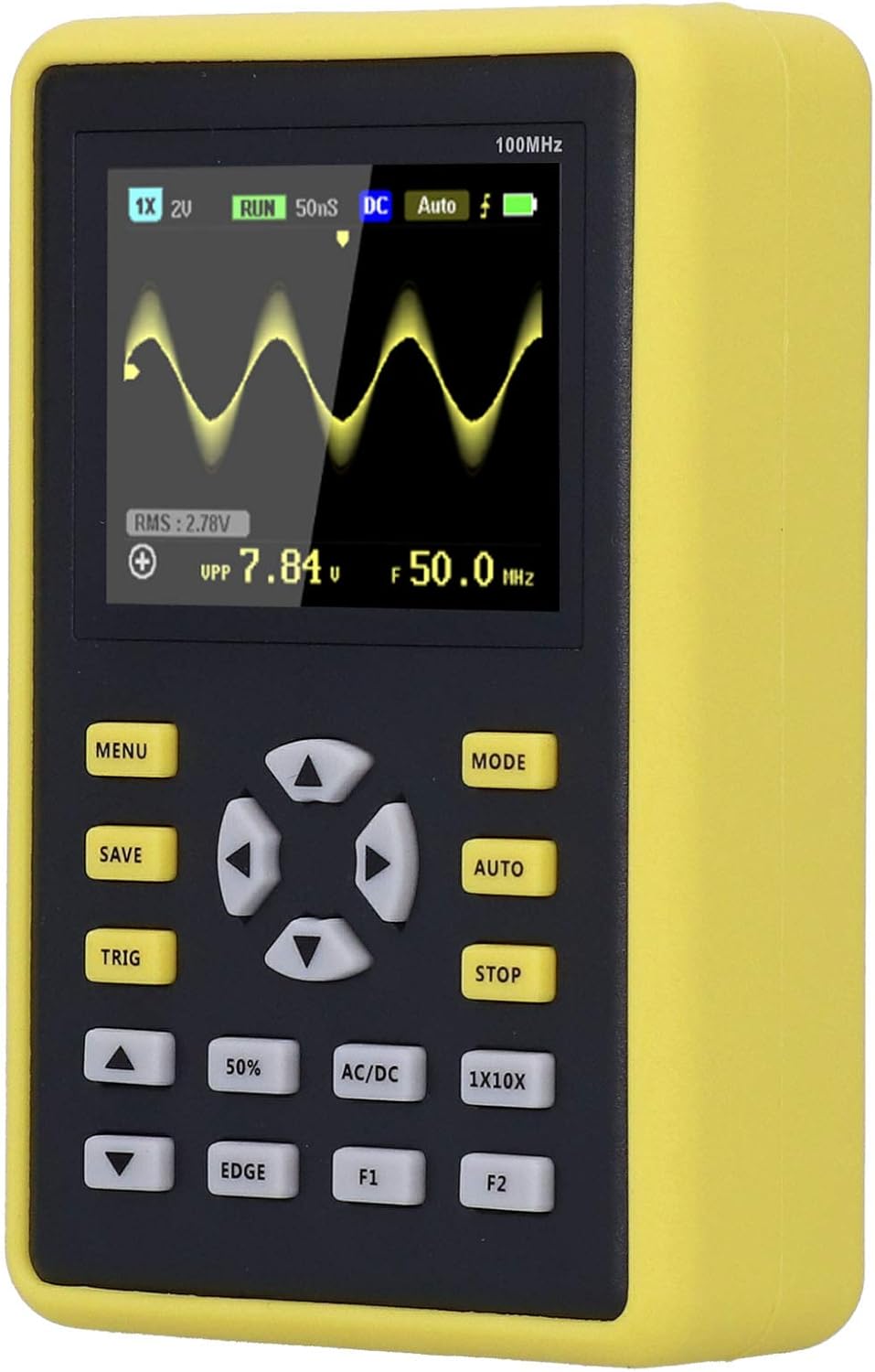
Figure 4.1: The ASHATA 5012H Oscilloscope, probe, USB cable, and user manual neatly packed in its protective storage case.
5. Configuración
5.1 Carga do dispositivo
Before initial use, fully charge the oscilloscope. Connect the provided USB data cable to the device's charging port and a 5V power adapter (1A to 4A recommended). The charging indicator will show the charging status.
5.2 Conectando a sonda
- Locate the BNC connector on the oscilloscope.
- Align the probe's BNC connector with the oscilloscope's input and twist clockwise to secure it.
- Attach the ground clip of the probe to the circuit's ground point.
- Select the appropriate attenuation setting (1X or 10X) on the probe based on your measurement requirements. Ensure the oscilloscope's setting matches the probe's attenuation.

Figure 5.1: The oscilloscope connected to its probe and USB charging cable, illustrating the setup for operation and power.
6. Modos de funcionamento
The ASHATA 5012H oscilloscope offers three primary operating modes to suit different measurement needs:
- Modo automático: This mode is ideal for testing periodic analog signals, such as sinusoidal waveforms. The oscilloscope automatically adjusts settings to display a stable waveform.
- Modo único: Use this mode for capturing unexpected, non-periodic events, such as car ignition signals. The oscilloscope triggers once and then stops, allowing for detailed analysis of a single event.
- Modo normal: This mode is suitable for testing digital logic signals, like those from an infrared remote control. It requires a stable trigger condition to display the waveform.
To switch between modes, press the 'MODE' button on the device. The current mode will be indicated on the screen.

Figure 6.1: A close-up of the oscilloscope's screen, showing a captured waveform and various measurement parameters.
7. Mantemento
- Limpeza: Usa un pano suave e seco para limpar o dispositivo. Non empregues produtos de limpeza abrasivos nin solventes.
- Almacenamento: Store the oscilloscope in its protective case in a cool, dry place when not in use. Avoid extreme temperatures and humidity.
- Coidado da batería: Para prolongar a duración da batería, evite descargala completamente con frecuencia. Cargue o dispositivo regularmente, mesmo se non o está a usar.
- Coidados da sonda: Handle the probe carefully. Do not bend or twist the cable excessively. Keep the probe tip clean.
8 Solución de problemas
If you encounter issues with your ASHATA 5012H oscilloscope, consider the following basic troubleshooting steps:
- O dispositivo non se acende: Asegúrate de que a batería estea cargada. Conecta o dispositivo a unha fonte de alimentación mediante o cable USB e inténtao de novo.
- Non se mostra ningunha forma de onda: Check if the probe is correctly connected to both the oscilloscope and the circuit. Verify the probe's attenuation setting matches the oscilloscope's setting. Adjust the trigger level and time base settings.
- Unstable waveform: Try adjusting the trigger settings (level, mode). Ensure the signal source is stable.
- Lecturas incorrectas: Calibrate the probe if necessary. Ensure the input voltage does not exceed the maximum test voltage for the selected probe attenuation.
Para problemas persistentes, consulte a sección detallada de resolución de problemas no manual de usuario completo ou póñase en contacto co servizo de atención ao cliente.
9. Garantía e soporte
This product comes with a standard manufacturer's warranty. For warranty details, technical support, or service inquiries, please refer to the contact information provided in the original product packaging or on the ASHATA official websitio. Garde o recibo da compra como xustificante da mesma.