
Introdución
This manual provides detailed instructions for the proper use and care of your HoMedics Premium Wrist Blood Pressure Monitor, Model BPW-930BT-AMZ. This device is designed for accurate and convenient measurement of blood pressure and pulse rate at the wrist. Please read this manual thoroughly before use to ensure correct operation and to obtain the most accurate readings.

Image: The HoMedics Premium Wrist Blood Pressure Monitor displayed alongside a smartphone showing the HoMedics Health App interface with blood pressure readings and data.
Información importante de seguridade
Observe as seguintes precaucións de seguridade para garantir un uso seguro e eficaz do seu monitor de presión arterial:
- Consult your physician regarding specific blood pressure information. This device is not intended to replace professional medical advice or treatment.
- Self-measurement is not diagnosis. Always consult a healthcare professional for interpretation of results.
- Non use este dispositivo para o diagnóstico ou tratamento de ningún problema de saúde ou enfermidade.
- As declaracións sobre suplementos dietéticos non foron avaliadas pola FDA e non están destinadas a diagnosticar, tratar, curar ou previr ningunha enfermidade ou condición de saúde.
- Manteña o dispositivo fóra do alcance dos nenos.
- Non empregues o dispositivo nun vehículo en movemento.
Contido do paquete
Upon opening your HoMedics Premium Wrist Blood Pressure Monitor package, please verify that all the following items are included:
- (1) HoMedics Premium Wrist Blood Pressure Monitor with Attached Wrist Cuff (Fits Wrist Circumference 5.3” - 7.7”)
- (2) Baterías AAA
- (1) Bolsa de almacenamento
- (1) Quick-Start Guide
- (1) Instruction Manual (English, Spanish, French)
Configuración
Instalación de baterías
Your monitor requires two AAA batteries for operation. Follow these steps to install them:
- Locate the battery compartment cover on the back of the monitor.
- Press down and slide the cover off.
- Insert the two AAA batteries, ensuring the polarity (+ and -) matches the diagrams inside the compartment.
- Volva colocar a tapa do compartimento da batería ata que encaixe firmemente no seu lugar.
HoMedics Health App Connection
The monitor features Bluetooth wireless technology to sync data with the HoMedics Health App on your smartphone. This allows for easy tracking and sharing of your readings, with automatic date and time stamps.
- Download the HoMedics Health App from your smartphone's app store (iOS or Android).
- Abre a aplicación e sigue as instrucións en pantalla para crear unha conta ou iniciar sesión.
- Activa o Bluetooth no teu smartphone.
- Within the app, select the option to add a new device and choose your HoMedics Premium Wrist Blood Pressure Monitor.
- Follow any further pairing instructions provided by the app to establish the connection.

Image: A smartphone displaying the HoMedics Health App, showing options to select and connect different HoMedics monitors.
Guía de operación
Proper Wrist Positioning
Accurate readings depend on correct wrist positioning. The monitor features a Wrist Positioning Sensor to guide you to the ideal position: your wrist at heart level.
- Sit comfortably with your feet flat on the floor and your arm resting on a table.
- Place the cuff on your left wrist, ensuring the display is on the inside of your wrist. The bottom edge of the cuff should be approximately 1/4 inch (0.6 cm) from your palm.
- Raise your wrist so the monitor is at the same level as your heart. The positioning sensor on the display will provide visual cues to help you achieve the correct height.
- Relax your hand and avoid clenching your fist.

Image: A woman demonstrating the correct wrist positioning for taking a blood pressure reading, with the monitor at heart level.
Tomando unha Medición
The monitor utilizes Smart Measure inflation technology for quick and comfortable readings.
- Ensure you are in a relaxed state and have followed the wrist positioning guidelines.
- Seleccione o seu usuario profesionalfile (User 1 or User 2) using the designated button if applicable.
- Preme o INICIAR/PARAR botón. O manguito comezará a inflarse automaticamente.
- Remain still and silent during the measurement. The monitor will deflate and display your systolic pressure, diastolic pressure, and pulse rate.
- The reading will automatically be stored in the device's memory and, if connected, synced to the HoMedics Health App.
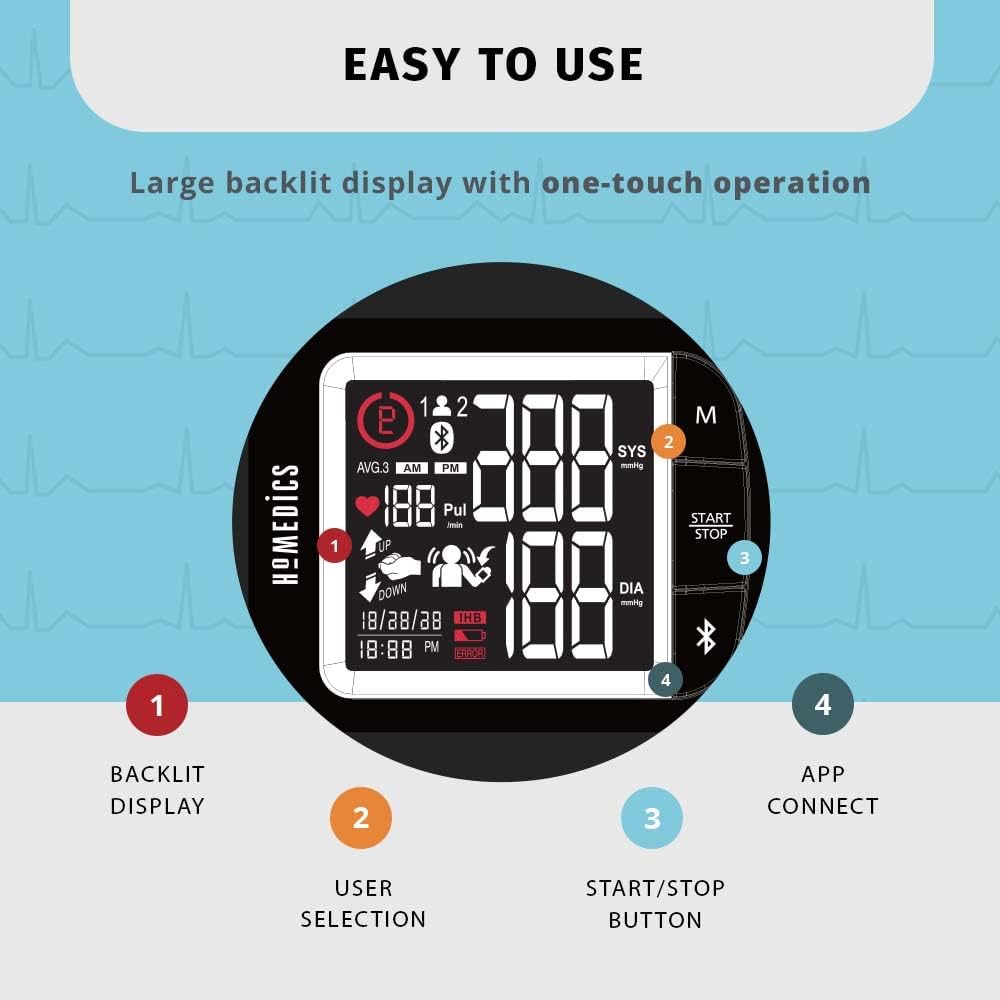
Imaxe: Unha detallada view of the monitor's backlit LCD display, highlighting the user selection, START/STOP button, and app connect features.
User Memory and Averaging
The monitor supports two users, each with storage for up to 120 memories, totaling 240 memories. It also provides AM/PM averaging, which calculates the average of the last 3 morning or evening readings.
- Para view stored memories, press the M (Memory) button. Repeated presses will cycle through past readings.
- The AM/PM averaging feature helps track trends in your blood pressure over time.
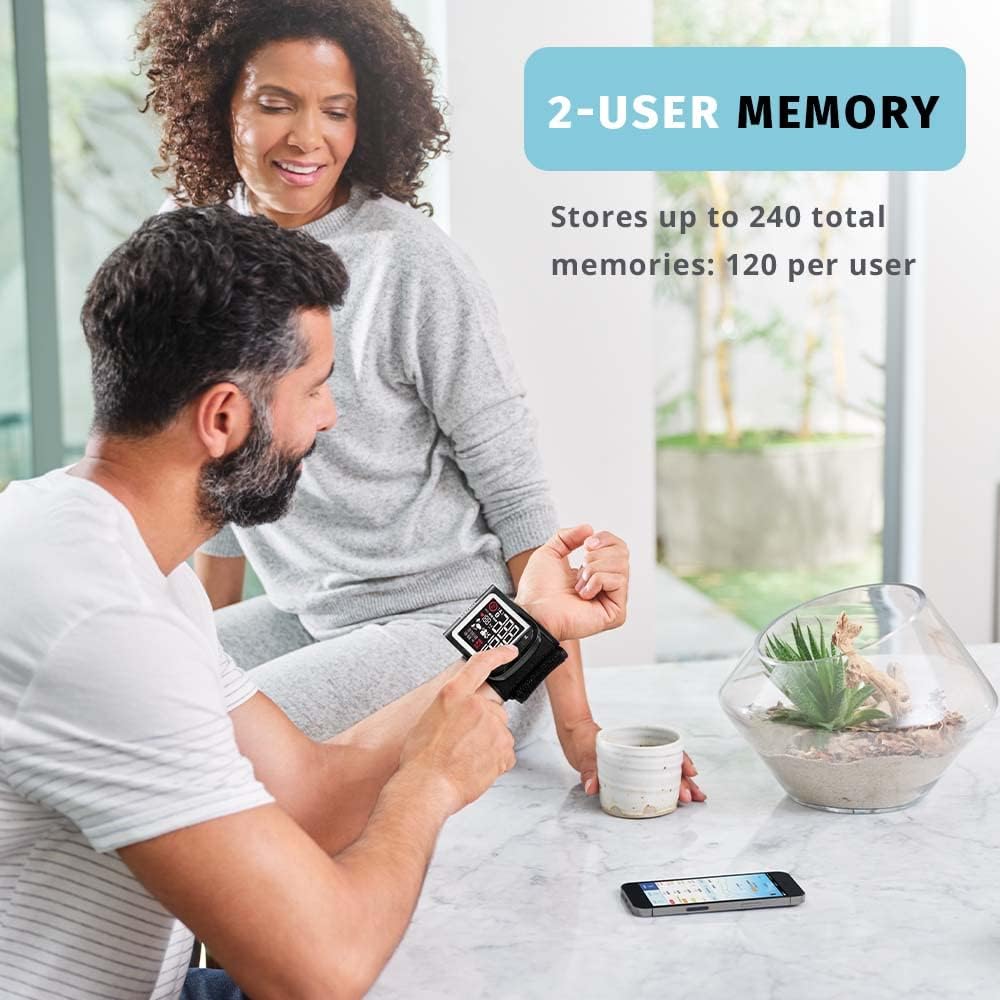
Image: A man and a woman interacting with the blood pressure monitor, demonstrating its capability to store readings for two distinct users.
Detector de latidos cardíacos irregulares (IHB)
The monitor is equipped with an Irregular Heartbeat Detector. If an irregular heartbeat is detected during a measurement, an IHB symbol will appear on the display. This indicates a pulse irregularity. If this symbol appears frequently, consult your physician.
Risk Category Index
The Risk Category Index provides a visual classification of your blood pressure reading based on established guidelines, allowing for easy comparison. Refer to the quick-start guide or consult your physician for detailed interpretation of these categories.

Image: The monitor's display highlighting the Irregular Heartbeat Detector symbol, the Risk Category Index bar, and the AM/PM averaging indicator.
Coidados e Mantemento
Limpeza
To maintain the accuracy and longevity of your monitor:
- Wipe the monitor and cuff gently with a soft, dry cloth.
- Non empregue produtos de limpeza abrasivos nin disolventes, nin mergulle o dispositivo en auga.
Almacenamento
Proper storage helps protect the device:
- Store the monitor in the provided storage bag when not in use.
- Keep the device in a cool, dry place, away from direct sunlight, extreme temperatures, and humidity.
- Retire as pilas se non vai usar o dispositivo durante un período prolongado para evitar fugas.

Image: A woman demonstrating the portability of the monitor by placing it into its included storage bag, emphasizing convenience for travel or daily use.
Resolución de problemas
If you encounter any issues with your HoMedics Premium Wrist Blood Pressure Monitor, refer to the table below for common problems and their solutions.
| Problema | Causa posible | Solución |
|---|---|---|
| O monitor non se acende | As pilas están gastadas ou inseridas incorrectamente. | Substitúa as pilas por pilas AAA novas, asegurándose de manter a polaridade correcta. |
| Lecturas inexactas ou inconsistentes | Incorrect wrist positioning, movement during measurement, or talking. | Ensure proper wrist positioning at heart level. Remain still and silent during measurement. Wait 5 minutes before re-measuring. |
| Fallo de conexión Bluetooth | Bluetooth is off on phone, app not open, or monitor not in pairing mode. | Ensure Bluetooth is enabled on your phone. Open the HoMedics Health App. Follow app instructions to re-pair the device. |
| Mensaxe de erro na pantalla | Excessive body motion detected, cuff not applied correctly, or other internal error. | Ensure you are still during measurement. Re-apply cuff snugly. If error persists, contact customer support. |
Especificacións do produto
The following are the technical specifications for the HoMedics Premium Wrist Blood Pressure Monitor:
| Característica | Detalle |
|---|---|
| Nome do modelo | BPW-930BT |
| Número de modelo do artigo | BPW-930BT-AMZ |
| Dimensións do produto | 8"L x 2"W x 4"Th (8 x 2 x 4 inches) |
| Peso | 7.62 onzas |
| Wrist Cuff Circumference | 5.3" - 7.7" (13.5 cm - 19.5 cm) |
| Fonte de enerxía | Battery Powered (2 AAA Batteries) |
| Compoñentes incluídos | Monitor, Cuff, Batteries |
| Capacidade de memoria | 2 users, 120 memories each (240 total) |
| Conectividade | Tecnoloxía sen fíos Bluetooth |
| Franxa de idade (descrición) | Adulto |
| UPC | 031262105691 |
Información da garantía
The HoMedics Premium Wrist Blood Pressure Monitor comes with a 5-Year Limited Warranty. Please refer to the warranty section in the included instruction manual (English, Spanish, French) for full details on coverage, terms, and conditions. Retain your proof of purchase for warranty claims.
Atención ao cliente
For further assistance, troubleshooting not covered in this manual, or warranty inquiries, please contact HoMedics Customer Service. Contact information can typically be found on the HoMedics official websitio web ou na guía de inicio rápido incluída co produto.
Tamén podes visitar o HoMedics Store on Amazon para obter información adicional sobre o produto e recursos de asistencia.