
1. Rematadoview
The Hoco ES61 Manner Sports Wireless Bluetooth Headset is designed for active lifestyles, offering a blend of comfort, long battery life, and versatile connectivity. This manual provides detailed instructions to help you get the most out of your headset.
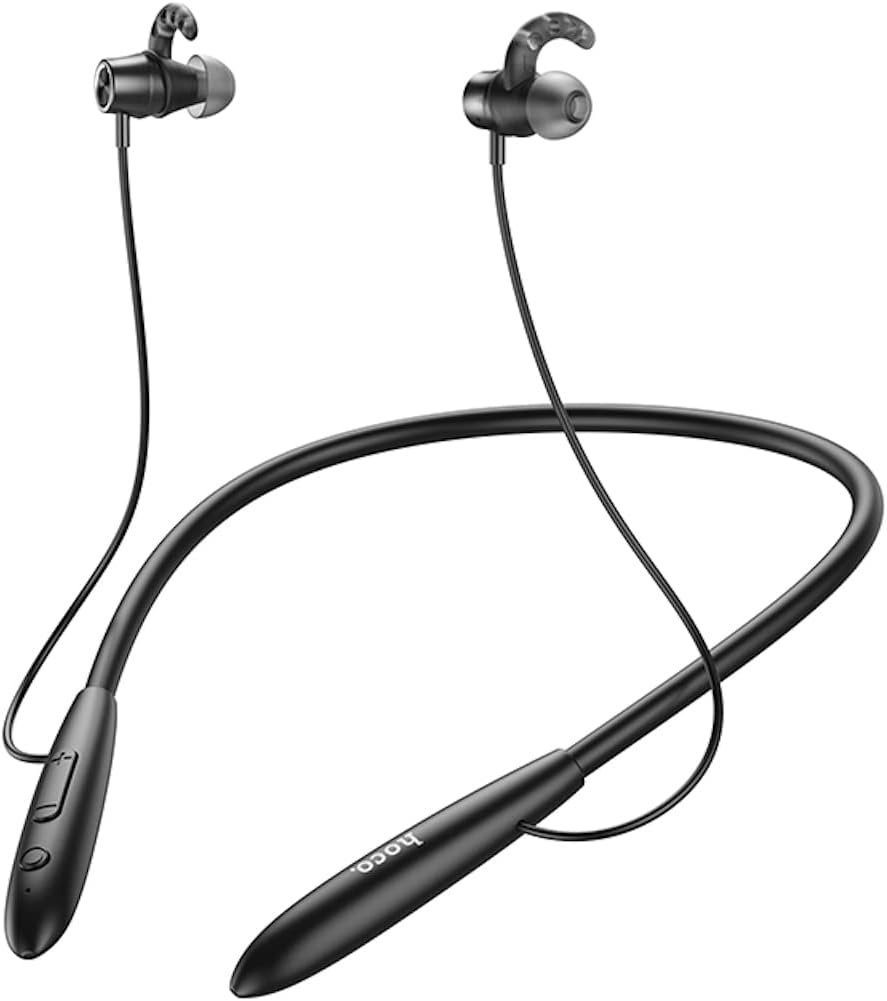
Imaxe: Fronte view of the Hoco ES61 headset, showcasing its neckband design and in-ear earbuds.
2. Características do produto
- Conectividade Bluetooth 5.1: Equipped with JL AC7006 chip for stable and efficient wireless connection.
- Duración prolongada da batería: Features a 200mAh battery, providing up to 20 hours of music/talk time and an impressive 330 hours of standby time.
- Carga rápida: Carga totalmente en aproximadamente 2 horas.
- Deseño lixeiro e cómodo: The earphone cord measures 85cm in length, and the headset weighs only 22g, ensuring comfort during extended wear.
- Opcións de reprodución versátiles: Supports Bluetooth audio streaming and TF card playback (up to 32GB) for direct music listening.
- Multi-language Voice Prompts: Offers voice prompts in both Chinese and English for user convenience.
- Ampla compatibilidade: Compatible with a broad range of devices including iPhone, Samsung, OnePlus, Huawei, Xiaomi, and Oppo smartphones.

Imaxe: Primeiro plano view of the Hoco ES61 headset, highlighting the integrated TF card slot for direct music playback.
Vídeo: Presentación oficial dun produto en vídeoasing the Hoco ES61 Bluetooth Headset's features, including its 20-hour battery life, voice prompts, and compatibility with iOS and Android devices.
3. Guía de configuración
3.1 Carga dos auriculares
Before first use, fully charge the headset. Use a standard USB charger (not included) to connect the charging port on the headset to a power source.
- O indicador LED normalmente amosará unha luz vermella durante a carga.
- Once fully charged (approximately 2 hours), the LED indicator will turn blue or off.
3.2 Emparejamento Bluetooth
To connect your Hoco ES61 headset to a Bluetooth-enabled device:
- Asegúrese de que os auriculares están apagados.
- Press and hold the multi-function button (usually the power button) for approximately 3-5 seconds until the LED indicator flashes red and blue alternately. This indicates pairing mode.
- No teu dispositivo (teléfono intelixente, tableta, etc.), activa o Bluetooth e busca os dispositivos dispoñibles.
- Select "Hoco ES61" from the list of found devices.
- Once connected, the LED indicator on the headset will typically flash blue slowly or turn off, and you will hear a voice prompt confirming the connection.
Reprodución de tarxetas TF 3.3
The Hoco ES61 supports direct music playback from a TF (MicroSD) card.
- Carefully insert a TF card (up to 32GB) with your music files into the designated TF card slot on the headset.
- The headset will automatically switch to TF card playback mode if a card is detected and contains playable audio files.
- Use the headset controls to manage playback (play, pause, skip tracks).
4. Instrucións de funcionamento
4.1 Controis básicos
| Botón/Acción | Función |
|---|---|
| Botón multifunción (MFB) | Power On/Off, Play/Pause, Answer/End Call |
| Subir volume (+) | Increase Volume, Next Track (long press) |
| Baixar volume (-) | Decrease Volume, Previous Track (long press) |
4.2 Reprodución de música
- Reproducir/Pausa: Prema brevemente o MFB.
- Próxima pista: Mantén premido o botón para subir o volume (+).
- Pista anterior: Mantén premido o botón para baixar o volume (-).
- Axuste de volume: Prema brevemente os botóns para subir volume (+) ou baixar volume (-).
4.3 Xestión de chamadas
- Responder/Finalizar chamada: Short press the MFB during an incoming call.
- Rexeitar a chamada: Manter premido o botón multifunción durante unha chamada entrante.
- Volver a marcar o último número: Double-click the MFB when not on a call.

Image: The Hoco ES61 headset resting on a smartphone, illustrating its use with mobile devices for music and calls.
5. Mantemento e coidados
- Keep the headset dry. Do not expose it to extreme temperatures or humidity.
- Clean the earbuds and charging port regularly with a soft, dry cloth to prevent dust and debris buildup.
- Evite o uso de produtos químicos agresivos ou produtos de limpeza abrasivos.
- Garda os auriculares nun lugar fresco e seco cando non estes en uso.
- Non intentes desmontar nin modificar os auriculares, xa que isto anulará a garantía e podería causar danos.

Image: The Hoco ES61 headset shown with different sizes of silicone ear tips, emphasizing the importance of proper fit for comfort and sound quality.
6 Solución de problemas
6.1 Headset Not Turning On
- Ensure the headset is fully charged. Connect it to a charger and check the LED indicator.
- Press and hold the multi-function button for a few seconds to power on.
6.2 Non se pode emparellar co dispositivo
- Make sure the headset is in pairing mode (LED flashing red and blue alternately).
- Asegúrate de que o Bluetooth estea activado no teu dispositivo e que estea dentro do seu alcance (normalmente 10 metros).
- Forget/delete "Hoco ES61" from your device's Bluetooth list and try pairing again.
- Reinicia tanto os auriculares como o dispositivo.
6.3 Sen son ou volume baixo
- Aumenta o volume tanto nos auriculares como no dispositivo conectado.
- Asegúrate de que os auriculares estean conectados correctamente ao dispositivo.
- Se usa unha tarxeta TF, asegúrese de que estea inserida correctamente e que conteña son reproducible files.
- Check for any obstructions in the earbud nozzles and clean if necessary.
6.4 Duración curta da batería
- Asegúrese de que os auriculares estean completamente cargados antes de utilizalos.
- Battery life can vary based on volume level and usage patterns.
- Evite expor a batería a temperaturas extremas.
7. Especificacións
| Característica | Detalle |
|---|---|
| Versión Bluetooth | 5.1 |
| Chip Bluetooth | JL AC7006 |
| Capacidade da batería | 200 mAh |
| Tempo de carga | Aprox. 2 horas |
| Tempo de música / conversación | Ata 20 horas |
| Tempo de espera | Ata 330 horas |
| Earphone Cord Length | 85 cm |
| Peso | 22 g |
| Soporte de tarxetas TF | Si, ata 32 GB |
| Indicacións de voz | chinés e inglés |
| Compatibilidade | iPhone, Samsung, OnePlus, Huawei, Xiaomi, Oppo |
8. Garantía e soporte
For warranty information and customer support, please refer to the product packaging or contact your retailer. Keep your purchase receipt as proof of purchase for any warranty claims.