
Produto rematadoview
This document provides instructions for the ZdalaMit 0212-62622-00R replacement remote control. This remote is designed to function with various Polaroid TV/DVD Combo models, offering a direct replacement without requiring complex programming. Simply install batteries, and the remote is ready for use.

Fronte view of the ZdalaMit 0212-62622-00R replacement remote control, showing all buttons and layout.
Configuración
1. Instalación de baterías
The remote control requires two (2) 1.5V AAA Alkaline batteries (not included). Ensure correct polarity when inserting the batteries.
- Localice o compartimento da batería na parte traseira do control remoto.
- Deslice a tapa do compartimento da batería cara abaixo ou na dirección indicada por unha frecha para abrila.
- Insert two AAA batteries, matching the positive (+) and negative (-) terminals as shown inside the compartment.
- Volva colocar a tapa do compartimento da batería, asegurándose de que encaixe correctamente no seu lugar.
Nota: No programming is required for this replacement remote. Once batteries are installed, it is ready for use with compatible Polaroid TV/DVD Combo models.
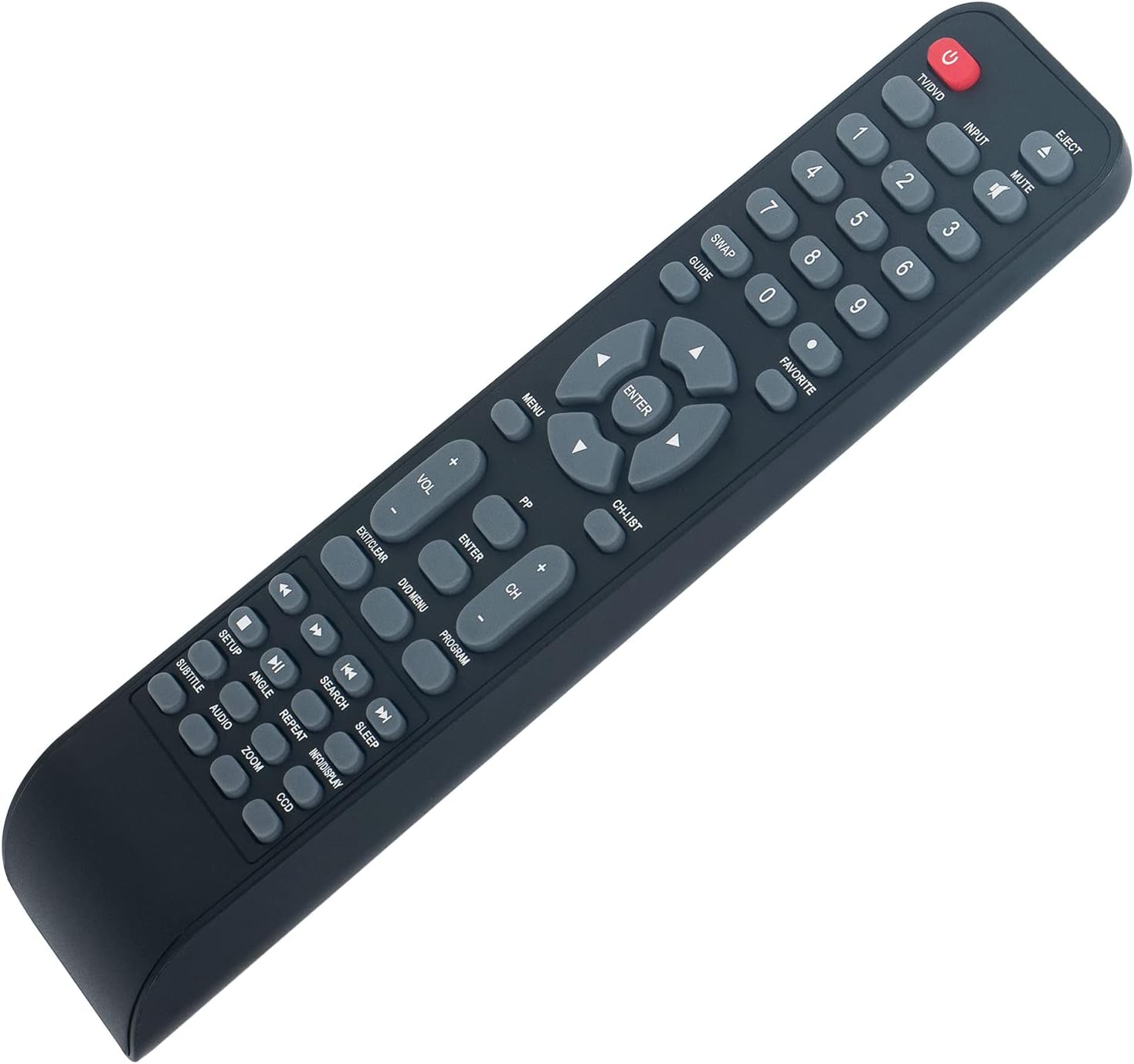
En ángulo view of the remote control, illustrating its ergonomic design and button layout for easy handling during battery installation.
Instrucións de funcionamento
Point the remote control directly at the infrared sensor on your Polaroid TV/DVD Combo unit for optimal performance. Ensure there are no obstructions between the remote and the unit.
Funcións básicas
- TV/DVD (Power): Press to turn the TV/DVD Combo unit on or off.
- ENTRADA: Selects the input source (e.g., TV, DVD, HDMI if applicable).
- MUTO: Silencia ou activa o audio.
- Botóns numéricos (0-9): Used for direct channel selection or entering numerical values.
- VOL +/-: Axusta o nivel de volume.
- CH +/-: Cambia a canle de televisión cara arriba ou cara abaixo.
- MENÚ: Accesses the main menu of the TV or DVD player.
- Botóns de frecha (arriba, abaixo, esquerda, dereita): Navega polas opcións do menú.
- ENTRAR: Confirms a selection in the menu.
- EXIT/CLEAR: Exits a menu or clears an entry.
DVD/Media Playback Functions
- EXECTAR: Ejects the DVD from the player.
- MENÚ DVD: Accesses the DVD disc menu.
- PLAY/PAUSE (►/❚❚): Inicia ou pon en pausa a reprodución.
- PARAR (■): Detén a reprodución.
- REBOBINAR (◀◀): Rebobina a reprodución.
- AVANCE RÁPIDO (►►): A reprodución de avance rápido.
- PREVIOUS (◀❚): Skips to the beginning of the current track/chapter or the previous one.
- NEXT (❚►): Salta á seguinte pista/capítulo.
- REPETIR: Repeats a track, chapter, or entire disc.
- BUSCAR: Initiates a search function within media.
- SUBTÍTULO: Toggles subtitle display.
- AUDIO: Changes audio tracks or languages.
- ÁNGULO: Cambia o ángulo da cámara en DVD compatibles.
- ZOOM: Zooms in or out on the picture.
- INFO/DISPLAY: Mostra información sobre o programa ou multimedia actual.
Mantemento
- Limpeza: To clean the remote control, wipe it with a soft, dry cloth. Do not use liquid cleaners or abrasive materials, as these can damage the surface or internal components.
- Substitución da batería: Replace batteries when the remote's response becomes sluggish or stops working. Always replace both batteries at the same time with new AAA Alkaline batteries. Do not mix old and new batteries, or different types of batteries.
- Almacenamento: If the remote control will not be used for an extended period, remove the batteries to prevent leakage, which can cause damage to the remote. Store the remote in a cool, dry place away from direct sunlight and extreme temperatures.
Resolución de problemas
| Problema | Causa posible | Solución |
|---|---|---|
| O control remoto non responde | Dead or incorrectly installed batteries. Obstruction between remote and TV/DVD Combo. Remote is too far from the unit. | Replace batteries with new AAA Alkaline batteries, ensuring correct polarity. Remove any objects blocking the line of sight to the TV/DVD Combo's IR sensor. Move closer to the unit (within 33 feet). |
| Algunhas funcións non funcionan | The specific function may not be supported by your particular Polaroid TV/DVD Combo model. | This remote is a replacement designed for a range of Polaroid TV/DVD Combo models. While it offers broad compatibility, some advanced or model-specific functions may not be fully supported on all units. Refer to your original TV/DVD Combo manual for specific feature compatibility. |
| Os botóns son pegajosos ou non responden | Lixo ou restos baixo os botóns. | Gently clean the remote control surface with a soft, dry cloth. Avoid pressing buttons excessively hard. |
Especificacións
- Modelo: 0212-62622-00R
- Marca: ZdalaMit
- Compatibilidade: Polaroid TV/DVD Combo models (TDAC-01933, TDAC-02212, TLAC-03212, 4641-TLXB, TDAC-03212B, TDAC-03212W, TLAC-02255, TDAC01933, TDAC02212, TLAC02255, TDAC03212B, TDAC03212W, TLAC03212, 4641TLXB)
- Fonte de alimentación: 2 pilas alcalinas AAA de 1.5 V (non incluídas)
- Tecnoloxía de conectividade: Infravermello (IR)
- Rango máximo: Aproximadamente 33 pés (10 metros)
- Cantidade de botóns: 18
- Cor: Negro
- Dimensións (L x W x H): 8.34" x 1.99" x 0.55" (21.18 cm x 5.05 cm x 1.4 cm)
- Peso do artigo: 40 gramos (sen pilas)
Garantía e Soporte
This ZdalaMit remote control comes with a 1 ano de garantía from the date of purchase. This warranty covers manufacturing defects under normal use. It does not cover damage caused by misuse, accidents, unauthorized modifications, or battery leakage.
For technical support, warranty claims, or any questions regarding your remote control, please contact the seller directly through the platform where the purchase was made. Please have your order number ready when contacting support.