
1. Introdución
Welcome to the Bmax I10 Pro Tablet user manual. This guide provides essential information for setting up, operating, maintaining, and troubleshooting your new tablet. Please read this manual thoroughly to ensure proper use and to maximize your device's performance.
The Bmax I10 Pro is a 10.1-inch tablet featuring a UNISOC Tiger T310 SoC, 4GB RAM, 64GB ROM (expandable via MicroSD), and runs on Android 11. It supports 4G LTE, dual-band Wi-Fi, and Bluetooth 5.0, making it suitable for various tasks from work to entertainment.

This banner image introduces the Bmax MaxPad I10 Pro, an ultralight entertainment tablet supporting 4G network standards. It highlights features like an In-Cell Display, a high AnTuTu benchmark score, A75 and A55 CPU cores, and its slim 8.9mm, 400g design.
2. Configuración inicial
2.1 Contido do paquete
Asegúrate de que todos os elementos estean presentes no paquete:
- Bmax I10 Pro Tablet
- Cable USB Tipo-C
- Adaptador de alimentación
- Manual de usuario (este documento)
2.2 Disposición do dispositivo

Este diagrama ofrece unha visión claraview of the Bmax I10 Pro Tablet's external components, labeling the front camera, rear camera, 3.5mm audio jack, power key, reset hole, volume keys, Micro SD card reader, Type-C port, microphone, and speakers for easy identification.
2.3 Cargar a tableta
Before first use, fully charge the tablet. Connect the USB Type-C cable to the tablet's Type-C port and the other end to the power adapter. Plug the adapter into a wall outlet. The battery indicator on the screen will show charging status.
2.4 Acendido/Apagado
- Para acender: Press and hold the Power key until the Bmax logo appears.
- Para apagar: Press and hold the Power key until the power options appear. Select "Power off" and confirm.
- Para reiniciar: Press and hold the Power key until the power options appear. Select "Restart" and confirm.
2.5 Configuración inicial
Upon first power-on, follow the on-screen prompts to set up your tablet:
- Seleccione o seu idioma preferido.
- Conéctate a unha rede wifi.
- Inicia sesión coa túa conta de Google ou crea unha nova.
- Set up screen lock (PIN, pattern, password, or face unlock).
- Review e aceptar os termos e condicións.
2.6 Inserción de tarxetas SIM e MicroSD
The tablet supports dual 4G SIM cards and a MicroSD card for expandable storage.
- Localiza a bandexa da tarxeta SIM/MicroSD no lateral da tableta.
- Usa a ferramenta de expulsión da tarxeta SIM fornecida para abrir a bandexa.
- Carefully place the SIM card(s) and/or MicroSD card into the designated slots. Ensure correct orientation.
- Empurre suavemente a bandexa cara atrás na tableta ata que encaixe no seu lugar.

This image demonstrates the Bmax I10 Pro Tablet's communication capabilities, showing a video call in progress. It details support for multiple 4G network standards (GSM, WCDMA, FDD-TLE, TD-TLE), dual SIM card slots (SIM 1 + SIM 2 & Dual Standby), a Micro SD card slot, and VoLTE high-definition voice calls.
3. Instrucións de funcionamento
3.1 Navegación básica
The Bmax I10 Pro uses a touch-sensitive screen for navigation:
- Toca: Toca a pantalla unha vez para seleccionar un elemento ou abrir unha aplicación.
- Tocar e manter premido: Touch and hold an item to access contextual menus or move icons.
- Pasar o dedo: Arrastra o dedo pola pantalla para percorrer páxinas ou listas.
- Beliscar: Usa dous dedos para ampliar ou reducir as imaxes e web páxinas.
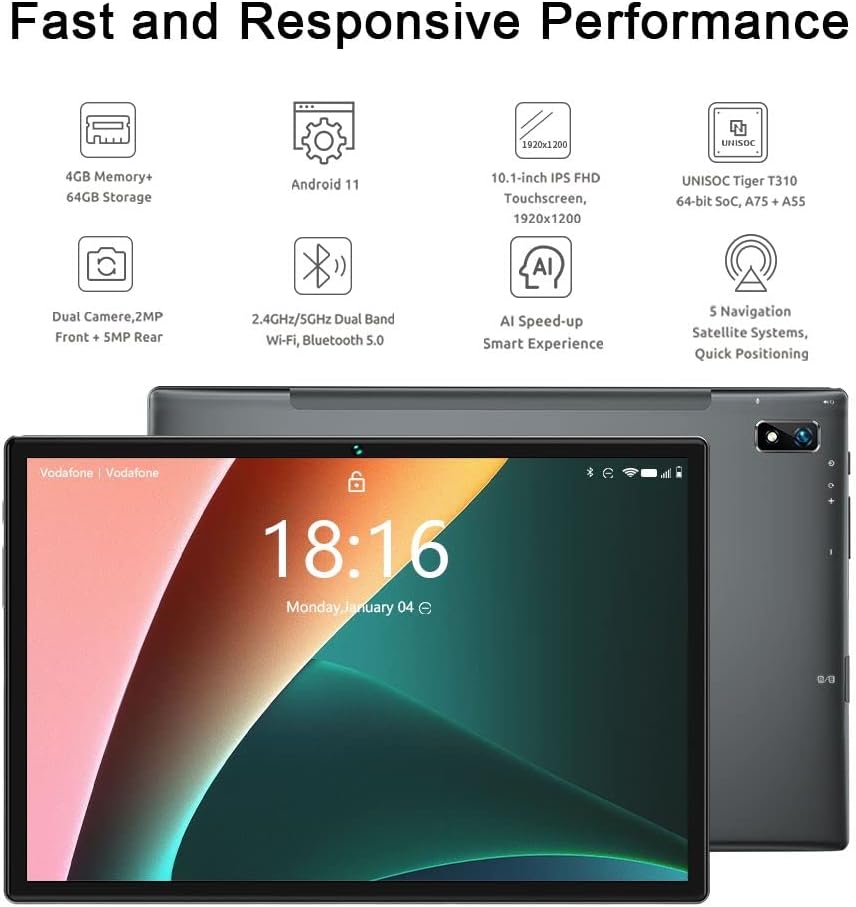
This image displays the Bmax I10 Pro tablet from both the front and rear. The front shows the Android home screen with the current time, while the rear highlights the camera module and sleek design.
3.2 Conectividade Wi-Fi e Bluetooth
To connect to Wi-Fi or Bluetooth devices:
- Ir a Configuración > Rede e internet for Wi-Fi, or Dispositivos conectados para Bluetooth.
- Toggle Wi-Fi or Bluetooth On.
- For Wi-Fi, select your desired network and enter the password if prompted.
- For Bluetooth, select a device from the list to pair.
3.3 Using 4G LTE and VoLTE
If you have inserted a 4G SIM card, your tablet can connect to mobile data networks and make calls via VoLTE (Voice over LTE).
- Asegúrate de que os datos móbiles estean activados en Configuración > Rede e internet > Rede móbil.
- VoLTE will automatically activate if supported by your carrier and SIM card.
- Use the pre-installed Phone app to make and receive calls.
3.4 Funcionamento da cámara
The tablet features a 2MP front camera and a 5MP rear camera.
- Abre o Cámara aplicación.
- Toca a icona do interruptor da cámara para alternar entre as cámaras dianteira e traseira.
- Toca o botón do obturador para sacar unha foto ou iniciar/deter a gravación de vídeo.

The image shows the Bmax I10 Pro Tablet with a vibrant image of a snowboarder on its screen, emphasizing its dual camera system: a 5-megapixel rear camera and a 2-megapixel front camera.
3.5 Funcionalidade do GPS
The Bmax I10 Pro supports multiple navigation satellite systems (GPS, Beidou, GLONASS, Galileo, A-GPS) for accurate positioning.
- Ensure Location services are enabled in Configuración > Localización.
- Use pre-installed or downloaded navigation apps for directions and location-based services.

The image shows the Bmax I10 Pro Tablet securely mounted in a car, displaying a navigation map. This illustrates the tablet's advanced GPS features, including support for GPS, Beidou, GLONASS, Galileo, and A-GPS for accurate positioning.
3.6 Face Recognition Unlock
To set up face recognition for unlocking your tablet:
- Ir a Configuración > Seguridade > Desbloqueo facial.
- Segue as instrucións en pantalla para rexistrar a túa cara. Asegúrate de estar nunha zona ben iluminada.
- Once registered, you can unlock your tablet by looking at the front camera.
4. Mantemento
4.1 Limpeza da tableta
To keep your tablet clean:
- Usa un pano suave e sen fiapos para limpar a pantalla e a carcasa.
- Para manchas difíciles, lixeiramente dampEnxágüe o pano con auga ou cun limpador de pantallas deseñado para dispositivos electrónicos.
- Evita o uso de produtos químicos agresivos, materiais abrasivos ou humidade excesiva.
4.2 Coidado coa batería
The Bmax I10 Pro has a 6600mAh battery. To prolong its lifespan:
- Evita temperaturas extremas.
- Non deixes que a batería se descargue completamente con frecuencia.
- Desconecta o cargador unha vez que a tableta estea completamente cargada.

This graphic highlights the Bmax I10 Pro Tablet's 6600mAh Li-polymer battery, indicating support for fast charging and suggesting 4 to 6 hours of usage for gaming and movie watching.
4.3 Actualizacións de software
Comprobe e instale regularmente actualizacións de software para garantir un rendemento, unha seguridade e un acceso a novas funcións óptimos.
- Ir a Configuración > Sistema > Actualización do sistema.
- Siga as instrucións que aparecen na pantalla para descargar e instalar as actualizacións dispoñibles.
4.4 Xestión do almacenamento
To manage the 64GB internal storage and any MicroSD card storage:
- Ir a Configuración > Almacenamento a view uso de almacenamento.
- Eliminar innecesario files, apps, or move them to the MicroSD card to free up space.
5 Solución de problemas
If you encounter issues with your Bmax I10 Pro Tablet, refer to the following common solutions:
| Problema | Solución |
|---|---|
| A tableta non se acende | Ensure the tablet is charged. Connect to the charger for at least 30 minutes. If still unresponsive, press and hold the Power key for 10-15 seconds to force a restart. |
| Wi-Fi / Bluetooth connectivity issues | Toggle Wi-Fi/Bluetooth off and on. Restart the tablet. Forget the network/device and reconnect. Ensure you are within range of the network/device. |
| Rendemento lento / Fallos das aplicacións | Close unused apps. Clear app caches (Settings > Apps > [App Name] > Storage > Clear cache). Free up storage space. Restart the tablet. |
| A pantalla non responde | Restart the tablet by holding the Power key. If unresponsive, use the reset hole (refer to Device Layout) with a thin pin. |
| Cannot make/receive calls (4G LTE) | Ensure SIM card is correctly inserted and activated. Check mobile network settings. Verify VoLTE is enabled and supported by your carrier. |
5.1 Restablecemento de fábrica
Se os problemas persisten, podes considerar un restablecemento de fábrica. Aviso: Isto borrará todos os datos da túa tableta. Fai unha copia de seguridade dos datos importantes antes de continuar.
- Ir a Configuración > Sistema > Restablecer opcións.
- Seleccione Borrar todos os datos (restablecemento de fábrica).
- Confirma a túa decisión e introduce o teu PIN/contrasinal se se che solicita.
6. Especificacións
Detailed technical specifications for the Bmax I10 Pro Tablet:

This image presents a detailed overview of the Bmax I10 Pro Tablet's key features, such as its 10.1-inch FHD display, 4GB RAM, 64GB ROM, dual speakers, UNISOC Tiger T310 processor, dual-band Wi-Fi, 5-mode GPS, 6600mAh battery, USB Type-C port, Android 11 operating system, and face recognition capability.
| Característica | Detalle |
|---|---|
| Modelo | Bmax I10 Pro |
| Sistema Operativo | Android 11 |
| Procesador | UNISOC Tiger T310 SoC (ARM Cortex A75@2.0GHz + A55@1.8GHz) |
| GPU | Imagination PowerVR GE8300 |
| RAM | 4 GB |
| Almacenamento interno | 64 GB |
| Almacenamento ampliable | MicroSD card slot (up to 2TB) |
| Tamaño da pantalla | 10.1 polgadas |
| Resolución de visualización | 1920 x 1200 pixels (IPS Display Panel, 16:10 Aspect Ratio, 10-point Touch Control) |
| Cámara traseira | 5 MP |
| Cámara frontal | 2 MP |
| Batería | Li-polímero de 6600 mAh |
| Conectividade | 2.4GHz + 5GHz Wi-Fi, Bluetooth 5.0, 4G LTE (Dual SIM), GPS (GPS, Beidou, GLONASS, Galileo, A-GPS) |
| Portos | USB tipo C, conector de audio de 3.5 mm |
| Dimensións | 8.9mm thin |
| Peso | 400 g |

This image provides a close-up of the UNISOC Tiger T310 processor, emphasizing its DynamIQ architecture, which includes A75 cores clocked at 2.0GHz and A55 cores at 1.8GHz, manufactured using a 12nm process. It also mentions the Imagination PowerVR GE8300 GPU.

This image presents two comparison charts. The first shows the upgraded CPU architecture of the T310 compared to SC9863A, indicating better performance. The second chart illustrates the upgraded manufacturing process (TSMC 12nm vs 28nm HPC+), leading to lower power consumption. An AnTuTu 8.0.5 benchmark result shows the T310 SoC improving the score by 44% over SC9863A.

The image features the Bmax I10 Pro Tablet displaying a vivid image of the aurora borealis, illustrating its high-quality display. Key display specifications highlighted are the IPS Display Panel, 1920 x 1200 resolution, 16:10 aspect ratio, and responsive 10-point touch control.
7. Garantía e soporte
7.1 Garantía do produto
Your Bmax I10 Pro Tablet is covered by a standard manufacturer's warranty. Please refer to the warranty card included in your product packaging or visit the official Bmax websitio web para obter información detallada sobre os termos e condicións da garantía.
7.2 Atención ao cliente
For technical assistance, troubleshooting beyond this manual, or warranty claims, please contact Bmax customer support through their official websitio web ou a información de contacto proporcionada na documentación do produto.