
1. Introdución
Thank you for choosing the COMAOGO T002-W Mini Projector. This manual provides essential information for setting up, operating, and maintaining your projector to ensure optimal performance and longevity. The T002-W is a versatile projector featuring 9500 Lumens brightness, 1080P support, 5G WiFi, and Bluetooth 5.1 connectivity, designed for an immersive viewexperiencia de ata 220 polgadas.
2. Contido do paquete
Comprobe se o paquete contén os seguintes elementos:
- 1 x COMAOGO T002-W Mini Projector
- 1 x mando a distancia
- 1 x cable de alimentación
- 1 x cable HDMI
- 1 x Cable AV
- 1 x Manual de usuario
3. Produto rematadoview
Familiarízate cos compoñentes e as interfaces do proxector.

Image: COMAOGO T002-W Projector with 5G and 2.4G WiFi capabilities, showing wireless screen synchronization with a tablet and smartphone.
The projector features various ports for connectivity, including HDMI, USB, VGA, AV, and a TF card slot, along with a 3.5mm audio output. It also supports dual-band 5G and 2.4G WiFi for stable wireless connections and Bluetooth 5.1 for audio devices.

Image: COMAOGO T002-W Projector connected to various devices including a laptop, game console, and streaming stick, highlighting its multiple input ports (AV, HDMI, USB, TF, VGA).
4. Configuración
4.1 Colocación
Position the projector on a stable, flat surface or mount it on a tripod. Ensure there are no obstructions to the ventilation vents. For optimal viewing, the projection distance should be between 1.5 meters and 5.5 meters, yielding a screen size from 45 inches to 220 inches.
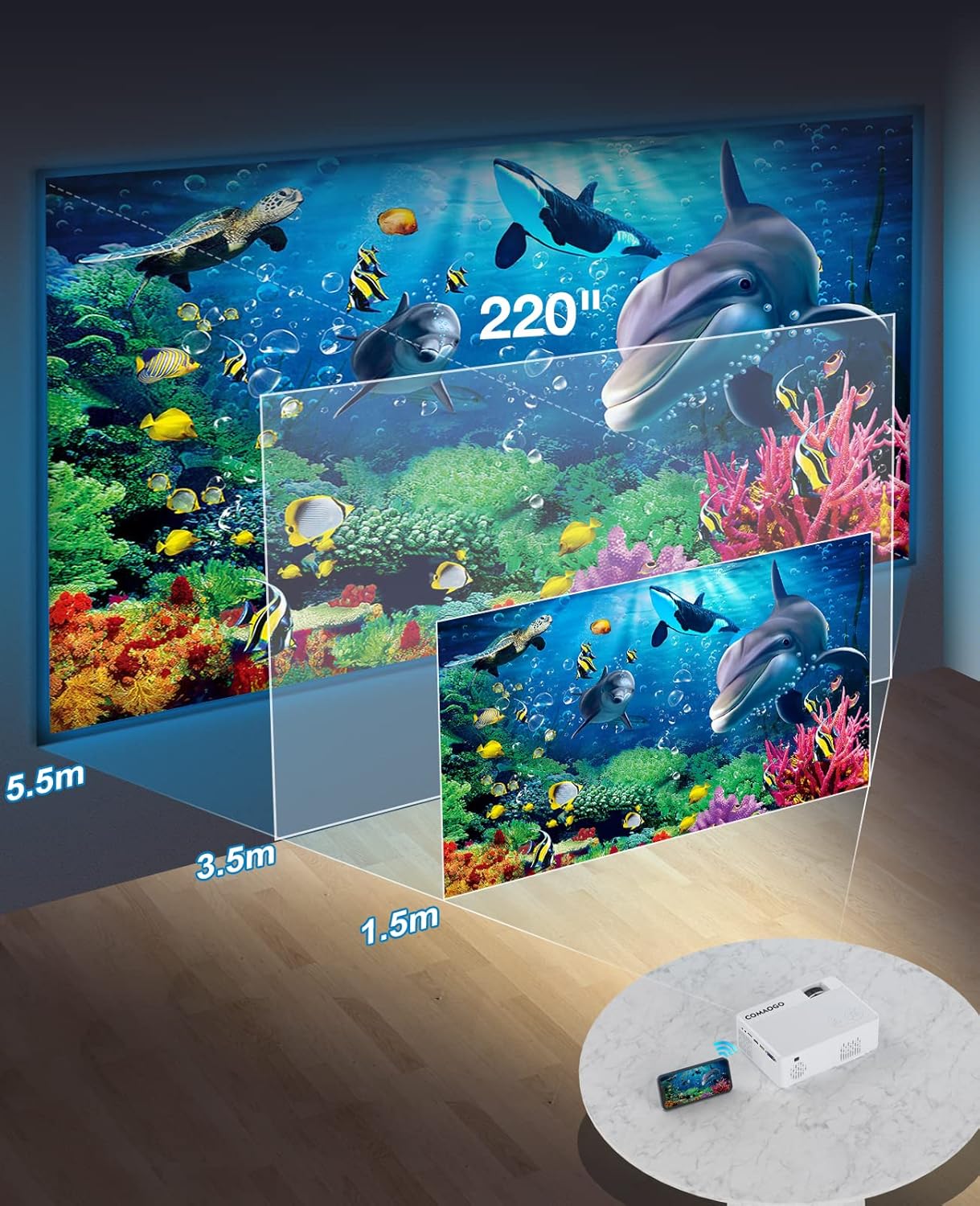
Image: Diagram illustrating the projection distances (1.5m to 5.5m) and corresponding screen sizes (45 to 220 inches) for the COMAOGO T002-W Projector.
4.2 Conexión de alimentación
Connect the power cable to the projector's power input and then plug it into a power outlet (AC 220V).
4.3 Corrección de enfoque e trapezoide
To achieve a clear and rectangular image:
- Axuste do foco: Xire o anel de enfoque da lente do proxector ata que a imaxe apareza nítida.
- Corrección Keystone: Adjust the keystone correction dial (if available, or via menu settings) to correct trapezoidal distortion, ensuring the image is rectangular. The projector supports ±15° keystone correction.

Image: Illustration of keystone correction and focus adjustment for the COMAOGO T002-W Projector, showing how to achieve a clear, rectangular image.
5. Instrucións de funcionamento
5.1 Encendido/apagado
- Encendido: Preme o botón de acendido do proxector ou do control remoto.
- Apagado: Press the power button again to turn off the projector.
5.2 Selección da fonte de entrada
Use the "Source" button on the remote control or the projector's control panel to select the desired input source (e.g., HDMI, USB, VGA, AV).
5.3 Conectividade sen fíos (WiFi)
The projector supports dual-band 5G and 2.4G WiFi for stable screen mirroring.
- Navigate to the WiFi settings on the projector's menu.
- Select your desired WiFi network (5G for faster, more stable connection; 2.4G for longer range and better penetration).
- Introduza o contrasinal para conectarse.
- For screen mirroring, select the appropriate option (e.g., "iOS Cast" or "Android Cast") on the projector and follow the on-screen instructions to connect your smartphone or tablet.
5.4 Conectividade Bluetooth
Connect external Bluetooth audio devices like speakers or headphones.

Image: COMAOGO T002-W Projector demonstrating Bluetooth 5.1 connection with a speaker and headphones.
- Vaia á configuración de Bluetooth no menú do proxector.
- Asegúrate de que o teu dispositivo Bluetooth estea no modo de emparellamento.
- Selecciona o teu dispositivo da lista para emparellalo.
- Note: The projector's Bluetooth function is for connecting output devices (speakers, headphones) only.
5.5 Conexións por cable
Conecta varios dispositivos usando os portos dispoñibles:
- HDMI: Connect laptops, PCs, game consoles (Xbox), TV sticks (Roku, Chromecast), DVD players.
- USB: Reproducir medios files directly from USB drives.
- VGA: Conecta ordenadores ou portátiles antigos.
- DE: Conecta dispositivos de vídeo herdados.
- Tarxeta TF: Insert a TF card to play media files.
- Important: Copyright-protected content from services like Netflix or Disney+ is not directly supported via screen mirroring. For these services, use an HDMI connection with a compatible adapter (e.g., Lightning Digital AV Adapter for iOS devices) or a streaming stick.
6. Mantemento
6.1 Limpeza da lente
Use a soft, lint-free cloth or lens cleaning paper to gently wipe the projector lens. Avoid using abrasive materials or harsh chemicals that could damage the lens coating.
6.2 Sistema de refrixeración
The projector features an updated cooling system designed to reduce noise and maintain optimal operating temperature. Ensure the ventilation vents are clear of dust and obstructions to prevent overheating. Regular cleaning of the vents with a soft brush or compressed air is recommended.
7 Solución de problemas
Se tes problemas co teu proxector, consulta as seguintes solucións habituais:
- Sen imaxe:
- Comprobe a conexión á alimentación e asegúrese de que o proxector estea acendido.
- Verify the input source selection matches your connected device.
- Ensure all cables (HDMI, VGA, etc.) are securely connected.
- Axusta o foco e a corrección trapezoidal.
- Sen son:
- Adjust the projector's volume.
- Se usas altofalantes externos, asegúrate de que estean conectados e acendidos correctamente.
- Check Bluetooth connection for external audio devices.
- Ensure the audio output from your source device is enabled.
- WiFi/Screen Mirroring Issues:
- Ensure both the projector and your device are connected to the same WiFi network.
- Check for strong WiFi signal.
- Restart both the projector and your source device.
- For Android devices, ensure "Wireless Projection" or "Screen Mirroring" is enabled. For iOS, use "Screen Mirroring" from Control Center.
- A imaxe está borrosa:
- Axuste o anel de enfoque na lente.
- Asegúrate de que a distancia de proxección estea dentro do rango recomendado.
- A imaxe é trapezoidal:
- Adjust the keystone correction dial or setting.
For further assistance or software updates, please contact COMAOGO customer support.
8. Especificacións
| Característica | Especificación |
|---|---|
| Marca | COMAOGO |
| Modelo | T002-W |
| Brillo | 9500 lúmenes (220 ANSI) |
| Relación de contraste | 6000:1 |
| Resolución nativa | 1280 x 720 |
| Resolución admitida | 1080p |
| Tamaño de proxección | 45" - 220" |
| Distancia de proxección | 1.5 m - 5.5 m |
| Corrección Keystone | ± 15° |
| Conectividade WiFi | Dual-band (5G + 2.4G) |
| Bluetooth | Bluetooth 5.1 |
| Interface de hardware | 3.5mm Audio, TF Card, USB 2.0, VGA, HDMI |
| Altavoz incorporado | Si |
| Nivel de ruído | 45 decibelios |
| Consumo de enerxía | 48 vatios |
| Dimensións | 20.32 x 15.24 x 7.62 cm |
| Peso | 1 quilogramos |
9. Vídeo oficial do produto
Watch this video for a visual guide on the COMAOGO T002-W Mini Projector's features and operation.
Video: An official product video demonstrating the features and usage of the COMAOGO T002-W Mini Projector, including connectivity and display capabilities.
10. Garantía e soporte
The COMAOGO T002-W Mini Projector comes with a standard manufacturer's warranty. For warranty claims, technical support, or inquiries regarding software updates, please contact COMAOGO customer service through the retailer where you purchased the product or visit the official COMAOGO websitio.
SOFTWARE UPDATES can be provided; please contact us if needed.