
Introdución
Thank you for choosing the LORERAN BT-24 Wireless Keyboard and Mouse Combo. This manual provides essential instructions for setting up, operating, maintaining, and troubleshooting your new device. Please read this manual thoroughly before use to ensure optimal performance and longevity of your product.
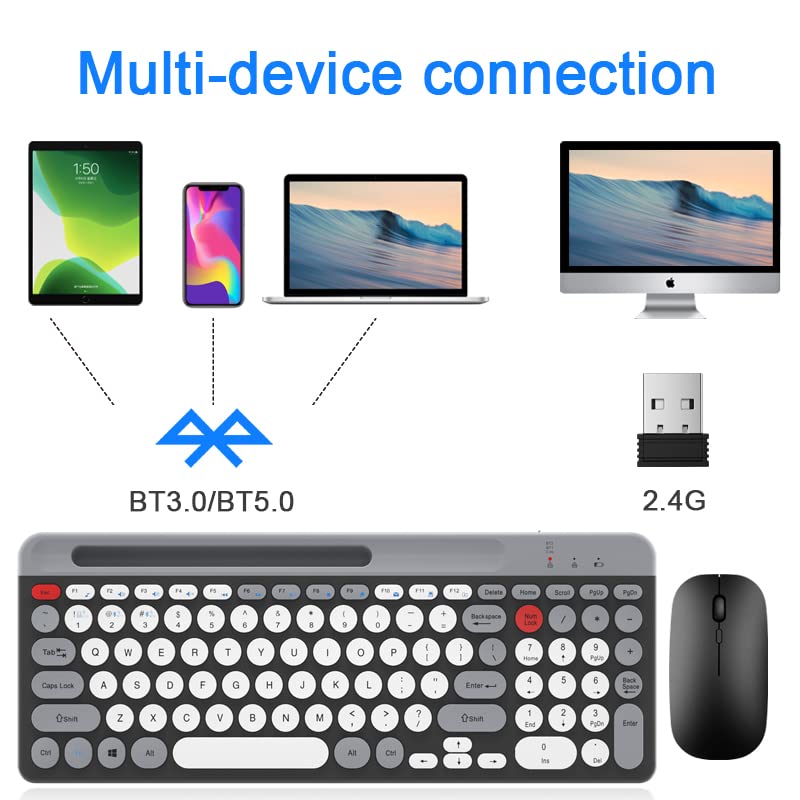
Image: LORERAN BT-24 Wireless Keyboard and Mouse Combo, showcasing the full-size keyboard and ergonomic mouse.
Contido do paquete
- 1 x LORERAN Wireless Keyboard
- 1 x LORERAN Wireless Mouse
- 1 x 2.4G USB Receiver (often stored in the mouse or keyboard battery compartment)
- 1 x cable de carga tipo C
- 1 x Manual de usuario (este documento)
Instrucións de configuración
1. Carga dos dispositivos
The keyboard and mouse are equipped with built-in rechargeable batteries. Before first use, it is recommended to fully charge both devices.
- Connect the provided Type-C charging cable to the charging port on the keyboard and mouse.
- Conecta o outro extremo do cable a unha fonte de alimentación USB (por exemplo, un porto USB do ordenador ou un adaptador de parede USB).
- A full charge typically takes approximately 3 hours. The keyboard can operate continuously for up to 300 hours on a full charge.

Image: Illustration of the keyboard and mouse being charged via Type-C cables.
2. Connecting to Devices (Dual Mode: 2.4G Wireless & Bluetooth)
The combo supports connection via a 2.4G USB receiver or Bluetooth (BT1 and BT2 channels), allowing connection to up to three devices simultaneously.
2.1. Conexión sen fíos 2.4G
- Locate the 2.4G USB receiver. It is often stored in a compartment on the mouse or keyboard.
- Plug the 2.4G USB receiver into an available USB port on your computer or laptop.
- Acende o teclado e o rato.
- No teclado, prema fn+1 keys to select the 2.4G mode.
- O teclado e o rato deberían conectarse automaticamente ao teu dispositivo.

Image: The LORERAN keyboard and mouse shown alongside the 2.4G USB receiver.
2.2. Conexión Bluetooth (BT1 / BT2)
The combo supports Bluetooth 5.0 + 3.0 technology.
- Acende o teclado e o rato.
- No teclado, prema fn+2 for Bluetooth Channel 1, or fn+3 for Bluetooth Channel 2. The indicator light will flash, indicating pairing mode.
- On your device (Mac, PC, Laptop, Tablet, Phone), enable Bluetooth and search for new devices.
- Select "LORERAN Keyboard" and "LORERAN Mouse" from the list of available devices to pair.
- Once paired, the indicator light on the keyboard will stop flashing.

Image: Diagram illustrating multi-device connectivity options (phone, tablet, laptop, desktop) via Bluetooth (BT3.0/BT5.0) and 2.4G wireless.
Instrucións de funcionamento
1. Cambio entre dispositivos conectados
To switch between your connected devices, simply press the corresponding function key on the keyboard:
- fn+1: Switch to 2.4G Wireless mode.
- fn+2: Switch to Bluetooth Channel 1.
- fn+3: Switch to Bluetooth Channel 2.
2. Características do teclado
- Circular Keys: The keyboard features uniquely designed circular keys for a comfortable typing experience.
- Low-Noise Switches: Keys are designed for quiet operation with satisfactory tactile feedback.
- Teclado numérico: A standard numeric keypad is included for improved workflow.
- Teclas de atallo multimedia: Utilize the F1-F12 keys with the Fn key for quick access to media controls and other functions. (Refer to the image below for specific functions).
- Botón de volume: A dedicated volume knob allows for convenient adjustment of audio levels by rotating it.

Image: Close-up of the LORERAN keyboard showing the layout of function keys (F1-F12) and their associated media controls.
3. Características do rato
- Axuste de DPI: An exclusive button on the mouse allows you to adjust the DPI (Dots Per Inch) sensitivity. Cycle through 800, 1200, and 1600 DPI settings for precise cursor control.
- Clics silenciosos: The mouse buttons are designed for quiet operation, minimizing noise during use.

Image: The LORERAN mouse highlighting its whisper-quiet click and adjustable DPI settings (800, 1200, 1600).
4. Modo de repouso automático
To conserve battery life, both the keyboard and mouse will automatically enter sleep mode if not used for over 30 minutes. To wake them up, simply press any key on the keyboard or click any button on the mouse.
Mantemento
- Limpeza: Use a soft, dry cloth to gently wipe the surfaces of the keyboard and mouse. For dust accumulation between keys, a can of compressed air can be used. Avoid using harsh chemicals or abrasive materials.
- Cargando: Recharge the devices when the battery indicator light shows low power or when performance degrades. Regular charging helps maintain battery health.
- Almacenamento: When not in use for extended periods, store the keyboard and mouse in a cool, dry place.
Resolución de problemas
- Dispositivo non se conecta:
- Ensure both keyboard and mouse are powered on.
- Comprobe os niveis da batería e cárguea se é necesario.
- For 2.4G connection, ensure the USB receiver is securely plugged into a working USB port and fn+1 está seleccionado.
- For Bluetooth connection, ensure Bluetooth is enabled on your device and you have selected fn+2 or fn+3 on the keyboard. Try re-pairing the devices.
- Try connecting to a different USB port or a different device to rule out port or device specific issues.
- Conexión intermitente ou con atraso:
- Ensure there are no strong interference sources nearby (e.g., other wireless devices, large metal objects).
- Move the keyboard and mouse closer to the receiver or Bluetooth-enabled device.
- Recharge the devices.
- Mouse cursor not moving or erratic:
- Check the mouse battery level.
- Asegúrate de que o sensor óptico da parte inferior do rato estea limpo e sen obstrucións.
- Proba a usar o rato nunha superficie diferente.
- Axusta a configuración de DPI usando o botón DPI do rato.
- Keyboard keys not responding:
- Check keyboard battery level.
- Asegúrate de que estea seleccionado o modo de conexión correcto (2.4G, BT1, BT2).
- Reinicia o teu ordenador ou dispositivo.
Especificacións
| Marca | LORERAN |
| Modelo | BT-24 |
| Tecnoloxía de conectividade | Bluetooth (5.0 + 3.0), 2.4G Wireless |
| Dispositivos compatibles | Mac OS/iOS 10.12+, Windows 8/10+, Android 4.3+ (Laptop, PC, Tablet, Phone) |
| Características especiais | Ergonomic, Rechargeable, Multi-device support, Quiet operation |
| Capacidade da batería do teclado | 500mAh (approximate, based on 300 hours usage) |
| Configuración de DPI do rato | 800-1200-1600 DPI |
| Detección de Movemento | Óptica |
| Peso do elemento | 739 g |
| Cor | White (as per product listing, though images show black/grey) |
Nota: as especificacións están suxeitas a cambios sen previo aviso.
Garantía e Soporte
For warranty information or technical support, please refer to the documentation included with your purchase or contact LORERAN customer service through the retailer where the product was purchased. Please retain your proof of purchase for warranty claims.
For further assistance, you may visit the LORERAN brand page on Amazon: LORERAN Brand Store