
1. Introdución
Thank you for choosing the HODO HD185D 14-in-1 USB C Docking Station. This versatile docking station is designed to expand the connectivity of your USB-C enabled laptop, providing multiple ports for displays, peripherals, network, and power delivery. Please read this manual carefully to ensure proper installation and operation.
2. Produto rematadoview
The HODO HD185D docking station features a comprehensive array of ports to enhance your productivity.

Imaxe: Máis deview of the HODO HD185D docking station with all ports labeled, including Ethernet, USB 3.0, USB 2.0, 3.5mm Audio/Mic, DisplayPort, HDMI 2, HDMI 1, SD/TF Card Slot, and USB-C PD port.
Descricións dos portos:
- Ethernet (1000 Mbps): Ofrece unha conexión de rede por cable estable.
- USB 3.0 (5 Gbps): Three ports for high-speed data transfer with external drives, smartphones, and other USB 3.0 devices.
- USB 2.0 (480 Mbps): Two ports ideal for connecting keyboard, mouse, or other low-bandwidth peripherals.
- 3.5mm Audio/Mic: Combined audio input/output jack for headphones or microphones.
- DisplayPort (DP): Supports video output up to 4K@60Hz.
- HDMI 1: Supports video output up to 4K@60Hz.
- HDMI 2: Supports video output up to 4K@30Hz.
- SD/TF Card Slot (104Mbps): For reading and writing data from SD and MicroSD cards.
- USB-C PD (Power Delivery): Input 100W, Output 85W for charging your laptop while using the docking station.
- USB Type-C Data Transfer Port (5Gbps): One port for data transfer.
3. Requisitos do sistema
To ensure full functionality of the HODO HD185D docking station, your laptop's USB-C port must support Power Delivery, DisplayPort Alternate Mode (Alt Mode), and Data Transfer. Look for a DP or Thunderbolt icon next to your laptop's USB-C port.

Image: Diagram illustrating different USB-C port protocols and their compatibility with the docking station. Ports supporting Data+Power Delivery+DisplayPort Alt or Thunderbolt 3/4 are fully compatible.
- Sistemas operativos compatibles: Windows 10/11, macOS, Linux.
- Incompatible USB-C Ports: USB-C ports that only support data transfer or data+power delivery without DisplayPort Alt Mode will not support video output.
4. Instrucións de configuración
4.1 Connecting the Docking Station to Your Laptop
- Conecta o cable USB-C integrado da estación de acoplamento a un porto USB-C compatible do teu portátil.
- For power delivery, connect your laptop's original USB-C power adapter to the USB-C PD port on the docking station. It is recommended to use a 65W or higher charger for optimal performance.
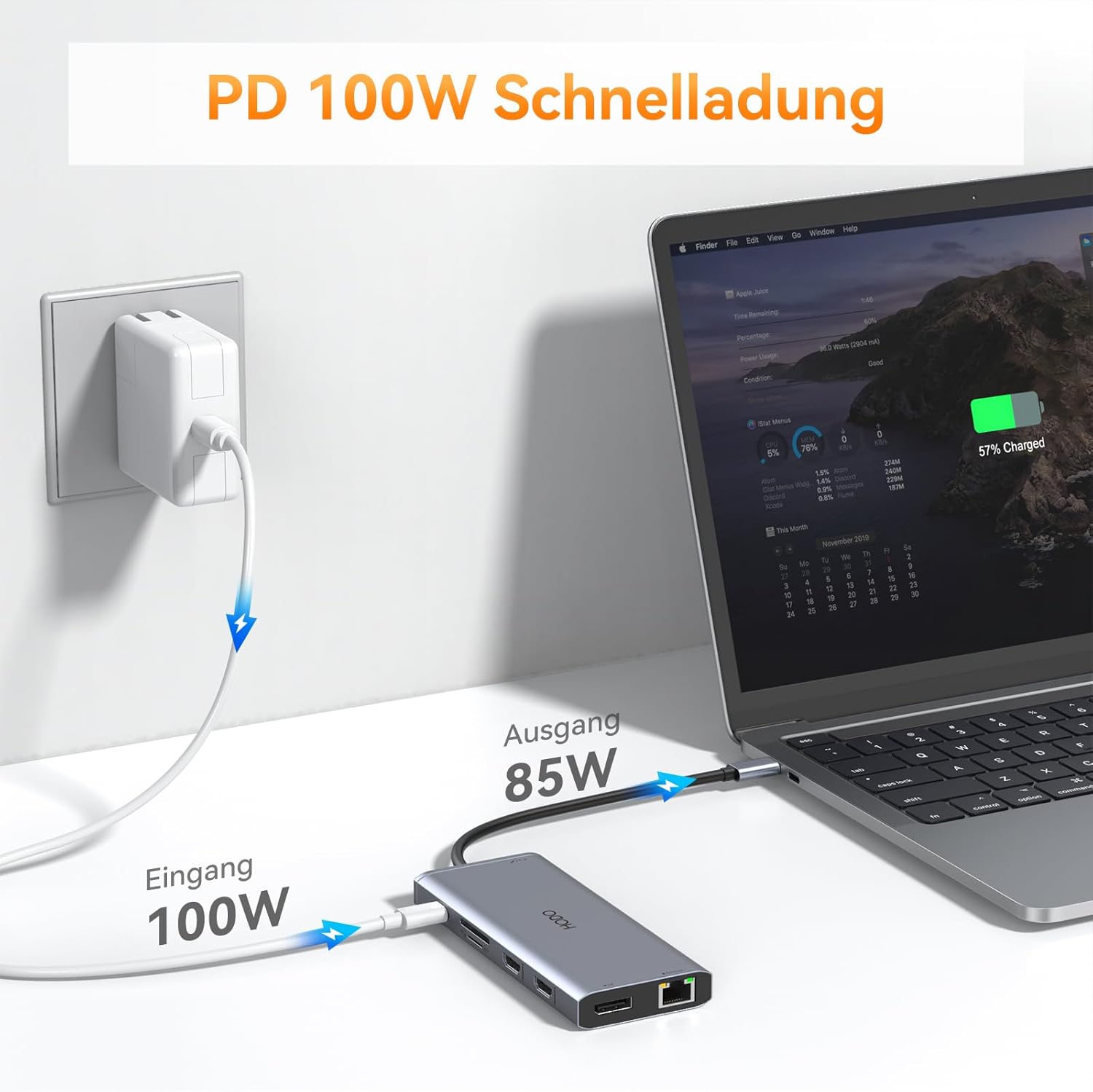
Image: Illustration showing a laptop connected to the docking station, with a 100W power adapter connected to the docking station's PD port, providing 85W output to the laptop.
4.2 Conexión de pantallas externas
Connect your monitors to the HDMI 1, HDMI 2, and/or DisplayPort outputs on the docking station using appropriate cables.
4.3 Conexión de periféricos
- Connect USB devices (keyboard, mouse, external hard drives, USB drives) to the USB 3.0 or USB 2.0 ports.
- Para unha conexión de rede con fíos, conecte un cable Ethernet ao porto Gigabit Ethernet.
- Connect headphones or a microphone to the 3.5mm Audio/Mic jack.
- Insert SD or TF cards into the corresponding card reader slots.

Image: A laptop connected to the docking station, demonstrating the connection of an Ethernet cable to the 1000Mbps Ethernet port and headphones to the 3.5mm Audio Jack.
5. Operating Instructions: Display Modes
The HODO HD185D supports various display configurations for both Windows and macOS systems.
5.1 Windows Display Modes
Windows systems support both dual and triple extended displays.
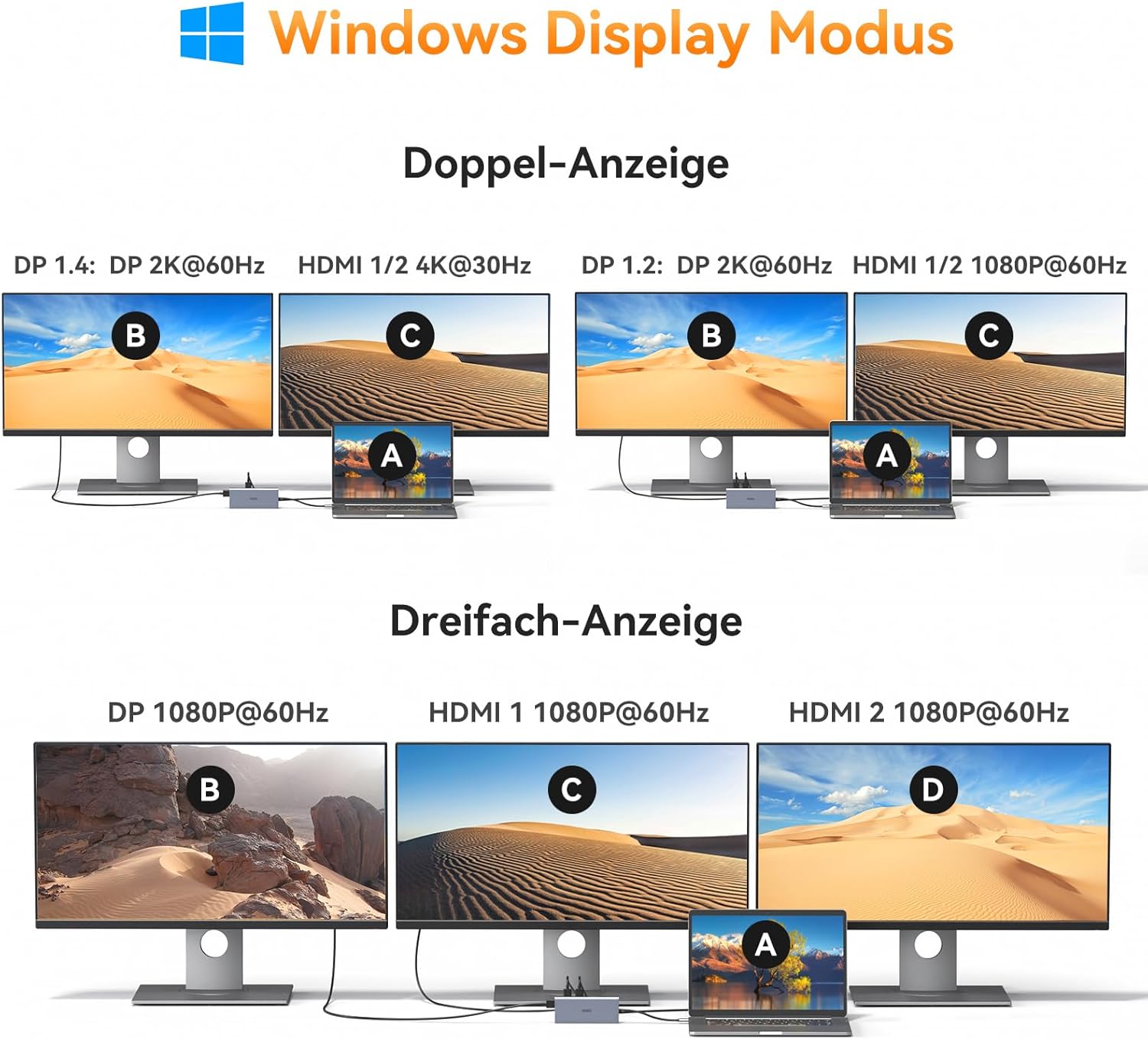
Image: Diagrams illustrating dual and triple display configurations for Windows. Dual display options include DP 2K@60Hz + HDMI 1/2 4K@30Hz or DP 1.2 2K@60Hz + HDMI 1/2 1080P@60Hz. Triple display is 1080P@60Hz across all three external monitors (DP, HDMI 1, HDMI 2).
- Pantalla única:
- HDMI 1: Up to 4K@60Hz
- HDMI 2: Up to 4K@30Hz
- DisplayPort: Up to 4K@60Hz
- Pantalla dual:
- HDMI 1 + HDMI 2: 4K@60Hz + 1080P@60Hz or 4K@29Hz + 2K@59Hz
- HDMI 1 + DisplayPort: 4K@60Hz + 4K@60Hz (or 4K@29Hz + 4K@29Hz)
- HDMI 2 + DisplayPort: 4K@30Hz + 4K@60Hz (or 2K@59Hz + 4K@29Hz)
- Triple Display (HDMI 1 + HDMI 2 + DisplayPort): All three external monitors will display at 1080P@60Hz.
Note: When configuring dual displays, if you desire 4K@29Hz resolution, you may need to adjust the settings for HDMI 1 from 4K@60Hz to 4K@29Hz.
5.2 macOS Display Modes
macOS systems support Mirror Mode and Extend Mode. Due to macOS limitations, Multi-Stream Transport (MST) for extended displays is not supported across multiple external monitors. Therefore, in Extend Mode, all external monitors will display the same extended content, distinct from the laptop screen.

Image: Diagrams illustrating Mirror Mode and Extend Mode for macOS. In Mirror Mode, all displays (laptop and external) show identical content. In Extend Mode, the laptop screen is extended, and all connected external monitors mirror each other, showing a single extended desktop.
- Modo espello: The laptop screen and all connected external monitors will display identical content.
- Modo de extensión: The laptop screen will be extended, and all connected external monitors will mirror each other, displaying the same extended content.
5.3 Display Resolution Summary

Image: A table summarizing display resolutions for single, dual, and triple monitor setups across HDMI and DisplayPort connections.
6. Especificacións
| Marca | HODO |
| Número de modelo | HD185D |
| Interface de hardware | 2x HDMI, 1x DisplayPort, 1x Ethernet, 3x USB 3.0, 2x USB 2.0, 1x USB Type-C Data, 1x USB-C PD, 1x SD Card, 1x MicroSD Card, 1x 3.5mm Audio/Mic |
| Total de portos USB | 6 (3x USB 3.0, 2x USB 2.0, 1x USB Type-C Data) |
| Taxa de transferencia de datos | USB 3.0: 5 Gbps, USB 2.0: 480 Mbps, SD/TF: 104 Mbps |
| Velocidade Ethernet | 1 Gbps |
| Entrega de enerxía | Input up to 100W, Output up to 87W (Safety) |
| Saída de vídeo | HDMI 1: 4K@60Hz, HDMI 2: 4K@30Hz, DisplayPort: 4K@60Hz |
| Dispositivos compatibles | Laptops with full-featured USB-C ports (Power Delivery, DisplayPort Alt Mode, Data Transfer), including Dell XPS, HP Elitebook, Lenovo Thinkpad/Yoga, Surface Pro/Go, etc. |
| Sistema Operativo | Windows 10/11, macOS, Linux |
| Material do recinto | Aluminio |
| Peso do elemento | 0.08 quilogramos |
7 Solución de problemas
- Sen saída de visualización:
- Asegúrate de que o porto USB-C do teu portátil sexa compatible co modo alternativo de DisplayPort.
- Check all cable connections (USB-C from dock to laptop, HDMI/DP to monitors).
- Tenta conectar un monitor á vez para illar o problema.
- Reinicia o teu portátil.
- Actualiza os controladores gráficos do teu portátil.
- A carga non funciona:
- Verifica que o porto USB-C do teu portátil sexa compatible con Power Delivery.
- Ensure your power adapter is connected to the docking station's USB-C PD port and is sufficient wattage (65W+ recommended).
- Dispositivos USB non recoñecidos:
- Volve conectar o dispositivo USB.
- Try a different USB port on the docking station.
- Ensure the docking station is properly connected to your laptop.
- Problemas de conexión Ethernet:
- Comprobe a conexión do cable Ethernet.
- Verify your network settings on your laptop.
- Asegúrate de que o teu router/módem funcione correctamente.
- MacBook External Monitors Mirroring:
- This is expected behavior for macOS. All external monitors will mirror each other in Extend Mode.
8. Coidados e mantemento
- Keep the docking station away from water, fire, and corrosive liquids.
- Evite deixar caer ou someter o dispositivo a fortes impactos.
- Non intente desmontar ou reparar o dispositivo vostede mesmo.
- Limpa o dispositivo cun pano suave e seco.
9. Garantía e soporte
HODO is committed to providing high-quality products and service. This product comes with a 1-year warranty from the date of purchase.
If you encounter any issues or have questions regarding your HODO HD185D docking station, please do not hesitate to contact our customer support team.
Correo electrónico de atención ao cliente: wirskpoke@hotmail.com