
Introdución
This manual provides comprehensive instructions for the operation and maintenance of your Andoer Portable Digital Camera. Designed for ease of use, this compact camera features a 48MP image sensor, 2.7K video recording capabilities, and a 2.88-inch IPS display. It includes advanced functions such as 16X digital zoom, auto focus, self-timer, face detection, and anti-shaking technology, making it ideal for capturing high-quality photos and videos.

Figure 1: Andoer Portable Digital Camera (Pink)
This image displays the front and back of the pink Andoer Portable Digital Camera. The front shows the lens, flash, and "Andoer" branding, along with "48.0 MEGA PIXELS" and "2.7K". The back features the 2.88-inch IPS screen, which is displaying a vibrant image of a person. Also visible are the control buttons and a 32GB SD card and two batteries, indicating included accessories.
As características principais inclúen:
- 48 megapíxeles still image resolution
- 2.7 mil gravación de vídeo
- Zoom dixital 16X for capturing distant subjects
- Pantalla IPS de 2.88 polgadas para claro viewing
- Enfoque automático for sharp images
- Detección facial e Captura de sorrisos for intelligent photography
- Support for up to 128GB Extended Memory (SD/MMC card)
- Integrado Antisacudida función

Figura 2: Características principaisview
This image visually summarizes the main features of the camera using icons and text: 48 Mega Pixel, 2.7K Video, 16X Powerful Zoom, Anti-shaking, 2s/5s/10s Self-timer, 2.88in IPS Screen, 128GB Extended Memory, and Face Detection. The camera is shown in the foreground with a group of smiling people in the background, suggesting its use for social photography.
Configuración
Before using your camera, please ensure it is properly set up. The package includes the digital camera, USB cable, strap, carrying pouch, two batteries, and a user manual.
1. Instalación e carga da batería
The camera is powered by a rechargeable lithium battery. Two batteries are included for extended use.
- Abra a tapa do compartimento da batería que se atopa na parte inferior da cámara.
- Insert the lithium battery, ensuring the correct polarity as indicated inside the compartment.
- Pecha a tapa do compartimento da batería de forma segura.
- To charge the battery, connect the camera to a computer or a power adapter (not included) using the provided USB cable. The charging indicator light will illuminate.
- Charging typically takes a few hours. The indicator light will change or turn off once charging is complete.
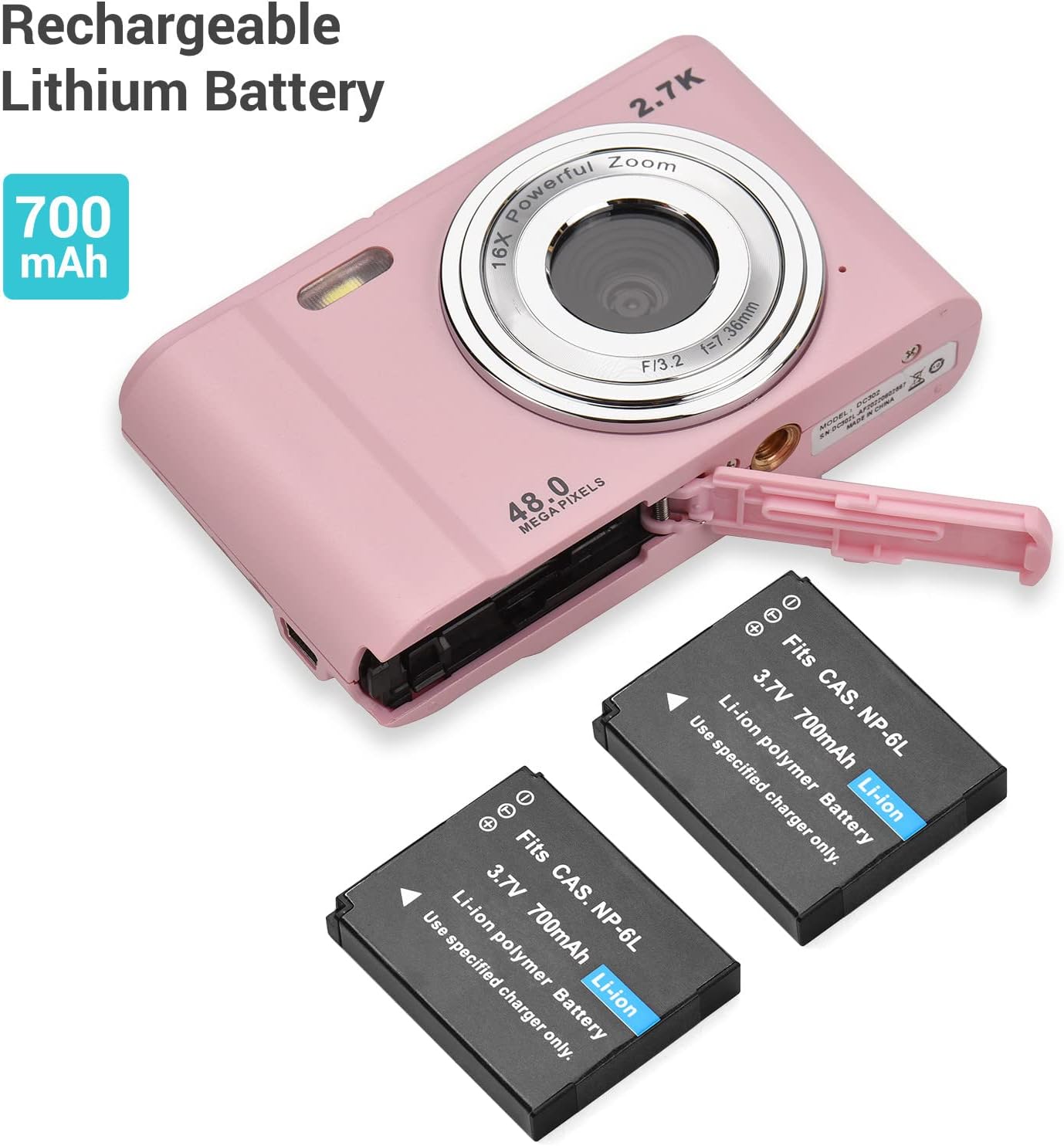
Figura 3: Instalación da batería
This image shows the Andoer Digital Camera with its battery compartment open, revealing the slot for the rechargeable lithium battery. Two 700mAh Li-ion batteries are displayed next to the camera, illustrating the power source and its capacity.
2. Instalación da tarxeta de memoria
The camera supports SD memory cards and MMC cards from 4GB to 128GB. A memory card is required to save photos and videos.
- Locate the memory card slot, usually next to the battery compartment or on the side of the camera.
- Insert the SD/MMC card into the slot with the metal contacts facing the correct direction (refer to the diagram near the slot). Push until it clicks into place.
- To remove the card, gently push it in again until it clicks, and it will spring out.
Figure 4: Memory Card and Accessories
This image highlights the camera's accessories, specifically a 32GB SD memory card and two rechargeable batteries, indicating their importance for camera operation and storage.
Instrucións de funcionamento
1. Acendido/apagado
- Para acender, manteña premido o botón de acendido.
- To power off, press and hold the Power button again. The camera also features an auto-off function (1min/3min/5min/No Shutdown) to conserve battery.
2. Facendo fotos
- Acende a cámara.
- Frame your shot using the 2.88-inch IPS screen.
- Press the Shutter button halfway down to allow the camera to auto-focus.
- Prema o botón do obturador ata o fondo para capturar a foto.
3. Gravación de vídeos
- Switch to video mode (if applicable, usually a dedicated button or menu option).
- Preme o botón do obturador para comezar a gravar. Aparecerá un temporizador na pantalla.
- Preme de novo o botón obturador para deter a gravación.

Figure 5: Photo and Video Capabilities
This image illustrates the camera's dual capabilities: 2.7K video recording and 48-megapixel still photography. It shows a person skiing (representing video) and a woman posing (representing photos), with the camera positioned below, emphasizing its versatility.
4. Función de zoom
Use the W (Wide) and T (Telephoto) buttons, typically located near the top right of the camera, to adjust the 16X digital zoom.
- Preme T to zoom in (telephoto).
- Preme W to zoom out (wide-angle).

Figure 6: 16X Powerful Zoom
This image demonstrates the camera's 16X powerful digital zoom capability. It shows a close-up shot of an insect on a leaf, contrasted with a wider view of the same scene as seen on the camera's screen, highlighting the zoom's effectiveness.
5. Temporizador automático
The camera offers 2s, 5s, and 10s self-timer options for delayed shooting.
- Access the self-timer setting through the camera's menu.
- Select your desired delay (2s, 5s, or 10s).
- Press the Shutter button. The camera will count down before taking the photo.
6. Smart Detection (Face Detection & Smile Capture)
The camera can automatically detect faces and capture photos when a smile is detected.
- Enable Face Detection and Smile Capture in the camera settings.
- When enabled, the camera will automatically focus on faces and trigger the shutter when a smile is detected, ensuring well-composed and joyful portraits.

Figure 7: Smart Detection Features
This image illustrates the camera's "Smart Detection" capabilities, specifically Face Detection and Smile Capture. The camera's screen displays a family photo, and icons below represent these intelligent features, indicating the camera's ability to automatically optimize shots for portraits.
7. Conectando a un ordenador
You can transfer photos and videos to your computer using the provided USB cable.
- Asegúrate de que a cámara estea acendida.
- Conecta un extremo do cable USB ao porto USB da cámara e o outro extremo ao teu ordenador.
- The camera will appear as a removable disk drive on your computer. You can then access and transfer your files.
Mantemento
Proper care and maintenance will extend the life of your Andoer Digital Camera.
- Limpeza da lente e da pantalla: Use a soft, lint-free cloth specifically designed for optics. Do not use abrasive cleaners or solvents.
- Almacenamento: When not in use for extended periods, remove the battery and store the camera in a cool, dry place, away from direct sunlight and extreme temperatures.
- Auga e po: This camera is not waterproof or dustproof. Avoid exposure to water, high humidity, and dusty environments.
- Coidado da batería: Fully charge batteries before first use. Do not expose batteries to high temperatures or dispose of them in fire. Recycle used batteries according to local regulations.
Resolución de problemas
Se tes problemas coa túa cámara, consulta os seguintes problemas e solucións comúns:
| Problema | Causa posible | Solución |
|---|---|---|
| A cámara non se acende. | A batería está descargada ou inserida incorrectamente. | Asegúrate de que a batería estea completamente cargada e inserida coa polaridade correcta. |
| Non se poden facer fotos/vídeos. | A tarxeta de memoria está chea, non está inserida ou está danada. | Insert a memory card, delete unnecessary files ou formate a tarxeta (isto borrará todos os datos). |
| As imaxes son borrosas. | A lente está sucia, hai luz insuficiente ou a cámara treme. | Clean the lens, use flash if needed, or enable anti-shaking function. Hold the camera steady. |
| A cámara conxélase. | Fallo de software ou batería baixa. | Remove and reinsert the battery to reset. Ensure battery is charged. |
| O ordenador non recoñece a cámara. | Problema co cable USB ou problema co controlador. | Try a different USB port or cable. Ensure camera is powered on when connected. |
Especificacións
Detailed technical specifications for the Andoer Portable Digital Camera:
| Característica | Especificación |
|---|---|
| Mostrar | 2.88 inches IPS LCD screen (4:3) |
| Sensor de imaxe | Sensor de imaxe CMOS de 8 MP |
| Relación de resolución da imaxe | Máx. 48 MP |
| Tamaño da película | 2688*1520 2.7K, 1920*1080 HD, 1280*720 HD, 640*480 |
| Distancia focal | f = 7.36 mm |
| Apertura | F/3.2 |
| Zoom dixital | 16X |
| Soporte para tarxetas de memoria | SD memory card and MMC card (4GB to 128GB) |
| File Formato | JPG, AVI |
| Disparador automático | 2s / 5s / 10s |
| Balance de brancos | Auto/ Daylight/ Cloudy/ Fluorescent/ Tungsten |
| Compensación de exposición | -3.0~+3.0 |
| Porto USB | USB 2.0 |
| Apagado automático | 1min/ 3min/ 5min/ No Shutdown |
| Poder | Batería de litio recargable 700mAh |
| Requisitos do sistema operativo | Compatible with Windows XP/ Vista/ 7/ 8/ 10; Mac10.2 (Include and later) |
| Dimensións | 9.6 * 5.6 * 2.5 cm / 3.78 * 2.2 * 0.98 polgadas |
| Peso neto | 93g / 3.28oz (with Battery) |
| Montaxe | 1/4 inch thread at the bottom for tripod/monopod |
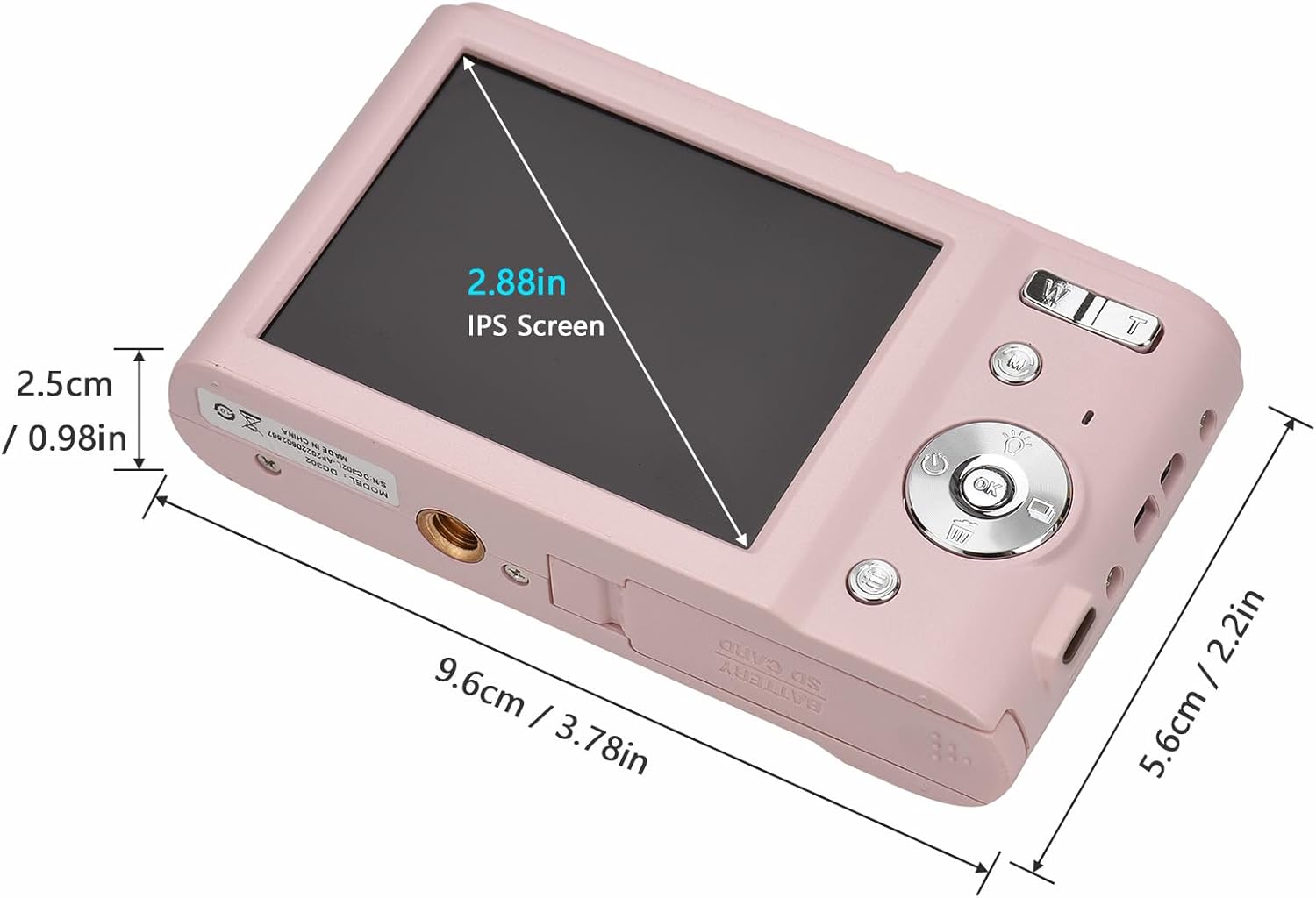
Figura 8: Dimensións do produto
Esta imaxe ofrece información detallada view of the Andoer Digital Camera's dimensions, including its length (9.6cm / 3.78in), width (5.6cm / 2.2in), and thickness (2.5cm / 0.98in). It also highlights the 2.88-inch IPS screen, offering a clear understanding of the camera's compact size.

Figure 9: Universal 1/4 Thread Mounting
This image illustrates the camera's universal 1/4 inch thread mounting point located at its bottom, allowing it to be easily attached to tripods or monopods for stable shooting. The camera is shown mounted on a small tripod, with a close-up inset of the mounting screw hole.
Apoio
For further assistance, technical support, or warranty information, please visit the official Andoer store or contact customer service.
Official Andoer Store: Andoer Store on Amazon