
1. Introdución
Thank you for choosing the Hoco GA08 Smart Sports Bracelet. This device is designed to help you monitor your fitness activities and health metrics, providing convenient notifications and smart features directly on your wrist. Please read this manual carefully before using the product to ensure proper operation and to maximize its potential.
2. Contido do paquete
Marque a caixa para os seguintes elementos:
- Hoco GA08 Smart Sports Bracelet (main unit and strap)
- Cable de carga USB
- Manual de usuario
3. Produto rematadoview
Familiarize yourself with the components of your Hoco GA08 Smart Sports Bracelet.

Figure 3.1: Hoco GA08 Smart Sports Bracelet and its retail packaging.
3.1 Main Unit and Strap
The main unit houses the display, sensors, and internal electronics. It is designed to be detachable from the strap for charging and maintenance.
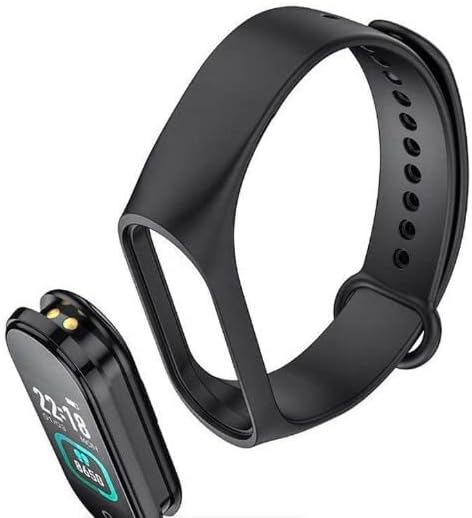
Figure 3.2: The main unit of the Hoco GA08 Smart Sports Bracelet detached from its silicone strap.
3.2 Sensores e contactos de carga
On the underside of the main unit, you will find the optical sensors for heart rate and blood pressure monitoring, along with the charging contacts.

Figura 3.3: Traseira view of the Hoco GA08 Smart Sports Bracelet, highlighting the health sensors and charging pins.
4. Configuración
4.1 Carga do dispositivo
- Gently detach the main unit from the strap.
- Connect the main unit to the USB charging cable, ensuring the charging contacts align correctly.
- Conecta o extremo USB do cable a un adaptador de corrente USB estándar (recoméndase 5 V/1 A) ou ao porto USB dun ordenador.
- The bracelet display will show a charging indicator. A full charge typically takes 1-2 hours.
4.2 Descarga da aplicación complementaria
To unlock all features and synchronize data, download the dedicated companion app on your smartphone. Busca the app name (usually mentioned in the quick start guide or on the product packaging) in your device's app store (Google Play Store for Android or Apple App Store for iOS).
4.3 Emparellamento co teu teléfono intelixente
- Asegúrate de que o Bluetooth do teu teléfono intelixente estea activado.
- Abre a aplicación complementaria no teu teléfono intelixente.
- Follow the in-app instructions to search for and connect to your Hoco GA08 bracelet. The bracelet's name will typically appear as 'GA08' or 'Hoco GA08'.
- Confirm the pairing request on both your smartphone and the bracelet if prompted.
5. Instrucións de funcionamento
The Hoco GA08 Smart Sports Bracelet features a touch-sensitive button or area for navigation. Tap to cycle through functions, or long-press to select/activate.
5.1 Navegación básica
- Toca: Short press the touch area to switch between different display screens (time, steps, heart rate, etc.) or to navigate within a menu.
- Prensa longa: Press and hold the touch area for a few seconds to enter a function, confirm a selection, or start/stop an activity.
5.2 Vixilancia da saúde
- Monitorización da frecuencia cardíaca: Navigate to the heart rate screen. The bracelet will automatically begin measuring your heart rate. Ensure the bracelet is snug on your wrist for accurate readings.
- Medición da presión arterial Navigate to the blood pressure screen. Remain still and relaxed during the measurement.
- Visualización da temperatura: Navigate to the temperature screen to view your current body temperature.
5.3 modos deportivos
The bracelet supports 6 modos deportivos. Navigate to the sports mode section and long-press to select your desired activity. The bracelet will track relevant metrics such as duration, steps, and calories burned during your workout.
5.4 Funcións intelixentes
- Clock, Stopwatch, Alarm, Timer, Calendar: Access these time-keeping functions directly from the bracelet. Alarms and timers can often be set via the companion app.
- Incoming Message and Call Notifications: Once paired with your smartphone, the bracelet will vibrate and display notifications for incoming calls and messages.
- Busca de teléfono: Use this feature to make your paired smartphone ring, helping you locate it.
- Función de recordatorio: Set custom reminders through the app for hydration, movement, or other tasks.
- Visualización do tempo: View current weather conditions after synchronizing with the companion app and your phone's location services.
- Captura de fotos remota: Use the bracelet as a remote shutter button for your smartphone camera. Open the camera in the app, then shake the bracelet or tap its touch area to take a photo.
6. Mantemento
- Limpeza: Regularly clean the bracelet, especially the sensors and charging contacts, with a soft, dry cloth. If necessary, use a slightly damp pano e xabón suave, despois seca ben.
- Evitar produtos químicos: Do not use harsh chemicals, cleaning solvents, or strong detergents, as these can damage the device.
- Resistencia á auga: The bracelet typically has a certain level of water resistance (e.g., IP67). Avoid prolonged submersion or use in hot water/steam. Refer to product specifications for exact water resistance ratings.
- Almacenamento: Store the bracelet in a cool, dry place when not in use.
- Coidado da batería: Avoid completely draining the battery frequently. Charge the device regularly to maintain battery health.
7 Solución de problemas
If you encounter issues with your Hoco GA08 Smart Sports Bracelet, try the following solutions:
- O dispositivo non se acende: Asegúrate de que o dispositivo estea completamente cargado. Conéctao ao cargador durante polo menos 30 minutos.
- Non se pode emparellar co teléfono intelixente:
- Asegúrate de que o Bluetooth estea activado no teu teléfono.
- Make sure the bracelet is charged and within Bluetooth range of your phone.
- Restart both your phone and the bracelet.
- Tenta desvincular e volver vincular o dispositivo a través da aplicación.
- Lecturas de saúde inexactas:
- Ensure the bracelet is worn snugly on your wrist, about one finger's width above the wrist bone.
- Keep still during measurements.
- Clean the sensor area on the back of the bracelet.
- Non aparecen as notificacións:
- Check app permissions on your smartphone to ensure the companion app has access to notifications.
- Verify that notification settings are enabled within the companion app.
- Ensure the bracelet is connected via Bluetooth.
8. Especificacións
| Característica | Descrición |
|---|---|
| Nome da marca | Hoco |
| Modelo | GA08 |
| Operating System (App Compatibility) | Android |
| Características especiais | Heart Rate Monitor, Blood Pressure Measurement, 6 Sports Modes, Notifications, Remote Camera Control, Weather Display, Temperature Display |
| Forma do elemento | Ovalado |
| Estilo | Apto para todas as estacións |
| Cor | Negro |
| Público obxectivo | Adults (Unisex) |
| Dispositivos compatibles | Teléfono intelixente |
| Cor da banda | Negro |
| Tipo de material da caixa | Resina |
9. Información de seguridade
- This device is not a medical device and should not be used to diagnose or treat any medical condition. Consult a healthcare professional for medical advice.
- Manteña o dispositivo lonxe de temperaturas extremas, luz solar directa e chamas abertas.
- Non intente desmontar nin modificar o dispositivo. Isto anulará a garantía e pode causar danos ou lesións.
- Manter fóra do alcance dos nenos.
- Se experimenta irritación ou molestias na pel, interrompa o uso e consulte un médico.
10. Garantía e soporte
For warranty information and customer support, please refer to the warranty card included in your product packaging or visit the official Hoco website. Typically, warranty covers manufacturing defects for a specified period from the date of purchase.
If you require technical assistance or have questions not covered in this manual, please contact Hoco customer service through their official channels.