
Tiburón negro BR50
Black Shark FunCooler 5 Magnetic Phone Cooler User Manual
Modelo: BR50
1. Introdución
The Black Shark FunCooler 5 is a high-performance magnetic cell phone cooler designed to prevent overheating during intensive use such as gaming, streaming, or extended video watching. Utilizing advanced cooling technology, it significantly reduces device temperature, ensuring stable performance and extending the lifespan of your mobile device. This manual provides essential information for setting up, operating, maintaining, and troubleshooting your FunCooler 5.

The Black Shark FunCooler 5 attached to a smartphone, illustrating its cooling capabilities.
2. Que hai na caixa
Comprobe o contido do paquete ao desembalar:
- Black Shark FunCooler 5 Magnetic Phone Cooler
- USB Type-C Power Cable (Note: Power adapter not included)
- 2 x Retentores extraíbles (para fixación tipo clip)
3. Especificacións
| Característica | Detalle |
|---|---|
| Dimensións do produto | 2.36 cm de longo x 1.06 cm de ancho x 2.36 cm de alto |
| Marca | Tiburón Negro |
| Tipo de conector de alimentación | USB tipo C |
| Voltage | 5 voltios (DC) |
| Wattage | 20 watts (for optimal performance) |
| Método de arrefriamento | Air (Peltier element / TEC) |
| Dispositivos compatibles | Laptop, Smartphone, Tablet (iPhone Magnetic Series, Android, iPad, Switch) |
| Nivel de ruído | 30 Decibels (in silent mode) |
| Material | Cobre, metal, plástico |
| Velocidade de rotación máxima | 6500 RPM |
| Número de modelo do artigo | BR50 |
| Peso do elemento | 2.82 onzas |
4. Configuración
4.1 Conexión de alimentación
Connect the provided USB Type-C cable to the cooler and a power source. For optimal cooling performance, ensure your power adapter provides at least 20W of power. The power adapter is not included.
4.2 Attaching the Cooler to Your Device
The FunCooler 5 offers two primary attachment methods:
- Magnetic Adsorption (for iPhone Magnetic Series and compatible devices):
Simply align the cooler with the magnetic area on the back of your device. The 12N strong magnetic force will securely hold the cooler in place. Ensure direct contact for best cooling results. - Clip-Type Attachment (for Android, Tablets, and other devices):
If your device is not MagSafe compatible or you prefer a clip attachment, use the two removable retainers included. - Take out the provided detachable handle/retainers.
- Pick up the magnetic cooling fan with the magnetic side facing down.
- Align the fixed ribs of the handle with the openings on the cooler in the middle of both side vents.
- Once aligned seamlessly, press the handle down vertically with force. When you hear a "click" sound, the installation is complete.
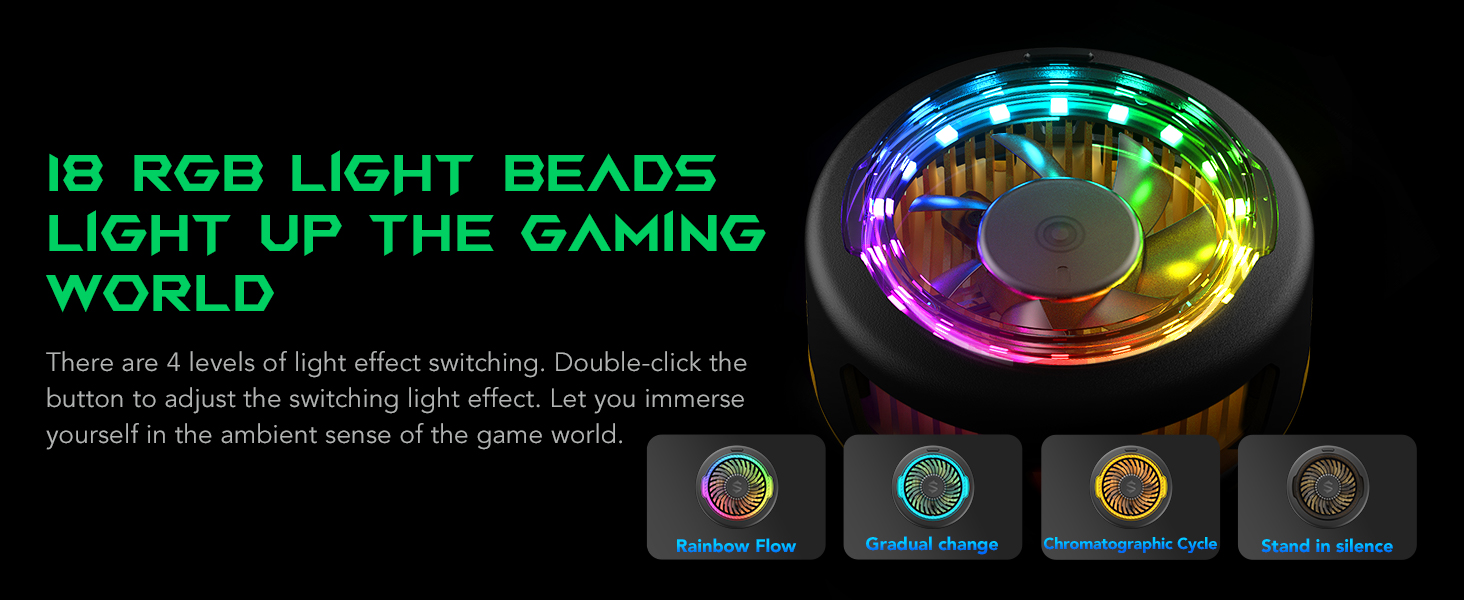
Illustration of the powerful 12N magnetic suction ensuring a secure attachment to your device.

Visual guide for attaching the detachable handle for clip-type usage.
Video demonstrating the process of attaching the grip to the FunCooler 5 Pro for secure device mounting.
5. Instrucións de funcionamento
5.1 Acendido/Apagado
O FunCooler 5 acéndese automaticamente cando se conecta a unha fonte de alimentación e apágase cando se desconecta.
5.2 Cambio dos modos de refrixeración
The cooler features two operating modes: Overclocking Mode for maximum cooling and Modo silencioso for reduced noise. Press the button on the cooler once to switch between these modes. Silent mode operates at a low noise level of 30dB.
5.3 Adjusting RGB Lighting Effects
The FunCooler 5 includes dazzling RGB lighting effects. Double-click the button on the cooler to cycle through four different light effect levels, enhancing your gaming or viewatmosfera.

The FunCooler 5 showcasing its 18 RGB light beads and four distinct lighting effects.
5.4 Optimal Airflow Design
The vertical air duct design ensures that hot air is directed away from your hands, providing a comfortable grip during extended use.

Visual representation of the vertical air duct design for efficient heat dissipation away from hands.
5.5 Escenarios de uso
The FunCooler 5 is adaptable for various scenarios, including:
- Xogos: Maintain peak performance during intense mobile gaming sessions.
- Binge-Watching: Keep your device cool during long video playback.
- Live Streaming/Video Recording: Use with the detachable grip and a tripod for stable and cool operation.

The FunCooler 5 adapts to various uses, from gaming to live streaming.
Vídeo de presentación oficial do produtoasing the Black Shark FunCooler 5 Magnetic Phone Cooler's features and cooling capabilities.
Detailed video showcasing the Black Shark FunCooler 5 Magnetic Cell Phone Cooler in action, highlighting its design and performance.
A quick look video demonstrating the Black Shark FunCooler 5 Magnetic Cell Phone Cooler's features and ease of use.
Video highlighting the fast phone cooling capabilities of Black Shark fans, including the FunCooler 5.
6. Mantemento
Para garantir a lonxevidade e o rendemento óptimo do teu Black Shark FunCooler 5, segue estas pautas de mantemento:
- Limpeza: Regularly wipe the cooler's surface with a soft, dry cloth to remove dust and debris. Avoid using abrasive cleaners or solvents.
- Respiradores de ventilación: Ensure the fan vents are clear of obstructions to maintain proper airflow. Use a soft brush or compressed air to gently clean any dust accumulation.
- Almacenamento: Cando non estea en uso, garde a neveira nun lugar fresco e seco, lonxe da luz solar directa e de temperaturas extremas.
- Evitar auga: Non mergulles o refrixerador en auga nin o expoñas a humidade excesiva.
7 Solución de problemas
If you encounter any issues with your FunCooler 5, please refer to the following common problems and solutions:
- Cooler is not turning on:
Ensure the USB Type-C cable is securely connected to both the cooler and a working power source. Verify that the power source provides at least 20W for the cooler to function. - Cooling performance is not optimal:
Check if the cooler is making direct and firm contact with the back of your device. Ensure the power adapter meets the 20W requirement. Clean any dust from the fan vents to improve airflow. - Cooler feels loose or falls off:
If using magnetic attachment, ensure your device is MagSafe compatible or has a magnetic case. If using clip-type attachment, verify that the removable retainers are correctly installed and tightened securely to your device. - As luces RGB non funcionan ou están atascadas:
Double-click the button on the cooler to cycle through the light effects. If the issue persists, disconnect and reconnect the power cable.
If these solutions do not resolve the issue, please contact Black Shark customer support for further assistance.
8. Garantía e soporte
The Black Shark FunCooler 5 Magnetic Phone Cooler comes with a standard manufacturer's warranty. For detailed warranty terms and conditions, please refer to the warranty card included in your product packaging or visit the official Black Shark websitio.
For technical support, troubleshooting assistance, or warranty claims, please contact Black Shark customer service through their official support channels. Keep your purchase receipt and product model number (BR50) handy when contacting support.
Ask a question about this manual
Ask about setup, troubleshooting, compatibility, parts, safety, or missing instructions. Manuals+ will review the question and use this page’s manual context to help answer it.