
1. Introdución
The OC Acoustic Newport Plug-in Bluetooth Speakers offer a convenient and clutter-free audio solution. Designed to plug directly into any standard electrical outlet, these speakers eliminate the need for charging cables and free up counter space. Enjoy crisp, loud sound without the hassle of batteries or wires.

Imaxe: Fronte view of the OC Acoustic Newport Plug-in Bluetooth Speaker.
2. Que hai na caixa
Verifica que todos os elementos estean presentes no paquete:
- OC Acoustic Newport Plug-in Bluetooth Speakers (Pair)
- USB charging cable (for device charging via speaker's USB port)
3. Configuración
Follow these steps to set up your Newport Plug-in Bluetooth Speakers:
- Conectar: Insert the speaker directly into any standard electrical outlet. The speaker is designed to not block the second plug.
- Encendido: Once plugged in, the speaker will automatically power on. A light indicator will confirm it is ready for pairing.

Image: The Newport speaker plugged into a wall outlet.
4. Instrucións de funcionamento
4.1 Emparejamento Bluetooth
To connect your device to the Newport speaker via Bluetooth:
- Ensure the Newport speaker is plugged into an outlet and powered on.
- No teu teléfono intelixente ou tableta, vai á configuración de Bluetooth.
- Activa o Bluetooth.
- Scan for available devices. The Newport speaker will appear as "Newport_XXXX" (where XXXX is a unique identifier).
- Select "Newport_XXXX" from the list to pair. A confirmation sound will indicate successful pairing.
4.2 Party Mode (Multiroom Audio)
To create a multiroom audio system with multiple Newport speakers:
- Ensure all Newport speakers are plugged in and powered on.
- Pair your primary device to one Newport speaker following the Bluetooth Pairing instructions above.
- Refer to the OC Acoustic app or additional documentation for specific instructions on linking multiple Newport speakers for Party Mode, as this feature typically requires app control.
4.3 Built-in USB Type-A Charging Port
The Newport speaker includes a USB Type-A port for convenient charging of your mobile devices.
- Locate the USB port on the side of the speaker.
- Connect your device's USB charging cable to this port.
- O teu dispositivo comezará a cargarse.
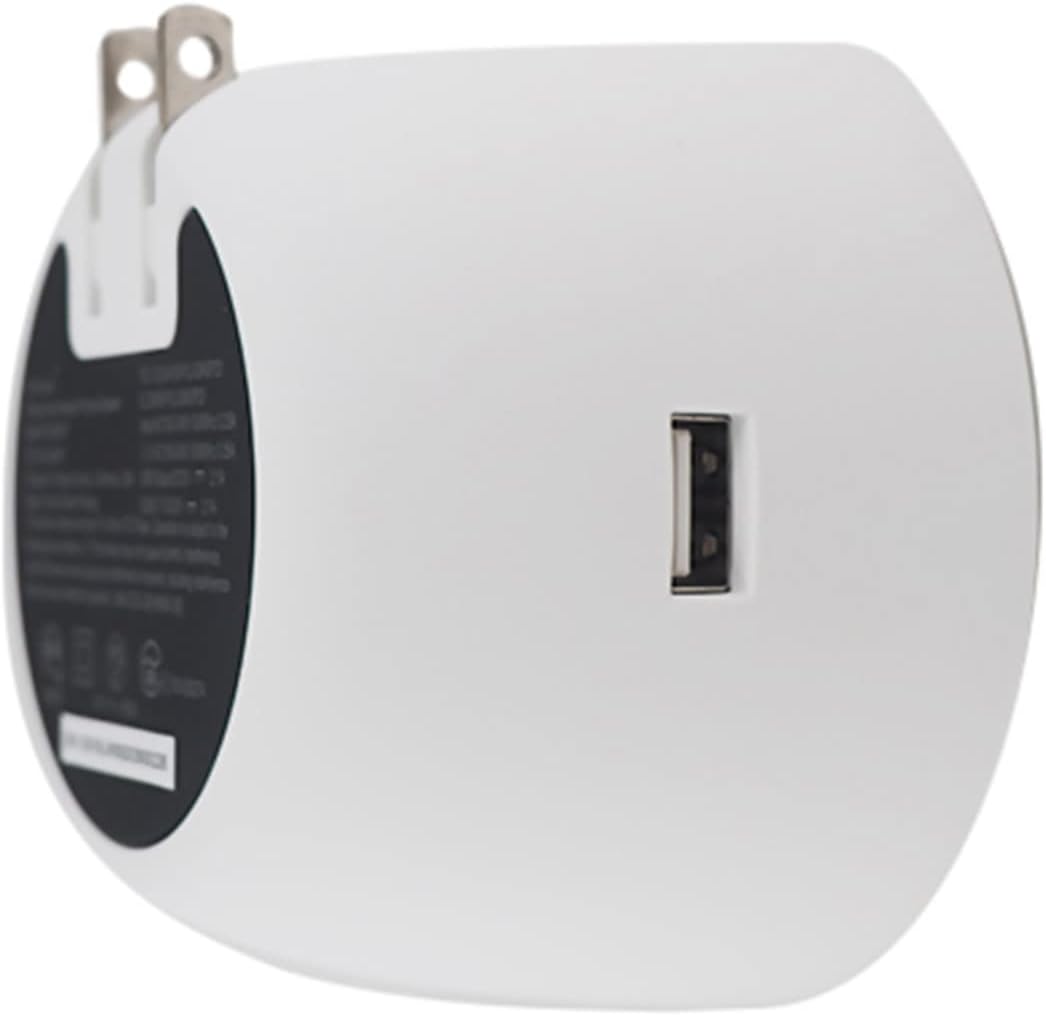
Imaxe: Costas view of the Newport speaker, highlighting the USB charging port.
5 Solución de problemas
5.1 Unit Pairing but No Sound
If your device shows as paired but you hear no sound:
- No teu dispositivo, vai á configuración de Bluetooth.
- Locate the paired Newport speaker (e.g., "Newport_5da9").
- Select the information icon (usually an 'i' in a circle) next to the speaker name.
- Choose the option to "Forget This Device" or "Unpair".
- Restart the pairing process from Section 4.1.
5.2 Reconnecting After Unplugging
If you unplug your Newport speaker and then plug it back in, it may not automatically reconnect to your device.

Image: Close-up of the Newport speaker, indicating the power button location.
Solución: After plugging the speaker back into the outlet, press the power button on the speaker to re-establish the connection with your previously paired device.
6. Especificacións
| Característica | Detalle |
|---|---|
| Marca | OC Acoustic |
| Nome do modelo | Newport Plug-in Bluetooth Speakers - Pair |
| Número de modelo | JBLSENSELITEBLKAM |
| Tecnoloxía de conectividade | Bluetooth, USB |
| Tipo de montaxe | Enchufe |
| Tipo de altofalante | Altavoz Bluetooth |
| Características adicionais | Porto USB |
| Diámetro do subwoofer | 2 polgadas |
| Cor | Light Gray/White |
| É Impermeable | FALSO |
| Tipo de garantía | Limitado |
| Método de control | Toca |
| Tamaño do altofalante | 2 polgadas |
| Diámetro do woofer | 2 polgadas |
| Alcance Bluetooth | 20.12 metros |
| Tipo de controlador | Battery powered (refers to connected device) |
| Dimensións do artigo D x W x H | 2.48" D x 3.64" W x 3.35" H |
| Peso do elemento | 2 libras |
| Dispositivos compatibles | Smartphone, Tablet |
| Fonte de enerxía | Eléctrico con cable |
| Medios incorporados | cable de carga USB |
| Número de elementos | 2 |
| UPC | 683950295810 |
| Fabricante | OC Acoustic |
| Número de canles de audio | 2.0 |
| Tecnoloxía sen fíos | Bluetooth |
| Tecnoloxía de conectividade do subwoofer | Sen fíos |
| Protocolo de conectividade | Bluetooth |
| GTIN | 683950295810 |

Image: Dimensions of the Newport Plug-in Bluetooth Speaker.
7. Vídeo do produto
Mira o vídeo oficial do produto para obter máis informaciónview of the OC Acoustic Newport Plug-in Bluetooth Speakers:
Vídeo: Presentación oficial dun produto en vídeoasing the features and use of the OC Acoustic Newport speakers.
8. Garantía e soporte
8.1 Información da garantía
The OC Acoustic Newport Plug-in Bluetooth Speakers come with a Garantía limitada do fabricante dun anoEsta garantía cobre defectos de materiais e fabricación en condicións normais de uso. Conserve o comprobante de compra para reclamacións de garantía.
8.2 Atención ao cliente
For technical assistance, warranty claims, or general inquiries, please visit the official OC Acoustic website or contact their customer support. Refer to the product packaging or the brand's online resources for the most current contact information.