
1. Información importante de seguridade
Lea atentamente todas as instrucións antes da montaxe e o uso. Garde este manual para futuras consultas.
- Always assemble the desk on a stable, flat surface.
- Be cautious when moving the desk to avoid tipping or injury.
- Non exceda a capacidade de peso de 132 libras en total (33 lbs per shelf) to ensure stability and safety.
- Manteña os nenos e as mascotas lonxe da zona de reunión.
- Ensure all fasteners are securely tightened before use. Periodically check and re-tighten as needed.
2. Produto rematadoview e Características
The Mount-It! MI-7940 Rolling Standing Desk is designed to provide a flexible and mobile workspace. It features adjustable height, multiple shelves for organization, and locking casters for easy movement and stability.

Figura 2.1: Diagram highlighting key features of the MI-7940 desk, including height adjustable tabletop, keyboard tray, utility shelves, durable steel frame, release knobs, decorative base cover, and locking wheel base.
Características principais:
- Flexible Workspace: Easily moves between various environments such as classrooms, offices, and home study areas.
- Altura axustable: Top shelves adjust through 11 locking intervals, from 37.25 inches to 53.75 inches, allowing for comfortable sitting or standing positions.
- AmpAlmacenamento: Four sturdy platforms provide dedicated surfaces for monitors, laptops, keyboards, printers, and supplies.
- Alta capacidade de peso: Each shelf supports up to 33 lbs, with a total desk capacity of 132 lbs.
- Mobilidade fácil: Equipped with 1.5-inch smooth-rolling casters, two of which are locking, for secure positioning.
- Construción duradeira: Built from high-strength steel and engineered wood for long-term reliability.

Figura 2.2: Illustration showing the weight capacity of each shelf (33 lbs) and the total maximum weight capacity of the desk (132 lbs).
3. Instrucións de montaxe
Follow these steps to assemble your Mount-It! MI-7940 Rolling Standing Desk. All necessary tools are typically included, but a Phillips head screwdriver may be useful.
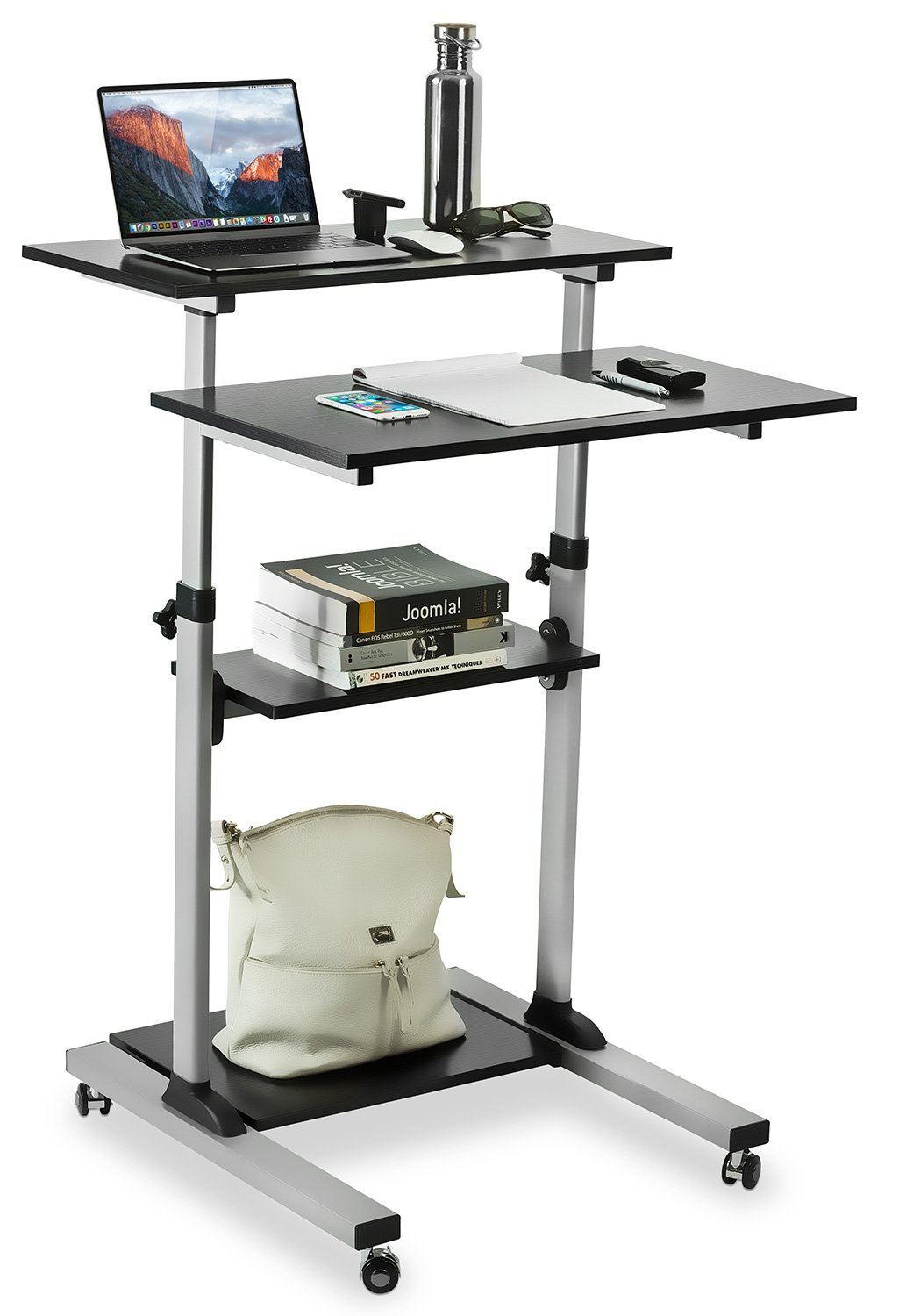
Figura 3.1: Fully assembled Mount-It! MI-7940 Rolling Standing Desk, showing its multi-tier design and mobile base.
- Desempaquetar compoñentes: Carefully remove all parts from the packaging and lay them out on a clean, flat, and soft surface to prevent scratches. Verify all components are present against the parts list (not provided in this manual, refer to your product packaging).
- Fixar as rodas á base: Insert the caster wheels into the designated holes on the base frame. Ensure two of the casters are locking wheels and position them on the front side for easy access. Tighten securely.
- Montar os postes verticais: Connect the vertical support posts to the base frame using the provided hardware. Ensure they are oriented correctly according to the design.
- Instalar a balda inferior: Slide the lowest utility shelf onto the vertical posts and secure it at the desired height using the locking knobs.
- Instalar a balda do medio: Slide the middle utility shelf onto the vertical posts and secure it using the locking knobs.
- Attach Main Tabletop and Keyboard Tray: Attach the main tabletop and the keyboard tray to the upper sections of the vertical posts. These sections are designed for height adjustment. Secure them with the provided hardware and locking knobs.
- Verificación final: Once all components are assembled, gently shake the desk to ensure stability. Re-tighten any loose connections.
4. Instrucións de funcionamento
4.1. Axuste de altura
The MI-7940 desk allows for flexible height adjustment to switch between sitting and standing positions. The top platforms can be adjusted from 37.25 inches to 53.75 inches.

Figura 4.1: Visual representation of the desk's height adjustment range, showing compressed (37.4 inches) and extended (54.7 inches) positions.
- Desbloquear: Locate the release knobs on the vertical posts supporting the main tabletop and keyboard tray. Turn these knobs counter-clockwise to loosen them.
- Axustar a altura: Carefully raise or lower the platforms to your desired height. The desk features 11 locking intervals for precise positioning.
- Bloqueo: Once the desired height is reached, turn the release knobs clockwise to securely tighten them. Ensure both knobs are fully tightened to prevent accidental movement.
4.2. Mobility and Locking Casters
The desk is equipped with smooth-rolling casters for easy movement. Two of these casters have locking mechanisms to secure the desk in place.

Figura 4.2: Primeiro plano view of the high-quality caster wheels, highlighting the locking mechanism.
- Para mover: Ensure the locking brakes on the casters are disengaged (unlocked). Gently push the desk to its new location.
- Para asegurar: Once the desk is in the desired position, press down on the locking levers of the two locking casters until they click into place. This will prevent the desk from rolling.
4.3. Posture Guidance
Maintaining correct posture is crucial for comfort and health, especially during prolonged use. The adjustable height feature of this desk can help you achieve an ergonomic setup.

Figura 4.3: Comparison of incorrect and correct posture when using a desk, illustrating how an adjustable standing desk can promote better ergonomics.
- Standing Posture: Adjust the desk height so your elbows are at a 90-degree angle when your hands are on the keyboard. Your monitor should be at eye level.
- Sitting Posture: If using with a chair, ensure your feet are flat on the floor, knees at a 90-degree angle, and elbows at a 90-degree angle to the keyboard.
5. Mantemento
Regular maintenance will help prolong the life and appearance of your Mount-It! MI-7940 Rolling Standing Desk.
- Limpeza: Limpe as superficies cun suave, damp pano. Evite produtos químicos agresivos ou produtos de limpeza abrasivos, que poden danar o acabado.
- Fixadores: Periodically check all screws and bolts to ensure they remain tight. Re-tighten as necessary to maintain stability.
- Rodízios: Keep caster wheels free of debris (hair, dust, etc.) to ensure smooth movement.
- Límites de peso: Always adhere to the specified weight limits for each shelf and the total desk to prevent structural damage.
6 Solución de problemas
Se tes algún problema co teu escritorio, consulta os seguintes problemas e solucións comúns.
| Problema | Causa posible | Solución |
|---|---|---|
| O escritorio está tremebundo ou inestable. | Fixadores soltos; superficie irregular. | Check and tighten all screws and bolts. Move the desk to a flat, level surface. |
| Height adjustment is difficult or stuck. | Locking knobs are too tight; mechanism obstructed. | Ensure locking knobs are fully loosened. Check for any obstructions in the adjustment mechanism. |
| As rodas non xiran con suavidade. | Debris in wheels; locking brake engaged. | Clean any debris from the caster wheels. Ensure locking brakes are disengaged. |
| Desk makes noise during movement. | Loose connections; friction. | Tighten all fasteners. A small amount of silicone spray on moving parts (avoiding wood surfaces) may reduce friction. |
If you are unable to resolve an issue using the troubleshooting guide, please contact Mount-It! customer support for assistance.
7. Especificacións
Detailed specifications for the Mount-It! MI-7940 Rolling Standing Desk.

Figura 7.1: Detailed dimensional drawing of the MI-7940 desk, including height, width, and depth measurements for all shelves and the overall structure.
| Característica | Especificación |
|---|---|
| Número de modelo | MI-7940 |
| Marca | Mount-It! |
| Deseño de escritorio | Escritorio de pé |
| Cor | Negro |
| Tipo de material | Madeira enxeñada, aceiro |
| Tipo de acabado | Laminado |
| Altura mínima | 37 polgadas (aprox. 94 cm) |
| Altura máxima | 54.7 polgadas (aprox. 139 cm) |
| Número de estantes | 4 |
| Capacidade de peso (por estante) | 33 libras |
| Recomendación de peso máximo (total) | 132 libras |
| Tamaño de rodicio | 1.5 polgadas |
| Peso do elemento | 20 libras |
| UPC | 810041737267 |
8. Garantía e soporte
8.1. Información da garantía
Mount-It! products are backed by a garantía de por vida, ensuring reliable performance for years to come. This warranty covers defects in materials and workmanship under normal use.
For specific details regarding the lifetime warranty, please refer to the official Mount-It! warranty policy available on their websitio ou póñase en contacto co servizo de atención ao cliente.
8.2. Atención ao cliente
Mount-It! provides expert US-based technical assistance to help you with any questions or issues before, during, and after setup.
For support, please visit the official Mount-It! website or refer to the contact information provided with your product packaging. You can also find additional resources and FAQs on their brand store: