
1. Produto rematadoview
The NexiGo PJ30 is a native 1080P LCD projector designed for both indoor and outdoor entertainment. It delivers crisp, clear images with 500 ANSI lumens brightness and supports Dolby Sound for an immersive audio experience. Equipped with 5G Wi-Fi and Bluetooth 5.1, it offers versatile connectivity options for various devices.
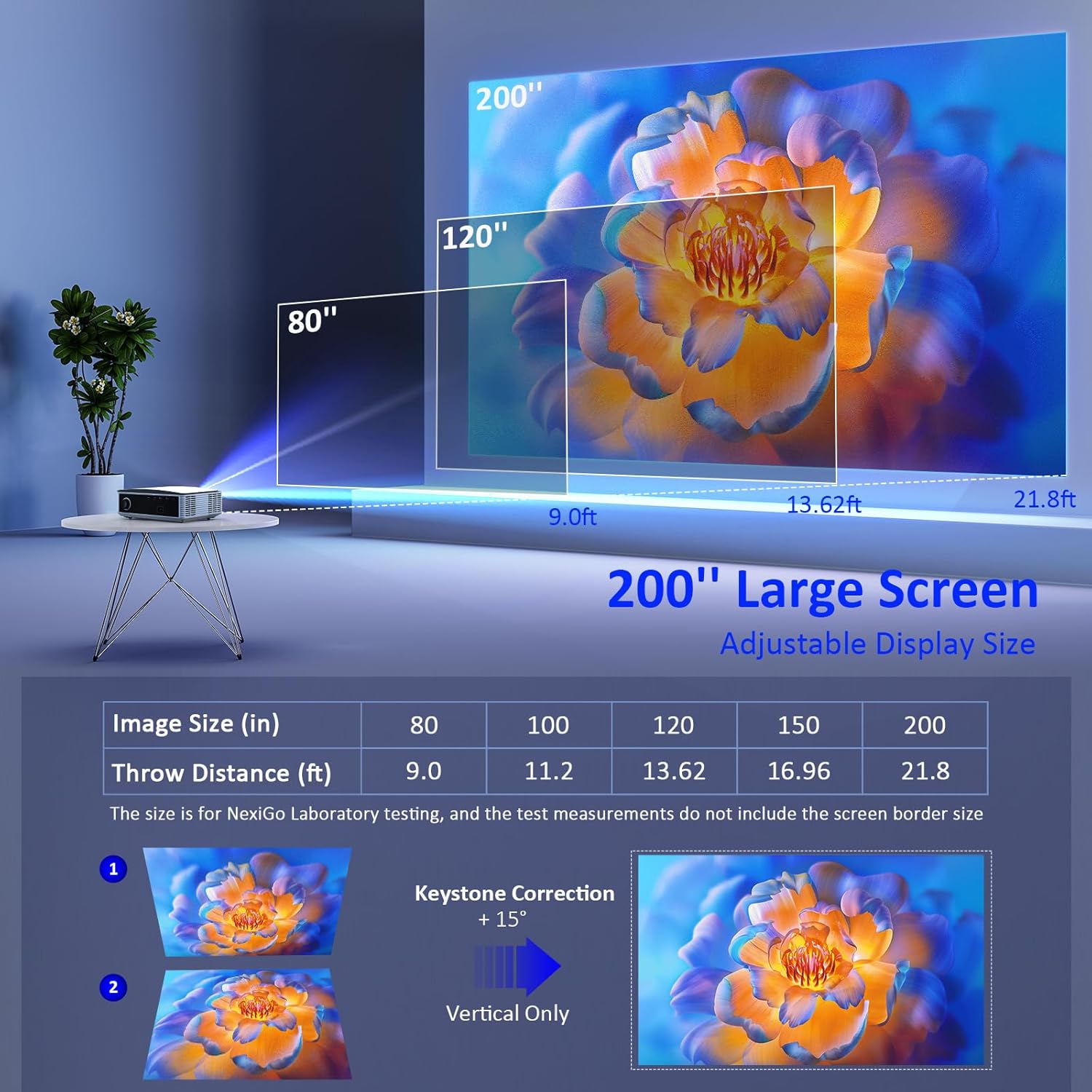
Image: The NexiGo PJ30 projector, a compact white device with a black lens, positioned to project an image.
Características principais:
- Native 1080P Resolution & 500 ANSI Lumens: Provides high-resolution, bright, and clear images.
- Espello de pantalla sen fíos: Supports 5G Wi-Fi for seamless mirroring from iOS, Android, and Windows devices.
- Dolby Sound & Bluetooth 5.1: Built-in speaker with lifelike Dolby sound and Bluetooth 5.1 for external audio devices.
- Ampla compatibilidade: Multiple ports including HDMI, USB, AV, and 3.5mm audio jack for various devices.
- Tamaño da pantalla grande: Adjustable projection from 42" to 200" with a projection distance of 4.8ft to 21.8ft.
- Zoom dixital: Easily adjust screen size with the remote control (available for local video via USB).
2. Que hai na caixa
Upon unboxing your NexiGo PJ30 projector, ensure all the following items are present:
- NexiGo PJ30 Projector
- Remote Control (2 x AAA batteries not included)
- Cable de alimentación
- Cabo AV
- Manual de usuario
- Cleaning Kit (cloth and cotton swabs for lens/screen)
3. Configuración
Colocación e instalación
The NexiGo PJ30 offers flexible installation options to suit your environment:
- Soporte de escritorio: Coloque o proxector nunha superficie plana.
- Montaxe no teito: Install the projector upside down on the ceiling (mounting hardware not included).
- Montaxe na parede: Secure the projector to a wall shelf (shelf not included).

Image: Diagrams illustrating desktop, ceiling, and wall mounting options for the projector.
Conectando ao poder
- Conecte o cable de alimentación ao porto de entrada de alimentación do proxector.
- Conecte o outro extremo do cable de alimentación a unha toma de corrente.
Distancia de proxección e tamaño da pantalla
Adjust the distance between the projector and the screen to achieve your desired display size. The optimal projection distance ranges from 4.8ft to 21.8ft for screen sizes between 42" and 200".

Image: A diagram showing recommended throw distances for various screen sizes (80" at 9.0ft, 120" at 13.62ft, 200" at 21.8ft).
4. Instrucións de funcionamento
Encendido/apagado
- Prema o botón de acendido do proxector ou do control remoto para acender ou apagar o dispositivo.
Enfoque e corrección trapezoidal
- Axusta o anel de enfoque da lente do proxector ata que a imaxe sexa nítida.
- Use the keystone dial on the rear of the projector to correct any trapezoidal distortion of the image.
Selección da fonte de entrada
O proxector admite varias fontes de entrada:
- HDMI: Connect devices like TV boxes, gaming consoles (PS5), laptops, or TV sticks via HDMI 1 or HDMI 2 ports.
- USB: Connect USB flash drives for direct media playback.
- DE: Use o cable AV fornecido para conectar dispositivos máis antigos.
- Espello de pantalla sen fíos: For iOS, Android, and Windows devices.

Image: The rear panel of the NexiGo PJ30 projector highlighting HDMI, USB, AV, and 3.5mm audio jack ports, with icons of compatible devices like iPhones, iPads, laptops, TV boxes, and USB drives.
Espello de pantalla sen fíos
The PJ30 supports 5G Wi-Fi for wireless screen mirroring. Navigate to the 'MultiScreen' option in the input source menu.
- Para dispositivos iOS: Connect your iOS device and the projector to the same Wi-Fi network. Open Control Center on your iOS device, tap 'Screen Mirroring', and select the projector's name (e.g., NexiGo-PJ30-XXXX).
- For Android/Windows Devices: Ensure your device supports Miracast or Wi-Fi Display. Connect the projector to Wi-Fi. On your device, open display settings or screen mirroring and select the projector's name.
- Note: Due to copyright protection, streaming services like Netflix, Amazon Prime Video, and Hulu do not support screen mirroring.

Image: The NexiGo PJ30 projector displaying a racing game on a large screen, with icons for 5G WiFi and Bluetooth 5.1, and logos for iOS, Android, and Windows devices, indicating wireless screen mirroring capability.
Conexión de audio Bluetooth
Conecta altofalantes ou auriculares Bluetooth externos para unha experiencia de audio mellorada.
- Go to 'Settings' on the projector's main menu and select 'Bluetooth'.
- Activa o Bluetooth e busca os dispositivos dispoñibles.
- Select your desired Bluetooth speaker or headphones from the list to pair.

Image: The NexiGo PJ30 projector on a coffee table, surrounded by sound waves, with headphones and a Bluetooth speaker, illustrating its immersive Dolby Audio capabilities.
Configuración da imaxe
Access 'Settings' from the main menu to adjust various picture parameters:
- Modo de proxección: Adjust based on projector orientation (Normal Front, Normal Back, Invert Front, Invert Back).
- Escalado da imaxe: Scale the image up or down (e.g., 100% to 99%).
- Relación de aspecto: Choose between Auto, 4:3, or 16:9.
- Modo de imaxe: Select predefined modes (Standard, Soft, Dynamic) or customize your own.
Zoom dixital
Use the remote control to digitally zoom in or out on the projected image.
- Note: Digital zoom functionality is only available when playing local video content via a USB connection.

Image: A person using a remote control to adjust the digital zoom on a projected image of a dolphin, showing 0.5X and 2X zoom levels.
5. Características
The NexiGo PJ30 projector is engineered to provide a versatile and high-quality viewexperiencia:
- Alto Brillo: With 500 ANSI lumens, the projector delivers bright images suitable for various lighting conditions.
- Long-lasting LED Lamp: The energy-saving LED light bulb technology ensures a lifespan of up to 30,000 hours, equivalent to approximately 10 years with 8 hours of daily use.
- Entretemento versátil: Ideal for home theater setups, gaming, outdoor movie nights, and presentations.

Image: A collage of four images depicting different uses for the NexiGo PJ30 projector: home theater, playing games, outdoor movie night, and as a holiday gift.
Vídeo oficial do produto
Video: An official product video from NexiGo USA showcasing the features and capabilities of the PJ30 Native 1080P Movie Projector, including its brightness, sound, and connectivity options.
6. Mantemento
Limpeza do filtro de po
To maintain optimal performance and prolong the projector's life, regularly clean the dust filter.
- Locate the dust filter cover on the bottom of the projector.
- Gently press and slide out the dust filter.
- Clean the filter with a soft, dry cloth or a small brush to remove accumulated dust.
- Volva inserir o filtro limpo na súa ranura ata que encaixe no seu lugar.
- It is recommended to clean the dust filter monthly.

Imaxe: Primeiro plano view of the NexiGo PJ30 projector showing the removable dust cover at the bottom, with text indicating the importance of regular cleaning.
Limpeza de lentes
Use a soft, lint-free cloth to gently wipe the projector lens. Avoid using abrasive cleaners or excessive force.
7 Solución de problemas
- Sen imaxe: Ensure the power cable is securely connected and the projector is turned on. Check the input source selection matches your connected device. Verify HDMI/AV cables are properly connected.
- Imaxe borrosa: Adjust the focus ring on the lens. Ensure the projector is within the recommended projection distance. Use keystone correction to fix distorted images.
- Sen son: Check the volume settings on both the projector and your connected device. If using Bluetooth, ensure it's properly paired and connected. If using external speakers via 3.5mm jack, ensure the cable is fully inserted.
- Problemas de duplicación de pantalla: Ensure both the projector and your device are connected to the same 5G Wi-Fi network. Some streaming apps do not support mirroring due to copyright.
- Sobrequecemento: Ensure the projector's vents are not blocked. Clean the dust filter regularly.
8. Especificacións
| Característica | Detalle |
|---|---|
| Número de modelo | PJ30 |
| Resolución nativa | 1920 x 1080 (1080p) |
| Brillo | 500 lúmenes ANSI |
| Tecnoloxía de conectividade | 5G Wi-Fi, Bluetooth 5.1 |
| Tamaño de visualización | 42" a 200" |
| Distancia de proxección | De 4.8 pés a 21.8 pés |
| Soporte de audio | Dolby Sound, Built-in Speaker, 3.5mm Audio Jack |
| Portos de entrada | 2x HDMI, 2x USB, AV, 3.5mm Audio Jack |
| Peso do elemento | 5.51 libras |
| Dimensións do produto | 12.2 x 8.66 x 3.14 polgadas |
9. Garantía e soporte
For warranty information and technical support, please refer to the official NexiGo website or contact their customer service directly. The product was first available on September 1, 2022.
Fabricante: Nextight INC