1. Introdución
Thank you for choosing the YENKEE YMS 3030BK RGB Gaming Mouse Ultra Light Shotgun. This manual provides detailed instructions for setting up, operating, and maintaining your new gaming mouse. Please read this manual carefully before use to ensure optimal performance and longevity of your device.
The YENKEE YMS 3030BK RGB Gaming Mouse features an ergonomic design for comfortable use. Its unique ultra-light perforated construction promotes airflow, helping to keep your palm cool during extended use. Equipped with an accurate IC 6651 sensor, it offers precise tracking with a resolution of up to 6400 DPI, and includes customizable RGB backlighting.
2. Contido do paquete
Comprobe se o paquete contén os seguintes elementos:
- 1 x YENKEE YMS 3030BK RGB Gaming Mouse Ultra Light Shotgun
- Manual de usuario (este documento)
3. Produto rematadoview
3.1 Características principais
- Unique ultra-light perforated construction for improved airflow
- Ergonomic design for comfortable grip and to prevent palm sweat
- Customizable RGB backlight
- Accurate IC 6651 sensor with up to 6400 DPI resolution
- Wired USB connectivity
3.2 Compoñentes do rato
The YMS 3030BK mouse typically includes the following components:
- Botón de clic esquerdo
- Botón de clic dereito
- Roda de desprazamento / Botón central de clic
- DPI Adjustment Button (usually located behind the scroll wheel)
- Forward/Backward Side Buttons (typically on the left side)
- Optical Sensor (on the underside)
- Cable USB
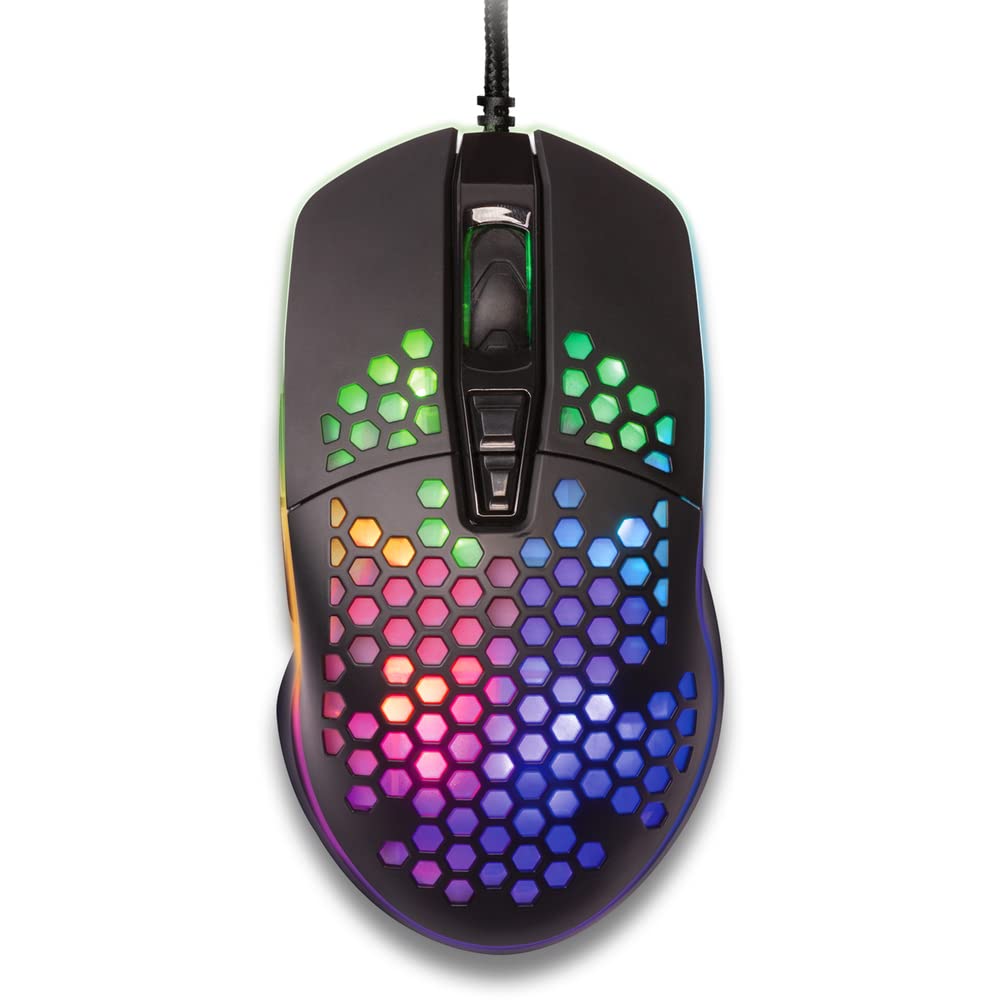
Figura 1: De arriba abaixo view of the YENKEE YMS 3030BK RGB Gaming Mouse, highlighting its ultra-light perforated design and ergonomic contours.
4. Configuración
Follow these steps to set up your YENKEE YMS 3030BK gaming mouse:
- Conecta o rato: Conecte o conector USB do rato a un porto USB dispoñible no seu ordenador.
- Instalación de controladores: Your operating system (Windows 7, 8, Vista, XP) should automatically detect and install the necessary drivers. No additional software installation is typically required for basic functionality.
- Software opcional: For advanced customization of RGB lighting and button assignments, please visit the official YENKEE website to check for any dedicated software for the YMS 3030BK model.
5. Instrucións de funcionamento
5.1 Funcionamento básico
- Clic esquerdo: Acción primaria, selección.
- Clic dereito: Menú contextual, acción secundaria.
- Roda de desprazamento: Scroll up/down, middle click for specific functions (e.g., opening links in new tabs).
- Botóns laterais: Default functions are typically 'Forward' and 'Backward' in web navegadores ou file exploradores. A miúdo pódense personalizar mediante software.
5.2 Axuste de DPI
The YMS 3030BK mouse features an IC 6651 sensor with a maximum resolution of 6400 DPI. You can adjust the DPI (Dots Per Inch) sensitivity on-the-fly using the dedicated DPI button, usually located behind the scroll wheel. Pressing this button will cycle through preset DPI levels, indicated by changes in the mouse's RGB lighting color or pattern. Refer to the optional software for precise DPI level configuration and customization.
5.3 Personalización da iluminación RGB
The RGB backlight of your mouse can be customized to match your preferences. While some mice offer onboard controls for basic lighting effects, full customization of colors, patterns, and brightness is typically achieved through the dedicated YENKEE software (if available). Please download and install the software from the official YENKEE website for advanced lighting options.
6. Mantemento
To ensure the longevity and optimal performance of your gaming mouse, follow these maintenance guidelines:
- Limpeza: Use a soft, dry cloth to wipe the surface of the mouse. For perforated areas, a soft brush or compressed air can help remove dust. Avoid using harsh chemicals or abrasive materials.
- Limpeza de sensores: Occasionally clean the optical sensor on the underside of the mouse with a cotton swab lightly dampenriquecido con alcohol isopropílico. Asegúrese de que estea completamente seco antes de usalo.
- Coidado do cable: Evite dobrar bruscamente ou tirar demasiado do cable USB para evitar danos.
- Almacenamento: Garde o rato nun ambiente limpo e seco cando non o use.
7 Solución de problemas
If you encounter issues with your YENKEE YMS 3030BK mouse, refer to the table below for common problems and solutions:
| Problema | Causa posible | Solución |
|---|---|---|
| O rato non responde | Conexión USB solta, porto USB defectuoso, problema co controlador. | Ensure USB cable is securely plugged in. Try a different USB port. Restart your computer. Check Device Manager for driver status. |
| O movemento do cursor é errático ou brusco | Sensor óptico sucio, superficie inadecuada da alfombrilla do rato. | Clean the optical sensor. Use a clean, uniform mouse pad. |
| O axuste de DPI non funciona | Conflito de software, mal funcionamento do botón. | Ensure no conflicting software is running. If using custom software, check its settings. |
| A iluminación RGB non funciona ou está atascada | Software issue, power issue. | Check the YENKEE software settings. Unplug and replug the mouse. Restart your computer. |
8. Especificacións
| Característica | Detalle |
|---|---|
| Marca | YENKEE |
| Número de modelo | YMS 3030BK |
| Tecnoloxía de conectividade | USB (con cable eléctrico) |
| Tecnoloxía de detección de movemento | Optical (IC 6651 Sensor) |
| DPI máximo | 6400 DPI |
| Características especiais | Ergonomic Design, Lightweight, Perforated Construction, RGB Backlight |
| Cor | Negro |
| Peso do elemento | 4.2 onzas (aprox. 119 gramos) |
| Dimensións do produto (LxWxH) | 5.43 x 2.44 x 9.06 polgadas (aprox. 13.8 x 6.2 x 23 cm) |
| Plataforma de hardware | Xogos |
| Compatibilidade do sistema operativo | Windows 7, Windows 8, Windows Vista, Windows XP |
9. Garantía e soporte
Información da garantía: For detailed warranty terms and conditions, please refer to the warranty card included with your product or visit the official YENKEE website. Warranty periods may vary by region and retailer.
Atención ao cliente: If you require technical assistance or have questions regarding your YENKEE YMS 3030BK gaming mouse, please contact your retailer or visit the support section of the official YENKEE websitio web con información de contacto e preguntas frecuentes.