
DDPAI X5P
DDPAI X5 Pro Dash Cam User Manual
Model: X5P
1. Introdución
This manual provides detailed instructions for the installation, operation, and maintenance of your DDPAI X5 Pro Dash Cam. Please read this manual thoroughly before using the device to ensure proper functionality and safety.
The DDPAI X5 Pro is a high-performance dual-channel dash camera system designed to record both front and rear views of your vehicle. It features 4K resolution for the front camera, 1080P for the rear, 5G WiFi connectivity, built-in GPS, and a supercapacitor for enhanced durability.
2. Produto rematadoview e Características

Figure 2.1: DDPAI X5 Pro Dash Cam with its components and app view.

Figure 2.2: Key features including 4K+1080P recording, Wi-Fi & GPS, 32G eMMC storage, 8MP IMX415 sensor, collision detection, and supercapacitor.
- Gravación de dobre canle: Records simultaneously in 4K (front) and 1080P (rear) for comprehensive coverage.
- Sony IMX415 Sensor: 8MP sensor with F1.8 aperture and 7 optical lenses for superior image clarity, especially in low light conditions.
- WiFi 5G integrado: Enables fast transfer of recordings to your mobile device via the DDPAI app.
- GPS integrado: Supports multi-satellite navigation systems (GPS, BDS, GLONASS, Galileo) for accurate location and speed tracking.
- Dual Storage: Features built-in 32GB eMMC storage and supports external Micro SD cards up to 128GB (not included).
- Supercondensador: Provides enhanced temperature resistance and longer lifespan compared to traditional batteries.
- Sensor G: Automatically detects sudden shakes/collisions and locks footage para evitar a sobreescritura.
- Gravación en bucle: Ensures continuous recording by overwriting the oldest unlocked files.
- Monitor de estacionamento as 24 horas: Provides surveillance when the vehicle is parked (requires hardwire kit, sold separately).
3. Contido do paquete
Verifica que todos os elementos estean presentes no paquete:
- DDPAI X5 Pro Front Dash Cam
- Cámara traseira
- Cargador de coche
- Cable de alimentación
- Cable da cámara traseira
- Montaxe para ventosa
- Manual de usuario
- Memory Card (32GB eMMC built-in, external card not included)
4. Guía de configuración
4.1 Installing the Front Dash Cam
- Escolla localización: Select a suitable location on your windshield, preferably behind the rearview mirror, to ensure it does not obstruct your view.
- Superficie limpa: Limpa ben a superficie do parabrisas onde se montará a cámara do salpicadero.
- Montaxe de montaxe: Secure the suction cup mount to the cleaned windshield. Ensure it is firmly attached.
- Montar a cámara do salpicadero: Slide the DDPAI X5 Pro onto the mount until it clicks into place.
- Conectar enerxía: Connect the power cable to the dash cam and route it along the windshield edge, down the A-pillar, and to the car's cigarette lighter socket using the provided car charger.
4.2 Instalación da cámara traseira
- Escolla localización: Monte a cámara traseira no parabrisas traseiro, garantindo unha visión clara view da estrada detrás.
- Cable de conexión: Connect the rear camera cable to the rear camera and route it to the front dash cam. This typically involves routing the cable along the headliner and side panels.
- Connect to Front Cam: Conecta o cable da cámara traseira ao porto designado da cámara frontal do salpicadero.

Figure 4.1: Illustration of typical front and rear dash cam installation and cable routing.
5. Instrucións de funcionamento
5.1 Acendido/Apagado
- A cámara do salpicadero acenderase automaticamente e comezará a gravar cando se acenda o contacto do vehículo.
- It will automatically power off a few seconds after the ignition is turned off.
5.2 Modos de gravación
- Gravación normal: Continuous recording while driving. Files are saved in segments (e.g., 1, 3, or 5 minutes) and loop recorded.
- Gravación de emerxencia (sensor G): In case of a sudden impact or collision, the built-in G-sensor will trigger emergency recording, locking the current video segment to prevent it from being overwritten.
- Monitorización do estacionamento: When properly hardwired (hardwire kit sold separately), the dash cam can monitor your vehicle for impacts or motion while parked.

Figure 5.1: Flowchart illustrating loop recording, conflict detection, G-sensor activation, and emergency lock save.

Figure 5.2: The 24-hour parking monitor feature, which records events when the car is parked and damaged.
6. App Connection and Wi-Fi Setup
The DDPAI app allows you to view vivir footage, reprodución de gravacións, descarga files, and adjust settings. The dash cam features built-in 5G WiFi for faster data transfer.
- Descarga a aplicación: Download the "DDPAI" mobile application from your device's app store (iOS App Store or Google Play Store).
- Power On Dash Cam: Ensure the dash cam is powered on.
- Iniciar aplicación: Open the DDPAI app on your smartphone.
- Connect New Devices: Tap on "Device > Connect New Devices" within the app.
- Select Dash Cam WiFi:
- For Android Devices: The DDPAI App will automatically search for the Dash Cam network.
- For iOS Devices: Go to "Settings > WLAN" on your phone and select the DDPAI Dash Cam's WiFi network.
- Introduza o contrasinal: Introduza o contrasinal predeterminado: 1234567890.
- Confirmar conexión: Return to the DDPAI app and wait a few seconds until the preview screen appears, indicating a successful connection.
Note: The available distance for WiFi connection is approximately 9-15 feet. The connection will automatically disconnect if out of range. Ensure your phone's WLAN is enabled for iOS devices.

Figure 6.1: Screenshot showing the DDPAI app interface for previewing and downloading videos, with icons for social media sharing.
7. Funcionalidade do GPS
The built-in multi-satellite navigation system (GPS, BDS, GLONASS, Galileo) provides accurate location and speed data, which is embedded into your video recordings. This allows for detailed tracking and playback of your routes.

Figure 7.1: Visual representation of the multi-GPS system providing detailed vehicle tracking and data overlay on video.

Figure 7.2: The internal GPS logger allows marking time, date, location, and speed information directly onto recordings, supporting higher frame rates.
8. Xestión do almacenamento
The DDPAI X5 Pro comes with built-in 32GB eMMC storage and supports an external Micro SD card up to 128GB (TF card not included). This dual storage system provides redundancy and ample space for your recordings.
- eMMC Storage: The integrated 32GB eMMC provides reliable internal storage.
- Tarxeta Micro SD: For expanded storage, insert a high-endurance Micro SD card (Class 10 or higher recommended) into the designated slot.
- Formato: It is recommended to format the Micro SD card periodically through the DDPAI app to maintain optimal performance and prevent data corruption.
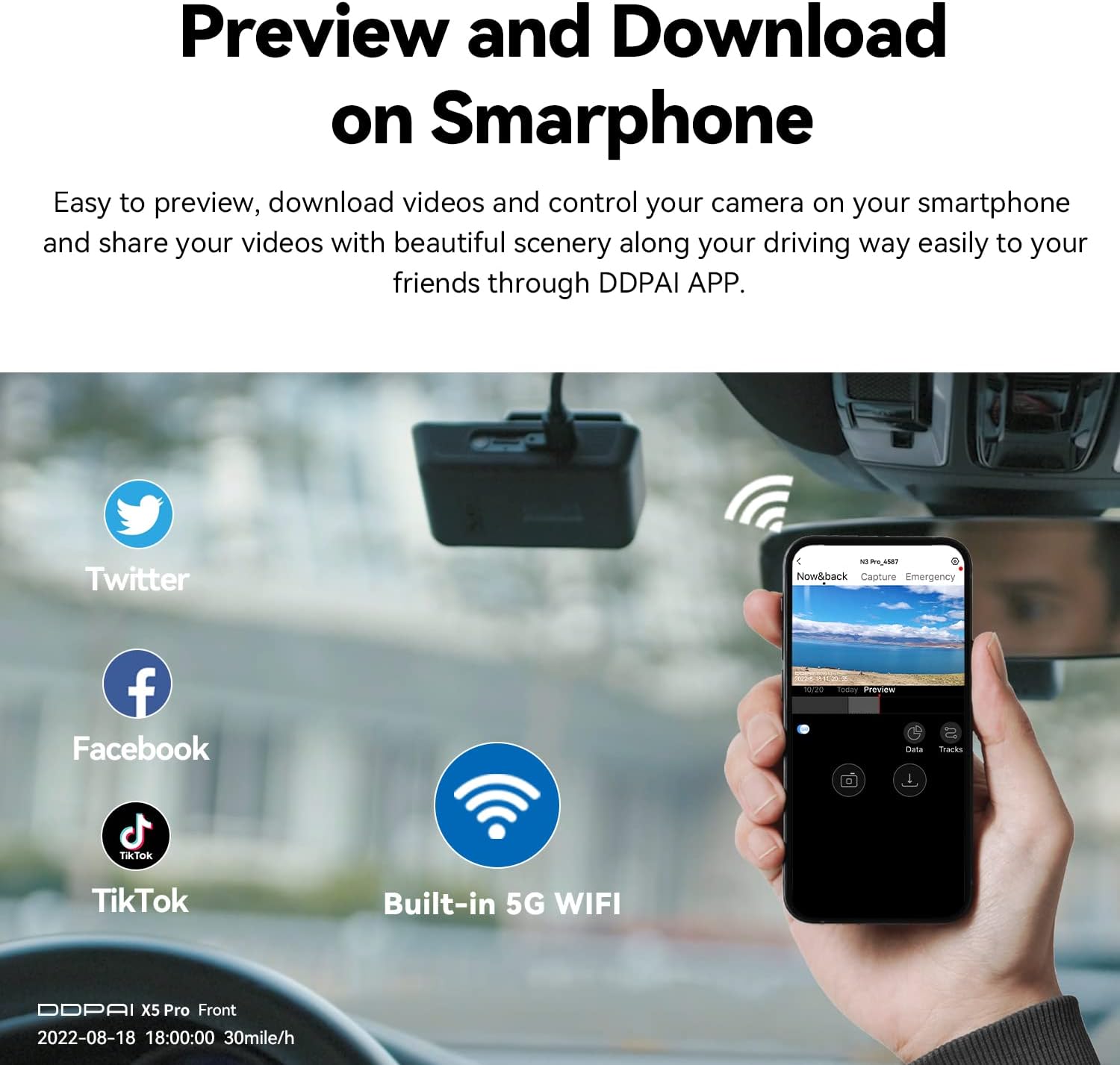
Figure 8.1: Diagram illustrating the dual storage system with built-in eMMC and support for external TF cards.
9 Solución de problemas
| Problema | Causa posible | Solución |
|---|---|---|
| A cámara do salpicadero non se acende. | Sen fonte de alimentación; conexión solta; cargador de coche avariado. | Check power cable connection; ensure car charger is working; try a different power source. |
| Non se pode conectar á wifi. | Incorrect password; out of range; Wi-Fi interference. | Ensure correct password (1234567890); move closer to the dash cam; restart both devices. |
| Vídeo footage está borrosa ou pouco clara. | Protective film on lens; dirty lens; improper mounting angle. | Remove protective film; clean the lens with a soft cloth; adjust mounting angle. |
| Micro SD card error / Cannot read TF card. | Card not inserted correctly; incompatible card; corrupted card. | Reinsert card; use a high-endurance Class 10 or higher card; format the card via the app or replace it. |
| A aplicación falla ou conxélase. | Outdated app version; phone storage full; software bug. | Update the DDPAI app; clear phone storage; restart the app and phone. |
10. Especificacións
- Product Dimensions (Front): 4.05 x 2.54 x 1.31 polgadas
- Peso do artigo: 1.7 libras
- Resolución de vídeo: Front: 3840*2160@30fps or 1920*1080P@90fps, Rear: 1080P@25fps
- Sensor de imaxe: Sony IMX415 8MP
- Lente: Front: 7 optical lens, F1.8 aperture; Rear: Optical lens, F2.0 aperture
- Almacenamento: Built-in 32GB eMMC, supports external Micro SD Card up to 128GB (TF card not included)
- WiFi: Built-in 5G WiFi
- GPS: Built-in multi-satellite navigation system (GPS, BDS, GLONASS, Galileo)
- Sensor G: Built-in 6-axis Motion tracking device
- Entrada de enerxía: Front: 12V-24V/1A, Rear: 5V 0.5A
- Supercondensador: Si
- Cor: Negro
- Método de control: Aplicación
11. Vídeos oficiais de produtos
Watch these official videos from DDPAI Direct for additional guidance and feature demonstrations.
DDPAI DASH CAM 4K Front and Rear 2160P 30fps or 1080P 90fps
This video demonstrates the 4K front and 1080P rear recording capabilities of the DDPAI X5 Pro Dash Cam, showcasing its high-resolution footage and smooth performance. It highlights key features such as NightVIS Technology, Sony IMX415 sensor, and Realcube Image Technology for clear visuals in various lighting conditions. The video also illustrates the dual-channel recording, sub-meter-level GPS accuracy, and the Sense Reality Skin feature for an enhanced driving experience.
12. Garantía e soporte
DDPAI is committed to providing reliable products and excellent customer service. For any issues, questions, or concerns regarding your DDPAI X5 Pro Dash Cam, please refer to the contact information provided in your product packaging or visit the official DDPAI websitio de apoio.
DDPAI offers 100% US-based support to assist with setup, troubleshooting, and any other inquiries you may have.
Ask a question about this manual
Ask about setup, troubleshooting, compatibility, parts, safety, or missing instructions. Manuals+ will review the question and use this page’s manual context to help answer it.